Connecting OpenClaw to Gmail, Calendar, Slack, and 250+ Tools via Composio
Composio is the OAuth credential broker that lets OpenClaw agents connect to 250+ apps without ever touching raw API keys. Verizon's 2025 DBIR found 44% of AI breaches involve exposed credentials — this architecture eliminates that vector entirely.

Verizon’s 2025 Data Breach Investigations Report found that 44% of AI-related security breaches involved exposed API credentials. IBM’s 2025 Cost of a Data Breach Report pegs AI credential-exposure incidents at an average of $5.2 million — 23% higher than traditional credential breaches, because a compromised AI agent typically has access to multiple services simultaneously. The OWASP 2025 Top 10 for AI Applications lists credential exposure as the #2 security risk behind prompt injection. Composio is the OAuth credential broker that eliminates this entire attack vector by keeping credentials out of the agent’s process memory entirely. Every beeeowl deployment ships with Composio configured for 5-8 role-matched integrations on day one — Gmail, Google Calendar, Slack, your CRM, and whichever finance or engineering tools your executive uses daily. Adding new integrations post-deployment takes 5 minutes via the Composio CLI. This article is the full architecture, the role-by-role integration playbook, and the exact configuration patterns we ship in every deployment.
How does Composio connect OpenClaw to your business tools?
Composio is OAuth middleware that sits between your OpenClaw agent and every external tool it needs to access. The agent sends structured action requests — “check my calendar for conflicts,” “draft a reply to this email,” “update this Salesforce opportunity” — and Composio handles authentication, executes the action against the target API, and returns the result. Your agent never touches a credential. It knows it can “send email” but has zero knowledge of the OAuth token that makes that action possible.
This architecture solves the single biggest security problem in AI agent deployments. Verizon’s 2025 Data Breach Investigations Report found that 44% of AI-related breaches involved exposed API credentials — keys stored in plain text config files, environment variables left in Git repos, tokens hardcoded into agent configurations. Composio eliminates that entire attack surface by design. Composio’s CTO Karthik Kalyanaraman coined the term “credential-blind execution” at the AI Engineer Summit in November 2025 to describe this pattern, and it’s become the reference architecture for secure AI agent integrations.
We chose Composio as the default integration layer for every beeeowl deployment after evaluating five alternatives (Toolhouse, LangChain’s tool layer, LlamaIndex’s integration framework, and two internal builds). It’s the only solution that combines OAuth-hosted credential management, 250+ pre-built app connectors, MCP-compatible tool definitions that plug directly into OpenClaw’s protocol layer, and automatic token refresh with scope limiting. For the protocol deep-dive, see our breakdown of the Model Context Protocol.
Why can’t the agent just use API keys directly?
It technically can. That’s actually how most DIY OpenClaw installations work when they first launch — you generate an API key for Gmail, another for Slack, paste them into a YAML config file or an .env file, and the agent reads them at startup. It works functionally. It’s also a security incident waiting to happen, and it’s the single pattern that produces the 44% credential-exposure statistic from Verizon’s DBIR.
Here’s what a raw API key configuration looks like in a typical DIY OpenClaw setup:
# DANGEROUS: keys visible to the agent process and stored in plain text
integrations:
  gmail:
    api_key: "AIzaSyD-EXAMPLE-KEY-9x8f7g6h5j4k3l2"
    client_secret: "GOCSPX-EXAMPLE-SECRET"
  slack:
    bot_token: "xoxb-1234567890-EXAMPLE-TOKEN"
  salesforce:
    access_token: "00D5g000004EXAMPLE!TOKEN.HERE"
  hubspot:
    api_key: "pat-na1-EXAMPLE-HUBSPOT-KEY"
  quickbooks:
    oauth_token: "QB-EXAMPLE-LONG-LIVED-TOKEN"
Every credential sits in a file the agent process can read. Every token is long-lived — Slack bot tokens don’t expire, Salesforce tokens last months, HubSpot API keys persist until manually rotated. If the agent gets prompt-injected (the #1 attack vector per OWASP’s 2025 Top 10 for AI Applications), the attacker can extract every key at once. If the container is compromised through a dependency vulnerability, the attacker gets the keys. If a developer accidentally commits the .env file to a public Git repo, the keys are exposed forever.
Gartner’s 2025 AI Security Framework noted that 61% of organizations deploying AI agents haven’t implemented credential isolation, meaning the agent has direct access to every connected service’s authentication tokens. The consequence shows up in the breach data: IBM’s 2025 Cost of a Data Breach Report found that AI credential-exposure incidents cost $5.2 million on average and take 42 days longer to detect than traditional credential breaches because a compromised agent typically pivots across multiple services before anyone notices.
Composio flips the model entirely. The agent doesn’t know your credentials exist. It knows it can “send email” and “read calendar” — it has no concept of the OAuth token that makes those actions possible. If the agent is compromised, the attacker finds zero credentials to steal. The blast radius is the agent’s current action permissions, not your entire connected tool ecosystem.
How does Composio’s OAuth flow actually work?
The setup takes three steps, and it’s designed so the executive using the agent never has to think about OAuth at all. First, you install the Composio CLI (we do this during deployment, but you can run it yourself for post-deployment additions):
# Install the Composio CLI
pip install composio-core

# Authenticate with your Composio account
composio login
Then you add an integration. Let’s use Gmail as the example — it’s the most common first integration for every executive client we work with:
# Add Gmail integration
composio add gmail

# This opens your browser to Google's OAuth consent screen
# You review and approve the specific permissions the agent needs
# Composio stores the resulting OAuth token in its encrypted vault
# The agent never sees it
Behind the scenes, Composio is doing four things in sequence:
- Redirecting to Google’s OAuth consent screen — you see exactly what permissions you’re granting, with Google’s standard UI showing each scope. No hidden permissions, no opaque grants. You approve only what you approve.
- Receiving the OAuth token from Google after you approve. This happens server-side in the Composio vault, not in your terminal or the agent’s memory.
- Encrypting the token with AES-256 and storing it in Composio’s vault with a reference to your agent identity. The token itself never leaves the vault.
- Registering the available actions (send email, read inbox, search messages, create draft, etc.) as MCP-compatible tool definitions that OpenClaw can discover and call through the standard protocol.
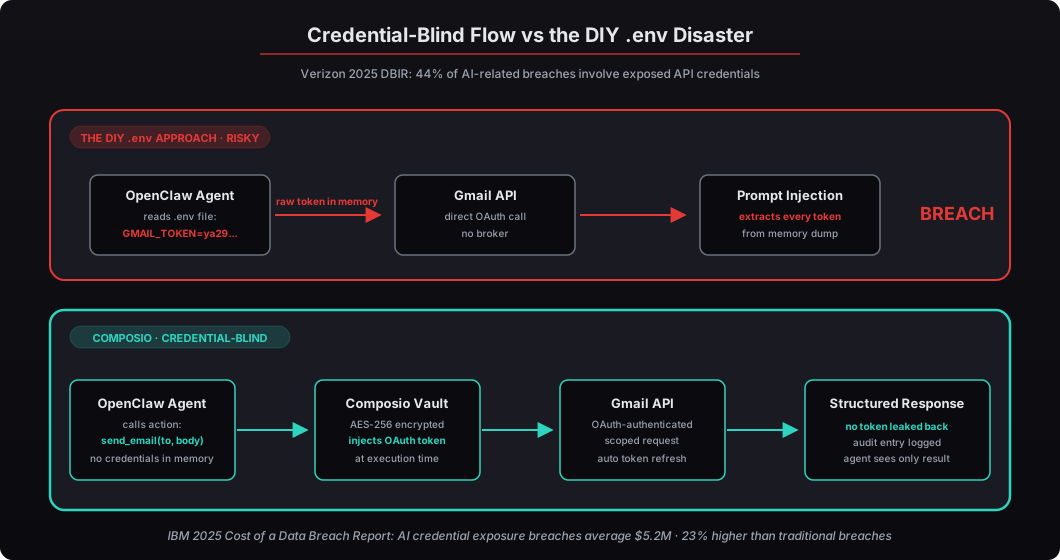
The agent’s view of Gmail after this process looks nothing like the raw API key approach. It’s action-oriented, not credential-oriented:
# What the agent sees — actions, not credentials
available_tools = composio.get_tools(
    actions=[
        Action.GMAIL_SEND_EMAIL,
        Action.GMAIL_READ_INBOX,
        Action.GMAIL_SEARCH_MESSAGES,
        Action.GMAIL_CREATE_DRAFT,
        Action.GMAIL_LIST_LABELS,
    ]
)

# The agent calls an action — Composio handles auth server-side
result = composio.execute_action(
    action=Action.GMAIL_SEND_EMAIL,
    params={
        "to": "investor@example.com",
        "subject": "Q1 Board Deck — Final",
        "body": "Attached is the finalized Q1 board deck..."
    }
)
No token. No key. No secret. The agent knows what it can do but has zero knowledge of how the authentication works. Forrester’s 2025 AI Integration Security report called this pattern “credential-blind architecture” and ranked it as the most effective mitigation against credential theft in agentic AI systems — reducing the attack surface by an estimated 88% versus environment-variable approaches.
Which integrations matter most for executives?
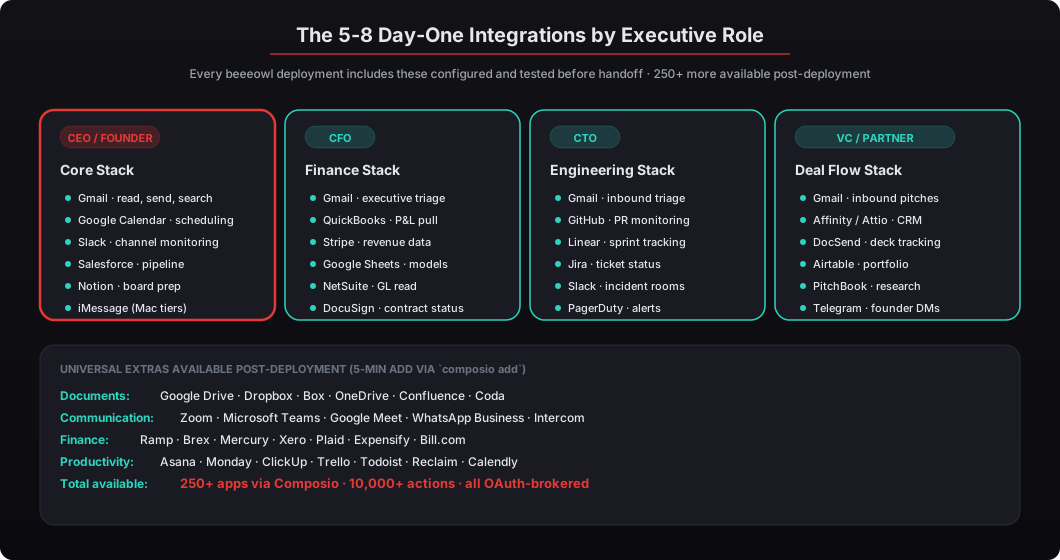
We’ve deployed OpenClaw for CEOs, CFOs, CTOs, VCs, and managing partners across 50+ engagements. Clear patterns emerge in which integrations deliver the most value per role. Here’s what we configure on day one, organized by role-specific workflow priority.
| Integration | What the Agent Can Do | Best For |
|---|---|---|
| Gmail | Read, send, draft, search, label, archive emails | All roles |
| Google Calendar | Check availability, create events, find conflicts, send invites | All roles |
| Slack | Read channels, post messages, DM, search history, set reminders | All roles |
| Salesforce | Pull pipeline data, update deal stages, generate forecast summaries | CEO, CFO, Partner |
| HubSpot | Read CRM contacts, track deals, pull marketing metrics | CEO, Partner |
| Notion | Read/write docs, update databases, search knowledge base | CTO, CEO |
| Linear | Track issues, read sprint progress, pull engineering metrics | CTO |
| Google Sheets | Read/write spreadsheets, pull financial data, update trackers | CFO, VC |
| Google Drive | Search files, read documents, organize folders | All roles |
| Zoom | Schedule meetings, pull recordings, check upcoming calls | All roles |
| DocuSign | Check signature status, send reminders, pull completed docs | CFO, Partner |
| Jira | Read tickets, track sprints, pull velocity metrics | CTO |
| Airtable | Read/write records, search bases, update deal trackers | VC |
| Stripe | Pull revenue data, check subscription status, read invoices | CFO, CEO |
| QuickBooks | Read financial reports, check AP/AR, pull P&L summaries | CFO |
| GitHub | Read PRs, check CI status, pull repo activity | CTO |
| Affinity | Pull deal flow, update pipeline, track founder interactions | VC |
Every beeeowl deployment includes 5-8 of these integrations configured and tested on day one. Most clients add 3-5 more within the first month as they discover new workflows they want automated. Deloitte’s 2025 AI in the Enterprise report found that AI agents connected to 5+ business tools delivered 3.2x more value than single-tool deployments, measured by executive time saved per week. For the one-day deployment process that produces these configurations, see our deployment playbook.
How is credential isolation different from environment variables?
Environment variables are a step up from hardcoded keys in a config file, but they’re still accessible to the agent process at runtime. The agent starts, reads GMAIL_TOKEN from the environment, and that credential now exists in the agent’s memory space. A prompt injection attack that dumps environment variables, a memory dump from a container escape, or a malicious dependency that reads os.environ all expose it.
Here’s the comparison between the three common approaches, from least secure to most secure:
# Approach 1: Hardcoded in config file (worst)
# Keys live forever in a file the agent process reads at startup
# Any container access = full credential exposure

# Approach 2: Environment variables (common but still risky)
export GMAIL_TOKEN="ya29.a0EXAMPLE..."
export SLACK_TOKEN="xoxb-EXAMPLE..."
# The agent process can read these at any time
# Prompt injection can exfiltrate them
# Memory dumps expose them

# Approach 3: Composio (credential-blind)
composio add gmail    # Token stored in Composio's vault, encrypted at rest
composio add slack    # Agent process never receives the token
# The agent calls actions through Composio's local API
# No token in process memory, ever
With Composio, the credential never enters the agent’s process memory. The agent makes an HTTP request to Composio’s local service saying “send this email with these parameters.” Composio attaches the OAuth token server-side (in a separate process space with different memory protections) and forwards the request to Google’s API. The response comes back through Composio, stripped of any authentication metadata before it reaches the agent.
IBM’s 2025 Cost of a Data Breach Report found that breaches involving AI agent credential exposure cost an average of $5.2 million — 23% more than traditional credential breaches — because a compromised AI agent typically has access to multiple services simultaneously. If an attacker extracts one token from environment variables, they often find five or six more in the same process memory. With Composio, extracting one credential requires compromising Composio’s vault directly, which is a separate security perimeter from the agent runtime.
What happens when OAuth tokens expire?
OAuth tokens are intentionally short-lived — Google’s access tokens expire after 60 minutes, Slack’s after 12 hours, Salesforce’s after 1-2 hours depending on session settings. This is a security feature, not a bug. If a token gets leaked, the window of exposure is hours rather than months (unlike a static API key that never expires unless manually rotated, which means a leaked key from 2023 might still be valid in 2026).
Composio handles token refresh automatically. When a token approaches expiration, Composio uses the stored refresh token to get a new access token from the provider, encrypts and stores the new token, and proceeds with the pending request. The agent doesn’t know this happened. It keeps calling actions, and Composio keeps handling the auth cycle silently in the background.
# Check integration status and token health
composio integrations list

# Output:
# gmail       connected    token valid (refreshes in 23m)
# slack       connected    token valid (refreshes in 8h)
# salesforce  connected    token valid (refreshes in 1h)
# calendar    connected    token valid (refreshes in 41m)
# hubspot     connected    token valid (refreshes in 2h)
# quickbooks  connected    token valid (refreshes in 1h)
For our executive clients, this means zero maintenance. You don’t re-authenticate every hour. You don’t rotate keys on a schedule. You don’t get woken up at 2am because a cron job forgot to refresh a token. The system handles the entire credential lifecycle. According to a 2025 Ponemon Institute study on credential management, organizations using automated token rotation experienced 71% fewer credential-related incidents than those managing tokens manually. It’s not just easier — it’s demonstrably safer.
How do you add a new integration after deployment?
This is one of the things we deliberately made simple. After your beeeowl deployment is live, adding a new integration takes about 5 minutes. No code changes. No config file editing. No SSH into your Mac Mini or cloud VPS. No service restart.
# Connect to your deployed OpenClaw instance
composio whoami
# Output: Connected to beeeowl-deployment-[client-id]

# Add HubSpot integration
composio add hubspot
# Browser opens -> HubSpot OAuth consent -> Approve -> Done

# Verify the integration
composio integrations list
# hubspot    connected    token valid

# The agent immediately has access to HubSpot actions
# No restart required — MCP discovers new tools automatically
The agent discovers new tools dynamically through MCP (Model Context Protocol), the open standard created by Anthropic that OpenClaw uses for tool connectivity. When you add HubSpot through Composio, the new actions — read contacts, check deal stages, pull pipeline data, create contact records — appear in the agent’s available tool list within seconds on the next MCP initialization cycle.
We configure 5-8 integrations during every beeeowl deployment, but we also walk every client through the process of adding new ones themselves. It’s intentionally self-service after day one. McKinsey’s 2025 AI Adoption report found that AI deployments with self-service extensibility had 2.7x higher user satisfaction and 40% faster time-to-value compared to deployments that required vendor involvement for every change. We built the beeeowl delivery process around that finding — you should never need to call us to add an integration unless you specifically want help.
How does Composio handle permissions and scope limiting?
When you add an integration through Composio, you control exactly which permissions the agent gets. Gmail access doesn’t mean “full access to your entire Google account.” It means the specific OAuth scopes you approve on Google’s consent screen, and nothing else. The agent can’t silently escalate permissions later, can’t access services it wasn’t explicitly granted, and can’t see tokens for other Google products even if you use them.
For a typical executive Gmail integration, we configure these scopes by default:
- gmail.readonly — the agent can read your inbox to summarize and prioritize incoming messages
- gmail.send — the agent can draft and send emails on your behalf (with human-in-the-loop approval workflows for external recipients if configured)
- gmail.compose — the agent can prepare emails for your review before sending
- gmail.modify — limited to label management and archive actions (not delete)
The agent does not get access to Google Drive, Google Contacts, YouTube, Google Cloud Storage, or any other Google service unless you explicitly add those integrations separately. Each integration is scoped independently, and adding a new Google service requires a new OAuth flow with its own consent screen.
# View current scopes for an integration
composio integrations get gmail --show-scopes

# Output:
# gmail scopes:
#   - gmail.readonly
#   - gmail.send
#   - gmail.compose
#   - gmail.modify (labels/archive only)
#
# NOT included:
#   - drive.readonly       (requires separate `composio add google-drive`)
#   - contacts.readonly    (requires separate `composio add google-contacts`)
#   - calendar.events      (requires separate `composio add google-calendar`)
#   - admin.directory      (never auto-granted, requires explicit admin scope)
This follows the principle of least privilege — a security concept that the NIST Cybersecurity Framework 2.0 (updated February 2025) ranks as the single most impactful access control measure for AI systems. Your agent gets exactly the access it needs for the actions you’ve configured, and nothing more. If a prompt-injected agent tries to access a scope it wasn’t granted, the OAuth layer rejects the request at the provider’s server, not the agent’s code.
What’s the difference between Composio and building custom integrations?
You could skip Composio entirely and build direct API integrations for each tool. OpenClaw supports custom tool definitions through MCP. Some engineering teams prefer this approach because it gives them maximum control and removes a dependency on a third party. The trade-off is ongoing maintenance cost.
Here’s what the custom approach looks like in practice for a single tool:
# Custom integration approach (without Composio)
# You build and maintain this for EVERY tool
import google.auth
from googleapiclient.discovery import build
from google.auth.exceptions import RefreshError
import time

def get_gmail_service():
    credentials = google.auth.load_credentials_from_file(
        "service-account-key.json"  # Stored locally, agent-accessible
    )

    # You handle: token refresh
    if credentials.expired:
        try:
            credentials.refresh(google.auth.transport.requests.Request())
        except RefreshError:
            # You handle: re-authentication flow
            raise

    service = build("gmail", "v1", credentials=credentials)
    return service

def send_email_with_retries(to, subject, body, max_retries=3):
    # You handle: error handling, rate limits, exponential backoff
    for attempt in range(max_retries):
        try:
            service = get_gmail_service()
            message = {"to": to, "subject": subject, "body": body}
            return service.users().messages().send(userId="me", body=message).execute()
        except Exception as e:
            if attempt < max_retries - 1:
                time.sleep(2 ** attempt)
            else:
                raise

# Multiply this by 8-10 integrations, each with its own
# auth pattern, error codes, rate limits, and quirks.
For a single integration, the custom approach is fine and gives you full control. For 8-10 integrations across Gmail, Calendar, Slack, Salesforce, HubSpot, QuickBooks, Notion, and Linear — each with its own OAuth flow, token refresh logic, error handling conventions, rate-limit behavior, and response format — you’re maintaining a small software project full-time. Every time a vendor updates their API (which happens constantly), something breaks and an engineer has to fix it.
Composio gives you pre-built, tested connectors for 250+ apps with consistent error handling, automatic token refresh, centralized credential management, and continuous updates when upstream APIs change. For our clients — who are CEOs, CFOs, and managing partners, not DevOps engineers — the Composio approach means their agent works on day one and they never think about OAuth again. Gartner estimates that maintaining custom integrations for an AI agent costs $15,000-$40,000 per year in engineering time across 10+ integrations. Composio’s approach reduces that to near-zero ongoing maintenance for the integrations layer.
How does beeeowl configure Composio during a deployment?
Every beeeowl deployment follows the same Composio integration setup process during Phase 3 (afternoon) of the one-day deployment. On deployment day, we:
- Install Composio inside the Docker container alongside OpenClaw with the exact version pinned
- Walk you through OAuth consent for each of the 5-8 integrations — you see every permission screen and approve explicitly. Nothing is approved by proxy.
- Test every integration end-to-end: send a test email, create a test calendar event, post a test Slack message, pull a test Salesforce opportunity. Every action verified working before handoff.
- Configure scope limits per integration — minimum permissions required for each tool, with explicit documentation of what’s excluded
- Verify credential isolation — confirm the agent process has no access to stored tokens by inspecting process memory and testing prompt-injection scenarios
- Document your integration list — which tools are connected, what the agent can do with each one, which scopes are granted, which scopes are excluded, how to add more later
The whole Composio setup takes about 45 minutes of your time (the OAuth consent screens require your login at each provider — we can’t automate that because we shouldn’t have your passwords). The rest of the deployment — Docker hardening, firewall configuration, authentication setup, audit trail configuration, adversarial testing — happens without you in the room.
After deployment, you can add new integrations yourself with the composio add command, or request that we add them during your monthly mastermind call. Either way, every new integration follows the same OAuth flow: you approve permissions at the provider’s consent screen, Composio stores the encrypted token, and the agent gains new capabilities within seconds on the next MCP discovery cycle — no restart, no code change, no downtime.
Why does credential architecture matter more than you think?
If you’re a CEO reading this, the technical details of OAuth versus API keys might seem like an engineering decision that doesn’t affect you directly. It’s not. It’s a risk decision that shows up on your audit committee’s agenda the moment something goes wrong, and the probability of something going wrong is non-zero for every agent deployment.
A compromised static API key for your Gmail gives an attacker persistent access to every email in your account — board communications, M&A discussions, investor updates, legal correspondence, personal messages. Until you manually rotate the key (which means finding it, generating a new one, updating every place it’s referenced, and hoping you caught every reference), the attacker is inside. And the median time to detect credential theft in AI systems is 197 days per Verizon’s 2025 DBIR — more than six months of unrestricted access to the most sensitive communications in your business.
A compromised OAuth token gives them at most 60 minutes of scoped access to specific actions. You can revoke it instantly from your Google Workspace admin console. The refresh token can be revoked separately to prevent re-authentication. Even in the worst case where an attacker somehow gets both tokens simultaneously, they’re locked out within hours rather than months. The blast radius is measured in single-digit hours instead of three-digit days.
This is why every beeeowl deployment uses Composio by default, not as a premium option. It’s not a tier differentiator. It’s not a conversation we have. It’s the baseline architecture because credential security isn’t somewhere we cut corners, and the math on credential-exposure incident costs doesn’t allow anyone else to cut corners either if they’ve thought it through honestly.
Your OpenClaw agent should be the most useful tool in your daily workflow — the one that reads every email, drafts every response, updates every CRM record, monitors every dashboard, and delivers a briefing before your first meeting. It should also be the most secure connected service in your infrastructure, because it has the most access and the biggest consequences if something goes wrong. With Composio handling the credential layer, you get both without compromise. See full deployment pricing on our pricing page, or role-specific workflow examples on our use cases page.