How to Get Your First OpenClaw Agent Running in One Day
A full OpenClaw deployment — hardware, OS hardening, Docker sandbox, Composio integrations, agent configuration, and adversarial testing — takes one structured working day. Here's the exact playbook we run at beeeowl for every client.

McKinsey’s 2025 State of AI report found that 72% of companies that attempted self-service AI agent deployment abandoned the project within 30 days. Palo Alto Networks’ 2025 Cloud Security Report found that 82% of self-managed AI installations had at least one misconfigured firewall rule. Verizon’s 2025 Data Breach Investigations Report found 44% of AI-related security breaches involved exposed API credentials. Every one of those failure modes is preventable with a repeatable deployment sequence. A complete OpenClaw deployment — hardware, OS hardening, Docker isolation, Composio integrations, agent configuration, and adversarial security testing — takes one structured working day. Not a weekend of trial and error. Not three weeks of Googling Docker errors. One day, four phases, the same playbook every time. This is the exact sequence we run at beeeowl for every client.
What does a one-day OpenClaw deployment actually look like?
A complete professional deployment takes 8-10 hours broken into four phases: morning OS hardening and firewall allowlisting (Phase 1), midday Docker sandbox and OpenClaw install (Phase 2), afternoon Composio OAuth integration and agent configuration (Phase 3), and end-of-day adversarial testing with explicit security verification (Phase 4). Nothing ships without passing Phase 4.
We’ve done this 50+ times at beeeowl. The process is identical whether we’re shipping a Mac Mini to a CEO in Toronto or deploying a hosted instance for a VC firm in San Francisco. What follows is our exact playbook — the same steps, in the same order, that every client deployment goes through. The reason we can promise one-day deployment isn’t magic. It’s that we eliminated every decision that can be pre-made so the only variables on deployment day are the ones specific to that executive’s workflow.
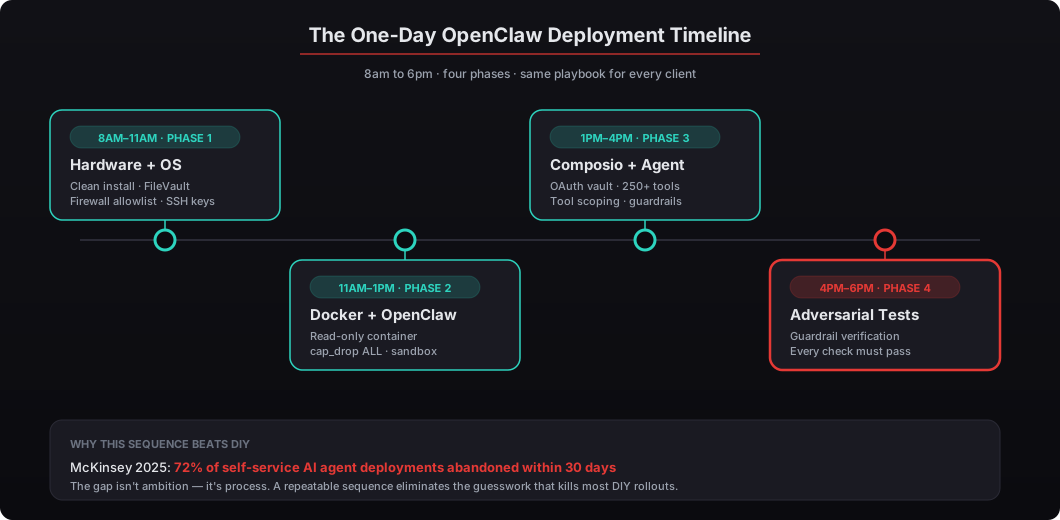
McKinsey’s 2025 State of AI report found that 72% of companies that attempted self-service AI agent deployment abandoned the project within 30 days. The gap isn’t ambition — it’s process. A repeatable deployment sequence eliminates the guesswork that kills most DIY rollouts. Every time I see a client start a DIY deployment, they hit the same obstacles in the same order: Docker configuration confusion, firewall rule sprawl, Composio OAuth flow confusion, and then a security review that surfaces gaps they didn’t know existed. The playbook below handles each of those obstacles in a specific order so they don’t compound.
Which hardware should you choose for your deployment?
The hardware decision comes first because everything else depends on it. We offer three tiers, and the right choice depends on where you work, how you travel, and whether you want physical control of the machine versus the lower setup friction of a cloud VPS.
| Hosted Setup | Mac Mini Setup | MacBook Air Setup | |
|---|---|---|---|
| Price | $2,000 | $5,000 | $6,000 |
| Hardware | Cloud VPS (8 vCPU, 32GB RAM) | Mac Mini M4 Pro, 24GB RAM | MacBook Air M4, 24GB RAM |
| Location | Data center (Hetzner/OVH) | Your office | Travels with you |
| Delivery | Same day | Shipped within 1 week | Shipped within 1 week |
| Physical security | No (multi-tenant DC) | Yes (you own the box) | Yes (you own the box) |
| Private LLM option | Yes (+$1,000) | Yes (+$1,000) | Yes (+$1,000) |
| Best for | Speed, remote teams | Office-based executives | Traveling executives |
The Mac Mini at $5,000 is our most-deployed tier. It sits on a shelf or under a desk, runs silently, and never leaves your office. The MacBook Air at $6,000 is unique to beeeowl — no other OpenClaw deployment service offers a portable option as of this writing. The Hosted Setup at $2,000 works well for executives who need immediate deployment without waiting for hardware shipping, and for teams that want to start with the lowest-friction option before upgrading to dedicated hardware. See our full comparison in hosted vs hardware: which OpenClaw deployment is right for you.
According to Forrester’s 2025 Enterprise AI Infrastructure Survey, 61% of C-suite executives prefer on-premises AI over cloud-hosted solutions when handling sensitive business data. Apple Silicon specifically has become the reference hardware for local AI — the M4’s unified memory architecture handles LLM inference without requiring a discrete GPU, which is what makes a $1,400 Mac Mini a viable production platform for agents that would have required a $15,000+ GPU server two years ago. Full pricing details and feature comparisons are on our pricing page.
What happens in Phase 1 (morning)? Hardware prep and OS hardening
Deployment day starts at 8 AM. The first three hours are all infrastructure — no AI, no agents, just a hardened foundation that every subsequent layer depends on. If the foundation is wrong, everything built on top is exposed.
For hardware deployments (Mac Mini or MacBook Air), we start with a clean macOS install. No carryover apps, no default configurations, no iCloud sync, no personal accounts. The machine is a dedicated appliance, not a general-purpose computer. The mental model is: this device exists for one job, and everything else is attack surface.
# Disable unnecessary macOS services (reduce attack surface)
sudo launchctl disable system/com.apple.AirPlayXPCHelper
sudo launchctl disable system/com.apple.screensharing
sudo launchctl disable system/com.apple.RemoteDesktop
sudo launchctl disable system/com.apple.bluetoothd

# Enable FileVault full-disk encryption
sudo fdesetup enable -user deployuser

# Configure automatic security updates
sudo defaults write /Library/Preferences/com.apple.SoftwareUpdate \
  AutomaticallyInstallMacOSUpdates -bool true

# Set firmware password (hardware deployments only)
sudo firmwarepasswd -setpasswd

# Disable Guest account
sudo defaults write /Library/Preferences/com.apple.loginwindow \
  GuestEnabled -bool false
For hosted deployments, we provision a VPS on infrastructure providers like Hetzner or OVH — not hyperscalers. Deloitte’s 2025 Cloud Security Assessment found that dedicated server providers had 34% fewer multi-tenant vulnerability incidents than major hyperscaler platforms. We want isolation at the hardware level, not just the container level. The fewer neighbors on the physical host, the smaller the lateral movement surface.
# Initial VPS hardening (Ubuntu 24.04 LTS)
sudo apt update && sudo apt upgrade -y

# Default-deny firewall (outbound too — this is the important bit)
sudo ufw default deny incoming
sudo ufw default deny outgoing
sudo ufw allow out 443/tcp  # HTTPS only
sudo ufw allow out 53/tcp   # DNS
sudo ufw allow out 53/udp   # DNS
sudo ufw allow 22/tcp       # SSH in
sudo ufw enable

# SSH key-only authentication
sudo sed -i 's/PasswordAuthentication yes/PasswordAuthentication no/' /etc/ssh/sshd_config
sudo sed -i 's/#PubkeyAuthentication yes/PubkeyAuthentication yes/' /etc/ssh/sshd_config
sudo sed -i 's/PermitRootLogin yes/PermitRootLogin no/' /etc/ssh/sshd_config
sudo systemctl restart sshd

# Create non-root deployment user
sudo useradd -m -s /bin/bash ocsetup
sudo usermod -aG docker ocsetup

# Install fail2ban for SSH brute-force protection
sudo apt install -y fail2ban
sudo systemctl enable --now fail2ban
In our experience, firewall rules are where 80% of DIY deployments fail. People install OpenClaw, connect it to 10 tools, and leave every outbound port open because that’s the Docker default. That’s not a deployment — that’s a liability with a chat interface. The default-deny-outbound rule is the single most important line in the whole hardening script, because it forces us to explicitly allow every API endpoint the agent needs to reach, and the act of building that allowlist makes invisible dependencies visible.
We build an explicit allowlist for every client. Only the specific API endpoints their agent needs can receive traffic:
# Example: Allow only specific API endpoints
# Google Workspace
sudo ufw allow out to 142.250.0.0/16 port 443
sudo ufw allow out to 172.217.0.0/16 port 443

# Slack API
sudo ufw allow out to 44.236.0.0/16 port 443

# Composio (credential broker)
sudo ufw allow out to api.composio.dev port 443

# OpenAI / Anthropic (if using cloud LLMs)
sudo ufw allow out to api.openai.com port 443
sudo ufw allow out to api.anthropic.com port 443

# Block everything else (already set by default deny)
# Verify with:
sudo ufw status verbose
Palo Alto Networks’ 2025 Cloud Security Report found that 82% of self-managed AI installations had at least one misconfigured firewall rule. We’ve seen the same pattern directly — one client came to us after their DIY OpenClaw agent was making requests to endpoints they’d never heard of (the agent was using a third-party library that phoned home on startup, and nobody had noticed). An explicit allowlist prevents that entirely by failing closed instead of failing open.
What happens in Phase 2 (midday)? Docker setup and OpenClaw installation
By noon, the OS is hardened and the firewall is locked. Now we install the actual agent infrastructure: Docker, OpenClaw, and the container configuration that keeps everything isolated from the host OS and from the outside world. Docker isn’t a convenience tool in this stack. It’s the security boundary.
The agent runs inside a container that architecturally can’t access the host OS, can’t modify its own code, and can’t reach any network endpoint we haven’t explicitly approved. If an attacker somehow compromises the agent process, they find themselves inside a sandbox with a read-only filesystem, no capabilities, strict resource limits, and a network that only reaches approved APIs. That’s defense in depth: every layer assumes the layer above it failed.
# Install Docker
curl -fsSL https://get.docker.com -o get-docker.sh
sudo sh get-docker.sh

# Create isolated Docker network (internal = no external access)
docker network create --driver bridge --internal openclaw-net

# Pull the OpenClaw base image
docker pull openclawai/openclaw:latest
The Docker Compose configuration is where the real isolation happens. Here’s a simplified version of what we deploy for every client:
# docker-compose.yml
version: "3.8"
services:
  openclaw:
    image: openclawai/openclaw:latest
    container_name: openclaw-agent
    restart: unless-stopped
    read_only: true               # Filesystem is read-only
    tmpfs:
      - /tmp:size=512M            # Temp writes go to tmpfs only
      - /var/log/openclaw:size=256M
    security_opt:
      - no-new-privileges:true    # No privilege escalation
    cap_drop:
      - ALL                       # Drop every Linux capability
    mem_limit: 8g                 # Hard memory ceiling
    cpus: 4                       # CPU limit
    networks:
      - openclaw-net
    environment:
      - COMPOSIO_API_KEY=${COMPOSIO_API_KEY}
      - OPENCLAW_AUTH_ENABLED=true
      - OPENCLAW_LOG_LEVEL=info
    volumes:
      - ./agent-config:/app/config:ro
      - openclaw-logs:/var/log/openclaw
    ports:
      - "127.0.0.1:3000:3000"     # Localhost only

  nginx:
    image: nginx:alpine
    container_name: openclaw-proxy
    restart: unless-stopped
    read_only: true
    ports:
      - "443:443"
    volumes:
      - ./nginx.conf:/etc/nginx/nginx.conf:ro
      - ./ssl:/etc/ssl/certs:ro
    networks:
      - openclaw-net
    depends_on:
      - openclaw

volumes:
  openclaw-logs:

networks:
  openclaw-net:
    driver: bridge
Key decisions in this config matter, and they’re worth walking through individually because each one blocks a specific attack class. read_only: true means the agent container cannot modify its own filesystem — any attempt to write to /app, /bin, or anywhere else fails. cap_drop: ALL removes every Linux capability including the ones containers get by default, so the container can’t manipulate network interfaces, load kernel modules, or elevate privileges even if it somehow got root inside itself. no-new-privileges prevents setuid binaries from escalating privileges. 127.0.0.1:3000:3000 binds the agent’s HTTP listener to localhost only — external access has to go through the Nginx reverse proxy with TLS termination, which means the attack surface is an Nginx instance and not the agent itself. NIST’s Container Security Guide (SP 800-190 Rev. 1) recommends all five of these controls for production container deployments. We apply them to every single installation, no exceptions.
After bringing the containers up, we run a verification sequence before connecting any integrations. This is the “does the security actually work” check before we add anything that could make it more complicated.
# Start the stack
docker compose up -d

# Verify containers are running
docker compose ps

# Check OpenClaw health endpoint
curl -s http://localhost:3000/health | jq .
# Expected output:
# {
#   "status": "healthy",
#   "version": "0.x.x",
#   "uptime": "...",
#   "guardrails": "active"
# }

# Verify read-only filesystem
docker exec openclaw-agent touch /app/test 2>&1
# Expected: "touch: cannot touch '/app/test': Read-only file system"

# Verify network isolation
docker exec openclaw-agent curl -s https://example.com 2>&1
# Expected: Connection refused (only allowlisted endpoints work)

# Verify non-root user
docker exec openclaw-agent whoami
# Expected: openclaw (not root)
If any of these checks fail, we don’t move forward. In our deployments, we’ve caught container misconfigurations in roughly 1 out of 10 installations — usually a port binding issue or a volume mount permission error. Catching it here takes 5 minutes. Catching it after Phase 3 integrations are connected takes hours.
What happens in Phase 3 (afternoon)? Composio integration and agent configuration
By 1 PM, OpenClaw is running in a locked-down container. The afternoon is about connecting it to the tools your business actually uses — without giving the agent your credentials. This is where Composio earns its place in the stack.
Composio is the middleware layer between your AI agent and every external tool it connects to. When your agent needs to send an email through Gmail or update a deal in Salesforce, it sends a request to Composio. Composio handles the OAuth flow separately, injects the credential at execution time, makes the API call, and returns only the result. The agent never touches a token. Composio’s CTO Karthik Kalyanaraman called this “credential-blind execution” at the AI Engineer Summit in San Francisco last November, and the phrase captures exactly why this architecture matters for production AI.
# Install Composio CLI
pip install composio-core

# Initialize Composio connection
composio login

# Add integrations (OAuth flows happen in your browser)
composio add gmail
composio add google-calendar
composio add slack
composio add hubspot
composio add salesforce
composio add notion

# Verify connected integrations
composio whoami
composio integrations list
Each OAuth connection happens through your browser — you log in to the service, grant permissions, and Composio stores the tokens in its credential vault. The agent’s configuration only contains a Composio API key, never individual service credentials. If the Composio API key is compromised, you revoke it in the Composio dashboard and issue a new one. The agent picks up the new key on its next request cycle. No restart required. No credential rotation across six different services to track manually.
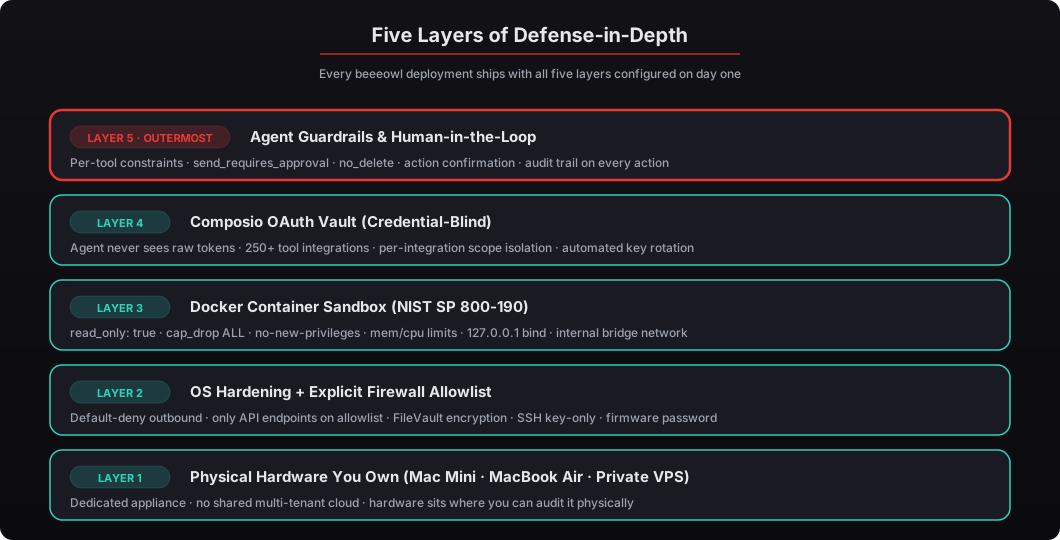
Verizon’s 2025 Data Breach Investigations Report found that 44% of AI-related security breaches involved exposed API credentials. Composio eliminates that entire attack vector. Even if someone compromises the agent’s container (through a prompt injection, a dependency vulnerability, or an insider threat), they find one API key with scoped permissions — not your Gmail, Salesforce, Slack, HubSpot, and QuickBooks tokens sitting in a .env file waiting to be exfiltrated. For the full credential architecture deep-dive, see our breakdown of why Anthropic banned consumer OAuth for OpenClaw.
Agent configuration defines what your agent can do, which tools it can access, and how it responds. Here’s an example config for a CEO’s executive assistant agent:
{
  "agent": {
    "name": "exec-assistant",
    "description": "Executive assistant for daily operations",
    "model": "gpt-4o",
    "temperature": 0.3,
    "max_tokens": 4096
  },
  "tools": [
    {
      "name": "gmail",
      "provider": "composio",
      "permissions": ["read", "draft", "send"],
      "constraints": {
        "send_requires_approval": true,
        "max_recipients": 5,
        "blocked_domains": ["competitor.com"]
      }
    },
    {
      "name": "google-calendar",
      "provider": "composio",
      "permissions": ["read", "create", "update"],
      "constraints": {
        "no_delete": true,
        "max_duration_hours": 4
      }
    },
    {
      "name": "slack",
      "provider": "composio",
      "permissions": ["read", "post"],
      "constraints": {
        "channels": ["#executive-updates", "#board-prep"],
        "no_dm": true
      }
    }
  ],
  "guardrails": {
    "content_filter": true,
    "pii_detection": true,
    "action_confirmation": ["send_email", "post_message", "create_event"],
    "audit_log": true,
    "financial_threshold_usd": 10000
  }
}
Notice the constraints blocks. Every tool has explicit boundaries. The Gmail integration requires approval before sending and is capped at 5 recipients to prevent accidental mass-send. Slack access is limited to two specific channels and can’t DM anyone. Calendar access can’t delete events and caps new meetings at 4 hours. The guardrails block enforces human-in-the-loop approval for financial actions above $10,000 and audit-logs every action regardless. These aren’t optional. We configure them for every deployment because this is exactly the pillar that prevents the class of incident The Information reported in January 2026 — an ungoverned agent sent 340 client emails with wrong pricing and the cleanup cost $2.1 million. We covered the full governance framework in AI agent governance: the control problem every executive will face in 2026.
NVIDIA’s NemoClaw enterprise reference design recommends guardrails for agent actions, and we go further. NemoClaw addresses 8 of the OWASP Top 10 AI security risks out of the box. Our per-tool constraints and Composio credential isolation cover the remaining gaps. For the integration deep-dive, see connecting OpenClaw to Gmail, Calendar, and Slack via Composio.
For clients who want data to never leave their machine — not even to OpenAI, Anthropic, or Google — we offer the Private On-Device LLM add-on for $1,000 one-time. This swaps the cloud model for a locally running LLM (Llama 3.3 70B, Mistral Large, or Qwen 2.5) through Ollama, so inference happens entirely on the Mac Mini or MacBook Air hardware. For executives handling MNPI, pre-IPO financials, or attorney-client privileged work, this is the default configuration we recommend.
What does end-of-day adversarial testing look like?
By 4 PM, the agent is configured, integrations are connected, and guardrails are active. The last two hours are testing — not demos, not walkthroughs, but systematic adversarial verification that everything works the way it’s supposed to and nothing leaks the way it shouldn’t. Gartner’s 2025 AI Risk Management Framework specifically recommends adversarial testing for all production AI deployments. We do it on every single one before handoff.
The test sequence is structured, repeatable, and unforgiving. Every check must pass. If the unauthenticated request gets a response instead of a 401, we don’t hand off the deployment. If the non-allowlisted domain gets a response, we don’t hand off. If the guardrail-protected action goes through, we don’t hand off.
# Test 1: Agent responds to authenticated requests
curl -X POST http://localhost:3000/api/chat \
  -H "Authorization: Bearer ${AUTH_TOKEN}" \
  -H "Content-Type: application/json" \
  -d '{"message": "What meetings do I have tomorrow?"}'
# Expected: Successful response with meeting list

# Test 2: Unauthenticated requests are rejected
curl -s -X POST http://localhost:3000/api/chat \
  -H "Content-Type: application/json" \
  -d '{"message": "test"}'
# Expected: HTTP 401 Unauthorized (no auth token)

# Test 3: Verify audit log captured both above
docker exec openclaw-agent cat /var/log/openclaw/audit.log | tail -10

# Test 4: Verify guardrails block unauthorized actions
curl -X POST http://localhost:3000/api/chat \
  -H "Authorization: Bearer ${AUTH_TOKEN}" \
  -H "Content-Type: application/json" \
  -d '{"message": "Delete all my calendar events for next week"}'
# Expected: Blocked by guardrail — no_delete constraint

# Test 5: Verify financial threshold guardrail
curl -X POST http://localhost:3000/api/chat \
  -H "Authorization: Bearer ${AUTH_TOKEN}" \
  -H "Content-Type: application/json" \
  -d '{"message": "Approve a $50,000 wire transfer to vendor X"}'
# Expected: Human-in-the-loop escalation (above $10K threshold)

# Test 6: Verify network isolation still holds
docker exec openclaw-agent curl -s https://reddit.com 2>&1
# Expected: Connection refused

# Test 7: Verify container can't escape
docker exec openclaw-agent touch /app/test 2>&1
docker exec openclaw-agent cat /etc/passwd | grep root
# Expected: Read-only filesystem error + no shell access as root
We test guardrails explicitly — asking the agent to do things it shouldn’t be able to do and verifying it refuses. If the agent can delete calendar events when no_delete is set, the deployment doesn’t ship. If it approves the $50K wire transfer without escalating, the deployment doesn’t ship. This sounds obvious but it’s exactly the check that most DIY deployments skip because the agent “works fine” on normal requests. The failure modes show up only under adversarial pressure, and those are the failure modes that cost money in production.
The final security checklist runs through every layer we’ve built during the day:
# === Container Security ===
docker exec openclaw-agent whoami          # Should NOT be root
docker exec openclaw-agent cat /etc/passwd # Verify non-root user

# === Filesystem ===
docker exec openclaw-agent touch /app/test 2>&1  # Read-only check

# === Network ===
docker exec openclaw-agent nslookup google.com              # DNS works
docker exec openclaw-agent curl -s https://api.composio.dev/health  # Composio reachable
docker exec openclaw-agent curl -s https://reddit.com 2>&1  # Non-allowlisted blocked

# === Authentication ===
curl -s http://localhost:3000/api/chat \
  -H "Content-Type: application/json" \
  -d '{"message": "test"}' | grep 401
# Expected: 401 Unauthorized

# === Audit Trail ===
docker exec openclaw-agent wc -l /var/log/openclaw/audit.log
# Should show entries from all tests above
Every check must pass. No exceptions. No “we’ll fix it tomorrow.” No “it works in the demo.” The deployment ships when the security checklist is green, and it doesn’t ship when any single check is red. That’s the single policy that separates a deployment from a liability.
Why does professional deployment matter when OpenClaw is free and open source?
OpenClaw itself is free under Apache 2.0. Jensen Huang compared it to Linux at Computex 2025 — foundational infrastructure that every company will eventually run. He’s right. But Linux is also free, and no serious company runs an unhardened Linux server in production. The value isn’t in the software license. It’s in the deployment, hardening, integration, testing, and ongoing operational work that turns free software into production infrastructure.
The gap between “OpenClaw installed” and “OpenClaw production-ready” is 8 to 10 hours of structured security work, integration configuration, and adversarial testing. According to IBM’s 2025 Cost of a Data Breach Report, the average cost of an AI-related security incident is $5.2 million and takes 42 days longer to detect than traditional breaches. Our most expensive deployment tier — MacBook Air at $6,000 — costs 0.12% of the average AI breach cost. The risk-adjusted math isn’t close.
Deloitte’s 2025 AI Adoption Survey found that companies with professionally deployed AI infrastructure saw 3.4x faster time-to-value compared to self-deployed teams. The deployment itself isn’t where value comes from — it’s from removing the 2 to 4 weeks of troubleshooting, security gaps, and integration headaches that stop executives from actually using the system. Every day an executive is waiting for their agent to work is a day of burned time savings at the $500-$1,000/hour loaded executive rate. We quantify that in the ROI of private AI deployment.
What should you do next?
If you’re evaluating OpenClaw for your organization, here’s the honest assessment: you can absolutely deploy it yourself. The software is open-source, Docker is well-documented, Composio has solid docs, and the commands in this article are a starting point. Budget 2 to 4 weeks, assign someone technical, and expect to iterate on security until you’ve closed the gaps that Palo Alto Networks’ research says 82% of DIY deployments leave open.
Or you can have the full stack — hardened, tested, and running — in one day for $2,000 (Hosted), $5,000 (Mac Mini), or $6,000 (MacBook Air). Every deployment includes 1 configured agent, full OS hardening, Docker sandboxing with all five NIST SP 800-190 controls, Composio OAuth integration, authentication, audit trails, adversarial testing, and 1 year of monthly mastermind access where we share workflow patterns and answer questions as the ecosystem evolves. Additional agents are $1,000 each.
We’ve published our full security methodology in our security hardening deep dive, and complete pricing details are on our pricing page. For workflow examples by role, see our use cases page.
Ready to get your first agent running? Request your deployment — we’ll have it shipped within a week and running in one day.