The OpenClaw Ecosystem Explained: Gateway, Skills, Channels, and MCP
OpenClaw isn't one tool — it's four systems working together. Here's how the Gateway, Skills, Channels, and MCP architecture works, explained for executives who need to make deployment decisions.
What Are the Four Layers of OpenClaw’s Architecture?
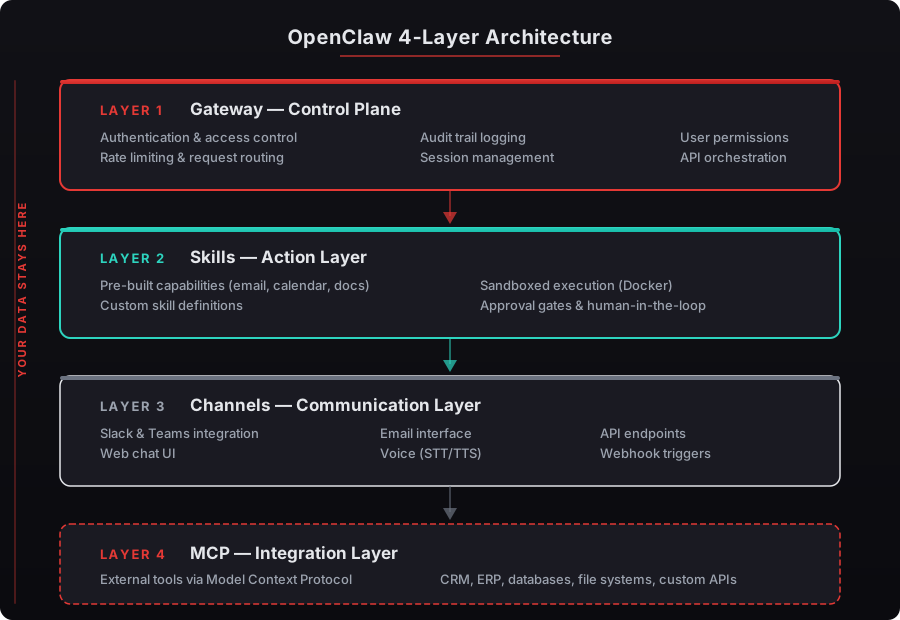

OpenClaw runs on four interconnected systems: the Gateway (control plane), Skills (actions your agent performs), Channels (how you communicate with it), and MCP (how it connects to external tools). Each layer handles one job, and together they form a production-grade AI agent that operates 24/7 on your infrastructure.
You don’t need to be a developer to understand this. But knowing the four pieces — even at a high level — changes how you think about deployment. According to Gartner’s 2025 AI Infrastructure report, executives who understand their AI architecture make 43% faster procurement decisions and report higher satisfaction with deployment outcomes.
We’ve walked 150+ executives through this exact breakdown. It typically takes 10 minutes. The ones who invest those 10 minutes consistently make better choices about scope, security, and integration priorities.
What Is the Gateway and Why Does It Matter?
The Gateway is OpenClaw’s control plane — the central system that manages your agent’s behavior, enforces security policies, routes tasks, and logs every action taken. If OpenClaw were a company, the Gateway would be the CEO, COO, and compliance officer rolled into one.
Here’s what the Gateway actually handles:
- Authentication — verifying who’s talking to the agent and what they’re allowed to request
- Task routing — deciding which Skill to invoke for each request
- Policy enforcement — applying rules about what the agent can and can’t do
- Audit logging — recording every action for compliance and review
NVIDIA’s NemoClaw reference design adds enterprise-grade hardening at this layer. According to NVIDIA’s 2025 documentation, NemoClaw includes policy guardrails, privacy routing, and Docker sandboxing — all enforced through the Gateway. Jensen Huang stated at Computex 2025 that agentic systems “can have access to sensitive information, execute code, and communicate externally” — and the Gateway is where you control all of that — see the Gateway architecture in detail.
Every beeeowl deployment ships with the full Gateway security stack. We configure authentication, set policy boundaries, and enable audit trails before the system leaves our hands.
What Are Skills and What Can They Do?
Skills are the specific actions your agent performs — the things it actually does with its hands. Email triage, calendar management, CRM updates, document generation, Slack monitoring, competitive intelligence gathering. Each Skill is a defined capability with clear boundaries.
Think of it this way: hiring a new employee and giving them a title doesn’t mean they know their job. You define their responsibilities. Skills work the same way — you decide what your agent can do, and the Gateway enforces those boundaries.
According to McKinsey’s 2025 State of AI report, companies deploying AI agents with clearly scoped capabilities see a 28% reduction in executive administrative time within 90 days. Vague deployments with unlimited scope? They stall in security review. Deloitte’s 2025 Enterprise AI Adoption Survey found that 71% of AI projects fail at that exact stage.
Here’s what most beeeowl clients configure as their first three Skills:
- Email triage — scanning inbox every 30 minutes, drafting responses, flagging urgent items
- Morning briefing — daily summary of calendar, attendee backgrounds, talking points, and overnight activity
- CRM sync — automatically updating Salesforce or HubSpot after meetings and calls
You start with one. Add more as trust builds.
How Do Channels Work?
Channels are how you talk to your agent — the messaging platforms where conversations happen. Slack, WhatsApp, Telegram, iMessage, or a dedicated web interface. You pick the platforms you already use, and your agent shows up there.
This matters more than it sounds. According to Forrester’s 2025 Enterprise Communication Survey, executives average 4.2 communication platforms daily. Asking them to open a fifth tool to interact with AI is a non-starter — that’s why most AI dashboards get abandoned within 60 days (Microsoft’s 2025 Workplace Analytics data).
OpenClaw meets you where you already work. Want to check your morning briefing on iMessage while commuting? Done. Need to ask your agent to pull a competitive analysis during a Slack conversation? It responds in the same thread.
We typically configure two Channels per executive: one for desktop work (usually Slack or Microsoft Teams) and one for mobile access (WhatsApp, Telegram, or iMessage). The agent maintains context across both — ask it something on Slack at 2 PM, follow up on WhatsApp at 6 PM. It remembers.
What Is MCP and Why Should Executives Care?
MCP — Model Context Protocol — is the open standard created by Anthropic that lets AI agents connect to external tools securely. It’s the universal connector that makes the entire ecosystem work. Without MCP, every tool integration would require custom development. With MCP, your agent connects to 10,000+ tools through a single standardized interface.
The analogy: MCP is USB-C for AI. Before USB-C, every phone manufacturer had a proprietary charger. MCP eliminates that fragmentation for AI integrations.
According to Anthropic’s 2025 MCP documentation, the protocol handles three things: authentication (proving the agent has permission), data exchange (passing information between tools securely), and action execution (telling tools what to do). GitHub’s 2025 State of Open Source report noted MCP adoption grew 340% year-over-year across AI agent frameworks — see the Model Context Protocol (MCP).
Here’s why it matters for deployment decisions: MCP means your agent isn’t locked into specific tools. Switch from Salesforce to HubSpot? Change your email from Gmail to Outlook? MCP handles the transition without rebuilding integrations from scratch.
What Does Composio Add to OpenClaw?
Composio is the integration layer that implements MCP connections to 10,000+ tools — Gmail, Outlook, Salesforce, HubSpot, Google Drive, Notion, Slack, Microsoft Teams, and dozens of financial platforms. It’s the library of pre-built connections that makes OpenClaw useful on day one.
The critical security feature: Composio handles OAuth authentication so your agent never sees raw credentials. According to IBM’s 2025 Cost of a Data Breach Report, compromised credentials caused 16% of all data breaches, averaging $4.8 million per incident. Composio’s architecture eliminates that attack surface entirely.
In practice, this is what Composio means for you: your agent can read your Gmail, update your Salesforce pipeline, and post a summary to Slack — without storing your Google password, Salesforce API key, or Slack token anywhere accessible. Credentials flow through OAuth and are never exposed to the agent or the LLM processing your requests — see Composio connects OpenClaw to 10,000+ tools.
Every beeeowl deployment includes Composio OAuth configuration as part of the standard setup. We handle the entire integration chain — you don’t touch credentials, API keys, or developer consoles.
How Does Understanding Architecture Help Deployment Decisions?
Knowing the four layers helps you answer three questions that determine deployment success: What should my agent do first? How tight should security be? And when do I add the next agent?
According to Accenture’s 2025 Technology Vision report, 83% of C-suite executives plan to deploy AI agents within 18 months — but only 12% have started. The gap between intention and action is almost always architectural uncertainty.
Here’s the practical framework we use with every client:
- Start with one Skill, one Channel. Email triage through Slack. Prove value in 2 weeks.
- Review the Gateway audit logs at day 14. You’ll see exactly what the agent did, when, and what it accessed. This builds trust through evidence, not promises.
- Add a second Skill at day 30. Morning briefings or CRM sync, depending on where you spend the most time.
- Add a second Channel at day 45. Mobile access through WhatsApp or iMessage for on-the-go interactions.
The architecture isn’t something you need to manage. It’s something that, once you understand it, makes every subsequent decision clearer. Gateway handles security. Skills define scope. Channels determine accessibility. MCP ensures flexibility.
Your deployment. Your hardware. Your rules.