How to Build an AI Executive Briefing Agent with OpenClaw
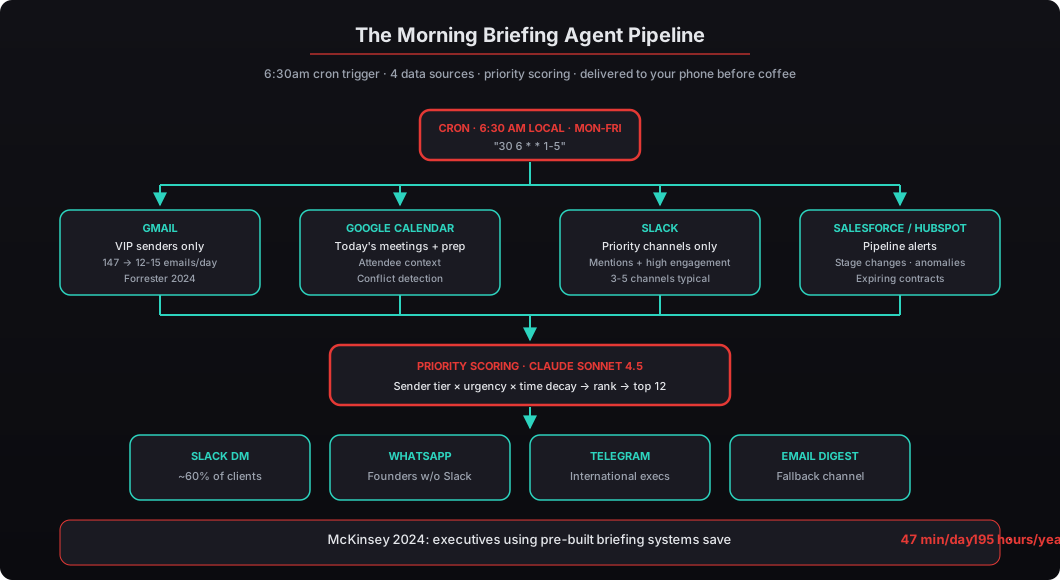
The morning briefing agent is our most-deployed OpenClaw configuration. It scans Gmail, Calendar, Slack, and your CRM every morning and delivers a prioritized daily briefing to your phone at 6:30am. McKinsey found it saves 47 minutes/day — here's the full build.

McKinsey’s 2025 research on executive productivity found that C-suite leaders spend 23% of working hours — roughly 11 hours per week — just processing information. Reading emails, scanning Slack, checking dashboards, mentally assembling context for the day ahead. McKinsey’s 2024 analysis of executive productivity tools found leaders using pre-built briefing systems save 47 minutes per day on information synthesis — about 195 hours per year, almost five full work weeks reclaimed. Harvard Business Review’s 2025 analysis found executives who receive pre-prioritized information make 34% faster decisions in morning meetings versus those who self-triage. The executive briefing agent is the single OpenClaw configuration that captures that productivity lift directly. It’s also the one beeeowl deploys more than any other — over 40 executives and counting. This article is the exact YAML config, priority scoring logic, system prompt, scheduling, and delivery setup we ship in every deployment.
What is an executive briefing agent — and why build one?
It’s the single agent configuration we deploy more than any other. An executive briefing agent connects to your inbox, calendar, Slack, and CRM through Composio OAuth, pulls overnight activity, runs it through a priority-scoring engine, and delivers a prioritized summary (400-600 words) to your phone every morning before you’ve had coffee. The mental model is “reliable chief of staff who reads everything overnight” — not “AI that writes clever emails.”
The problem it solves is concrete and measurable. According to McKinsey’s 2025 research on executive productivity, C-suite leaders spend 23% of their working hours just processing information — reading emails, scanning Slack, checking dashboards, and mentally assembling context for the day ahead. That’s roughly 11 hours per week spent on intake rather than decisions. For a CEO at a $500/hour loaded rate, that’s $5,500 per week in reverse-engineered context-gathering work that doesn’t need to be done by the most expensive person in the company.
We’ve configured this agent for 40+ executives since launching beeeowl. This guide walks through exactly how we build it — the same YAML configs, the same prompt structure, the same priority scoring logic we use in production deployments. If you’re technical, you can follow along and build this yourself on an existing OpenClaw instance. If you’d rather have it done in a day, that’s what our deployment packages are for. Either way, the recipe below is the one that works.
What data sources should the briefing agent connect to?
Four sources cover 90% of what a CEO needs every morning: email, calendar, team chat, and CRM. We’ve tested configurations with 6, 8, and 10 data sources, and the diminishing returns kick in fast — past four, you’re adding signal at the cost of noise, and noise is what the briefing agent exists to eliminate. Here’s how we configure each of the four core sources.
Gmail is the highest-signal source and the hardest one to filter well. We don’t pull every email — we filter for VIP senders (board members, investors, direct reports, key clients), anything flagged or starred, and any thread the executive is directly mentioned in. According to a 2024 Forrester study on enterprise communication patterns, executives receive an average of 147 emails per day but only 12-15 require same-day action. The agent finds those 12-15. The rest stay in the inbox for later scanning or archiving.
Google Calendar gives the agent context for the day. It pulls today’s meetings, attendee names and titles (cross-referenced with your CRM so a “meeting with John” becomes “meeting with John Chen, VP of Sales at Sequoia’s portfolio company XYZ”), prep notes from linked documents, and any scheduling conflicts between overlapping meetings. This is the part that most briefing systems miss — calendar data without context is just a list of times. Calendar data with attendee backgrounds and meeting purpose is a decision-support tool.
Slack is filtered to priority channels only. Most CEOs we work with monitor 3-5 channels actively — executive team, board, revenue, and maybe one product channel. The agent scans those for direct mentions, threads with high reply counts (8+ is our default threshold), and messages from specific people flagged as priority senders. Channels with 50-500 messages per day become 2-3 items in the briefing.
Salesforce or HubSpot feeds pipeline alerts. Deals above a dollar threshold that changed stage overnight, contracts expiring this week, revenue anomalies (sudden changes in close rate or pipeline velocity), and any accounts that went from Negotiation back to Stalled. For HubSpot users, we also pull marketing metrics if the CEO tracks those — MQL volume, lead scoring changes, campaign performance deltas.
Here’s the Composio connection config we ship in every beeeowl deployment. This is the exact file, anonymized:
# agent-config/data-sources.yaml
data_sources:
  gmail:
    provider: composio
    app: gmail
    scopes:
      - gmail.readonly
    filters:
      vip_senders:
        - "board@company.com"
        - "investor-updates@sequoia.com"
        - "cfo@company.com"
        - "cto@company.com"
        - "vp-sales@company.com"
      include_starred: true
      include_flagged: true
      max_age_hours: 14  # since last briefing
      exclude_labels:
        - "newsletters"
        - "automated"
        - "promotions"

  google_calendar:
    provider: composio
    app: google_calendar
    scopes:
      - calendar.readonly
    filters:
      calendars:
        - "primary"
        - "board-meetings"
      lookahead_hours: 14
      include_attendee_context: true
      cross_reference_crm: true

  slack:
    provider: composio
    app: slack
    scopes:
      - channels:read
      - channels:history
    filters:
      priority_channels:
        - "#executive-team"
        - "#revenue"
        - "#board"
        - "#product-launches"
      mention_scan: true
      high_engagement_threshold: 8  # replies
      max_age_hours: 14

  salesforce:
    provider: composio
    app: salesforce
    scopes:
      - api
    filters:
      pipeline_minimum: 100000
      stage_changes: true
      expiring_contracts_days: 7
      anomaly_detection: true
Every connection goes through Composio’s OAuth flow. The agent never sees raw credentials — that’s one of the security guarantees we build into every beeeowl deployment. Verizon’s 2025 DBIR found 44% of AI-related breaches involved exposed API credentials, and this architecture eliminates that entire attack vector. For the full credential isolation story, see our deep-dive on connecting OpenClaw via Composio.
How does the priority scoring logic work?
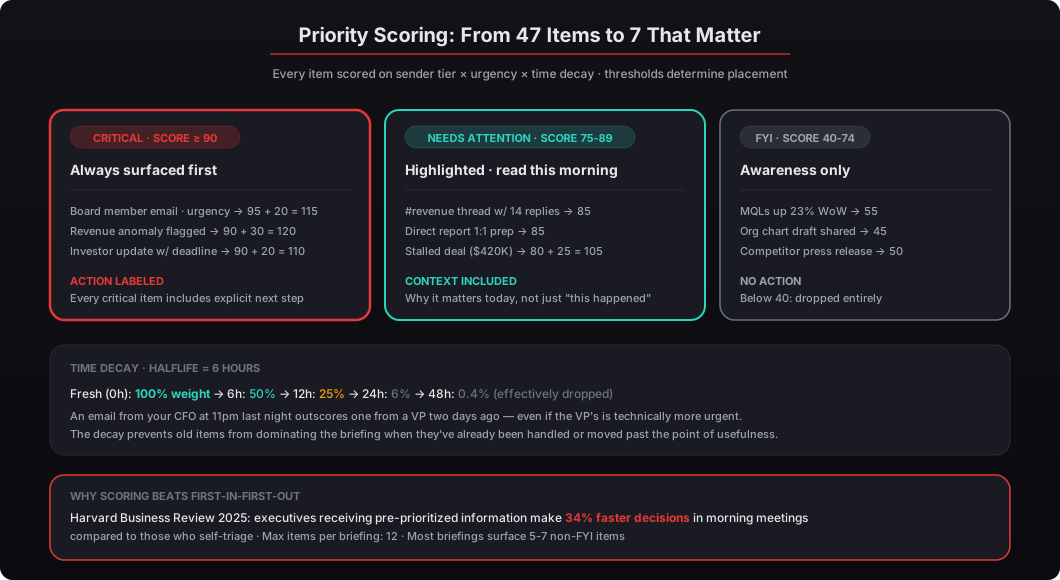
Raw data isn’t useful. A CEO doesn’t want 47 items dumped into a message — they want the 7 things that actually matter, ranked by why they matter today. That’s where priority scoring comes in, and it’s the part most DIY briefing attempts skip because it’s tedious to build right.
We assign a numerical score to every item the agent collects, then sort descending. Items below a threshold get dropped entirely. Items in the middle get a “NEEDS ATTENTION” label. Items above the critical threshold get called out first. Harvard Business Review’s 2025 analysis of executive decision-making found that leaders who receive pre-prioritized information make 34% faster decisions in morning meetings compared to those who self-triage. The scoring engine is the mechanism that makes that number real in practice.
Here’s the scoring config we ship in production:
# agent-config/priority-scoring.yaml
priority_scoring:
  weights:
    sender_tier:
      board_member: 95
      investor: 90
      direct_report: 85
      key_client: 80
      vip_custom: 75
      other: 30

    channel_importance:
      revenue: 90
      executive_team: 85
      board: 95
      product: 60

    urgency_signals:
      contains_deadline: +20
      mentions_you_directly: +25
      flagged_or_starred: +15
      reply_count_above_threshold: +15
      negative_sentiment: +10
      revenue_anomaly: +30
      deal_stage_regression: +25

    time_decay:
      halflife_hours: 6  # older items score lower

  thresholds:
    include_minimum: 40
    highlight_minimum: 75
    critical_minimum: 90

  max_items: 12
  critical_items_always_included: true
The time_decay setting is important and it’s the piece that makes the difference between a briefing that feels fresh and one that feels stale. An email from your CFO sent at 11 PM last night scores higher than one from a VP sent two days ago, even if the VP’s is technically more urgent on raw content. The halflife_hours: 6 parameter means an item loses half its time-based weight every 6 hours. After 24 hours, an item retains only 6% of its original weight. After 48 hours, effectively zero — which prevents old items from dominating the briefing when they’ve already been handled or moved past the point of usefulness.
Items scoring above 90 are marked CRITICAL and always appear first regardless of total item count. Items between 75-89 get a NEEDS ATTENTION highlight marker. Items between 40-74 appear in an FYI section. Anything below 40 gets dropped entirely — it’s not worth the cognitive load of reading. In our experience, it takes about a week of tuning these weights before a CEO says “yes, this is exactly what I’d want to see.” We handle that tuning during the first-week follow-up after deployment, and it’s included in every beeeowl package without extra charge.
What should the agent’s system prompt look like?
The system prompt is where most DIY attempts fail hard. A vague prompt produces vague briefings that feel generic and slowly lose the executive’s trust. We’ve iterated on this prompt across dozens of deployments, and the structure below consistently produces the best output across different executives and different industries. According to Gartner’s 2025 report on AI agent deployment patterns, 62% of failed agent projects cite “poor prompt engineering” as the primary cause. The fix isn’t complicated — it’s just specific and grounded in concrete rules rather than vague aspirations.
# agent-config/system-prompt.yaml
agent:
  name: "Morning Briefing Agent"
  model: "claude-sonnet-4-5-20250929"
  system_prompt: |
    You are an executive briefing agent for a CEO. Your job is to
    produce a concise, prioritized daily briefing every morning.

    RULES:
    - Lead with the single most important thing. No preamble.
    - Use bullet points. Maximum 3 lines per item.
    - Group items into three sections: CRITICAL, NEEDS ATTENTION, FYI.
    - For calendar items: include attendee names, their titles,
      and one line of context (why this meeting matters today).
    - For email items: include sender name, subject, and a
      one-sentence summary of what they need from you.
    - For Slack items: include channel, thread topic, and why
      it surfaced (mentions you, high engagement, or keyword match).
    - For CRM items: include deal name, dollar amount, what changed,
      and recommended action.
    - End with a "TODAY'S SCHEDULE" section — chronological list
      of meetings with times and one line of context each.
    - Total briefing length: 400-600 words. Never exceed 600.
    - Tone: direct, no fluff, no greetings, no sign-offs.
    - If nothing is critical, say so explicitly. Don't inflate importance.
    - Flag scheduling conflicts with [CONFLICT] marker.
    - Every critical item must end with an explicit → Action: line.

  temperature: 0.2
  max_tokens: 1200
A few things to note about this configuration. We use temperature: 0.2 because you want consistency, not creativity. The briefing should read the same way every morning — like a reliable chief of staff, not a different intern each day. Creativity is the enemy of trust in a briefing format. The max_tokens: 1200 cap prevents the agent from rambling past the 600-word target. Anthropic’s Claude Sonnet 4.5 is our default model because it follows structured instructions precisely without over-explaining and handles the nuanced priority calls better than smaller models. For executives who’ve added the Private On-Device LLM option, we configure a local model (Llama 3.1 8B or Mistral 7B through Ollama) instead — slightly less polished output, but nothing leaves the machine.
The “If nothing is critical, say so explicitly” rule is one we added after early deployments where the agent would inflate one item to CRITICAL status just because it needed something in that slot. Executives caught on fast and started distrusting the prioritization. Better to get “Nothing critical this morning. 3 items need attention.” than to have the agent promote an FYI item just to fill the slot.
How do you schedule the morning briefing?
The agent needs to run on a schedule. OpenClaw uses standard cron syntax for this, and the typical configuration triggers the briefing at 6:30 AM in the executive’s local timezone. We also configure a separate lighter schedule for weekends because most executives don’t want full meeting prep on Sunday morning.
# agent-config/schedule.yaml
schedule:
  briefing:
    cron: "30 6 * * 1-5"  # 6:30 AM, Monday through Friday
    timezone: "America/New_York"
    task: "morning_briefing"
    retry:
      max_attempts: 3
      delay_minutes: 5
    timeout_minutes: 10

  weekend_briefing:
    cron: "0 8 * * 0,6"  # 8:00 AM, Saturday and Sunday
    timezone: "America/New_York"
    task: "morning_briefing"
    config_override:
      max_items: 5
      include_calendar: false
      critical_only: true
We configure a separate weekend schedule for most clients. Saturdays and Sundays use critical_only: true — the agent only surfaces items scoring above 90, and drops the calendar section entirely because most executives don’t want meeting prep on a weekend morning. If nothing hits the critical threshold, the weekend briefing is a single sentence: “Nothing critical overnight — enjoy the weekend.”
The retry block handles intermittent API failures. If Gmail’s API is slow at 6:30 AM (which happens occasionally), the agent tries again at 6:35 and 6:40 before marking the run as failed and alerting you via a separate notification channel. This matters because a silently failed briefing is worse than no briefing at all — you think you’re informed and you’re not. According to a 2024 Deloitte survey on executive morning routines, 68% of C-suite leaders check their phone within 10 minutes of waking. The 6:30 AM default ensures the briefing is waiting when they do, and the retry logic ensures it’s there even when the source APIs misbehave.
How does delivery work?
The briefing needs to arrive where you’ll actually read it — not a new app you’ll forget to open. We support four delivery channels: Slack DM, WhatsApp, Telegram, and email digest. About 60% of our clients pick Slack DM because they can read it on their phone before getting out of bed. WhatsApp is second, especially for founders who aren’t in Slack all day. Telegram is common for international executives. Email digest is the standard fallback when the primary channel fails.
{
  "delivery": {
    "primary_channel": "slack_dm",
    "fallback_channel": "email",
    "channels": {
      "slack_dm": {
        "workspace": "your-company",
        "user_id": "U04ABC123",
        "format": "mrkdwn"
      },
      "whatsapp": {
        "phone": "+1XXXXXXXXXX",
        "via": "twilio",
        "format": "plain_text"
      },
      "telegram": {
        "chat_id": "123456789",
        "bot_token_ref": "composio:telegram_bot",
        "format": "markdown"
      },
      "email": {
        "to": "ceo@company.com",
        "subject_template": "Daily Briefing — {date}",
        "format": "html"
      }
    },
    "confirmation": {
      "send_delivery_receipt": true,
      "alert_on_failure": "email"
    }
  }
}
The fallback_channel ensures that if Slack delivery fails (Slack maintenance window, workspace hiccup, token expiration), the briefing still reaches you via email. One detail we always configure: send_delivery_receipt: true. This logs a confirmation that the briefing was delivered successfully. If the agent runs but delivery fails silently, you’d never know you missed something critical — which defeats the entire point of the system.
What does the final briefing actually look like?
Here’s a real example (anonymized) of what a CEO receives at 6:32 AM on a Tuesday. This is the exact output format we target with every deployment, and the length and structure match the system prompt specifications above.
CRITICAL

- Board member David Chen emailed at 11:47 PM re: Q2 revenue
  forecast. Wants revised numbers before Thursday's board call.
  → Action: Reply with updated forecast or delegate to CFO.

- Salesforce: Meridian Health deal ($420K) moved from
  Negotiation to Stalled. Last activity was 6 days ago.
  → Action: Ask VP Sales for status before your 2 PM pipeline review.

NEEDS ATTENTION

- #revenue Slack: Thread on enterprise tier churn (14 replies).
  VP Customer Success flagged 3 accounts at risk — $180K ARR
  combined. You were mentioned twice.

- Email from Sarah Kim (Series A lead, Greylock Partners):
  Requesting intro to your CTO for technical diligence.
  → Action: Make intro or delegate to EA.

- Google Calendar conflict: 10 AM product review overlaps
  with investor check-in. Both confirmed.
  → Action: Move one or send delegate to product review.

FYI

- HubSpot: Marketing qualified leads up 23% week-over-week.
  No action needed — tracking for board deck.

- Slack #executive-team: COO shared updated org chart draft.
  3 reactions, no discussion yet.

TODAY'S SCHEDULE

  8:00 AM — Leadership standup (15 min) — weekly sync, no prep
  9:00 AM — 1:1 with CFO Lisa Park — Q2 forecast revision
 10:00 AM — Product review [CONFLICT] — v2.1 launch timeline
 10:00 AM — Investor check-in (Greylock) [CONFLICT] — Series A follow-up
 12:30 PM — Lunch with CTO — recruiting pipeline discussion
  2:00 PM — Pipeline review — weekly Salesforce walkthrough
  4:00 PM — Board prep session — Thursday deck finalization
That’s 280 words. Takes about 90 seconds to read. The CEO now knows exactly what to focus on, what to delegate, and what’s coming today — before they’ve left the house. According to McKinsey’s 2024 analysis of executive productivity tools, leaders who use pre-built briefing systems save an average of 47 minutes per day on information synthesis. Over a year, that’s roughly 195 hours — almost five full work weeks reclaimed from reading unprioritized inbox clutter into actual strategic work.
How do you handle data security for the briefing agent?
This is where self-hosted infrastructure matters more than anything else in the stack. The briefing agent accesses your most sensitive data: investor emails, board communications, revenue numbers, HR discussions, M&A conversations, pre-IPO financials. That data categorically cannot flow through a third-party AI provider’s cloud infrastructure — not because the providers are malicious, but because the regulatory and fiduciary overhead of sharing board-level data with a third party is usually prohibitive once a CFO or general counsel thinks about it honestly.
On a beeeowl deployment, the agent runs entirely on your hardware — a Mac Mini sitting in your office, a MacBook Air in your briefcase, or a private VPS that only you control. Data is pulled from Gmail, Slack, and Salesforce via Composio’s OAuth connections (broker runs server-side in your infrastructure, not in a cloud), processed locally by the LLM in a Docker sandbox with read-only filesystem and cap_drop: ALL, and the briefing is pushed to your delivery channel. Nothing is stored after the briefing is sent — the working data is ephemeral and lives in tmpfs for the duration of the run only.
Forrester’s 2025 Enterprise AI Security report found that 78% of enterprises cite data residency as their top concern when deploying AI agents. Running on your own infrastructure eliminates that concern entirely. The Docker sandboxing following NemoClaw’s enterprise reference design adds another layer — the agent runs inside an isolated container with no access to your host filesystem, no outbound network access except to the allowlisted APIs, and no way to escalate privileges. If something goes wrong in the agent process, the blast radius is contained to that container. We covered the full sandboxing architecture in how to get your first OpenClaw agent running in one day.
Every action the agent takes is logged in an audit trail — which emails it read, which Slack messages it accessed, which CRM records it queried, which LLM it called and with what parameters. That audit trail lives on your infrastructure too, not in a vendor’s log stream. When your compliance officer asks “what data did the AI process this morning,” you get a complete, timestamped, signed answer instead of “we’d need to ask our vendor.”
What if you don’t want to build this yourself?
Most executives we work with don’t configure their own agents. That’s expected and reasonable — you wouldn’t ask a CEO to set up their own email server either. The configuration in this article is the technical reference, not a requirement that every deployer be a technical one.
Every beeeowl deployment package includes one fully configured agent, and the morning briefing is the one clients request most often — roughly 70% of our deployments start with this configuration. We handle the Composio OAuth connections, the system prompt tuning, the priority scoring calibration, the cron scheduling, the delivery channel setup, and the first-week iteration as you tell us what should and shouldn’t surface. The whole thing is done in a single structured deployment day.
Our Hosted Setup starts at $2,000 — that includes the briefing agent running on a private VPS in Hetzner or OVH (not a hyperscaler). The Mac Mini package at $5,000 puts it on dedicated Apple Silicon hardware shipped to your door with everything pre-configured. Either way, you’re reading your first real briefing within a week of placing the order. For executives who want multiple agents — say, a briefing agent plus a CRM update agent plus an email draft agent — additional agents are $1,000 each. Every agent runs on the same secured infrastructure with its own isolated Docker container and its own Composio credential scope.
The morning briefing agent is the starting point. Once executives see what it does, they almost always come back for a second agent within 30 days. It changes how you think about what should require your direct attention versus what a machine can pre-process for you. For workflow examples across other roles (CFO, CTO, VC, managing partner), see our use cases page.
Request your deployment here and we’ll have your briefing agent configured, tuned, and running within a week.