OpenClaw API Cost Controls: Setting Daily Budgets, Alerts, and Hard Stops Across Claude/GPT/Gemini Backends
Agent loops and retry storms can produce $500+ overnight surprise bills. Complete configuration walkthrough for OpenClaw budget controls, model-tier routing, hard-stop policies, and the local LLM pivot that eliminates API cost entirely for sensitive workflows.

OpenClaw API costs can spiral quickly when an agent loop fires unexpected workloads, a retry storm hits during external API outages, or a skill accidentally routes to a higher-cost model. Real-world cost runaway scenarios we’ve seen: a single overnight skill loop generating $500-$1,200 in Claude Opus API costs before the morning alert; a misconfigured retry policy producing $200-$400 in GPT-4o costs during a 30-minute Anthropic API outage; a skill set to “best available model” switching to GPT-4.5 and tripling per-call costs without operator awareness. OpenClaw provides four layers of cost control: per-skill budgets with daily/weekly/monthly limits, model-tier routing rules that constrain which skills can use which model tiers, hard-stop policies that abort skill execution when budgets approach threshold, and alerting that notifies the operator via macOS notification, email, or Slack when spend approaches limits. The strategic pivot most cost-conscious operators ultimately make: routing sensitivity-tier workflows to the local LLM (Mistral 7B or Llama 3.1 8B running on the Mac Mini) which has zero API cost — only capability-bound workflows route to GPT-4o/Claude/Gemini APIs. For executive deployments where 60-80% of workflow volume is sensitivity-tier work, this routing pattern reduces typical monthly API spend from $300-$800 to $50-$150. The Mac Mini hardware that runs the local LLM is a one-time $5,000 purchase versus the ongoing API spend the local model replaces — typical payback is 6-12 months on API cost savings alone. This article walks through the four cost control layers in detail, the configuration syntax for each, the local LLM routing strategy, and the cost monitoring patterns we recommend for production OpenClaw deployments. Buy preconfigured OpenClaw deployments include the cost control configuration as standard setup with sensible defaults that prevent the most common runaway scenarios.
What does an API cost runaway actually look like?
Three real cases from our deployment history illustrate the failure modes.
Case 1: silent model upgrade. An executive’s skill set to model: "best-available" was accidentally routing to GPT-4.5 (when it released) instead of the expected GPT-4o. GPT-4.5 pricing is approximately 3x higher per token than GPT-4o on input and output. The skill ran daily for two weeks before the operator noticed the monthly billing statement showed $850 in API charges versus the expected $280. The root cause: the “best-available” routing pattern had no version pinning, so when the provider released a new top-tier model, the routing automatically upgraded.
Case 2: overnight loop catastrophe. A skill configured to monitor a specific Slack channel for incoming messages had a parse error handler that, on certain message formats, fed the malformed message back to itself for retry. The malformed message kept malforming, the retry kept firing, and the loop ran for 8 hours overnight before the morning alert noticed sustained API activity. Total accumulated cost: $1,200 in Claude Opus API charges before manual intervention.
Case 3: cascading recursion. A multi-step skill workflow where one step’s failure triggered a recursive call to the parent workflow produced a cascade that ran for two hours before the operator noticed the unusual CPU activity on the Mac Mini. The cascade fired GPT-4o calls at approximately 60 calls per minute for the duration. Total: $400 in mixed API costs before manual termination.
All three cases are preventable with the budget and hard-stop configurations OpenClaw provides. They occurred at deployments where the operator hadn’t configured the cost controls because the default configuration was permissive enough to allow them. The standard order OpenClaw system deployment now ships with conservative default budgets, hard stops at 100% of budget, and alerts at 75% — preventing the standard runaway scenarios out of the box.
What are the four layers of OpenClaw cost control?
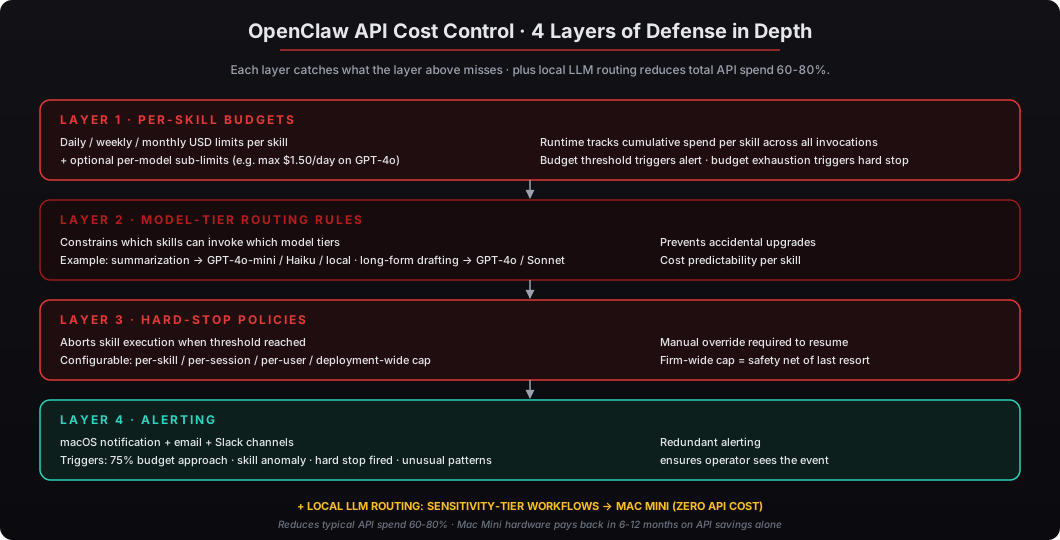
The four cost control layers compose to provide defense in depth. Each addresses a different failure mode.
Layer 1: Per-skill budgets cap the total spend any single skill can incur in a defined time window. The configuration specifies daily, weekly, and monthly limits in USD, plus optional per-model sub-limits for more granular control. When a skill approaches its budget, the runtime fires an alert. When the skill reaches its budget, the runtime either pauses for approval or aborts based on the hard-stop policy.
Layer 2: Model-tier routing rules constrain which skills can invoke which model tiers. A typical configuration: “long-form drafting” skill can use GPT-4o or Claude 3.7 Sonnet; “summarization” skill must use GPT-4o-mini, Claude 3.5 Haiku, or local LLM; “classification” skill must use local LLM only. The routing rules prevent accidental upgrades to more expensive model tiers and provide cost predictability per skill.
Layer 3: Hard-stop policies abort skill execution when accumulated costs approach configured thresholds. The hard stop can apply at the per-skill budget level, at the per-session level (single skill invocation), at the per-user level (all skills under a user account), or at the deployment level (firm-wide cost cap). The deployment-level cap is the safety net of last resort — even if all other controls fail, the firm-wide cap prevents catastrophic overrun.
Layer 4: Alerting notifies the operator via macOS notification, email, or Slack when:
- Spend approaches budget limits (typically at 75% threshold)
- Individual skills exceed expected cost thresholds (typically per-skill anomaly detection)
- Unusual cost patterns appear (sudden spike, sustained elevated rate, off-hours activity)
- Hard stops fire (the skill was aborted to prevent further spend)
Most deployments use all four layers with conservative defaults adjusted up over time as the operator gains visibility into normal spend patterns for each skill.
How does the local LLM routing pattern reduce API costs?
OpenClaw’s routing logic classifies each workflow by sensitivity tier and capability requirement. The classification happens at the skill level — each skill declares its sensitivity tier in the manifest, and the OpenClaw runtime applies routing rules accordingly.
Sensitivity tiers:
- Internal-Confidential — matter analysis, financial reports, regulated industry workflows, M&A activity. Always routes to local LLM. Never hits external API.
- Internal-General — internal documents, meeting prep, routine analysis. Routes to local LLM by default; can route to API if capability is required and skill is explicitly permitted.
- External-Public — public news synthesis, marketing content drafts, general writing. Routes based on capability requirements; typically API.
Capability requirements:
- Standard capability — summarization, classification, structured extraction, light analysis. Local LLM handles well.
- Long-form generation — multi-thousand-word writing, complex narrative drafting. May require API for quality.
- Sophisticated reasoning — multi-step analysis with complex dependencies. May require API for capability.
- Long context — workflows requiring more than 32K tokens of context. Currently requires API (local LLM context windows are typically 8K-32K).
For typical executive deployments where 60-80% of workflow volume is sensitivity-tier work (matter analysis, internal documents, financial review, regulated industry workflows), this routing reduces API spend dramatically:
| Deployment Pattern | Typical Monthly API Spend |
|---|---|
| All API, no local LLM | $300-$800 |
| Hybrid with local LLM for sensitivity-tier | $50-$150 |
| Local LLM primary, API only for capability-bound | $20-$60 |
The Mac Mini hardware investment of $5,000 typically pays back in 6-12 months on API cost savings alone, before counting the data sovereignty and privacy benefits. For an executive deployment running $400/month in API costs that drops to $80/month with local LLM routing, the $320/month savings amortize the Mac Mini hardware in approximately 15 months. For higher-volume deployments running $800/month in API costs that drop to $120/month, payback is closer to 7 months.
What does the budget configuration syntax look like?
Per-skill budgets are configured in the skill manifest’s config block or in the deployment’s central budget configuration file at ~/Library/Application Support/OpenClaw/budgets.yaml:
# Deployment-wide defaults
defaults:
  daily_usd: 10.00
  weekly_usd: 50.00
  monthly_usd: 150.00
  alert_at_percent: 75
  hard_stop_at_percent: 100

# Per-skill overrides
skills:
  daily-briefing:
    daily_usd: 2.00
    models:
      gpt-4o: 1.50      # max $1.50/day on GPT-4o specifically
      claude-3-7-sonnet: 1.50
      local: unlimited  # local LLM is free, no cap needed

  weekly-status-report:
    weekly_usd: 5.00
    hard_stop_at_percent: 100

  pre-meeting-context:
    daily_usd: 5.00
    alert_at_percent: 80

  long-form-drafting:
    daily_usd: 8.00     # higher budget for capability-bound work
    models:
      gpt-4o: 8.00
      gpt-4-5: 0.00     # disabled — too expensive

# Deployment safety net
deployment:
  daily_usd: 25.00      # firm-wide hard cap across all skills
  alert_at_percent: 60
  hard_stop_at_percent: 90
The configuration is loaded at runtime startup and re-loaded on file change. Operators can adjust budgets without restarting OpenClaw. The runtime tracks cumulative spend per skill in ~/Library/Application Support/OpenClaw/cost-ledger/ with hash-chain integrity for audit defensibility.
For multi-user deployments, each user has their own budget configuration file. The deployment-level safety net applies across all users combined to provide a firm-wide cap.
How do hard-stop policies work?
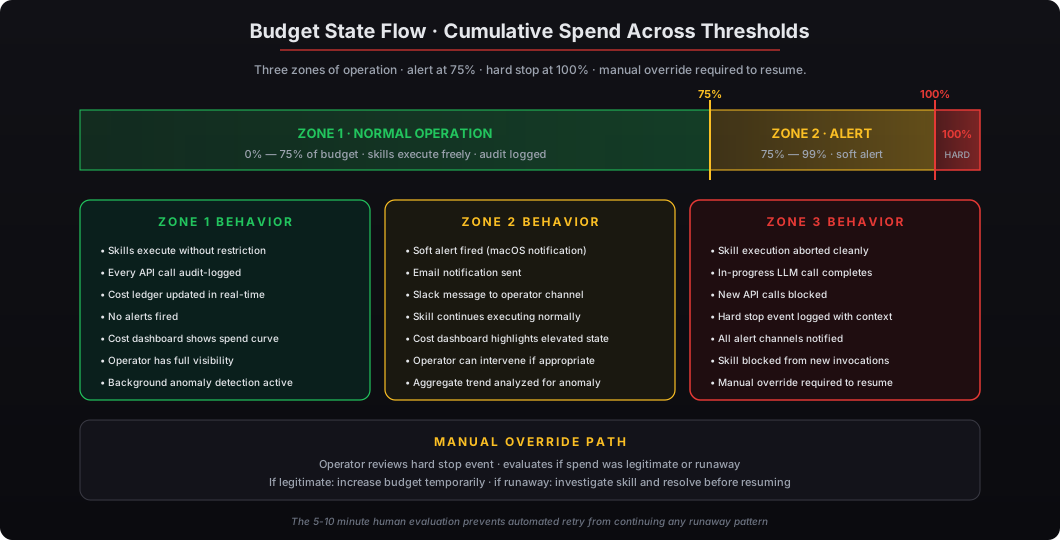
Hard stops abort skill execution when a budget threshold is reached. The configuration specifies the threshold and the abort behavior:
hard_stop_at_percent: 100  # abort exactly at budget exhaustion
hard_stop_at_percent: 90   # abort at 90% — leave 10% headroom for safety
hard_stop_at_percent: 75   # abort at 75% — aggressive conservative cap
When the hard stop fires, the runtime:
- Aborts the current skill invocation cleanly, completing any in-progress LLM call but not initiating new calls
- Logs the hard stop event to the audit trail with the budget threshold, accumulated spend, and the skill invocation context
- Notifies the operator via the configured alert channels (macOS notification, email, Slack)
- Prevents new invocations of the same skill until either (a) the budget window resets at the next day/week/month boundary, or (b) the operator manually overrides the hard stop with a budget increase
The override path is intentionally manual. If a skill hits its hard stop, the operator needs to evaluate whether the spend was legitimate (and the budget should be increased) or whether something went wrong (and the skill needs investigation). The 5-10 minutes of operator review prevents the worst runaway scenarios where automated retry would just continue the runaway pattern.
For deployments where some skills should genuinely have higher budgets — for example, an active M&A diligence workflow during a sprint — the budget configuration can be adjusted upward for the duration of the sprint. The temporary increase is reversed when the sprint completes, preventing the elevated budget from carrying forward into normal operations.
What does cost monitoring look like in production?
The OpenClaw cost dashboard (accessible via openclaw costs command-line or via the optional web dashboard) shows real-time and historical cost data:
Real-time view:
- Current daily spend across all skills (with per-skill breakdown)
- Top 5 most-expensive skills today
- API calls per minute (last hour, with anomaly highlighting)
- Active skills currently invoking external APIs
Historical views:
- Daily, weekly, monthly cost trends
- Per-skill cost trends (which skills are getting more expensive over time?)
- Per-model cost attribution (where is the spend concentrated — GPT-4o, Claude, Gemini?)
- Cost-per-output metrics (briefing per dollar, meeting prep per dollar) for skill ROI tracking
Alerts and incidents:
- Recent budget alerts (which skills hit thresholds and when?)
- Hard stop events (which skills were aborted and why?)
- Anomaly detection results (which skills had unusual cost patterns?)
For deployments where the firm’s CFO or finance team wants cost visibility, the dashboard can export to standard formats (CSV, JSON) for ingestion into the firm’s existing expense tracking. For deployments where cost data should feed corporate FP&A processes, the OpenClaw cost data can be forwarded via webhook to standard FP&A platforms (Mosaic, Anaplan, custom internal systems).
The cost monitoring is firm-controlled — the data lives on the Mac Mini, exports to firm-controlled destinations, and never routes through third-party cost management vendors. This matters for firms where the AI cost data itself is competitive (firms in industries where AI spend is a strategic indicator).
What’s the recommended configuration for new deployments?
The configuration we ship with buy secure OpenClaw online deployments as standard defaults:
Deployment-level cap: $25/day across all skills and users. This is the absolute safety net — even in the worst combinatorial failure, total firm-wide spend cannot exceed $25/day or $750/month.
Per-user defaults: $10/day, $50/week, $150/month. Adjustable upward for users with higher-volume workflows.
Per-skill defaults: $2-$8/day depending on the skill’s expected usage pattern. Daily briefing skill defaults to $2/day; complex analytical skills default to $5-$8/day.
Model-tier routing: GPT-4.5 disabled by default (operators must explicitly enable). GPT-4o-mini and Claude 3.5 Haiku preferred over higher-tier siblings for any workflow that can use them. Local LLM routing enabled for all sensitivity-tier workflows.
Hard-stop policy: 100% of budget at the skill level, 90% at the deployment level. The 10% headroom at the deployment level provides safety against simultaneous skill executions pushing past the firm-wide cap.
Alerting: 75% of budget triggers a soft alert. Hard stops trigger immediate notifications via macOS notification AND email AND Slack (if Slack is configured). The redundant alerting ensures the operator sees the hard stop even if they’re away from the Mac Mini.
For executive deployments running typical workflow patterns, these defaults result in $50-$150/month in actual API costs — well below the $750/month deployment cap and providing meaningful runway for occasional higher-volume periods. Most deployments adjust budgets upward modestly during the first 2-3 months as the operator gains visibility into normal spend patterns; after that, the configuration tends to stabilize at the operator’s preferred steady state.
For firms ready to deploy private AI with robust cost controls, buy preconfigured OpenClaw at the standard $5,000 Mac Mini tier ships with the cost control configuration pre-installed and sensible defaults activated. The local LLM routing — the structural mechanism that reduces API spend 60-80% by keeping sensitivity-tier workflows on-device — is the architectural feature that makes private AI deployment financially superior to pure cloud AI for executive workflows. Section 179 tax deduction makes the Mac Mini after-tax cost approximately $1,750-$2,000 in the 35% federal bracket, and the API cost savings amortize the hardware in 6-12 months for typical executive usage patterns. Order OpenClaw system deployments include the cost control configuration as part of the standard one-week delivery.