Connecting OpenClaw to Salesforce: Two-Way CRM Sync via Composio OAuth (Lead Capture, Opportunity Updates, Account Notes)
Complete walkthrough for connecting OpenClaw to Salesforce via Composio OAuth. Object scopes, two-way sync patterns, conflict resolution, agent-driven note writing, and the 8 highest-value executive workflows that depend on the integration.


Salesforce is the most-requested CRM integration in OpenClaw deployments — it appears in approximately 70% of executive deployments at firms with active sales motion or client relationship management workflows. The Composio OAuth integration provides standardized authenticated access to Salesforce Lead, Account, Opportunity, Contact, Task, Note, and Activity objects, plus Salesforce Financial Services Cloud objects (Financial Account, Financial Goal, Asset, Liability) for RIAs and wealth managers. Two-way sync is supported but typically scoped narrowly — agent writes account notes, meeting summaries, and follow-up tasks, while CRM remains the source of truth for opportunity stages and revenue forecasting. Configuration takes 30-45 minutes for the initial connection plus 15-30 minutes per workflow skill activation. Composio handles OAuth token storage in the Mac Mini’s macOS Keychain (Secure Enclave-backed) with automatic refresh, field-level permission respect, and audit logging of every Salesforce API call the agent makes. This article walks through the complete setup: Composio app installation in Salesforce, OAuth flow, object access configuration, the standard skill library covering 8 high-value workflows, two-way sync conflict resolution patterns, custom object support, and the audit trail configuration that satisfies enterprise compliance requirements. Buy preconfigured OpenClaw deployments include the Salesforce integration setup as standard configuration — the integration is operational within the one-week deployment window.
Why is Salesforce the most-requested CRM integration?
Three reasons drive Salesforce dominance in executive OpenClaw deployments. First, Salesforce is the dominant enterprise CRM — Salesforce Sales Cloud, Service Cloud, Financial Services Cloud, Health Cloud, and Education Cloud collectively serve the majority of mid-market and enterprise customer relationship workflows. Second, Salesforce’s API model is mature and stable — the REST API and OAuth flow have been production-stable for over a decade, which makes the integration reliability story strong. Third, the executive workflow value is high — pre-meeting context, pipeline review, account notes synthesis, and opportunity stage flagging are workflows that compound value across an executive’s entire week.
I’ve configured the Salesforce integration for executives at sales-driven SaaS companies, professional services firms, investment advisory practices, and family offices. The pattern is consistent: the Salesforce data is rich, the executive’s daily routine includes multiple Salesforce-touching workflows, and the OpenClaw agent dramatically reduces the friction of moving information between Salesforce and the executive’s other tools (email, calendar, Slack). The standard order OpenClaw system deployment for sales-driven executives ships with Salesforce pre-configured as one of the primary integrations.
The integration works across Salesforce editions: Enterprise Edition, Unlimited Edition, Performance Edition, Developer Edition (for testing), and the industry clouds (Financial Services Cloud, Health Cloud, Education Cloud, Manufacturing Cloud, Consumer Goods Cloud). Salesforce Essentials and Professional Edition have API limitations that constrain some workflows but the core integration still works for read access and limited write workflows.
How does the Composio OAuth integration actually work?
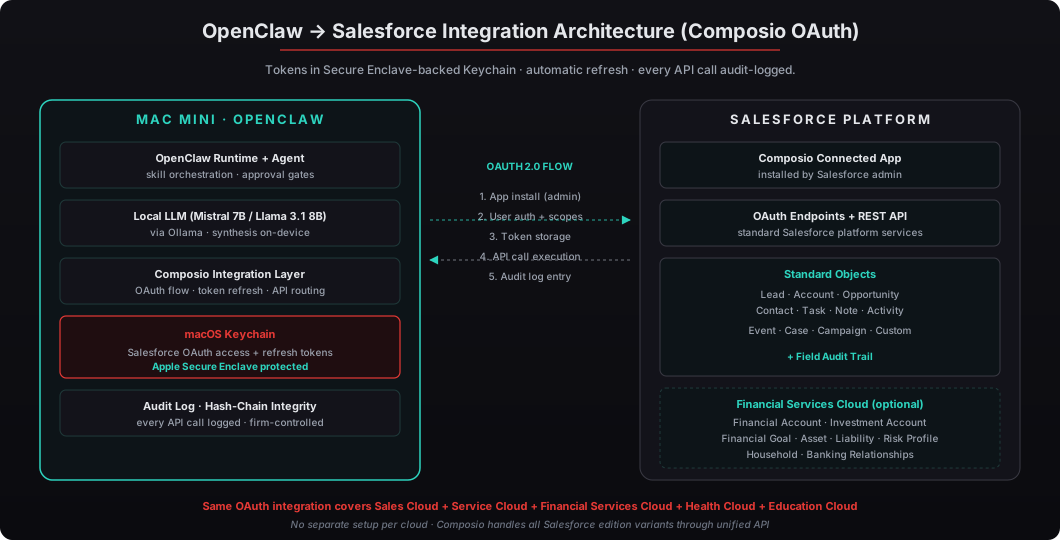
Composio is the integration layer that handles OAuth flows, token management, and API call orchestration for OpenClaw’s external integrations. For Salesforce, the integration follows a standard OAuth 2.0 authorization code flow:
- App installation in Salesforce — the firm’s Salesforce administrator installs the Composio Connected App (or pre-existing if Composio is already in use) which establishes the OAuth client credentials at the org level
- OAuth flow initiation — the executive’s OpenClaw deployment opens the OAuth authorization URL, the executive logs into Salesforce and approves the requested scopes
- Token storage — Composio receives the access token and refresh token, stores them in the Mac Mini’s macOS Keychain protected by the Apple Secure Enclave
- API call execution — when an OpenClaw skill needs Salesforce data or writes, Composio injects the access token automatically, handles refresh-on-expiry, and returns the API response to the skill
- Audit logging — every API call is logged to the OpenClaw audit log with hash-chain integrity
The Composio Connected App installation is typically a one-time activity per Salesforce org. After installation, individual executives can connect their own Salesforce accounts via the OAuth flow without requiring administrator involvement for each new user. For enterprise deployments where IT requires control over which apps are installed, the Composio Connected App goes through standard Salesforce app review and installation procedures.
The OAuth scopes requested during connection cover the standard objects and operations:
api— broad API accessrefresh_token— automatic token refreshoffline_access— long-lived sessionsid— user identificationweb— web-based authentication flow
These are standard Salesforce OAuth scopes that admins are familiar with reviewing. Composio does not request administrative scopes (modify_metadata, manage_user, etc.) for the standard integration — the agent operates as a regular user, not an admin.
What are the 8 highest-value workflows that depend on Salesforce integration?
Eight workflows drive most of the Salesforce integration value for executive OpenClaw deployments. Each has been refined across dozens of deployments and represents the consensus highest-value pattern for the relevant role.
| # | Workflow | Frequency | Time Saved | Role |
|---|---|---|---|---|
| 1 | Daily pipeline review with stage flags | Daily | 20-30 min/day | CEO, CRO, Sales VP |
| 2 | Pre-meeting account context briefing | Per meeting | 15-30 min/meeting | All client-facing roles |
| 3 | Email-to-CRM activity logging | Per email batch | 5-10 min/day | All sales-facing roles |
| 4 | Opportunity stage update assistance | Per opp change | 5-15 min/opp | Sales operators, AEs |
| 5 | Forecast variance analysis | Weekly | 30-60 min/week | CRO, Sales Operations |
| 6 | Account notes from email and Slack synthesis | Per touchpoint | 5-15 min/touchpoint | Sales, customer success |
| 7 | Custom report scheduling and delivery | Daily/weekly | 10-30 min/week | Sales operations, RevOps |
| 8 | Salesforce-to-Slack alerts for sales-critical events | Real-time | Continuous | Sales leadership |
Pre-meeting account context briefing is consistently the most valuable workflow. Before any external meeting, the skill pulls the Account record, related Contacts, open Opportunities, recent Activity history, recent Cases, and any custom field data relevant to the meeting. The local LLM synthesizes a 1-2 page briefing covering: who’s in the meeting, what’s happening in the account, recent communications, open commercial items, and flags from custom fields. The briefing is delivered to the executive’s inbox 30-60 minutes before the meeting. For executives doing 8-15 external meetings per week, this saves 2-7 hours per week and substantially improves meeting effectiveness.
Daily pipeline review is the second-highest value. The skill runs in the morning (often as part of the daily executive briefing) and identifies opportunities that have changed stage, opportunities approaching close date without recent activity, opportunities above commit threshold that need executive attention, and forecast deltas vs the previous week’s commit. The output is a structured review document the executive uses during their morning pipeline check.
How does two-way sync work without creating CRM data conflicts?
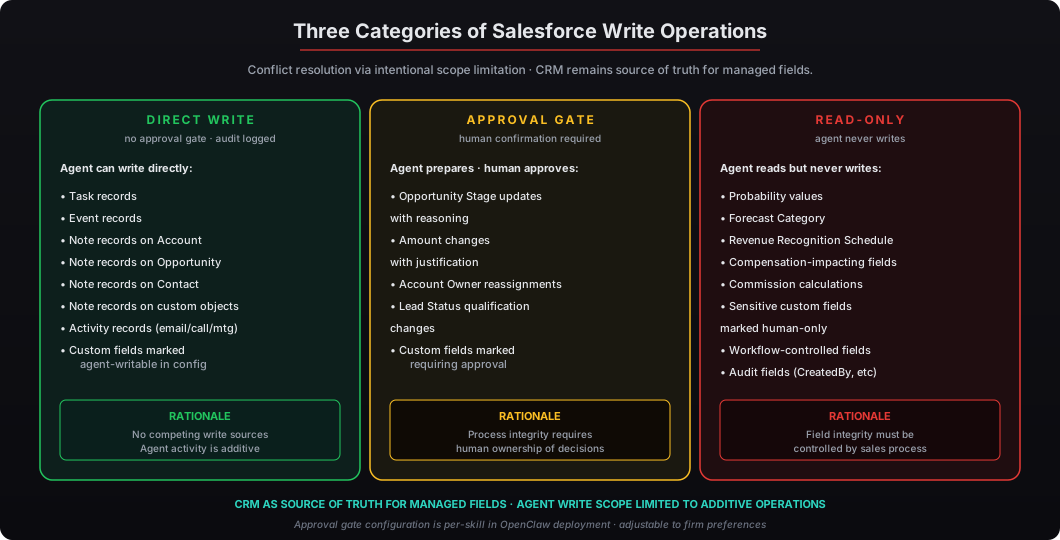
The conflict resolution pattern is intentional scope limitation. OpenClaw uses a “CRM as source of truth” model for most fields, with agent write scope limited to fields where the agent’s write doesn’t conflict with other write sources.
Agent-writable fields by default:
- Task and Event records (meeting notes, follow-ups, scheduled actions)
- Note records on Account, Opportunity, Contact, and custom objects
- Activity records (logged emails, calls, meetings, demos)
- Custom field updates for fields marked as “agent-writable” in the deployment configuration
Human-only fields by default:
- Opportunity Stage (sales process integrity requires human ownership)
- Amount, Close Date, Probability (forecast field integrity)
- Account Owner, Opportunity Owner (assignment changes)
- Lead Status (qualification flow integrity)
- Custom fields marked as “human-only” in deployment configuration
For workflows where the agent does need to write to managed fields — for example, an opportunity stage update based on email analysis — OpenClaw uses approval gates that require human confirmation before the write commits to Salesforce. The agent prepares the change, presents it to the executive with reasoning, and waits for explicit approval before executing the API call. This pattern preserves the CRM data integrity while still letting the agent assist with the workflow.
The approval gate pattern is configured in the OpenClaw skill JSON. Each skill that writes to Salesforce declares which write operations require approval gates and which can execute directly. For most executive deployments, the default configuration has approval gates on Opportunity field updates and direct execution on Task/Note/Activity writes.
How does the integration handle Salesforce Financial Services Cloud?
Salesforce Financial Services Cloud adds industry-specific objects on top of standard Sales Cloud: Financial Account, Financial Goal, Asset, Liability, Insurance Policy, Investment Account, Risk Profile, Banking Relationships, and household structures (Person Account relationships, Household objects). The Composio integration covers all Financial Services Cloud objects through the same OAuth flow.
For RIA principals running Financial Services Cloud, the deployment workflows include:
-
Pre-meeting client context — pulls the household structure, all Financial Accounts and their current balances, recent Investment Account performance, open Financial Goals with progress status, and any Risk Profile updates. The briefing covers the full client relationship view in a single document.
-
Quarterly review preparation — synthesizes the client’s portfolio performance, financial goal progress, life event documentation, and outstanding items into a review document for the principal’s quarterly meeting preparation.
-
Wealth aggregation analysis — pulls all Asset records (Investment Accounts, Real Estate, Business Interests, Personal Property) and all Liability records (Loans, Credit, Mortgages) to produce a current net worth and asset allocation view across the household.
-
Life event documentation — when client communications mention life events (marriage, divorce, retirement, inheritance, business sale), the skill drafts the Financial Goal and Risk Profile updates the principal can review and approve.
-
Household relationship navigation — for complex households with multiple Person Accounts (primary client, spouse, children, dependent parents), the skill maintains relationship awareness across the household.
The Financial Services Cloud integration is standard configuration for RIA deployments — covered in our RIA private AI playbook along with the broader regulatory framework for SEC-registered investment advisers.
What about audit trail and compliance for agent-driven CRM updates?
Every Composio API call is logged to the Mac Mini’s OpenClaw audit log with hash-chain integrity. The log captures:
- Timestamp — when the API call was made
- Authenticating user — which Salesforce user the OAuth token represents
- API endpoint — which Salesforce REST API endpoint was called
- Object and record identifiers — which Salesforce records were read or written
- Field-level changes — for write operations, the field changes with before/after values
- Response status — success, failure with error details, or partial success
The hash-chain structure means every audit entry is cryptographically linked to the previous entry. Tampering with any entry invalidates the chain, providing tamper-evident integrity that supports regulatory examination scenarios. The audit log is firm-controlled — no third-party retention dependency, no vendor lookup required during examination.
For FINRA-regulated firms, the audit log provides the agent-driven CRM activity records needed for Rule 3120 supervisory control demonstration. For HIPAA-covered entities, the audit log supports the Section 164.312 audit control requirement. For SEC-registered investment advisers, the audit log supports the Rule 204-2 books and records requirement plus the Marketing Rule documentation requirement for any agent-assisted marketing review workflows.
The audit log also supports SIEM forwarding via standard syslog if the firm has centralized log aggregation. Most enterprise deployments configure forwarding to the firm’s existing SIEM (Splunk, Microsoft Sentinel, Sumo Logic, Datadog) so the OpenClaw activity flows alongside other security event data.
Salesforce’s own Field Audit Trail captures the same changes from the Salesforce side, providing two independent audit records that cross-reference each other. For deployments where compliance teams want maximum audit confidence, the cross-referenced records satisfy the most rigorous examination scenarios.
What’s the complete setup process for the Salesforce integration?
The end-to-end setup takes 30-45 minutes for the initial connection plus 15-30 minutes per workflow skill activation:
-
Composio Connected App installation in Salesforce (10-15 min) — Salesforce administrator installs the Composio Connected App via AppExchange or the standard Connected App installation flow. This is typically a one-time activity per Salesforce org.
-
OAuth flow completion (5 min) — the executive opens the OAuth authorization URL from their OpenClaw deployment, logs into Salesforce, reviews the requested scopes, and approves the connection. Composio receives the tokens and stores them in macOS Keychain.
-
Object access verification (5 min) — OpenClaw runs a verification call against Account, Opportunity, Contact, Task, Note, and Activity objects to confirm read and (where configured) write access. Any permission errors are reported during verification so they can be resolved in Salesforce before workflow setup.
-
Standard workflow skill activation (15-30 min) — the deployment includes 8 standard Salesforce workflow skills as JSON manifests. Each is activated with optional configuration adjustments for the executive’s specific preferences. Most executives use the default configuration for the initial period and refine after 2-3 weeks of usage.
-
Optional custom workflow development (variable) — for workflows specific to the firm’s Salesforce configuration (custom objects, custom fields, custom validation rules), additional skills can be developed using the standard OpenClaw skill development framework documented in our writing custom skills guide.
For buy secure OpenClaw online deployments at sales-driven firms, the Salesforce integration is included as standard configuration. The standard $5,000 Mac Mini OpenClaw deployment ships within one week with the Salesforce integration pre-configured for the executive’s role, the 8 standard workflow skills activated, and the audit logging configured for the firm’s compliance environment. Section 179 tax deduction applies to the hardware purchase, making the after-tax cost approximately $1,750-$2,000 in the 35% federal bracket. For multi-executive deployments (sales leadership team), the configuration replicates across each Mac Mini with appropriate Composio token isolation so each executive operates within their own Salesforce permission scope.