Setting Up Multi-User OpenClaw on One Mac Mini: How to Configure Shared Hardware for an Executive Team of 3-5
When does it make sense to share one Mac Mini across an executive team versus deploying separate hardware per executive? Complete configuration walkthrough for multi-user OpenClaw with per-user Keychain isolation, separate Composio accounts, and role-based skill access.

Multi-user OpenClaw on a single Mac Mini works well for executive teams of 3-5 people where the workload is bursty rather than continuous and the deployment cost matters more than maximum per-user throughput. The configuration uses standard macOS user account isolation, per-user Keychain entries for Composio OAuth tokens, separate Composio account scopes per executive, per-user audit logs with hash-chain integrity, and role-based skill access controls. Resource sharing on M4 Pro hardware is generous — 24GB unified memory handles 2-3 concurrent agent sessions with local LLM inference plus an additional 1-2 sessions doing pure orchestration. The economic case: a single Mac Mini at $5,000 plus 4 Additional Agent licenses at $1,000 each lands at $9,000 for a 5-user deployment versus $25,000 for 5 separate Mac Minis — 64% lower capital cost for the shared deployment. The pattern works best for executive plus executive assistant deployments, family office shared deployments, small boutique law firms with 3-5 partners, and small RIAs where 3-4 principals share matter-side AI access. This article is the complete configuration walkthrough — user account creation, Composio OAuth scoping per user, Keychain entry separation, audit log configuration, role-based skill access, resource limit configuration, and the operational considerations for multi-user deployments at scale.
When does multi-user on one Mac Mini make sense?
Three scenarios make multi-user deployment the right choice over separate Mac Minis. Executive plus executive assistant deployments are the most common multi-user pattern. The EA’s preparation workflows — meeting prep, document review, email triage, calendar coordination — typically run during the executive’s away time (early morning before the executive arrives, midday during executive meetings, end of day after executive’s typical departure). The hardware sits unused during these windows in single-user deployments, so adding the EA captures otherwise idle capacity at no real cost.
Small teams of 3-5 users with bursty AI workloads work well on shared hardware. Most executive AI usage patterns are bursty — short intense sessions of 5-15 minutes followed by long stretches where the user is in meetings, on calls, traveling, or doing non-AI work. The aggregate load across a 5-person team typically sits at 20-30% of single-Mac-Mini capacity, leaving meaningful headroom for occasional concurrent sessions.
Cost-sensitive deployments where the $1,000 Additional Agent license per user is materially cheaper than separate $5,000 Mac Mini per user. For boutique professional services firms with 3-5 senior staff where the firm’s AI budget is constrained, shared deployment captures most of the benefit at a fraction of the capex.
I’ve configured multi-user deployments for family offices (principal + COO + general counsel + 1-2 staff), small boutique law firms (3-4 partners sharing), small RIAs (3 principals + 1 CCO), and executive plus EA pairs across various firms. The pattern works well in all these scenarios. For deployments where any of the three “don’t use multi-user” conditions apply — regulated environments requiring strict separation, high-volume continuous workflows, or team sizes above 5-6 — separate Mac Mini deployments are the better fit. Buy OpenClaw system deployments support either pattern; the recommendation comes out of the firm’s specific situation during deployment scoping.
How does macOS user account isolation work for OpenClaw?
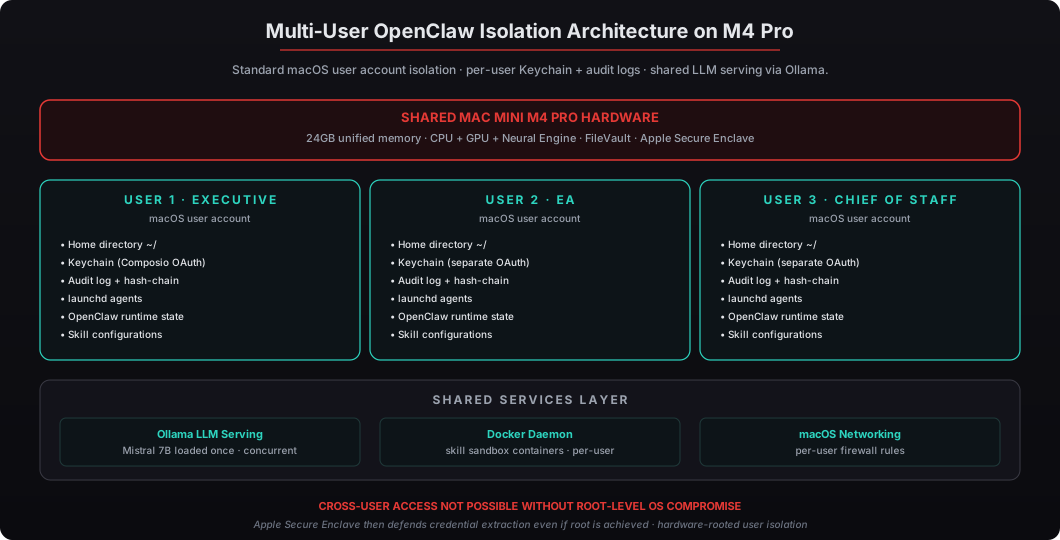
macOS provides strong user account isolation as a standard operating system feature. The isolation operates at several layers:
Filesystem isolation — each user has their own home directory at /Users/<username>/ with standard Unix permissions preventing cross-user access. OpenClaw’s per-user configuration, audit logs, and runtime state all live in the user’s home directory under ~/Library/Application Support/OpenClaw/.
Keychain isolation — each user has their own Keychain (login.keychain-db in ~/Library/Keychains/) separately encrypted with the user’s password as the seed for the encryption key, plus Secure Enclave-derived hardware keys. Composio OAuth tokens, API credentials, and other sensitive data live in the user’s Keychain with no cross-user access possible.
Process isolation — each user’s OpenClaw runtime runs as a separate process under the user’s UID. Standard Unix process isolation prevents one user’s processes from accessing another user’s memory or files.
launchd isolation — each user has their own launchd agents at ~/Library/LaunchAgents/ that run only when that user is logged in (or for “always-on” agents, run under the user’s UID regardless of login state). For multi-user deployments where each user’s daily briefing should fire at a different time, the per-user launchd agents handle the scheduling independently.
Audit isolation — each user has their own OpenClaw audit log in their home directory with independent hash-chain integrity. The logs can be forwarded to a centralized SIEM for aggregated firm-wide visibility while maintaining per-user attribution.
The combination of these layers provides isolation comparable to running on separate machines for most practical purposes. The boundary that the multi-user pattern does NOT cross: regulated user separation requirements (FINRA Chinese walls between research and banking, for example) typically still want separate hardware per regulated boundary. For those scenarios, multi-user on shared hardware is not appropriate.
What resource limits apply with multiple concurrent users?
M4 Pro Mac Mini with 24GB unified memory has generous capacity for multi-user concurrent operation, but understanding the limits helps with deployment planning.
LLM inference concurrency — Ollama serves LLM inference to multiple concurrent requests automatically. Mistral 7B Q4_K_M loaded once consumes approximately 4-5GB of unified memory; each concurrent inference request adds 1-2GB for KV cache. The Mac Mini can comfortably handle 2-3 concurrent LLM inference requests with quality output. Beyond 3 concurrent requests, queuing happens and individual response times stretch from typical 5-30 second range to 15-60+ second range.
Agent orchestration concurrency — agent sessions that don’t require LLM inference (pure orchestration, API calls, data retrieval) consume much less memory — typically 100-300MB per agent process. The Mac Mini can handle 5-10+ concurrent orchestration sessions without resource pressure.
Composio API concurrency — Composio’s integration layer handles concurrent API calls to external services without contention. The bottleneck is typically the external service’s own rate limits (Salesforce REST API, Gmail API, etc.) rather than Composio.
Storage — each user’s home directory, audit logs, and skill state consume modest storage (typically 1-5GB per active user after several months of use). The Mac Mini’s 512GB SSD (default) easily accommodates 5-10 users worth of data with substantial headroom.
For typical executive team usage patterns (bursty 5-15 minute sessions distributed throughout the day), 5 users on one Mac Mini rarely hit concurrent limits. For team patterns with predictable concurrent peaks (everyone runs morning briefings at 6:30 AM simultaneously, for example), staggering the schedules slightly across users avoids the peak.
What’s the economic comparison: multi-user vs separate Mac Minis?
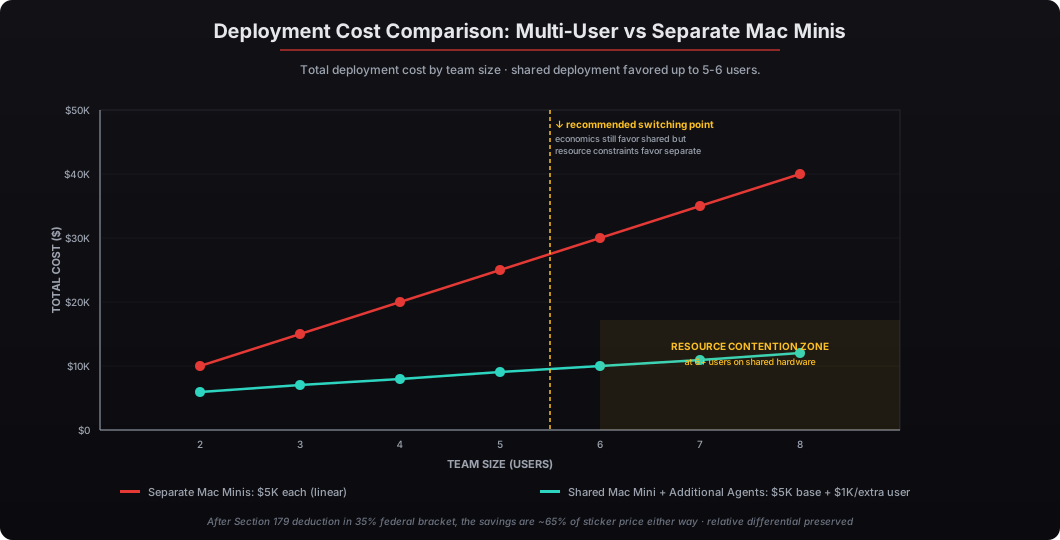
The economic comparison breaks down as follows for a 5-user deployment:
| Configuration | Hardware Cost | Additional Agents | Total | After Section 179 (35% bracket) |
|---|---|---|---|---|
| 5 separate Mac Minis | $25,000 (5 × $5K) | $0 | $25,000 | $16,250 |
| 1 Mac Mini + 4 Additional Agents | $5,000 | $4,000 (4 × $1K) | $9,000 | $5,850 |
| Difference | -$20,000 | +$4,000 | -$16,000 (64% savings) | -$10,400 |
For a 3-user deployment:
| Configuration | Hardware Cost | Additional Agents | Total | After Section 179 |
|---|---|---|---|---|
| 3 separate Mac Minis | $15,000 (3 × $5K) | $0 | $15,000 | $9,750 |
| 1 Mac Mini + 2 Additional Agents | $5,000 | $2,000 (2 × $1K) | $7,000 | $4,550 |
| Difference | -$10,000 | +$2,000 | -$8,000 (53% savings) | -$5,200 |
The crossover where shared deployment stops making economic sense lands around 6-7 users. At 6 users on shared hardware: $5,000 + (5 × $1,000) = $10,000. At 6 separate Mac Minis: $30,000. The shared deployment still saves 67% — but the resource contention at 6 concurrent users starts being noticeable, so the better answer at 6+ users is typically two Mac Minis serving 3-4 users each, or full separate deployments depending on the firm’s specific needs.
The Section 179 tax deduction applies to either configuration in the year placed in service. For firms in the 35% federal bracket, the after-tax cost differential between shared and separate deployment scales linearly with the deployment size.
What does the standard multi-user deployment configuration look like?
The standard multi-user configuration is one Mac Mini per 3-5 user group, with users selected based on workflow patterns and access requirements. For typical executive team deployments:
Pattern A: Executive + EA + 1-2 Staff (3-4 users)
- Executive (primary user, full skill access)
- Executive Assistant (preparation workflows, calendar management, email triage)
- 1-2 staff supporting the executive (e.g., Chief of Staff, Business Manager)
Pattern B: Small Partnership (4-5 users)
- 3-4 partners (each with their own user account, full skill access scoped to their practice)
- Office Administrator (administrative workflows, scheduling, document management)
Pattern C: Family Office Staff (3-5 users)
- Principal (read-only access to most workflows, write access only to personal items)
- COO (full operational access, oversees other staff)
- General Counsel (legal matters, compliance, regulatory)
- 1-2 family office staff (administrative, scheduling, light analysis)
Each user account ships with:
- Hardened macOS configuration — FileVault enabled, Gatekeeper + SIP enabled, automatic security updates configured, sleep disabled for users who need 24/7 launchd agents
- OpenClaw runtime under the user’s account with launchd auto-start
- Local LLM access via shared Ollama serving — no per-user model duplication
- Composio OAuth setup for the user’s specific tool stack (Gmail/Outlook, Calendar, Slack, CRM, role-specific tools)
- Audit log with hash-chain integrity, optionally forwarded to firm SIEM
- Role-specific skills activated for the user’s responsibilities, with role-based access controls preventing access to other users’ workflows
What about Fast User Switching and concurrent login?
macOS Fast User Switching allows multiple users to be logged in simultaneously, with active sessions for each user that can be switched between via the menu bar user picker. For multi-user OpenClaw, Fast User Switching enables genuine concurrent operation:
- User A is logged in and running an OpenClaw skill
- User B logs in via Fast User Switching while User A’s session remains active in the background
- Both users’ OpenClaw runtimes are active and processing concurrently
- The Mac Mini handles both users’ workflows from shared CPU, memory, and shared Ollama LLM serving
For deployments where genuine simultaneous use matters (executive plus EA needing to work concurrently while the executive is at their desk), Fast User Switching is the right configuration. For deployments where users mostly take turns at the physical Mac Mini (small partnership where one principal at a time sits at the device), Fast User Switching is still useful for letting the other partners’ overnight scheduled workflows run while a different partner is at the device.
The Mac Mini at $5,000 supports Fast User Switching as a standard macOS feature. The Additional Agent licenses ($1,000 each beyond the first user) cover the user-specific OpenClaw configuration but do not unlock additional macOS users — macOS itself supports unlimited user accounts. The license is for OpenClaw integration setup and the per-user configuration burden we handle during deployment.
When should I definitely choose separate Mac Minis instead?
Three definite scenarios where separate Mac Minis are the right choice:
Regulated environments requiring strict user separation. FINRA Chinese walls between research and banking functions, HIPAA covered entity separation between treatment and payment functions, SCIF-adjacent classified environments, and any regulated function where the supervisory framework presumes physical hardware separation. The macOS user account isolation is strong but it’s still software-level — regulators examining a firm’s information barrier compliance typically want to see physical separation between regulated functions. Our air-gapped OpenClaw configuration covers the defense-side strict-isolation pattern in detail.
High-volume continuous workflows. If every user is running continuous CRM automation, live market data ingestion, real-time transcription, or other continuous workflows that don’t have idle periods, the aggregate load on shared hardware degrades all users’ experience. The signal that separate hardware is needed: total CPU utilization above 60% sustained, or LLM inference queue depth above 3 concurrent waiting requests for extended periods.
Team sizes above 5-6. The economic curve still favors sharing at 6-7 users, but the resource contention at that scale starts producing noticeably slower response times and queue waits. The deployment pattern we recommend for larger teams: cluster users into groups of 3-4 sharing Mac Minis where the cluster makes operational sense (function-aligned clustering, geography-aligned clustering, or seniority-aligned clustering depending on the firm structure).
For firms ready to deploy multi-user OpenClaw configurations, order OpenClaw system at the $5,000 base configuration plus Additional Agent licenses at $1,000 each for additional users beyond the first. For firms where separate Mac Mini deployments are the better fit, buy preconfigured OpenClaw at $5,000 per user covers the standard configuration. Both patterns ship within one week of order with Section 179 tax deduction available in the year placed in service.