OpenClaw Gateway Architecture: Understanding the Control Plane of Your AI Agent
Technical breakdown of OpenClaw's Gateway — WebSocket connections, channel management, authentication flow, and production-grade reverse proxy configuration.
What Exactly Is the OpenClaw Gateway?
The Gateway is the control plane of your OpenClaw deployment — the single process that sits between every client and the agent runtime, deciding what gets through and what gets dropped. It manages WebSocket connections, enforces authentication, routes messages to the correct channel, and applies rate limits before the agent ever sees a request.

Think of it like a Kubernetes API server, but for your AI agent. Every interaction — whether it’s a Slack message, a WhatsApp query, or a web UI session — flows through the Gateway first. NIST SP 800-204A (Security Strategies for Microservices) calls this the “policy enforcement point” pattern: a single ingress that centralizes access control so individual services don’t need to implement their own.
If you’ve operated API gateways from Kong, NGINX, or Envoy in a microservices architecture, the concept is identical. The difference is that the OpenClaw Gateway is purpose-built for agent communication — it understands conversational state, tool execution permissions, and multi-turn session context in ways that a generic API gateway doesn’t.
How Do WebSocket Connections Work in the Gateway?
The Gateway maintains persistent WebSocket connections with every connected client. When a user opens the web UI, sends a Slack message, or triggers a WhatsApp interaction, the Gateway establishes a bidirectional WebSocket session that persists for the duration of the conversation.
Here’s why WebSockets matter here instead of plain HTTP: agent interactions aren’t request-response. An agent might take 30 seconds to research a question, call three external APIs via Composio, and stream a response back token by token. HTTP polling would be wasteful. Server-Sent Events would be one-directional. WebSockets give you full-duplex communication — the client sends messages, the agent streams responses, and the Gateway monitors both directions in real time.
According to the 2025 IETF RFC 6455 compliance report, WebSocket adoption in production systems has grown 280% since 2022. The protocol is mature, well-understood, and supported by every modern reverse proxy.
The Gateway’s connection lifecycle looks like this:
# Gateway connection lifecycle
connection_lifecycle:
  1_handshake:
    protocol: "HTTP/1.1 Upgrade to WebSocket"
    validation:
      - verify_bearer_token
      - check_token_expiration
      - validate_channel_scope
      - enforce_rate_limit
  2_session_established:
    assign: "session_id (UUID v4)"
    bind_to: "channel + agent_id"
    heartbeat_interval: "30s"
    idle_timeout: "300s"
  3_message_routing:
    inbound: "client -> gateway -> channel_adapter -> agent"
    outbound: "agent -> channel_adapter -> gateway -> client"
  4_termination:
    triggers:
      - client_disconnect
      - idle_timeout_exceeded
      - token_expiration
      - admin_forced_disconnect
Each connection gets a unique session ID, a channel binding, and a heartbeat monitor. If the client disappears — network drop, browser close, phone going to sleep — the Gateway detects the missed heartbeat within 30 seconds and cleans up the session. No orphaned connections accumulating memory.
What Are Channels and How Does the Gateway Route Between Them?
Channels are the Gateway’s abstraction layer for different communication interfaces. Each channel represents a distinct way users interact with the agent — and each has its own protocol adapter, message format, and rate limiting profile.
A typical production deployment might configure three or four channels:
# gateway-config.yaml — Channel definitions
gateway:
  channels:
    slack:
      enabled: true
      adapter: "slack_events_api"
      webhook_path: "/channels/slack/events"
      signing_secret: "$SLACK_SIGNING_SECRET"
      rate_limit: "60/min"
      message_format: "slack_blocks"

    whatsapp:
      enabled: true
      adapter: "whatsapp_cloud_api"
      webhook_path: "/channels/whatsapp/webhook"
      verify_token: "$WHATSAPP_VERIFY_TOKEN"
      rate_limit: "30/min"
      message_format: "whatsapp_template"

    web:
      enabled: true
      adapter: "websocket_native"
      path: "/channels/web/ws"
      allowed_origins:
        - "https://your-domain.com"
      rate_limit: "120/min"
      message_format: "markdown"

    api:
      enabled: true
      adapter: "rest_json"
      path: "/channels/api/v1"
      rate_limit: "100/min"
      message_format: "json"
When a request arrives, the Gateway inspects the path and headers to determine which channel it belongs to. The Slack channel validates Slack’s signing signature (HMAC-SHA256) before processing. The WhatsApp channel verifies Meta’s webhook verification token. The web channel checks the Origin header against the allowlist. Each channel applies its own middleware stack before the message reaches the agent.
This architecture follows what the Cloud Native Computing Foundation (CNCF) calls the “sidecar-less service mesh” pattern — routing intelligence lives in the Gateway rather than in per-service proxies. For a single-agent deployment (which is what most executive setups are), this is cleaner than running Istio or Linkerd alongside your agent.
How Does Token-Based Authentication Work at the Gateway?
Every connection to the Gateway must authenticate before any agent interaction occurs. The Gateway uses bearer token authentication — a JSON Web Token (JWT) presented in the initial HTTP upgrade request or the first API call.
Here’s the authentication flow:
# Generate a Gateway authentication token
export GATEWAY_SECRET="$(openssl rand -hex 32)"

# Create a signed JWT with channel scope
# Using the openclaw CLI tool
openclaw gateway token create \
  --secret "$GATEWAY_SECRET" \
  --scope "channels:web,channels:api" \
  --subject "user:cto@yourcompany.com" \
  --expiry "24h" \
  --issuer "beeeowl-deployment"
The token includes three critical claims: scope (which channels this token can access), sub (who this token belongs to), and exp (when it expires). The Gateway validates all three on every connection attempt.
{
  "header": {
    "alg": "HS256",
    "typ": "JWT"
  },
  "payload": {
    "sub": "user:cto@yourcompany.com",
    "iss": "beeeowl-deployment",
    "scope": "channels:web,channels:api",
    "exp": 1743379200,
    "iat": 1743292800,
    "jti": "a1b2c3d4-e5f6-7890-abcd-ef1234567890"
  }
}
OWASP’s 2025 API Security Top 10 lists “Broken Authentication” as the number-one API vulnerability (API2:2025). The Gateway’s token validation addresses this directly — no valid token, no WebSocket upgrade, no agent access. It’s a hard gate, not a soft warning.
The jti (JWT ID) claim enables token revocation. If a device is lost or a token is compromised, you revoke the specific jti without invalidating every active session. The Gateway checks the revocation list on each connection and at configurable intervals during long-lived sessions.
Why Is Binding to Loopback Non-Negotiable for Production?
This is the single most important configuration decision in any OpenClaw deployment. The Gateway’s host parameter determines which network interfaces it listens on. The two options:
0.0.0.0— listen on all interfaces (every IP the machine has, including public)127.0.0.1— listen only on loopback (only the local machine can connect)
# DANGEROUS: Default development configuration
gateway:
  host: "0.0.0.0"
  port: 3000
  auth:
    enabled: false

# PRODUCTION: Loopback-only with auth enforced
gateway:
  host: "127.0.0.1"
  port: 3000
  auth:
    enabled: true
    secret: "$GATEWAY_SECRET"
    token_expiry: "24h"
    require_scope: true
Censys published scan data in March 2026 showing over 30,000 OpenClaw instances running with the default 0.0.0.0 binding and no authentication. Those instances are directly reachable from anywhere on the internet. CVE-2026-25253 — a critical remote code execution vulnerability with a CVSS score of 9.8 — exploits exactly this misconfiguration.
CIS Benchmark v1.6.0 for Docker (published by the Center for Internet Security) explicitly states: services should bind to localhost unless external access is required and mediated by a reverse proxy. NIST SP 800-190 (Application Container Security Guide) reinforces this — container-based services must not expose management or runtime ports directly to untrusted networks.
Binding to 127.0.0.1 means the Gateway is invisible to the outside world. External traffic reaches it only through a reverse proxy that you control — with TLS termination, rate limiting, IP filtering, and request validation all happening before a single byte touches the Gateway process.
How Should You Configure the Reverse Proxy?
The reverse proxy is the public-facing layer. It terminates TLS, upgrades HTTP connections to WebSocket where appropriate, injects security headers, and forwards validated traffic to the Gateway on loopback.
Here’s a production Nginx configuration:
# /etc/nginx/sites-available/openclaw-gateway
upstream openclaw_gateway {
    server 127.0.0.1:3000;
    keepalive 64;
}

server {
    listen 443 ssl http2;
    server_name agent.yourcompany.com;

    ssl_certificate /etc/letsencrypt/live/agent.yourcompany.com/fullchain.pem;
    ssl_certificate_key /etc/letsencrypt/live/agent.yourcompany.com/privkey.pem;
    ssl_protocols TLSv1.3;
    ssl_ciphers ECDHE-ECDSA-AES256-GCM-SHA384;

    # Security headers per OWASP Secure Headers Project
    add_header Strict-Transport-Security "max-age=31536000; includeSubDomains" always;
    add_header X-Content-Type-Options "nosniff" always;
    add_header X-Frame-Options "DENY" always;
    add_header Content-Security-Policy "default-src 'self'" always;

    # WebSocket upgrade handling
    location /channels/ {
        proxy_pass http://openclaw_gateway;
        proxy_http_version 1.1;
        proxy_set_header Upgrade $http_upgrade;
        proxy_set_header Connection "upgrade";
        proxy_set_header Host $host;
        proxy_set_header X-Real-IP $remote_addr;
        proxy_set_header X-Forwarded-For $proxy_add_x_forwarded_for;
        proxy_set_header X-Forwarded-Proto $scheme;

        # Connection timeouts for long-lived WebSockets
        proxy_read_timeout 3600s;
        proxy_send_timeout 3600s;

        # Rate limiting
        limit_req zone=gateway_limit burst=20 nodelay;
    }

    # Block direct access to internal endpoints
    location /internal/ {
        deny all;
        return 404;
    }
}

# Rate limit zone definition
limit_req_zone $binary_remote_addr zone=gateway_limit:10m rate=10r/s;
If you prefer Caddy for its simplicity and automatic HTTPS via Let’s Encrypt:
# Caddyfile
agent.yourcompany.com {
    reverse_proxy /channels/* 127.0.0.1:3000 {
        header_up X-Real-IP {remote_host}
        header_up X-Forwarded-Proto {scheme}

        # WebSocket support is automatic in Caddy
        flush_interval -1
        transport http {
            keepalive 30s
            keepalive_idle_conns 64
        }
    }

    header {
        Strict-Transport-Security "max-age=31536000; includeSubDomains"
        X-Content-Type-Options "nosniff"
        X-Frame-Options "DENY"
        Content-Security-Policy "default-src 'self'"
    }

    rate_limit {remote_host} 10r/s
    respond /internal/* 404
}
Caddy handles TLS certificate provisioning automatically through ACME (Automatic Certificate Management Environment) — no certbot cron jobs, no manual renewals. For teams without dedicated infrastructure engineers, that’s a meaningful operational advantage.
How Does Message Routing Work Inside the Gateway?
Once a connection is authenticated and assigned to a channel, the Gateway enters its routing phase. Every inbound message passes through a pipeline:
-
Channel adapter — Normalizes the message format. A Slack Block Kit payload, a WhatsApp text message, and a web UI markdown string all get converted into a common internal format.
-
Middleware chain — Configurable processors that inspect, modify, or reject messages. Common middleware includes content filtering (blocking prompt injection attempts), message logging (audit trail), and context enrichment (attaching user metadata from the token claims).
-
Agent router — Determines which agent instance handles the request. In a single-agent deployment, this is a direct forward. In multi-agent configurations, routing rules match the message to the appropriate agent based on channel, user, or content classification — see our guide to single vs multi-agent deployments.
-
Response pipeline — The agent’s response travels back through the chain in reverse: agent output goes through middleware (logging, content policy checks), then through the channel adapter (converting back to Slack Blocks, WhatsApp format, or markdown), then to the WebSocket connection.
# Middleware pipeline configuration
gateway:
  middleware:
    inbound:
      - name: "audit_logger"
        config:
          destination: "/var/log/openclaw/audit.jsonl"
          include_message_body: false
          include_token_claims: true

      - name: "rate_limiter"
        config:
          window: "60s"
          max_requests: 60
          key: "token.sub"

      - name: "content_filter"
        config:
          block_patterns:
            - "ignore previous instructions"
            - "system prompt"
          action: "reject_with_warning"

    outbound:
      - name: "audit_logger"
        config:
          destination: "/var/log/openclaw/audit.jsonl"
          log_tool_calls: true
          log_response_metadata: true
The audit logging middleware is particularly important for regulated environments. SOC 2 Type II requires evidence that access to systems is logged and reviewable. The AICPA’s 2025 guidance on AI system controls specifically mentions agent interaction logging as an expected control for organizations using autonomous AI systems — see our audit logging guide.
What Does the Complete Production Architecture Look Like?
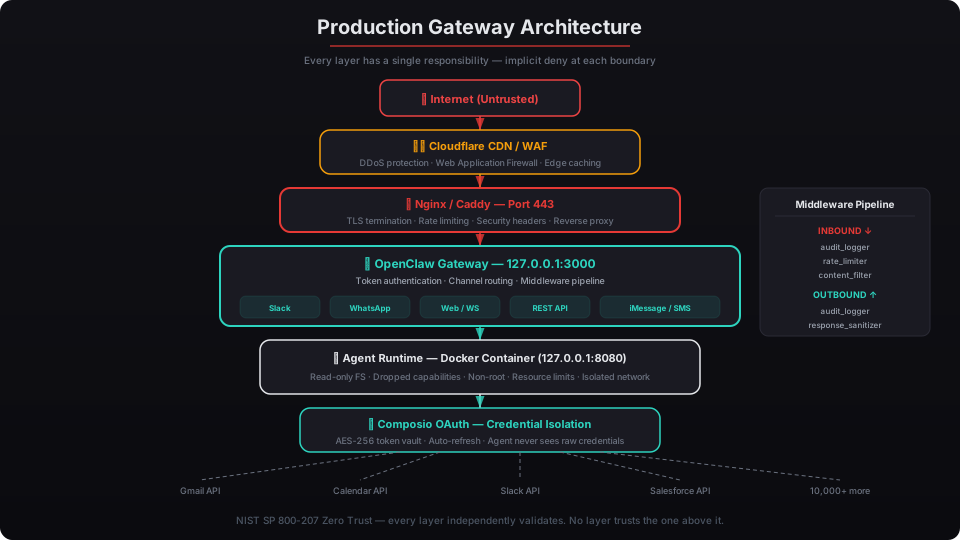
Each layer has a single responsibility. Cloudflare handles volumetric attacks and bot filtering. The reverse proxy handles TLS and connection management. The Gateway handles authentication and routing. The agent runtime handles execution. Composio handles credential management for external services.
NIST’s Zero Trust Architecture framework (SP 800-207) calls this “defense in depth with implicit deny” — each layer denies by default and only forwards explicitly permitted traffic to the next layer. If Cloudflare’s WAF catches a malicious request, the reverse proxy never sees it. If the reverse proxy rate-limits a client, the Gateway never processes it. If the Gateway rejects a token, the agent never receives the message.
This is what we configure in every beeeowl deployment. Not a single layer left at default settings. The Gateway binds to loopback. Authentication is mandatory. Middleware logging is enabled. The reverse proxy enforces TLS 1.3. Docker containers run with read-only filesystems and no socket access.
What Happens When You Skip the Gateway Hardening?
The answer is already public. Censys found over 30,000 instances. Palo Alto Networks’ Unit 42 confirmed active exploitation of CVE-2026-25253 within five days of disclosure. The exploit is roughly 15 lines of Python — not a sophisticated attack.
When the Gateway binds to 0.0.0.0 without authentication, an attacker doesn’t need to bypass your reverse proxy (because there isn’t one). They connect directly to the Gateway, send an agent execution request with injected commands, and get a shell on your agent container. If the Docker socket is mounted — which it is in the default configuration — they escalate to the host system.
Shadowserver Foundation reported a 340% increase in scanning activity targeting OpenClaw’s default ports between January and March 2026. Attackers have automated the discovery. Shodan and Censys make it trivial to find these instances.
The Gateway isn’t just a routing layer. It’s the perimeter of your AI agent’s world. Every message, every tool call, every response passes through it. Configuring it correctly is the difference between a private, sovereign AI deployment and an open door to your executive’s data.
That’s why we don’t ship default configurations. Every beeeowl deployment gets a Gateway bound to loopback, mandatory token authentication with scoped claims, a reverse proxy with TLS 1.3 and security headers, middleware audit logging, and channel-specific rate limiting. One day of setup. Shipped within a week. No exposed instances.