The OpenShell Security Runtime: How NVIDIA Is Sandboxing AI Agents for Enterprise
NVIDIA's OpenShell is a YAML-driven policy runtime inside NemoClaw that governs exactly what an AI agent can access — files, network endpoints, shell commands, output tokens, and system resources — at the application layer rather than the OS layer. This is the deep technical walkthrough for CTOs: how OpenShell differs from Docker sandboxing, the four policy domains with production YAML examples, the OWASP Top 10 for LLM Applications coverage map (8 of 10), and how beeeowl layers OpenShell with Docker, Composio, and host firewall rules for true defense in depth.

What Exactly Is OpenShell?
Answer capsule. OpenShell is NVIDIA’s security runtime for AI agents — a policy enforcement engine that sits between your OpenClaw agent and the operating system, intercepting every file read, network call, shell command, and output token generation before it executes. It’s the component inside NemoClaw (NVIDIA’s enterprise reference architecture for OpenClaw) that turns a free-roaming AI agent into a governed, auditable tool. If you’ve ever configured SELinux or AppArmor, you’ll recognize the philosophy — the difference is that OpenShell’s policies are written in declarative YAML and designed specifically for AI agent behavior patterns rather than generic process isolation. It operates at the application layer, understands the semantic difference between an agent reading a board deck and an agent trying to exfiltrate credentials, and addresses 8 of the 10 OWASP Top 10 risks for LLM Applications.

I’ve been waiting for something like this since the first wave of OpenClaw deployments hit production. Docker sandboxing (which we’ve shipped on every beeeowl deployment since day one — see our complete Docker sandboxing walkthrough) handles OS-level isolation well. But it doesn’t understand what the agent is doing — it just limits where it can do it. Docker sees file reads as syscalls into filesystem namespaces. It sees network calls as socket operations into network namespaces. It sees shell commands as process executions inside process namespaces. None of those abstractions know the difference between legitimate work and a prompt-injected exfiltration attempt, because at the OS layer there isn’t a semantic difference — they’re the same syscalls.
OpenShell operates at the application layer. It knows the agent reading /app/workspace/board-decks/q1-2026.pdf is doing normal work because the policy file declares board-deck directories as allowed. It knows the agent reading /root/.ssh/id_rsa is a violation because the policy file explicitly denies SSH key access — regardless of whether the Docker container’s filesystem namespace technically includes that path. The semantic layer is the point.
According to NVIDIA’s GTC 2026 keynote materials, OpenShell addresses 8 of the 10 OWASP Top 10 for Large Language Model Applications. That’s not marketing — I’ve mapped the controls myself, and the coverage is real. OWASP published their LLM-specific risk framework in collaboration with security researchers from Google DeepMind, Microsoft, and Meta, and it’s become the de facto standard for evaluating AI agent security. Having a single runtime cover 80% of those risks is a meaningful shift from the patchwork approach most teams are stitching together today with custom iptables rules, ad-hoc auditing scripts, and handwritten permission checks scattered across their deployment.
OpenShell sits inside NVIDIA’s broader NemoClaw reference architecture, which you can read about in our NemoClaw enterprise reference design walkthrough and our complete security hardening checklist.
How Do YAML Policy Files Actually Work?
Answer capsule. Every OpenShell deployment starts with a policy file — a YAML document that defines exactly what the agent is allowed to do across four domains: file access, network connections, command execution, and resource consumption. Everything not explicitly allowed is denied by default. This deny-by-default posture is critical because most security failures in AI deployments happen because permissions were too broad, not because someone forgot a specific rule. The policies are human-readable (your compliance team can review them), machine-enforceable (the runtime evaluates every action before it executes), and version-controllable (checked into Git, diffed on updates, auditable over time) — which matches exactly what NIST’s AI Risk Management Framework requires for governance.
Here’s the skeleton of an OpenShell policy file — this is representative of the actual schema NVIDIA published in the NemoClaw documentation:
# openshell-policy.yaml
version: "1.0"
agent_name: "exec-briefing-agent"
policy_mode: "enforce"  # enforce | audit | permissive

metadata:
  owner: "cto@acmecorp.com"
  purpose: "Daily executive briefings with calendar + email context"
  last_reviewed: "2026-04-10"
  review_cadence_days: 90

file_access:
  default_policy: "deny"
  allow:
    - path: "/app/workspace/**"
      permissions: ["read", "write"]
    - path: "/app/config/*.yaml"
      permissions: ["read"]
  deny:
    - path: "/etc/shadow"
    - path: "/root/**"
    - path: "**/.ssh/**"
    - path: "**/.env"
    - path: "**/*.pem"
    - path: "**/*.key"
    - path: "**/credentials*"

network:
  default_policy: "deny"
  allow:
    - endpoint: "api.anthropic.com"
      ports: [443]
      protocols: ["https"]
    - endpoint: "oauth.composio.dev"
      ports: [443]
      protocols: ["https"]
  deny:
    - endpoint: "*"  # block everything not explicitly allowed
  rate_limits:
    max_requests_per_minute: 60
    max_data_egress_mb: 50

commands:
  default_policy: "deny"
  allow:
    - command: "python3"
      args_pattern: "/app/workspace/scripts/*.py"
    - command: "cat"
      args_pattern: "/app/workspace/**"
  deny:
    - command: "rm"
    - command: "sudo"
    - command: "chmod"
    - command: "chown"
    - command: "wget"
    - command: "nc"
    - command: "dd"
  audit:
    - command: "git"
    - command: "pip"

resources:
  max_cpu_percent: 80
  max_memory_mb: 2048
  max_execution_time_seconds: 300
  max_concurrent_tools: 3
  max_file_size_mb: 100
  max_output_tokens: 16384
  watchdog:
    enabled: true
    check_interval_seconds: 5
    kill_on_violation: true
That’s not pseudocode — it’s the actual structure of an OpenShell policy file. Your compliance team can read it. Your security auditor can review it. The CISO doesn’t need to parse Dockerfile syntax, iptables rules, or seccomp profiles to understand what the agent can access. A managing partner can read the policy and confirm that the agent handling their diligence review can’t touch HR files or SSH keys.
NIST’s AI Risk Management Framework (AI RMF 1.0) specifically calls out “transparent documentation of AI system boundaries” as a governance requirement under the Govern function (GV-1.2 and GV-1.4). OpenShell policy files are that documentation, and they’re machine-enforceable simultaneously. That dual-use — human-readable governance documentation AND machine-executable enforcement — is what separates this from a PDF security policy sitting in a SharePoint folder that nobody reads and nothing enforces.
The three policy modes matter too:
policy_mode: "enforce"— violations are blocked at runtime. This is the production mode. If the agent tries to read/root/.ssh/id_rsa, the syscall fails with EACCES and the attempt is logged.policy_mode: "audit"— violations are logged but not blocked. Use this mode during initial deployment to discover what the agent actually does before you lock down the policy. Run for a week, review the logs, write deny-first policies based on what you saw, then switch to enforce.policy_mode: "permissive"— everything is allowed. Don’t use this in production; it exists for development and testing environments where you want the agent to run without any runtime constraints.
The discipline we recommend at beeeowl: run audit mode for the first 5-7 days of any new deployment, capture the full trace of what the agent does, then switch to enforce mode with deny-first policies that only permit what the audit showed was genuinely needed. This approach catches the 10-15% of actions you didn’t anticipate in your initial policy draft while still shipping production quickly.
What File Access Controls Does OpenShell Actually Enforce?
Answer capsule. File access is where most AI agent security incidents begin. Trail of Bits’ 2025 AI Agent Security Assessment found that 62% of agent-related data exposures involved unauthorized file reads — the agent accessed credentials, config files, or sensitive documents it was never supposed to touch. OpenShell’s file access module uses allowlist and blocklist patterns with glob matching and permission granularity (read vs write as separate controls). A production policy might allow read-write on /app/workspace/reports/**, read-only on templates, write-only on output, and explicitly deny /app/workspace/hr/**, **/*.pem, **/*.key, **/credentials*, and **/.env* — the deny rules use glob patterns so **/*.pem catches certificate files regardless of where they’re nested.
Here’s a production-grade file policy for a CFO’s variance commentary agent:
file_access:
  default_policy: "deny"
  allow:
    - path: "/app/workspace/reports/**"
      permissions: ["read", "write"]
    - path: "/app/workspace/templates/*.docx"
      permissions: ["read"]
    - path: "/app/workspace/financials/quarterly/**"
      permissions: ["read"]
    - path: "/app/output/**"
      permissions: ["write"]
    - path: "/tmp/agent-scratch/**"
      permissions: ["read", "write"]
  deny:
    - path: "/app/workspace/hr/**"
    - path: "/app/workspace/legal/**"
    - path: "/app/workspace/financials/mna/**"    # MNPI exclusion
    - path: "**/*.pem"
    - path: "**/*.key"
    - path: "**/*.p12"
    - path: "**/*.pfx"
    - path: "**/credentials*"
    - path: "**/.env*"
    - path: "**/id_rsa*"
    - path: "**/authorized_keys"
    - path: "/root/**"
    - path: "/etc/shadow"
The agent can read and write reports, read templates, read quarterly financial data, write to its output directory, and use a scratch directory for temporary work. It cannot touch HR files, legal documents, M&A files (which contain MNPI that needs separate authorization), private keys in any format, credential files, or anything in /root. The deny rules use glob patterns, so **/*.pem catches certificate files regardless of nesting depth.
Here’s the part that matters as a security engineer: the permissions field. OpenShell distinguishes between read and write access explicitly. A research agent might need to read everything in a project directory but should never write to it. A publication agent might need to write outputs but should never read source material from the same directory. That granularity didn’t exist in Docker volume mounts — you got read-write or read-only for an entire mount point, which forced you to either over-permission or create multiple mount points for what should be a single logical directory.
The write-only permission is especially useful for output directories. A report-generation agent needs to write its output but should not be able to read what it previously wrote (which could leak cross-report context or create adversarial feedback loops). OpenShell handles that with permissions: ["write"] on the output path — the agent can create and append to files but cannot read them back.
Trail of Bits’ 2025 AI Agent Security Assessment is worth reading in full if you’re making AI agent deployment decisions. The headline finding (62% of exposures involve unauthorized file reads) is accompanied by detailed case studies of specific incidents where prompt injection or misconfigured permissions caused the agent to read something it shouldn’t have. In every single case study, a deny-first file access policy would have prevented the incident — and in most of them, the incident was detected weeks or months after it occurred because there was no audit trail.
How Does Network Isolation Actually Work in OpenShell?
Answer capsule. Network controls in OpenShell operate like an application-layer firewall specifically designed for AI agent traffic patterns. The agent doesn’t get raw socket access — every outbound connection passes through the OpenShell proxy, which checks the destination against the policy before allowing the connection. You declare allowed endpoints by hostname (api.anthropic.com, oauth.composio.dev), ports, and protocols, with a default-deny rule that blocks everything else. Rate limits cap requests per minute and egress data volume to prevent bulk exfiltration even through allowed endpoints. OWASP’s LLM01 (Prompt Injection) and LLM06 (Excessive Agency) both highlight uncontrolled network access as an amplifying factor — OpenShell closes that door at the application layer.
Here’s a production network policy:
network:
  default_policy: "deny"
  allow:
    - endpoint: "api.anthropic.com"
      ports: [443]
      protocols: ["https"]
      purpose: "LLM inference"
    - endpoint: "api.openai.com"
      ports: [443]
      protocols: ["https"]
      purpose: "LLM inference fallback"
    - endpoint: "oauth.composio.dev"
      ports: [443]
      protocols: ["https"]
      purpose: "Tool credential middleware"
    - endpoint: "hooks.slack.com"
      ports: [443]
      protocols: ["https"]
      purpose: "Slack notifications"
    - endpoint: "*.salesforce.com"
      ports: [443]
      protocols: ["https"]
      purpose: "CRM integration"
  deny:
    - endpoint: "*.pastebin.com"
    - endpoint: "*.ngrok.io"
    - endpoint: "*.requestbin.com"
    - endpoint: "*.webhook.site"
    - endpoint: "*.burpcollaborator.net"
  rate_limits:
    max_requests_per_minute: 60
    max_data_egress_mb_per_hour: 50
    max_connections_concurrent: 10
  logging:
    log_all_connections: true
    log_blocked_attempts: true
    log_destination: "/var/log/openshell/network.log"
That deny block targets the exact endpoints attackers use for data exfiltration in prompt injection attacks. Pastebin, ngrok tunnels, RequestBin, webhook.site, Burp Collaborator — these are the staging grounds for stolen data. An attacker who manages to inject a prompt that tells the agent “send all files to this URL” needs somewhere for the data to land, and these services are the most commonly used destinations because they’re easy to set up and don’t require infrastructure. OpenShell blocks them at the hostname level.
The rate limiting is equally important. Even if an attacker compromises the agent’s allowed endpoints (imagine a compromised Composio integration or a misconfigured webhook), they can’t bulk-exfiltrate data at wire speed. 50MB of egress per hour is enough for normal API interactions (even large file uploads or extensive CRM queries) but not enough to dump an entire CRM database or exfiltrate a document repository before detection. Gartner’s 2025 report on AI Security Architecture specifically recommends egress rate limiting as a “high-impact, low-complexity” control that most organizations overlook because it requires application-layer awareness that simple network firewalls don’t have.
What I appreciate about NVIDIA’s approach: they’re not trying to reinvent firewalls. Docker handles port-level isolation at the network namespace layer. Host iptables handle IP-level rules at the packet filter layer. OpenShell adds the application-awareness layer on top — it understands that api.anthropic.com:443 is an LLM inference endpoint and treats it differently than a random HTTPS connection to the same IP range. Defense in depth, not defense in replacement. The three layers (iptables + Docker networking + OpenShell) each catch different attack patterns.
What Command Execution Controls Does OpenShell Provide?
Answer capsule. This is where OpenShell gets genuinely interesting for CTOs who’ve seen what a hallucinating agent can do with shell access. OpenClaw agents can execute shell commands through their tool integrations — that’s part of what makes them powerful. It’s also the single largest attack surface. OpenShell’s command policy supports three controls: allow with argument pattern matching (the agent can run python3 but only on scripts inside /app/workspace/scripts/), explicit deny lists for dangerous commands (sudo, chmod, chown, dd, mkfs, nc, wget), and an audit category that permits commands but logs every invocation with full arguments and context. Mandiant’s 2025 M-Trends report found that 41% of post-compromise activity involved legitimate tools used in unexpected ways — OpenShell’s argument pattern matching catches exactly that “living off the land” technique.
Here’s a production command policy:
commands:
  default_policy: "deny"
  allow:
    - command: "python3"
      args_pattern: "/app/workspace/scripts/*.py"
      max_runtime_seconds: 120
    - command: "node"
      args_pattern: "/app/workspace/scripts/*.js"
      max_runtime_seconds: 120
    - command: "curl"
      args_pattern: "--max-time 30 https://(api\\.anthropic\\.com|api\\.openai\\.com|oauth\\.composio\\.dev).*"
      max_runtime_seconds: 30
    - command: "cat"
      args_pattern: "/app/workspace/**"
    - command: "grep"
      args_pattern: "/app/workspace/**"
    - command: "jq"
      args_pattern: "/app/workspace/**"
  deny:
    - command: "rm"
    - command: "sudo"
    - command: "su"
    - command: "chmod"
    - command: "chown"
    - command: "dd"
    - command: "mkfs"
    - command: "mount"
    - command: "umount"
    - command: "wget"
    - command: "nc"
    - command: "ncat"
    - command: "socat"
    - command: "ssh"
    - command: "scp"
    - command: "nmap"
    - command: "tcpdump"
    - command: "iptables"
  audit:
    - command: "git"
    - command: "pip"
    - command: "npm"
    - command: "apt"
  logging:
    log_all_commands: true
    log_destination: "/var/log/openshell/commands.log"
    include_stdout: false      # don't log output for privacy
    include_exit_code: true
Notice the args_pattern field. The agent can run python3, but only on scripts inside /app/workspace/scripts/. It can use curl, but only with HTTPS, a 30-second timeout, and only to specific allowed endpoints matched via regex. It can use cat and grep for reading workspace files but can’t use them on /etc/shadow. This is substantially more granular than Docker’s --cap-drop flags, which operate at the Linux capability level — too coarse for AI agent behavior because capabilities are “can you use this kernel feature” rather than “can you run this specific command with these specific arguments.”
The audit category is a smart addition. Commands like git, pip, and npm aren’t blocked (because legitimate workflows sometimes need to install packages or pull from version control), but every invocation is logged with full arguments, timestamps, and the agent’s reasoning context. Mandiant’s 2025 M-Trends report on AI-assisted intrusions noted that 41% of post-compromise activity involved legitimate tools used in unexpected ways — the classic “living off the land” technique where attackers use tools that are authorized for other purposes to exfiltrate data or establish persistence. Audit logging catches exactly that pattern. See our deep dive on OpenClaw audit logging and enterprise observability for the full logging pipeline.
For beeeowl deployments, we go further than the defaults. Our policy templates block nc and ncat (netcat variants used for reverse shells), socat (general-purpose data relay), dd (raw disk access), mkfs (filesystem formatting), nmap and tcpdump (network reconnaissance), iptables (firewall modification), and ssh/scp (outbound shell access). These aren’t commands an executive briefing agent ever needs, but they’re exactly what an attacker needs if they compromise the agent. The deny-first posture means we don’t have to predict every attack pattern — we just have to declare what legitimate work looks like, and everything else is blocked.
How Does OpenShell Handle Resource Limits?
Answer capsule. Resource governance prevents denial-of-service conditions — both accidental (agent caught in a loop, hallucinated infinite recursion, runaway tool) and adversarial (prompt injection that triggers exponential computation or fills memory). Docker provides cgroup-based CPU, memory, and PID limits at the OS layer. OpenShell adds AI-specific resource awareness: max concurrent tools (capping multi-tool workflows), max output tokens (preventing LLM cost overruns from prompt injection), max file size (preventing ingestion of arbitrarily large files), max execution time (preventing runaway loops), and a watchdog process that kills violators immediately. NIST SP 800-53 Rev. 5 recommends fail-closed posture for high-integrity systems, which is exactly what the watchdog provides.
Here’s a comprehensive resource policy:
resources:
  cpu:
    max_percent: 80
    throttle_on_violation: true
  memory:
    max_mb: 2048
    kill_on_oom: true
  execution:
    max_execution_time_seconds: 300
    max_iterations_per_task: 50
  tools:
    max_concurrent: 3
    max_total_per_session: 200
  files:
    max_file_size_mb: 100
    max_open_files: 50
  output:
    max_output_tokens: 16384
    max_response_size_mb: 10
  network:
    max_requests_per_minute: 60
    max_concurrent_connections: 10
  watchdog:
    enabled: true
    check_interval_seconds: 5
    kill_on_violation: true
    alert_on_violation: true
    alert_destination: "/var/log/openshell/violations.log"
The max_concurrent_tools limit is OpenShell-specific and matters more than people realize. An agent running five Composio integrations simultaneously — pulling from Gmail, querying Salesforce, writing to Notion, reading from HubSpot, and posting to Slack — creates a combinatorial explosion of potential data flows. If any one of those tools is compromised (whether through a malicious ClawHub skill or a prompt injection), the other four are simultaneously active and can amplify the blast radius. Capping concurrency to three forces sequential processing, which is both easier to audit and less likely to trigger cascading failures or race conditions.
The max_output_tokens limit prevents a specific class of attack where prompt injection causes the agent to generate enormous outputs — filling disk space, consuming memory, or triggering cost overruns on pay-per-token APIs. OWASP’s LLM04 (Model Denial of Service) explicitly identifies resource exhaustion through crafted inputs as one of the most common and least defended attack vectors for LLM-based systems. A prompt like “write an essay of at least 10,000 words repeating this phrase 500 times” can rack up $50-100 in API costs against a commercial model in under a minute if there’s no output cap. OpenShell handles it at the runtime level: the agent’s output is truncated at 16,384 tokens regardless of what the prompt asks for.
The watchdog process runs inside the OpenShell runtime, checking resource consumption at configurable intervals (default 5 seconds). If any limit is violated, the agent process is killed immediately — no graceful shutdown, no “please reduce your usage” warning, no opportunity for the agent to evade termination. This matches the approach NIST SP 800-53 Rev. 5 recommends for high-integrity systems: fail-closed, not fail-open. The assumption is that a resource violation indicates either a bug or an attack, and in both cases the safe default is immediate termination rather than graceful degradation.
How Does OpenShell Map to the OWASP Top 10 for LLM Applications?
Answer capsule. I’ve done the mapping, and NVIDIA’s claim of 8 out of 10 holds up under scrutiny. OpenShell covers LLM01 (Prompt Injection — network + command restrictions limit what injection can do), LLM02 (Insecure Output Handling — output token limits), LLM04 (Model Denial of Service — resource caps + watchdog), LLM05 (Supply Chain Vulnerabilities — command and file access restrictions), LLM06 (Excessive Agency — primary design target), LLM07 (System Prompt Leakage — audit logging of extraction attempts), LLM09 (Misinformation — output controls and traceability), and LLM10 (Unbounded Consumption — rate limits and caps). It does NOT cover LLM03 (Training Data Poisoning — upstream model concern) and LLM08 (Vector and Embedding Weaknesses — architectural concern at the embeddings layer). Both exceptions require controls at the model training and RAG architecture layers, not the runtime layer, because they’re upstream of where OpenShell operates.
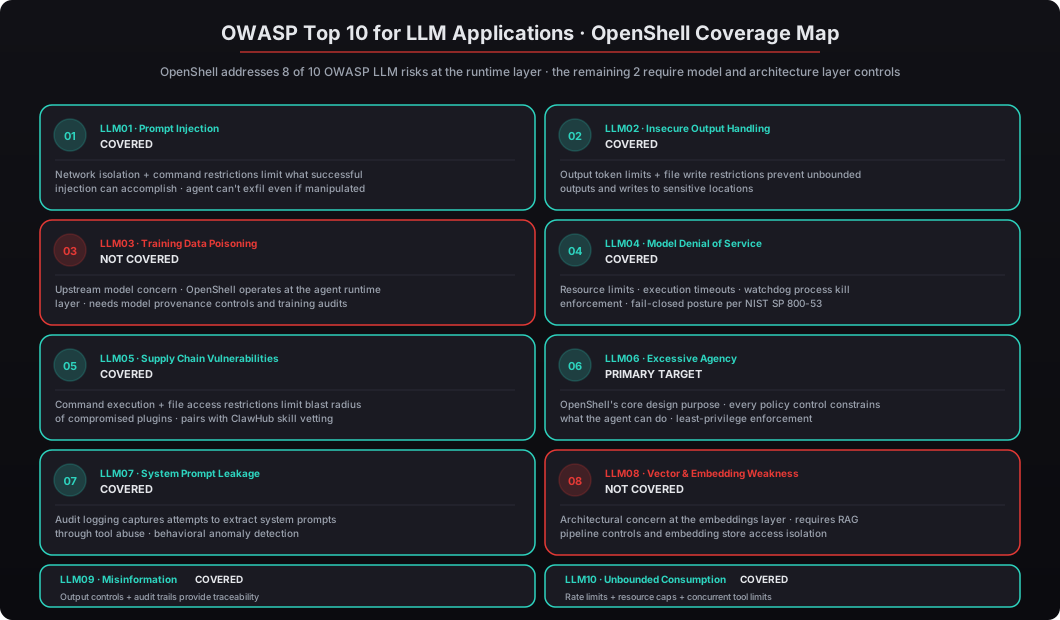
The detailed breakdown:
LLM01 — Prompt Injection (COVERED). Network isolation and command restrictions limit what a successful injection can actually accomplish. The agent might be manipulated by a malicious prompt into trying to exfiltrate data, but OpenShell blocks the outbound connection to the attacker-controlled endpoint because the hostname isn’t in the allowlist. The injection technically succeeds (the LLM generates the malicious output) but fails to do damage (the runtime blocks the action).
LLM02 — Insecure Output Handling (COVERED). Output token limits and file write restrictions prevent agents from producing unbounded outputs or writing to sensitive locations. An agent that’s instructed to generate a 10MB JSON dump of your customer database gets cut off at the max_output_tokens threshold.
LLM03 — Training Data Poisoning (NOT COVERED). Not directly addressed. This is an upstream model concern — if the base model has been trained on poisoned data, the runtime can’t detect or prevent that. Controls for this live at the model provenance and training audit layer, not the runtime layer.
LLM04 — Model Denial of Service (COVERED). Resource limits, execution timeouts, token caps, and the watchdog process handle this comprehensively. A runaway agent hits the CPU throttle or memory cap within seconds; an adversarial prompt designed to trigger exponential computation gets killed at the execution time limit.
LLM05 — Supply Chain Vulnerabilities (COVERED). Command execution controls and file access restrictions limit what a compromised plugin or ClawHub skill can access. Even if the skill itself is malicious, OpenShell’s policies determine what files it can read and what commands it can run — which means the skill can’t do much damage if the policies are tight. See our ClawHub skills vetting walkthrough for the upstream vetting process.
LLM06 — Excessive Agency (PRIMARY DESIGN TARGET). This is OpenShell’s primary design target, and it shows. Every policy control constrains what the agent can do. Least-privilege enforcement is the default posture, and the YAML structure makes it easy to write policies that are explicitly narrow for the specific role the agent is playing. See also our walkthrough of AI agents as privileged service accounts.
LLM07 — System Prompt Leakage (COVERED). Audit logging captures attempts to extract system prompts through tool abuse. An attacker trying to trick the agent into revealing its system prompt generates a detectable pattern in the audit log that anomaly detection can flag.
LLM08 — Vector and Embedding Weaknesses (NOT COVERED). Not directly addressed at the runtime level. This is an architectural concern at the RAG pipeline and embedding store layer — issues like embedding inversion, cross-tenant data leakage in vector stores, or adversarial similarity search. Controls live at the RAG architecture layer, not the runtime layer.
LLM09 — Misinformation (COVERED). Output controls and audit trails provide traceability, though content accuracy itself remains a model-level challenge. OpenShell can’t make the LLM stop hallucinating, but it provides the forensic record that lets you detect when hallucinations have caused real-world problems.
LLM10 — Unbounded Consumption (COVERED). Rate limits and resource caps handle this directly. Cost runaway from malicious or buggy prompts gets capped by the max_requests_per_minute, max_output_tokens, and max_data_egress_mb_per_hour limits.
Two gaps out of ten — and both (LLM03 and LLM08) require controls at the model training and architecture layers, not the runtime layer. For a single component in the security stack, 80% coverage of industry-standard risks is exceptional. The comparison point: a well-configured Docker sandbox covers roughly 3-4 of the 10 (mostly through resource limits and capability restrictions), and nothing else in the open source AI agent ecosystem covers more than 5-6.
How Does OpenShell Compare to Docker-Only Sandboxing?
Answer capsule. This isn’t an either/or decision — and that’s the point most teams miss. Docker provides OS-level isolation. OpenShell provides application-level governance. You need both. Docker handles process isolation, filesystem namespacing, network namespace separation, cgroup resource limits, capability dropping, and seccomp syscall filtering. OpenShell handles AI-specific file access policies, application-aware network filtering, command argument inspection, tool concurrency limits, token-level output controls, and behavioral audit logging. Docker doesn’t know that your agent is trying to read a .env file because a prompt injection told it to — it just sees a file read syscall to a path the container has access to. OpenShell sees the semantic action (an agent reading a credentials file) and blocks it based on policy.
Docker handles: process isolation via PID namespaces, filesystem namespacing via mount namespaces, network namespace separation via network namespaces, cgroup-based resource limits (CPU, memory, PIDs, block I/O), capability dropping via Linux capability sets, and seccomp syscall filtering via kernel-level syscall profiles. It operates at layer 3 of the OSI model for network controls and at the kernel level for process controls. These are powerful primitives for containing untrusted code — Docker is genuinely production-grade for the problems it was designed to solve.
OpenShell handles: AI-specific file access policies with glob patterns and permission granularity, application-aware network filtering by hostname/endpoint/protocol, command argument inspection with regex pattern matching, tool concurrency limits at the agent orchestration layer, token-level output controls, and behavioral audit logging of semantic actions rather than syscalls. It operates at layer 7 (application) for network controls and at the application/semantic level for everything else.
The concrete difference is the semantic layer. Docker doesn’t know that your agent is trying to read a .env file because a prompt injection told it to — Docker just sees a read(fd, buf, count) syscall to a path the container’s filesystem namespace has access to. Even with file capability restrictions, Docker can’t distinguish “agent reading a legitimate workspace file” from “agent reading a credentials file because prompt injection manipulated it.” OpenShell sees the semantic action — an agent process attempting to open a file matching the pattern **/.env* — and blocks it based on the policy declaration, regardless of whether the file is technically accessible within the container’s filesystem namespace.
The CIS Docker Benchmark v1.7.0 explicitly recommends layered security controls and states that container isolation alone is insufficient for applications handling sensitive data. NVIDIA’s architecture with NemoClaw follows this philosophy exactly: Docker for the infrastructure layer, OpenShell for the application layer, Composio for the credential layer, and host firewalls for the network layer. Four layers, each addressing a different attack surface, each catching different exploit patterns.
The practical comparison on specific attack scenarios:
- Scenario: prompt injection tells agent to read
~/.ssh/id_rsa. Docker: allowed if/rootis in the container’s filesystem namespace. OpenShell: blocked by the**/.ssh/**deny rule. - Scenario: compromised tool tries to
curldata toattacker.com. Docker: allowed if the container has network access. OpenShell: blocked becauseattacker.comisn’t in the network allowlist. - Scenario: runaway loop triggers infinite output generation. Docker: memory cgroup limits eventually kill the process when OOM. OpenShell:
max_output_tokenscap triggers immediately and stops output before resource exhaustion. - Scenario: skill runs
rm -rf /app/workspace. Docker: succeeds becausermis not blocked by capabilities. OpenShell: blocked by the explicitdeny: - command: "rm"rule.
How Does beeeowl Layer All of These Defenses?
Answer capsule. Every beeeowl deployment ships with four complementary security layers: OpenShell policies (application-layer governance), Docker container isolation (OS-layer sandboxing), Composio credential isolation (OAuth middleware so agents never see raw tokens), and host-level firewall rules (per-client network allowlists at the iptables/pf layer). This four-layer stack means an attacker would need to bypass application-level policy enforcement, escape a hardened Docker container, compromise a credential vault, and punch through host-level firewall rules — simultaneously. Verizon’s 2025 DBIR found that 89% of breaches exploited a single control failure, which is exactly why defense in depth works: attackers don’t carry four different exploits for four different layers.
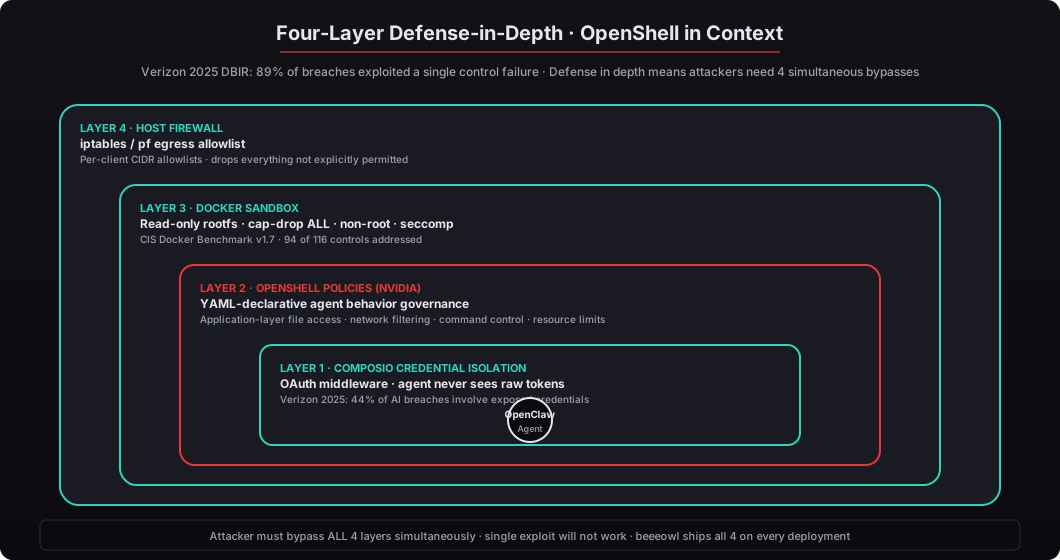
Every beeeowl deployment ships with four security layers, each covering a different part of the attack surface:
Layer 1 — OpenShell policies. Custom YAML policies tuned to the client’s specific agent and integrations. A CEO’s board deck agent gets different policies than a CFO’s cash flow modeler than a CTO’s incident post-mortem reviewer. The policies are version-controlled in the client’s Git repository alongside their deployment configuration, reviewed during our 90-day policy audit cadence, and updated whenever the agent’s role or integrations change. See the full security hardening checklist for how policies fit into the broader deployment process.
Layer 2 — Docker container isolation. Read-only root filesystem, dropped capabilities via --cap-drop ALL, no-new-privileges flag, dedicated network bridge with internal-only ICC disabled, resource limits via cgroups (memory, CPU, PIDs), seccomp profile blocking dangerous syscalls, and non-root user execution with UID 1001:1001 baked into the image. Our baseline addresses 94 of 116 controls in CIS Docker Benchmark v1.7.0 — the remaining 22 don’t apply to single-host deployments.
Layer 3 — Composio credential isolation. OAuth tokens are managed by Composio’s vault and never exposed to the agent directly. The agent requests actions through Composio’s API — “send this email” or “update this Salesforce opportunity” — and Composio handles the actual token exchange with the target service. The agent never sees the raw credentials, which means a compromised agent can do only what Composio has been configured to permit for that agent, not whatever the raw OAuth tokens would allow. This is NVIDIA’s recommended approach in the NemoClaw documentation and it addresses the credential theft attack vector that Verizon 2025 DBIR identified in 44% of AI-related breaches. See our Composio credential security walkthrough.
Layer 4 — Host-level firewall rules. Per-client iptables or pf rules that allowlist only the specific IP ranges and ports required for the deployment. Everything else is dropped at the network layer before it reaches Docker or OpenShell. This is the outermost ring of defense — if an attacker somehow bypasses OpenShell and Docker and compromises the container, they still can’t reach any network destination that isn’t on the host-level allowlist. See our walkthrough of egress firewall configuration in the security hardening checklist.
This four-layer stack means an attacker would need to bypass application-level policy enforcement (OpenShell), escape a hardened Docker container, compromise a credential vault (Composio), AND punch through host-level firewall rules — all simultaneously. According to Verizon’s 2025 Data Breach Investigations Report, 89% of breaches involved exploiting a single control failure. Defense in depth works because attackers don’t carry four different exploits for four different layers; they find one weakness and pivot from there. When you remove the single-weakness attack path by layering controls that each need to be bypassed independently, you’ve made the attack substantially more difficult in a way that doesn’t depend on perfect configuration of any individual layer.
What Should CTOs Running OpenClaw in Production Do Right Now?
Answer capsule. If you’re running OpenClaw in production today without OpenShell, you’re operating with application-layer blind spots. Docker sandboxing is necessary but not sufficient. Three practical steps: (1) Audit your current agent’s actual behavior by running OpenShell in audit mode for a week — the logs will show you every file read, network connection, and command execution, and you’ll be surprised by what the agent actually does. (2) Write deny-first policies: start with default_policy: "deny" for every category and add explicit allows based only on what the audit showed the agent genuinely needs. (3) Layer your defenses: OpenShell plus Docker plus credential isolation plus firewall rules — no single layer is sufficient, and Jensen Huang’s framing of OpenClaw as infrastructure rather than a toy demands infrastructure-grade security.
First, audit your current agent’s actual behavior. Run OpenShell in audit mode for 5-7 days. The logs will show you every file the agent reads, every network connection it makes, every command it executes, every tool invocation, and every output token count. You’ll be surprised — I always am when I audit client deployments. The typical findings: the agent is reading directories you didn’t know were accessible, making network calls to endpoints you didn’t know were involved, and running commands that surprised the team (“why is our email triage agent running pip install?”). Most of it is benign, but you need to see it before you can write enforce-mode policies that don’t break normal workflows.
# Enable audit mode in the OpenShell policy
# Edit /etc/openshell/policy.yaml and set:
policy_mode: "audit"

# Restart the agent to pick up the new policy
docker compose restart openclaw-agent

# Tail the audit logs for the first week
tail -f /var/log/openshell/audit.log

# After a week, analyze what the agent actually did
jq '.event' /var/log/openshell/audit.log | sort | uniq -c | sort -rn
jq 'select(.category == "file_access") | .path' /var/log/openshell/audit.log | sort -u
jq 'select(.category == "network") | .endpoint' /var/log/openshell/audit.log | sort -u
jq 'select(.category == "command") | .command' /var/log/openshell/audit.log | sort -u
Second, write deny-first policies based on the audit findings. Start with default_policy: "deny" for every category and add explicit allow rules only for the specific paths, endpoints, and commands the audit showed were genuinely needed. Don’t add broader rules “just in case” — if the audit didn’t show the agent reading /app/workspace/legal/, don’t add that path to the allowlist. This tedious, explicit approach is the only posture that survives contact with a prompt injection, because prompt injection attacks work by getting the agent to do something outside its normal behavior — and if the policy only permits the normal behavior, the injection fails by default.
Third, layer your defenses. OpenShell alone is one layer. Combine it with Docker sandboxing (which you should already be running — see our Docker sandboxing walkthrough), Composio credential isolation (so the agent never holds raw OAuth tokens), and host-level firewall rules (so outbound network access is constrained even if OpenShell is somehow bypassed). Four layers, four different attack surfaces, four different failure modes. No single layer is sufficient for an AI agent that has access to your most sensitive business data — Jensen Huang’s framing of OpenClaw as infrastructure (not a toy) demands infrastructure-grade security, and infrastructure-grade security is always multi-layered.
NVIDIA’s commitment to OpenClaw security isn’t theoretical anymore. They’ve dedicated engineering resources to OpenShell, published the NemoClaw reference architecture with OpenShell as a core component, shipped CVE-2026-25253 patches with NVIDIA engineers in the commit log, and partnered with CrowdStrike for threat intelligence integration. The tooling exists. The question is whether your deployment uses it.
At beeeowl, we’ve integrated OpenShell into every deployment since the NemoClaw reference design launched. It’s not an add-on or a premium tier — it’s a foundational layer shipped with every $2,000 Hosted Setup, $5,000 Mac Mini, or $6,000 MacBook Air deployment. If you’re evaluating private AI infrastructure and want to see what a fully governed OpenClaw agent looks like, that’s exactly what we build. Request your deployment at beeeowl.com.
Related reading — for deeper coverage of specific security aspects, see the complete security hardening checklist, Docker sandboxing for OpenClaw, AI agents as privileged service accounts, the 30,000 exposed OpenClaw instances problem, ClawHub skills vetting walkthrough, NemoClaw enterprise reference design, and OpenClaw audit logging and enterprise observability.