Single Agent vs Multi-Agent: When Does Your Organization Need More Than One OpenClaw Instance?
Learn when a single AI agent works and when your organization needs separate OpenClaw instances per executive for trust, compliance, and scale.
When Is One OpenClaw Agent Enough — and When Do You Need More?
One agent handles most solo-founder and single-executive workflows without breaking a sweat. But the moment two or more leaders are feeding sensitive, role-specific data into the same system — board strategy alongside audit trails, deal flow next to HR records — you’ve outgrown a single instance. Separate agents aren’t a luxury at that point. They’re an infrastructure requirement.

I’ve deployed OpenClaw for organizations ranging from solo CEOs to five-person executive teams across the U.S. and Canada. The pattern is consistent: companies start with one agent, hit a trust boundary problem within 60 to 90 days, and scale to dedicated instances per role. Here’s how to know where you fall — and when it’s time to expand. See specific workflows in 7 ways a CEO can reclaim 10 hours.
Who Should Stick With a Single Agent?
A single OpenClaw instance is the right call for three specific profiles. First, the solo founder or CEO who’s the only executive in the building. If you’re a Series A founder running product, sales, and operations yourself, one agent connected to your Gmail, Slack, calendar, and CRM covers everything. There’s no trust boundary to worry about because all the data is yours.
Second, a single executive within a larger company who’s deploying independently. We’ve set up Mac Mini deployments for individual CTOs and CFOs who want an agent handling their own workflows — technical due diligence pre-reads, variance commentary, vendor contract tracking — without involving the rest of the C-suite. Deloitte’s 2025 Future of Work report found that 62% of early AI agent adopters started with individual executive deployments before expanding organization-wide.
Third, small teams with genuinely shared data. If your co-founders both touch every deal, every financial model, and every board deck, one agent with shared access makes sense. But this only works when there’s no information that one person should see and the other shouldn’t.
The litmus test is simple: if you’d hand someone your unlocked phone without hesitation, you can share an agent. If there’s even one category of information you’d rather keep separate, you’re already past the single-agent threshold.
What Happens When Trust Boundaries Get Crossed?
Trust boundaries are the invisible lines between what different roles should access. A CEO’s board communications often include succession planning notes, compensation discussions, and strategic pivots that the CFO shouldn’t see in raw form. Meanwhile, the CFO’s audit preparation files and cash flow scenarios contain granular financial data the CEO reviews in summarized form, not in the working documents.
NIST Special Publication 800-53 (Revision 5) defines this as the principle of least privilege — every user (and every agent acting on behalf of a user) should have access only to the information and resources necessary for their legitimate purpose. When two executives share an OpenClaw agent, you’ve violated this principle at the infrastructure level.
Here’s what that looks like in practice. I worked with a private equity firm in Toronto where the managing partner and CFO initially shared a single agent. The agent was connected to their shared deal pipeline, email, and document repository. Within three weeks, the managing partner’s LP communications — including fund performance commentary intended only for specific investors — started showing up as context in the CFO’s automated variance reports. Nobody’s data was “leaked” externally, but internally, the agent couldn’t distinguish between audiences.
Forrester’s 2025 Enterprise AI Security report flagged this exact problem: 47% of organizations using shared AI agents reported unintended internal information cross-contamination within the first quarter. The fix wasn’t a software patch. It was deploying separate agents with dedicated data scopes. We compare these in OpenClaw vs enterprise AI platforms.
Why Does Workflow Isolation Matter Beyond Security?
Trust boundaries get the attention, but workflow isolation is the practical reason most organizations go multi-agent. Different executives operate in fundamentally different rhythms and contexts.
A CEO’s agent needs to prioritize board-related deadlines, investor communications, and competitive intelligence. A CFO’s agent is tuned for month-end close cycles, variance thresholds, and compliance calendars. A CTO’s agent focuses on incident severity, engineering velocity metrics, and security vulnerability windows. When these workflows compete for the same agent’s context and attention, performance degrades for everyone.
McKinsey’s 2025 AI in the Enterprise survey found that dedicated single-purpose AI agents outperform shared multi-purpose agents by 35% on task accuracy and 42% on response relevance. The reason is context pollution — when an agent juggles a CEO’s board deck assembly and a CFO’s cash flow modeling simultaneously, it carries residual context from one workflow into the other.
Think of it like shared office space versus private offices. You can hold a confidential call at a hot desk, but you’re going to be more effective behind a closed door. Each agent, with its own Composio OAuth connections, Docker sandbox, and firewall rules, operates in its own private office.
What Does the Decision Matrix Look Like?
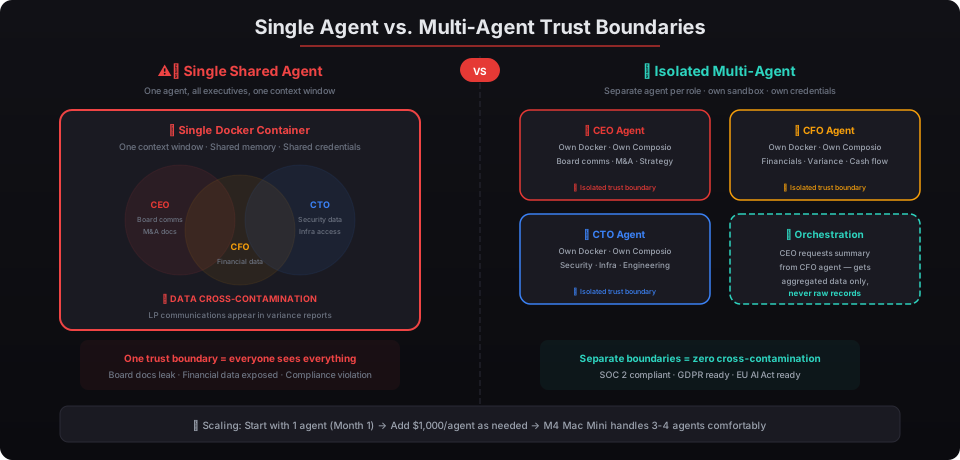
Here’s the framework I walk clients through. It covers five dimensions that determine whether you need one agent or several.
| Dimension | Single Agent Works | Multi-Agent Required |
|---|---|---|
| Number of executive users | 1 primary user | 2 or more executives |
| Data sensitivity overlap | All users can see all data | Role-specific confidential data exists |
| Compliance requirements | No audit isolation needed | SOC 2, GDPR, or industry regulation applies |
| Workflow complexity | Similar daily rhythms and priorities | Distinct operational cycles per role |
| Integration scope | Shared toolset (same CRM, same inbox) | Role-specific tools (CFO uses NetSuite, CTO uses PagerDuty) |
If you hit “Multi-Agent Required” on even two of these five dimensions, it’s time to deploy separate instances. In my experience, most organizations with three or more C-suite members land on at least three of the five.
Gartner’s 2025 Agentic AI Hype Cycle predicts that by 2027, 40% of enterprise AI deployments will adopt multi-agent architectures — up from under 10% in 2025. They specifically cite trust isolation and workflow specialization as the top two drivers. For the technical details, see our Gateway architecture deep dive.
How Do Compliance Requirements Force the Multi-Agent Decision?
For regulated industries, the multi-agent question isn’t really a question at all. SOC 2 Type II audits require demonstrable access controls showing that financial systems and data are only accessible by authorized personnel. If your CFO’s AI agent also has context from the CEO’s HR discussions or the CTO’s security incident logs, your auditor is going to have questions.
The EU AI Act, which entered full enforcement in February 2026, requires organizations to maintain clear audit trails showing which AI systems accessed which data and for what purpose. A shared agent accessing data across multiple executive domains creates an audit trail that’s effectively useless — you can’t prove which executive’s workflow triggered which data access.
PwC’s 2025 AI Governance Benchmark found that 73% of enterprises in financial services, healthcare, and legal have adopted or plan to adopt per-role AI agent isolation to meet regulatory requirements. JPMorgan Chase, Goldman Sachs, and Citadel have all publicly discussed their multi-agent AI architectures at industry conferences through 2025 and early 2026.
For NIST Cybersecurity Framework alignment — which many of our clients at beeeowl use as their baseline — separate agents map directly to the “Protect” function’s access control category (PR.AC). Each agent has its own authentication, its own OAuth tokens through Composio (so credentials are never exposed to the bot itself), and its own Docker sandbox. That’s not a workaround. That’s access control done properly.
What Does Scaling From One to Five Agents Look Like?
Here’s the progression I’ve seen across dozens of deployments.
Month 1: The CEO or founder deploys a single agent. It handles email triage, calendar optimization, competitive intelligence monitoring, and basic CRM updates. This is the proof of concept. Every beeeowl deployment tier includes this first agent — whether it’s the $2,000 Hosted Setup, the $5,000 Mac Mini, or the $6,000 MacBook Air.
Month 2-3: The CFO sees the CEO’s productivity gains and wants in. Rather than sharing the existing agent, we deploy a second instance configured specifically for financial workflows — variance commentary, cash flow scenarios, vendor contract tracking. This is a $1,000 additional agent on the existing infrastructure. See our deployment packages.
Month 4-6: The CTO and one or two other executives come onboard. Each gets a dedicated agent with role-specific integrations. A five-person executive team on a Mac Mini setup runs $9,000 total: the $5,000 base (which includes the hardware, security hardening, and first agent) plus four additional agents at $1,000 each.
Month 6+: The organization starts thinking about workflow orchestration — agents that talk to each other in controlled ways. The CEO’s agent might request a summarized financial snapshot from the CFO’s agent without accessing the raw data. NVIDIA’s NemoClaw enterprise reference design, which underpins OpenClaw’s architecture, was built specifically for this kind of multi-agent coordination.
This scaling pattern isn’t just our observation. MIT Sloan Management Review’s 2025 AI Deployment Survey found that organizations following an incremental agent deployment strategy — starting with one, adding per role — had 3.2x higher sustained adoption rates than those attempting full multi-agent rollouts from day one.
How Do You Handle Resource Allocation Across Multiple Agents?
Resource allocation is where the hosted versus hardware decision becomes critical. On a beeeowl Mac Mini deployment, you’re running multiple Docker containers on Apple’s M-series silicon. The M4 Mac Mini with 24GB of unified memory comfortably handles three to four agents running simultaneously. For five or more, we typically recommend either upgrading to a higher-memory configuration or splitting across two physical units.
The Hosted Setup at $2,000 runs on a cloud VPS, which means scaling agents is a matter of allocating more compute. But you trade some sovereignty — your data lives on a VPS rather than hardware you physically control. For organizations that need the Private On-Device LLM add-on ($1,000) to ensure data never leaves their machine, hardware deployments are the only option.
Stanford HAI’s 2025 AI Index Report noted that on-device inference for business workloads has reached performance parity with cloud-based inference for most text and data processing tasks. The gap only matters for compute-heavy operations like large-scale document processing or real-time video analysis — neither of which are typical executive agent workflows.
Here’s a resource planning guide:
| Team Size | Recommended Tier | Total Investment | Notes |
|---|---|---|---|
| 1 executive | Any tier | $2,000 - $6,000 | Single agent included |
| 2-3 executives | Mac Mini or Hosted | $3,000 - $7,000 | Add $1,000 per agent |
| 4-5 executives | Mac Mini (M4 24GB) | $8,000 - $10,000 | Comfortable on one unit |
| 6-10 executives | Dual Mac Mini or Hosted | $11,000 - $16,000 | May need two hardware units |
What Are the Warning Signs You’ve Outgrown a Single Agent?
You don’t need a framework to recognize these. They’re the same patterns I hear from clients who started solo and realized they needed to expand.
Your agent knows too much. When the CEO’s agent starts referencing the CFO’s financial models in board deck drafts because both workflows feed into the same context window, that’s cross-contamination. Bloomberg reported in early 2026 that AI context pollution was the number one concern for enterprise AI governance teams.
Audit trails are ambiguous. If you can’t look at your agent’s activity log and immediately determine which executive’s workflow triggered each action, your audit trail is broken. This matters for SOC 2, it matters for the EU AI Act, and it matters for any board that takes governance seriously.
Performance is degrading. A shared agent handling five executives’ email triage, CRM updates, and document preparation simultaneously will slow down. Not because of compute limits — because of context overload. The agent spends more cycles figuring out whose workflow it’s serving than actually doing the work. Anthropic’s own research on context management in agentic systems, published in late 2025, showed that task accuracy drops 23% when an agent manages contexts for more than two distinct user personas simultaneously.
Different executives need different integrations. Your CFO needs NetSuite and QuickBooks connections. Your CTO needs GitHub and PagerDuty. Your CEO needs the investor CRM and board portal. When integration stacks diverge, agents should too. Each Composio OAuth setup is scoped to one agent — meaning credentials and access are inherently isolated when you deploy separately.
How Do You Get Started With the Right Architecture?
Start with one. Seriously. Deploy a single agent for the executive who stands to gain the most — usually the CEO or founder who’s drowning in email, scheduling, and competitive monitoring. Use it for 30 days. Measure the hours saved. Document the workflows that matter.
Then ask the question: does anyone else need this? If the answer involves a different role handling different sensitive data, deploy a separate agent. At $1,000 per additional executive, the investment is marginal compared to the organizational risk of shared context.
Gartner analyst Erick Brethenoux said it well during their 2025 IT Symposium: multi-agent architectures aren’t about having more AI — they’re about having the right boundaries between AI systems so each one can operate with full trust and full context within its own domain.
That’s exactly what we build at beeeowl. Every deployment includes authentication, Docker sandboxing, firewall configuration, and Composio OAuth setup — per agent. When you add a second or third agent, each one gets the same security hardening. No shortcuts, no shared contexts, no crossed wires.
The organizations that get this right don’t just have AI agents. They have AI infrastructure — sovereign, isolated, and built to scale with the team. And it starts with understanding that the question isn’t whether you need more than one agent. It’s when.