7 Ways a CEO Can Use OpenClaw to Reclaim 10 Hours a Week
HBR tracked 27 CEOs working 62.5 hours per week — only 28% on strategy. McKinsey found 23% of executive hours are fully automatable today. Here are 7 specific OpenClaw use cases that give CEOs 10+ hours back every week, with time savings per use case.

A 2024 Harvard Business Review study tracked 27 CEOs over three months and found they work an average of 62.5 hours per week — with only 28% of that time spent on strategy and vision. The rest goes to meetings, communications, and operational catch-up that someone (or something) else could handle. McKinsey’s 2025 State of AI report found executives spend an average of 23% of working hours on tasks AI agents can fully automate today — roughly 14-15 hours per 60-hour week buried in work that doesn’t need a CEO’s brain. Deloitte’s 2025 Board Effectiveness Survey puts board prep alone at 4.2 hours per meeting. First Round Capital’s 2024 State of Startups found only 38% of founders send monthly investor updates because “it takes too long.” Gartner 2025 found 67% of CEOs call competitive intelligence “critical” but only 23% have a systematic process. This article is the 7 OpenClaw use cases that capture this entire productivity gap, each with the time savings we’ve measured across 50+ beeeowl client deployments, each deployable on hardware you own in one day.
How much time are CEOs actually losing to admin work?
More than you’d guess — and more than most will admit. A 2024 Harvard Business Review study tracking 27 CEOs found they work an average of 62.5 hours per week, with only 28% of that time spent on strategy and vision. The rest goes to meetings, communications, and operational catch-up that someone (or something) else could handle. McKinsey’s 2025 State of AI report puts a finer point on it: executives spend an average of 23% of their working hours on tasks that AI agents can fully automate today. For a CEO working 60-hour weeks, that’s roughly 14 hours buried in work that doesn’t need their brain.
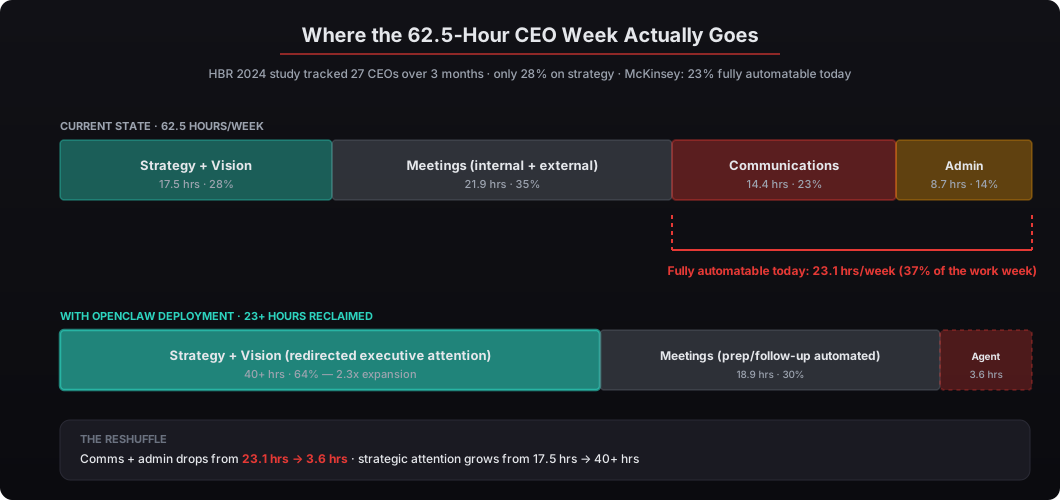
We’ve seen this firsthand across every beeeowl deployment. The pattern is always the same — a CEO spending Sunday nights on board decks, Monday mornings chasing investor update data, and Tuesday afternoons reading competitor press releases they should’ve seen last week. The technology to fix this has existed for a year. The deployment playbook to make it practical for non-technical executives is newer, and it’s what we ship every week. See our deep-dive on AI-powered board deck assembly for the specific architecture behind use case #1 below.
Here are the 7 specific use cases we’ve deployed that consistently give CEOs 10+ hours back every week. Each one is a single-purpose agent workflow that slots into the beeeowl deployment at $1,000 per additional agent after the first (which is included in every tier).
1. Can an AI agent assemble your board deck automatically?
Yes — and it’s the single highest-ROI automation we deploy. Board deck prep is the task every CEO dreads, and for good reason. You’re pulling revenue numbers from Stripe, ARR data from HubSpot, hiring updates from Greenhouse, burn rate calculations from QuickBooks, product metrics from Mixpanel, and customer sentiment from a Notion doc your VP of Customer Success maintains. Then you’re formatting it all into slides that look consistent and tell a coherent story — which is where the real time vanishes.
An OpenClaw agent handles this end-to-end. It connects to your data sources through Composio’s OAuth integrations, pulls the latest numbers on a schedule you set (typically 48 hours before the board meeting), and populates a templated deck in Google Slides or Notion. The agent formats charts, flags metrics that moved more than 10% since last quarter (because those are the ones your board will ask about), cross-references growth against your last update, and drops the draft into your inbox with a summary of “here’s what I pulled, here’s what changed, here’s what you should probably talk about.”
According to Deloitte’s 2025 Board Effectiveness Survey, CEOs spend an average of 4.2 hours preparing for each board meeting. With monthly boards, that’s 50+ hours a year on deck assembly alone — roughly one full work week per year gone to formatting slides. One of our clients — a Series B SaaS founder with a 7-person board — told us his board prep went from “a full Sunday” to “20 minutes of review on Monday morning.” The pattern is consistent across every CEO deployment we’ve shipped.
Time saved: 2+ hours per board cycle (averaged: 1+ hour/week in a monthly cadence)
2. What if your investor updates wrote themselves?
They basically can. Investor update emails follow a predictable structure: key metrics, milestones hit, challenges, asks, and a forward look. The data lives in your existing tools. The format rarely changes. The only variable is whether you actually get around to sending it — which most founders don’t, because it feels like it’ll take an hour every time.
An OpenClaw agent pulls your MRR from Stripe, pipeline data from Salesforce, team updates from Notion, recent press mentions from Google Alerts, and customer wins from your CRM. It drafts the full update in your voice — matching tone and structure from your last 5 to 10 updates that you feed it during setup. The draft lands in Gmail as a pre-filled email with the right recipient list (from your investor contact tags). You review, adjust anything that needs a personal touch, and hit send. The whole process takes 15 minutes instead of 90.
According to First Round Capital’s 2024 State of Startups report, only 38% of founders send monthly investor updates consistently. The number one reason cited: “It takes too long.” That’s not a discipline problem. It’s a workflow problem. Fixing the workflow fixes the discipline. This is especially valuable for CEOs managing relationships with multiple VC firms — Sequoia, a16z, Founders Fund, Benchmark, Accel — all of whom expect regular communication and remember the founders who show up consistently in their inboxes versus the ones who disappear between rounds.
Time saved: 1.5 hours per update (monthly cadence: ~0.35 hours/week)
3. How do you stay ahead of competitors without reading all day?
You don’t read. Your agent reads. Competitive intelligence is one of those tasks that’s critical but never urgent — so it gets pushed to “when I have time,” which means it doesn’t happen, which means you get surprised by competitor moves your board reads about before you do.
An OpenClaw agent monitors your competitor list across multiple channels simultaneously: SEC filings on EDGAR, press releases via PR Newswire and Business Wire, LinkedIn company pages, G2 review changes, Crunchbase funding rounds, patent filings on USPTO, and job postings on LinkedIn and Greenhouse. It runs this sweep daily and compiles a briefing that hits your inbox before you start your morning. The briefing isn’t just a link dump — the agent summarizes what changed, why it might matter, and flags anything that needs your immediate attention (a competitor closing a Series C, launching a product in your space, or poaching your VP of Engineering). See our guide to building a competitive intelligence agent.
Gartner’s 2025 CEO Survey found that 67% of CEOs consider competitive intelligence “critical” to their decision-making, but only 23% have a systematic process for gathering it. The 44-point gap between “I know this matters” and “I do this reliably” is where OpenClaw fits. We set this up for a fintech CEO competing against Brex, Ramp, and Mercury. His words: “I went from being surprised by competitor moves to seeing them before my board did.” The psychological shift matters — not because being first to know about a press release is valuable in itself, but because the CEO’s preparation for board questions flips from defensive (“I’ll look into that”) to proactive (“here’s what we’re already doing about it”).
Time saved: 5+ hours per week (replaces a 1-hour daily manual scan plus the surprise-recovery time)
4. Can OpenClaw draft crisis communications in real time?
It can draft them. You still decide whether to send them — and you should. But having a first draft ready in minutes instead of hours changes the game when something breaks, because the alternative is staring at a blank page while your comms VP asks “what do we say?”
Crisis communication has a well-documented timing problem. According to Weber Shandwick’s 2024 Crisis Communications Benchmark, companies that respond to a PR incident within the first 60 minutes see 40% less brand damage than those that respond after 4 hours. The difference isn’t just about speed — it’s about having something coherent to say while your brain is still processing “what just happened.” The first 60 minutes is when CEOs are worst at drafting because the adrenaline gets in the way.
An OpenClaw agent monitors your brand mentions across X (formerly Twitter), Reddit, Hacker News, Google News, and Glassdoor. When it detects a spike in negative sentiment or a mention from a high-follower account, it triggers a workflow: pull context on what happened, cross-reference against historical incidents, draft a holding statement for your comms team, draft an internal Slack message for employees, and flag the CEO with a one-paragraph summary plus the draft. You’re not sending the AI’s draft verbatim — you’re editing a draft instead of starting from nothing during the worst 30 minutes of your week. That’s the difference between a 60-minute response and a 4-hour response.
Time saved: 1-2 hours per incident (plus the reputational cost avoided, which is usually the bigger number)
5. How can an AI agent track your executive hiring pipeline?
Executive hiring is high-stakes, low-frequency, and almost entirely manual for most CEOs. You’re personally involved in hiring your VP of Sales, CFO, or Head of Product — but you’re tracking candidates across email threads, LinkedIn DMs, recruiter calls, and Notion pages that go stale between meetings. The hiring process stretches to 5+ months and half the context lives in your head.
An OpenClaw agent consolidates this. It monitors your recruiting pipeline in Greenhouse or Lever, pulls LinkedIn profiles for candidates your recruiter flags, cross-references them against your existing network in HubSpot, and maintains a living scorecard in Notion. Every Monday morning, you get a pipeline summary: who’s in process, where each candidate stands, what interviews are scheduled this week, and which candidates have gone cold. The agent also runs lightweight background research — checking candidates’ LinkedIn activity, recent publications, conference talks, and company performance data. This surfaces things like “this CFO candidate’s current company just missed earnings by 15%” that would otherwise require you to dig manually the day before the offer call.
According to Spencer Stuart’s 2025 Executive Hiring Report, the average C-suite search takes 5.2 months. CEOs who stay actively engaged throughout the process fill roles 6 weeks faster than those who delegate entirely to recruiters. The problem isn’t engagement willingness — it’s that staying engaged currently requires too much manual tracking. The OpenClaw pipeline agent makes engagement sustainable, which shortens the search by compressing the context-gathering time at every step.
Time saved: 3.5+ hours per week (during active searches)
6. What would a CEO’s perfect daily briefing look like?
It would be one page, delivered before your first meeting, covering everything you need to know and nothing you don’t. Most CEOs cobble this together manually — checking email, scanning Slack, glancing at dashboards, scrolling through news. That “morning scan” takes 45 to 90 minutes and still misses things because it’s reactive rather than structured.
An OpenClaw daily briefing agent consolidates your entire information diet into a single document. Here’s what we configure for most CEO clients:
- Calendar preview with attendee backgrounds pulled from LinkedIn and your CRM, plus relevant notes from previous meetings
- Overnight email summary prioritized by sender importance and urgency signals, with draft replies ready for routine messages
- Slack digest filtered to channels and threads where you’re mentioned or where decisions are pending
- Revenue dashboard snapshot with MRR, churn, and pipeline numbers pulled from Stripe and Salesforce
- News and competitor alerts from overnight monitoring (see use case #3)
- Team pulse — any PTO, sick days, or calendar conflicts across your direct reports
The briefing lands in your inbox at 6:30 AM local time, Monday through Friday. By the time you sit down at your desk, you’ve already read a 2-minute summary that would’ve taken 90 minutes to assemble manually. See the full architecture in how to build an AI executive briefing agent with OpenClaw.
According to Bain & Company’s 2024 Executive Productivity Study, CEOs who start their day with a structured briefing make 34% faster decisions in their first three meetings. It’s not about working harder. It’s about arriving prepared. This is the use case most of our clients start with because it delivers visible value on day one — every morning, before coffee.
Time saved: 7.5+ hours per week
7. Can OpenClaw handle meeting prep and follow-up?
Meeting prep and follow-up are the invisible time sinks. You spend 10 minutes before each meeting remembering context, and 15 minutes after each meeting sending follow-ups that you’ll forget if you don’t do immediately. Multiply that across 8 to 12 meetings a day, and you’ve lost 2 to 3 hours without producing a single deliverable. The mental tax is worse than the clock tax — you end the day exhausted from context switching that an agent can handle for you.
An OpenClaw agent handles both sides. Before each meeting, it pulls the attendee’s LinkedIn profile, your CRM history, previous meeting notes from Notion, any recent email threads, and relevant documents. This context packet arrives 10 minutes before the meeting starts in a Slack DM or email. After the meeting, the agent processes your transcript (from Otter.ai, Fireflies.ai, or Zoom’s built-in transcription), extracts action items, drafts follow-up emails, and updates your CRM. The follow-ups sit in your Gmail drafts — you review and send.
Harvard Business Review’s 2024 study on CEO time allocation found that the average CEO attends 37 meetings per week. Even saving 5 minutes of prep and follow-up per meeting adds up to over 3 hours weekly. We deployed this for a healthcare CEO with back-to-back meetings from 8 AM to 6 PM. She told us it was “like having a chief of staff who never sleeps.” The phrase has come up verbatim in at least five beeeowl client engagements — it’s the most consistent reaction to this specific workflow.
Time saved: 3+ hours per week
What does the total time savings look like?
Here’s the breakdown across all 7 use cases, in the order we typically deploy them:
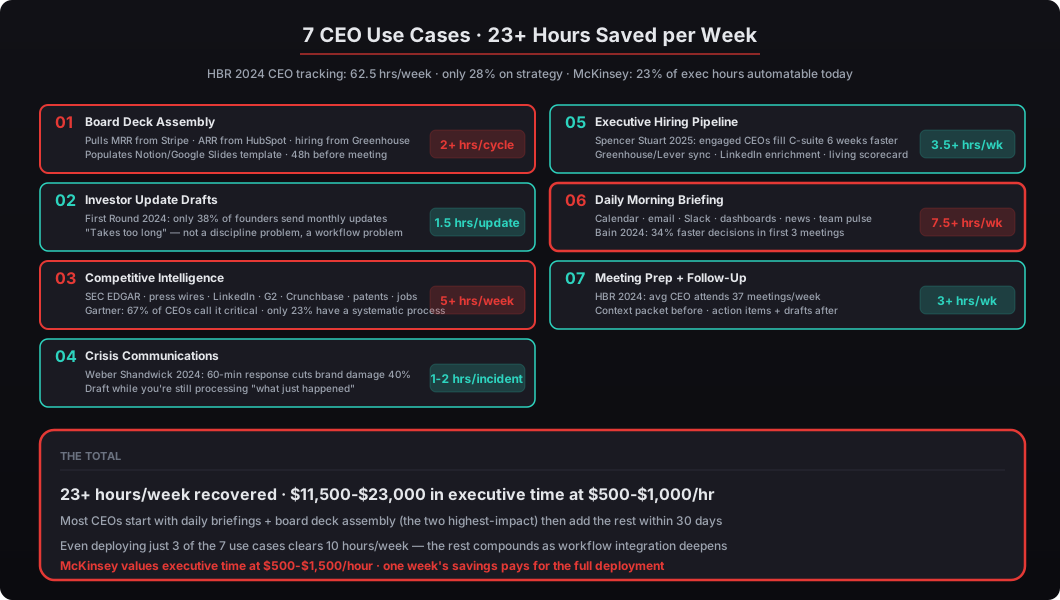
| Use Case | Hours Saved Per Week |
|---|---|
| Board Deck Assembly | 2+ per cycle (~1/week averaged) |
| Investor Update Drafts | 1.5 per update (~0.35/week) |
| Competitive Intelligence | 5+ |
| Crisis Communication Drafting | 1-2 per incident |
| Executive Hiring Pipeline | 3.5+ |
| Daily Briefings | 7.5+ |
| Meeting Prep and Follow-Up | 3+ |
| TOTAL (all 7 active) | ~23 hrs/week |
The total exceeds 10 hours per week even if you only implement 3 or 4 of these. Most of our CEO clients start with daily briefings and board deck assembly — the two use cases with the highest immediate impact — then add competitive intelligence and meeting prep within the first month. By the 60-day mark, most clients have all 7 running with role-specific tuning.
At $500-$1,500 per hour (McKinsey’s valuation range for executive time), 23 hours per week reclaimed equals $11,500-$34,500 per week in recovered capacity. The math on a $5,000 Mac Mini deployment pays back in the first week and compounds every week after that. Even the most skeptical CFO finance review clears in one meeting once you show them the calculation. See our full ROI breakdown by tier for the numbers.
What’s the actual setup process?
beeeowl deploys all of this on dedicated hardware you own — a Mac Mini that sits in your office or a MacBook Air for CEOs who travel. Your data never touches a cloud server you don’t control. Every deployment includes Docker sandboxing (NIST SP 800-190 compliant), NVIDIA’s NemoClaw security stack, Composio OAuth credential isolation, and a fully configured first agent with your integrations. Setup takes one day. Your first agent is running before you go to bed that night. See our deployment walkthrough in how to get your first OpenClaw agent running in one day.
The investment starts at $2,000 for a hosted setup or $5,000 for a Mac Mini with hardware included. Additional agents (for each of the 7 use cases above if you want them in separate isolated containers) are $1,000 each on the same physical machine. For the full 7-agent deployment, you’re looking at $5,000 base + $6,000 for 6 additional agents = $11,000 one-time — which is less than a single week of recovered executive time at McKinsey’s rate. Every deployment comes with 1 year of monthly mastermind calls where you can workshop new use cases with other CEO clients running similar deployments.
McKinsey values executive time at $500 to $1,500 per hour depending on company stage. At 23 hours per week, the math is straightforward — and it pays for itself before the first board meeting after deployment. If you’re a CEO who’s tired of spending Sundays on slides, tired of missing competitor moves, tired of the 6:30 AM scramble to prep for your 9 AM, request your deployment today. We’ll have you running within a week, and all 7 use cases configured within 30 days. Role-specific workflow examples across every C-suite role are on our use cases page.