Air-Gapped OpenClaw: Running a Fully Disconnected AI Agent on a Mac Mini for Classified, Defense, and Regulated Workflows
An air-gapped Mac Mini OpenClaw deployment runs without any internet connection — local LLM inference, on-device document storage, no Composio external APIs. The only practical OpenClaw tier for SCIF-adjacent rooms, defense contractors, and classified IP environments.

Air-gapped OpenClaw is the deployment pattern for environments where internet connectivity is the threat — defense contractors handling Controlled Unclassified Information (CUI), SCIF-adjacent classified IP rooms, regulated pharmaceutical formulation environments, and sovereign-grade national security contractors. The Mac Mini is the only practical OpenClaw tier that supports air-gap deployment because the Hosted tier is by definition internet-connected (it’s a VPS) and the MacBook Air is portable, which is exactly the wrong property for environments where physical security is the architecture. The Department of Defense’s 2024 cybersecurity report documented that 67% of CUI breaches in defense supplier networks involved internet-connected systems where air-gap would have eliminated the attack vector. CMMC 2.0 (Cybersecurity Maturity Model Certification) Level 3, with phased implementation through 2028, requires defense contractors handling CUI to demonstrate either FedRAMP High accredited cloud providers or air-gapped on-premises systems for the most sensitive workflows. The air-gapped Mac Mini OpenClaw configuration runs entirely on the local Mistral 7B or Llama 3.1 8B model via Ollama, uses local document storage, and disables all Composio external integrations — every inference, every workflow, every reference document lives on hardware you physically possess. This article is the full air-gap deployment architecture for CTOs operating in classified, defense, pharma, or sovereign environments — the regulatory frameworks driving the requirement, the threat model air-gap actually defeats, and the configuration we ship for clients running OpenClaw without internet.
What does air-gapped actually mean for a Mac Mini OpenClaw deployment?
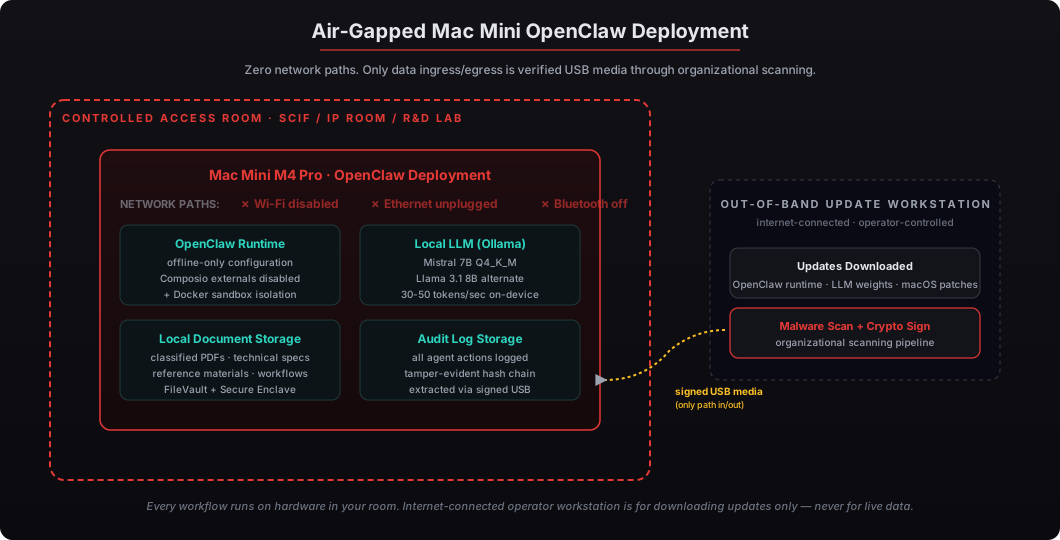
Air-gapped means zero network connectivity. The Mac Mini has Wi-Fi disabled at the firmware level, Ethernet physically unplugged or hardware-blocked, Bluetooth disabled, no cellular modem present (Mac hardware doesn’t ship with cellular by default), and no other side-channel network paths. The only way data enters or leaves the system is through physically attached USB media that’s been scanned and signed by an authorized operator. Every OpenClaw workflow, every LLM inference, and every reference document operates on the local SSD without internet dependency.
I’ve shipped this configuration to defense suppliers, pharma R&D labs, and one sovereign-grade national security contractor where the entire workflow happens in a Faraday-cage-equipped IP room. The deployment pattern is straightforward when the form factor matches the physical security model — the Mac Mini sits on a desk, doesn’t move, and can be physically secured via Kensington lock or rack mount. Our Mac Mini OpenClaw deployment service is the foundation; the air-gap configuration adds in-person setup so we configure the system in your physical environment without ever connecting it to your network.
Why is the Mac Mini the right form factor for air-gap?
The Mac Mini is stationary, fanless, small, and physically securable — properties that match the physical security model of SCIF-adjacent rooms, defense contractor IP rooms, and pharma R&D environments. The Hosted tier is by definition internet-connected, so air-gap is structurally impossible. The MacBook Air is portable, which is exactly the wrong property for air-gap because the device must remain inside a controlled access boundary. The Mac Mini’s form factor — sits on a desk, no moving parts, can be Kensington-locked or rack-mounted — matches what these rooms are physically built around.
The thermal profile matters too. Air-gapped rooms tend to be physically isolated and may have limited HVAC capacity. The M4 Pro Mac Mini idles at ~7W and peaks at ~65W with no fan noise — fitting comfortably in any environment that already houses controlled-access workstations. We covered the thermal and power profile in detail here for clients evaluating 24/7 uptime in less-than-ideal physical environments.
| Tier | Air-Gap Capable | Why |
|---|---|---|
| Hosted (Cloud VPS, $2K) | No | By definition internet-connected — VPS is on the internet |
| MacBook Air ($6K) | Possible but wrong | Portable form factor doesn’t match air-gap physical security model |
| Mac Mini ($5K) | Yes | Stationary, fanless, securable, matches SCIF/IP room architecture |
What regulations actually drive the air-gap requirement?
CMMC 2.0 (Cybersecurity Maturity Model Certification), proposed final rule with phased implementation through 2028, requires defense contractors handling Controlled Unclassified Information to demonstrate either FedRAMP High accredited cloud providers or air-gapped on-premises systems for the most sensitive workflows. DFARS 252.204-7012 mandates safeguards on CUI in defense supplier networks per NIST SP 800-171’s 110 control framework. ITAR (International Traffic in Arms Regulations 22 CFR Parts 120-130) requires export-controlled technical data to remain within US persons’ control — air-gap is the simplest implementation that demonstrates compliance.
For commercial pharma R&D, 21 CFR Part 11 governs electronic records and electronic signatures, while ICH Q12 drives formulation IP isolation requirements. For sovereign-grade national security contractors, ICD 503 (Intelligence Community Directive 503) governs IT systems within IC facilities. None of these regulations prescribe air-gap explicitly — but for the most sensitive workflows, air-gap is the simplest defensible architecture that satisfies the controls without requiring continuous compliance demonstrations against an evolving cloud provider.
| Regulation | Scope | Air-Gap Relevance |
|---|---|---|
| CMMC 2.0 Level 3 | DoD contractors handling CUI | Air-gap is one of two acceptable architectures (FedRAMP High = other) |
| DFARS 252.204-7012 | Defense supplier CUI safeguards | Underlying NIST 800-171 controls easier to demonstrate air-gapped |
| ITAR (22 CFR 120-130) | Export-controlled defense data | Air-gap demonstrates US person-only access |
| 21 CFR Part 11 | FDA electronic records | Air-gap simplifies system validation requirements |
| ICD 503 | Intelligence community IT | Air-gap aligns with SCIF connectivity rules |
What threat model does air-gap actually defeat?
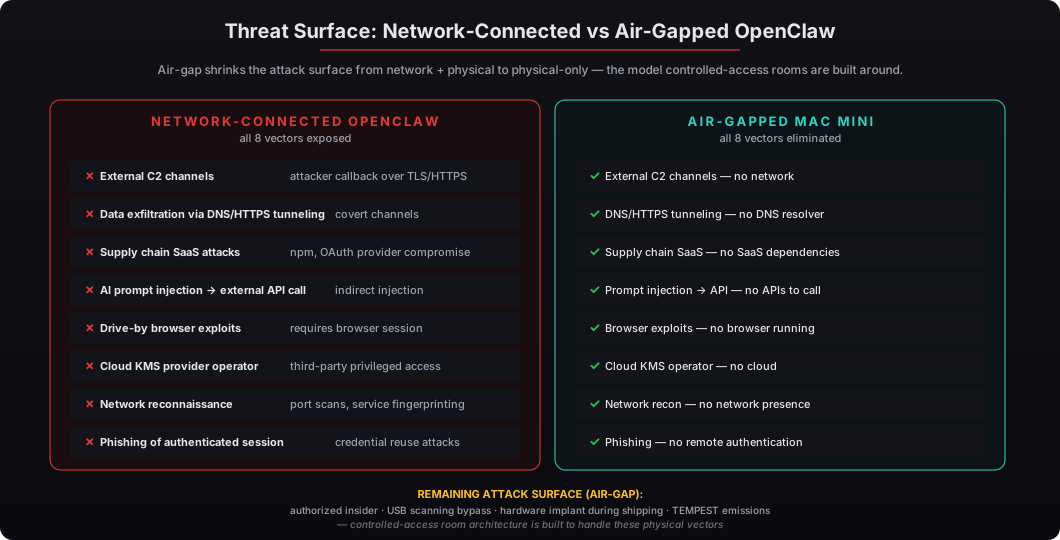
Air-gap defeats the entire class of network-based attacks. External command-and-control channels need network access. Data exfiltration via DNS or HTTPS tunneling needs network. Supply chain attacks against SaaS dependencies don’t apply because there are no SaaS dependencies. AI prompt injection attacks that try to trigger external API calls have no APIs to call. Drive-by browser exploits don’t apply because there’s no browser running on the air-gapped system. Any attack that requires post-compromise communication with the attacker is structurally defeated.
The remaining attack surface is physical: an authorized insider with malicious intent, a malware-infected USB drive that bypasses the scanning pipeline, a hardware implant introduced during shipping, or a side-channel like TEMPEST emissions. All of these are vastly smaller attack surfaces than a network-connected system with the same workload, and they’re the threats the controlled-access room architecture is built to address. The DoD’s 2024 cybersecurity report documented 67% of CUI breaches in defense supplier networks involved internet-connected systems where air-gap would have eliminated the attack vector — the data is consistent with the structural argument.
What can OpenClaw agents do without internet?
Air-gapped OpenClaw handles every workflow where the data domain is internal: document summarization (classified contracts, defense technical specs, pharma formulation reports), structured extraction from PDFs, agent reasoning over local knowledge bases, classification and tagging, redaction workflows, report generation from local data, technical Q&A against local reference materials, and meeting transcript analysis. What it cannot do is integrate with Gmail, Slack, Salesforce, or any cloud SaaS — those workflows require Composio’s external integrations and route to cloud APIs by design.
For executive workflows in classified, defense, or pharma environments, the data domain is almost always internal. A defense contractor reviewing a classified RFP doesn’t need Gmail integration — the document arrives via secure channels and the analysis happens within the controlled-access room. A pharma R&D team analyzing formulation data doesn’t need Slack — they need fast extraction and structured output for the regulatory submission. The air-gap configuration covers these workloads fully because the workflow architecture matches the physical isolation model.
How does the deployment handle software updates?
Through a controlled out-of-band update process. We ship the Mac Mini with OpenClaw, Ollama, the local LLM weights (Mistral 7B Q4_K_M plus Llama 3.1 8B), and macOS pre-installed and verified. When updates are needed — security patches, OpenClaw runtime versions, new LLM models — the operator downloads them on a separate internet-connected workstation, runs them through their organization’s existing malware verification pipeline, copies them via signed USB media, and installs them on the air-gapped Mac Mini. This matches the SCIF-standard out-of-band update process used for classified workstations across DoD and IC environments.
The update cadence we recommend for air-gapped clients is quarterly — security patches plus quarterly OpenClaw runtime updates plus quarterly LLM model refreshes. Critical security patches can be applied off-cycle when warranted. We provide signed update bundles via secure courier or operator pickup; clients on multi-year deployments often prefer to own the update verification pipeline themselves to align with their existing CUI policies. Our security hardening checklist covers the broader configuration baseline applied to every Mac Mini deployment, which the air-gap configuration extends.
What’s the configuration we ship for air-gapped clients?
The air-gapped configuration is the standard $5,000 Mac Mini OpenClaw deployment plus the $1,000 Private On-Device LLM add-on plus the $2,000 In-Person Setup add-on. Total: $8,000 one-time. This includes pre-loaded Mistral 7B Q4_K_M plus Llama 3.1 8B as alternatives, all Composio external integrations disabled by default, OpenClaw runtime configured for offline-only operation, FileVault disk encryption with Secure Enclave-backed keys, all macOS network services disabled, and in-person setup so we configure the system inside your physical environment without ever connecting it to your network.
Defense contractors and IC clients should expect to provide their own scanning pipeline and out-of-band update process per their existing CUI handling policies — we don’t presume to operate inside your security boundary. Pharma R&D and sovereign-grade clients typically operate similarly. For the sovereign AI movement discussion of why this architecture is becoming the default for nation-state and enterprise sovereign deployments, see our broader sovereign AI infrastructure analysis.
If you’re operating in a classified, defense, pharma R&D, or sovereign-grade environment where internet connectivity is the threat, the air-gapped Mac Mini OpenClaw deployment is the only configuration that survives a serious physical security audit. Request your deployment and we’ll ship hardware to your controlled-access environment within one week, configured for full air-gap operation.