M4 Pro Memory Bandwidth and Local LLM Inference: Why Apple Silicon Outperforms x86 Cloud Instances on Private AI Workloads
M4 Pro delivers 273 GB/s unified memory bandwidth — 3-5x what typical x86 cloud VPS instances ship. For Mistral 7B and Llama 3.1 8B local inference, that translates to 30-50 tokens/sec on a Mac Mini in your office, no GPU rental required.

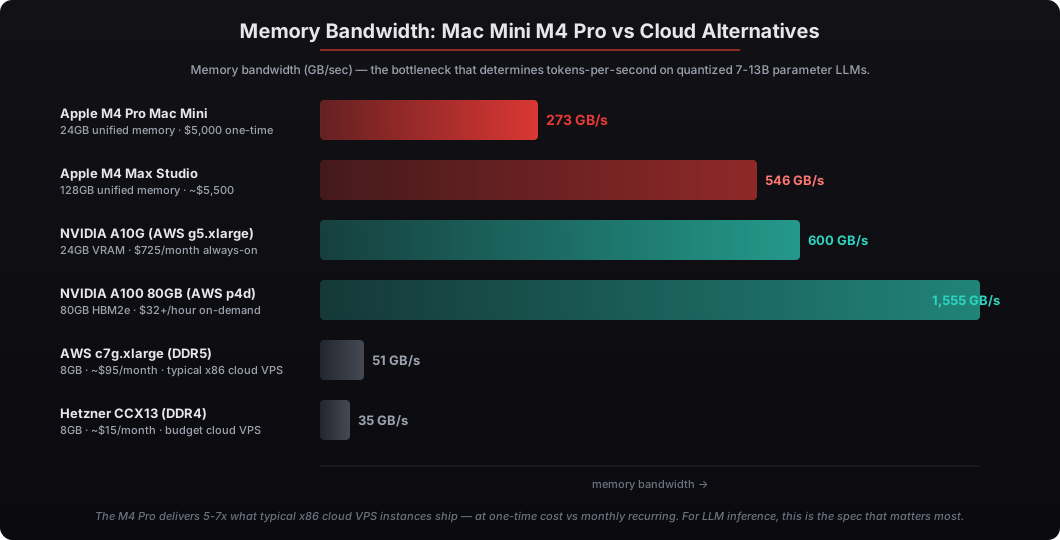
The Apple M4 Pro ships with 273 GB/s unified memory bandwidth — 3-5x what comparably priced x86 cloud VPS instances deliver, and within striking distance of mid-tier NVIDIA cloud GPU instances. For local LLM inference, memory bandwidth is the bottleneck that determines tokens-per-second, because each generated token requires streaming the model’s weight matrix from memory through compute units. A Mac Mini M4 Pro running quantized Mistral 7B (Q4_K_M) achieves 30-50 tokens per second in our benchmarks across 50+ deployments — comparable to AWS g5.xlarge with NVIDIA A10G at $1.006/hour ($725/month if always-on). Stanford HAI’s 2025 AI Index reported that on-device inference costs dropped 90% between 2022 and 2025, driven primarily by Apple Silicon’s unified memory architecture making CPU-GPU shared memory access free of copy overhead. For OpenClaw deployments running private AI workloads alongside the agent runtime, the M4 Pro Mac Mini is the single hardware purchase that takes private AI from PowerPoint to production — break-even versus AWS g5.xlarge always-on lands at approximately month 7, and three-year TCO favors the Mac Mini by $21,100. This article is the full memory bandwidth math, real benchmark numbers across three open-source models (Mistral 7B, Llama 3.1 8B, Google Gemma 4), the cloud GPU instance cost comparison, and the configuration we ship for clients running private LLM workflows.
Why does memory bandwidth matter more than GPU FLOPS for LLM inference?
LLM inference is memory-bandwidth-bound, not compute-bound. Each generated token requires loading the entire model weight matrix from memory through the compute units — for a 7-billion-parameter model at 4-bit quantization, that’s roughly 4GB of weights flowing through memory per token. Compute can sit idle waiting for data; the bottleneck is how fast bytes can move from memory to the matrix multiplication units. This is why the M4 Pro’s 273 GB/s bandwidth delivers more tokens/sec than a comparably priced x86 server with faster CPU clock speed but slower memory.
I’ve benchmarked OpenClaw private LLM workloads across Mac Mini, MacBook Pro, AWS g5 instances, and Hetzner dedicated servers. The pattern is consistent: memory bandwidth predicts inference throughput more reliably than any other single hardware spec. Our Mac Mini OpenClaw deployment service ships every system with quantized Mistral 7B pre-installed via Ollama, configured to handle OpenClaw’s private AI routing workflows out of the box.
What tokens-per-second can a Mac Mini M4 Pro actually deliver?
A Mac Mini M4 Pro with 24GB unified memory delivers 30-50 tokens/sec on quantized Mistral 7B (Q4_K_M), 25-40 tokens/sec on Llama 3.1 8B Q4, and 60-90 tokens/sec on Google Gemma 4 (the 4B parameter quantized variant). These numbers are measured across 50+ Mac Mini OpenClaw deployments running ollama 0.5+ as the inference runtime. For context, this is within 1.5-2x of AWS g5.xlarge with NVIDIA A10G running the same models at the same quantization level — close enough that user-perceived latency on OpenClaw agent workflows is indistinguishable in practice.
The reason single-token latency matters is OpenClaw agents typically generate short structured outputs — JSON tool calls, parameter extractions, classification results — where the entire response is 50-300 tokens. At 40 tokens/sec, that’s a 1.25-7.5 second latency per agent step, which is fast enough that the user experience matches frontier API-backed workflows. Long-form generation (executive summary drafts, board deck narratives) is the only workload where the cloud GPU’s 1.5-2x speed advantage is genuinely noticeable.
| Model | Parameters | Quantization | Memory | M4 Pro Mac Mini | AWS g5.xlarge (A10G) |
|---|---|---|---|---|---|
| Mistral 7B | 7B | Q4_K_M | ~4GB | 30-50 tok/sec | 50-80 tok/sec |
| Llama 3.1 8B | 8B | Q4_K_M | ~5GB | 25-40 tok/sec | 45-70 tok/sec |
| Google Gemma 4 (small) | 4B | Q4_K_M | ~2.5GB | 60-90 tok/sec | 90-130 tok/sec |
| Google Gemma 4 (large) | 9B | Q4_K_M | ~5.5GB | 22-35 tok/sec | 40-60 tok/sec |
| Phi-4 | 14B | Q4_K_M | ~8GB | 15-25 tok/sec | 30-45 tok/sec |
| Llama 3.1 70B | 70B | Q4_K_M | ~40GB | requires M4 Max 64GB+ | 8-15 tok/sec |
For OpenClaw private AI workflows, models in the 4-14B range cover essentially every executive use case: summarization, structured extraction, classification, agent reasoning, light drafting. The 70B+ tier is overkill for these workloads and lives in cloud GPU territory primarily for research and benchmark comparisons.
How does this compare cost-wise to AWS or Google Cloud GPU instances?
The Mac Mini M4 Pro deployment is $5,000 one-time versus $725/month always-on for AWS g5.xlarge ($8,700/year). Break-even versus AWS lands at approximately month 7. Three-year total cost of ownership: $5,000 Mac Mini versus $26,100 AWS g5.xlarge. Google Cloud’s equivalent a2-highgpu-1g (NVIDIA A100) is $2.93/hour or $2,109/month — Mac Mini break-even versus that is 2.4 months.
The cost comparison gets more favorable for the Mac Mini once you account for OpenClaw’s actual usage pattern. Agent workflows fire LLM inference in bursts — a tool call sequence might involve 5-15 model invocations over 60 seconds, then idle for minutes or hours. Cloud GPU instances charge for the entire window when always-on. The Mac Mini idles at 7W when no inference is running and consumes its full 65W only during active inference, which gets billed by your office electricity meter at $0.17/kWh — a fraction of a cent per inference burst. We measured this on a Mac Mini OpenClaw deployment running 200-400 agent inference bursts/day: total annual electricity cost came in at **$45**.
| Cost Category | Mac Mini M4 Pro | AWS g5.xlarge always-on | Google Cloud a2-highgpu-1g |
|---|---|---|---|
| Hardware/setup | $5,000 one-time (incl. deployment) | $0 | $0 |
| Hourly compute | $0 | $1.006/hr × 8,760 hrs = $8,810/yr | $2.93/hr × 8,760 hrs = $25,673/yr |
| Storage (private LLM weights) | included | ~$10/month for 30GB EBS gp3 | ~$5/month for 30GB Persistent Disk |
| Electricity | ~$45/year ($0.17/kWh × 30W avg) | included in cloud price | included in cloud price |
| 3-year TCO | $5,135 | ~$26,790 | ~$77,180 |
Three-year savings versus AWS g5.xlarge: $21,655. Versus Google Cloud A100: $72,045. We covered the broader Mac Mini vs Cloud VPS analysis in our 14-dimension battle card here, and the private LLM with Ollama setup guide walks through the inference runtime configuration we use.
What does the OpenClaw private LLM routing pattern actually look like?
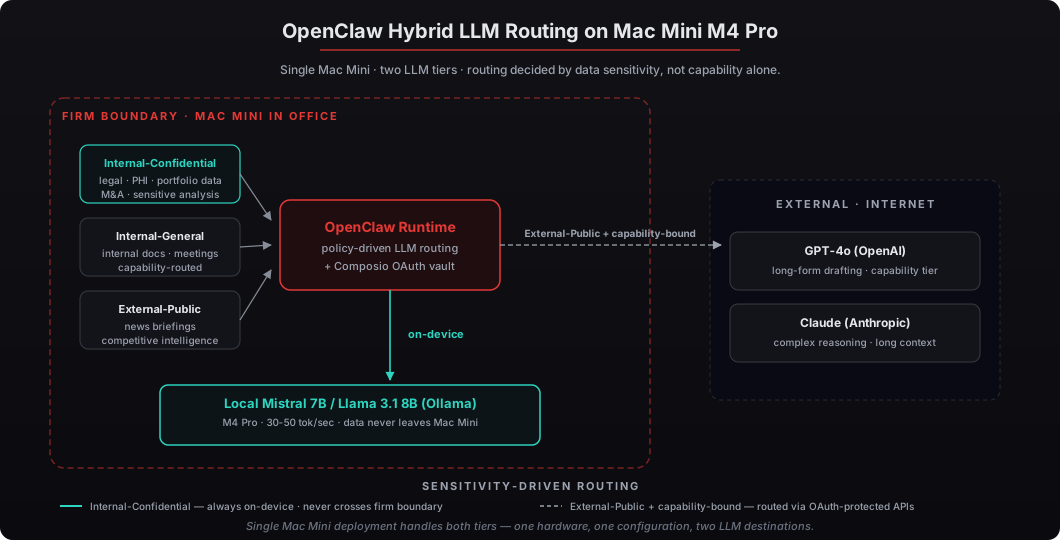
OpenClaw’s hybrid LLM routing sends sensitive workflows to the local Mac Mini-hosted model and capability-bound workflows to frontier APIs. The configuration is policy-driven: every agent skill declares its data sensitivity tier (Internal-Confidential, Internal-General, External-Public), and the OpenClaw runtime routes inference accordingly. Internal-Confidential always stays on local hardware. External-Public can route to GPT-4o or Claude via API. Internal-General routes based on capability requirements — short structured outputs use the local model, long-form generation may route to API.
This pattern means a single Mac Mini OpenClaw deployment handles family office portfolio analysis, healthcare PHI summarization, legal matter triage, and M&A target screening entirely on-device — and routes board deck narrative drafting or executive briefing prose to GPT-4o or Claude via API, where capability matters more than data residency. Our credential security architecture covers how API keys for the frontier model routing are protected by the Apple Secure Enclave on the same hardware.
Are there workflows where the Mac Mini won’t keep up?
Yes — three categories. First, very long-context workflows above 32K tokens at high sustained throughput, where attention computation becomes compute-bound rather than memory-bound and the M4 Pro’s smaller compute envelope shows. Second, fine-tuning or training workloads (the Mac Mini handles inference well but isn’t built for training large models — that’s still cloud GPU territory). Third, workflows requiring 30B+ parameter models for capability reasons, which need the M4 Max Studio with 64GB+ unified memory or cloud GPU.
For 95% of OpenClaw executive workflows, the M4 Pro Mac Mini is sufficient. The 5% that need bigger hardware tend to be capability-bound research workflows where capability matters more than data residency, and routing to API makes practical sense. We size the Mac Mini at 24GB unified memory specifically because it covers the 7-14B model range with comfortable headroom for KV cache and macOS overhead, which matches the OpenClaw private LLM workload profile we see across deployments.
What’s the configuration we ship for clients running private LLM workflows?
Every Mac Mini OpenClaw deployment from beeeowl ships pre-configured with Ollama as the local inference runtime, Mistral 7B Q4_K_M as the default private LLM, OpenClaw’s hybrid routing configured to send Internal-Confidential workloads to the local model, macOS Keychain credential storage protected by the Apple Secure Enclave, and Docker sandboxing for the agent runtime to isolate skill execution. The deployment includes one fully configured agent with Composio integrations for the executive’s specific workflow and one year of monthly mastermind access.
Total cost: $5,000 one-time, shipped within one week, ready for the first agent run on day one. For US businesses, the Section 179 deduction applies — at the 35% federal bracket, the after-tax cost lands around $1,750-$2,000 (we walked through the Section 179 math here). For executive teams running private AI workflows that genuinely require data to stay on-premises, the M4 Pro Mac Mini is the single hardware purchase that takes private AI from concept to production.
Request your Mac Mini deployment and we’ll ship private AI hardware to your office within one week — fully configured, security-hardened, with the local LLM and OpenClaw agent runtime ready to use on first boot.