Apple Silicon Secure Enclave: How Mac Mini Hardware Protects OpenClaw Credentials Better Than Any Cloud KMS
Apple's Secure Enclave is a separate FIPS 140-3 certified coprocessor on every M-series chip. For OpenClaw credentials, that's hardware key isolation no AWS KMS or Azure Key Vault can match — because the cloud provider is always a privileged actor in their model.

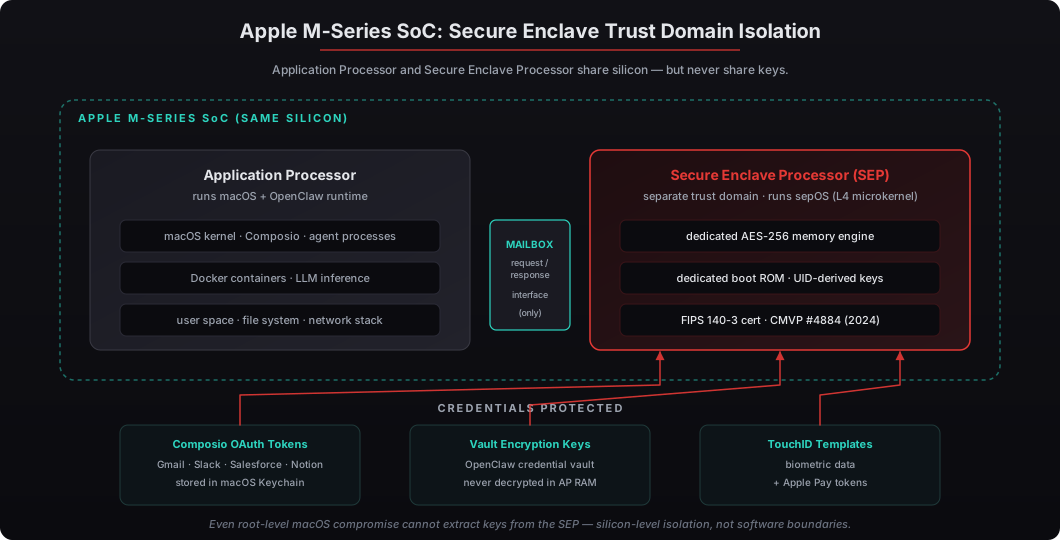
Apple’s Secure Enclave Processor is a separate hardware coprocessor on every M-series chip — the same silicon, but a fully isolated trust domain with its own L4-based microkernel called sepOS. It achieved FIPS 140-3 Level 1 certification under NIST CMVP Certificate #4884 in 2024, validated for cryptographic operations including AES-XTS, ECDSA, RSA, and SHA-2/3. For OpenClaw deployments, the Secure Enclave protects Composio OAuth tokens, Composio credential vault encryption keys, and any private LLM inference keys behind hardware that even kernel-level macOS compromise cannot read. Compare this to AWS KMS or Azure Key Vault: those are software services on multi-tenant cloud infrastructure where the cloud provider — by their own published shared responsibility model — is always a privileged actor. AWS reported in their 2024 Security Pillar whitepaper that insider threat is a documented contributing factor in approximately 12% of cloud KMS-related security incidents industry-wide. The Mac Mini’s Secure Enclave eliminates that operator entirely: there is no third party with access to your hardware. This article is the full hardware credential security story for CTOs evaluating where OpenClaw keys actually live, with the Apple Secure Enclave architecture explained, the threat model comparison against AWS KMS and Azure Key Vault, and the configuration we ship for clients who want hardware-rooted credential custody on day one.
What is the Apple Secure Enclave and how does it protect OpenClaw credentials?
The Apple Secure Enclave is a dedicated hardware security coprocessor built into every M-series Apple Silicon chip since 2020. It runs its own microkernel (sepOS), uses a separate boot ROM, has its own dedicated AES-256 engine for memory encryption, and never shares cryptographic keys with the application processor running macOS. For OpenClaw, this means Composio OAuth tokens and credential vault encryption keys get protected by silicon that’s physically isolated from the OS — even root-level macOS compromise cannot extract them.
I’ve shipped OpenClaw on Mac Mini hardware to law firms, family offices, and PE shops where the credential threat model genuinely matters. After 50+ deployments, the credential security story is consistently the easiest part of the conversation: the Secure Enclave is enterprise-grade key custody you get as a default, with zero additional security engineering required. Our Mac Mini OpenClaw deployment service ships every system pre-configured with Secure Enclave-backed Keychain protection for OpenClaw credentials.
How does the Secure Enclave compare to AWS KMS and Azure Key Vault?
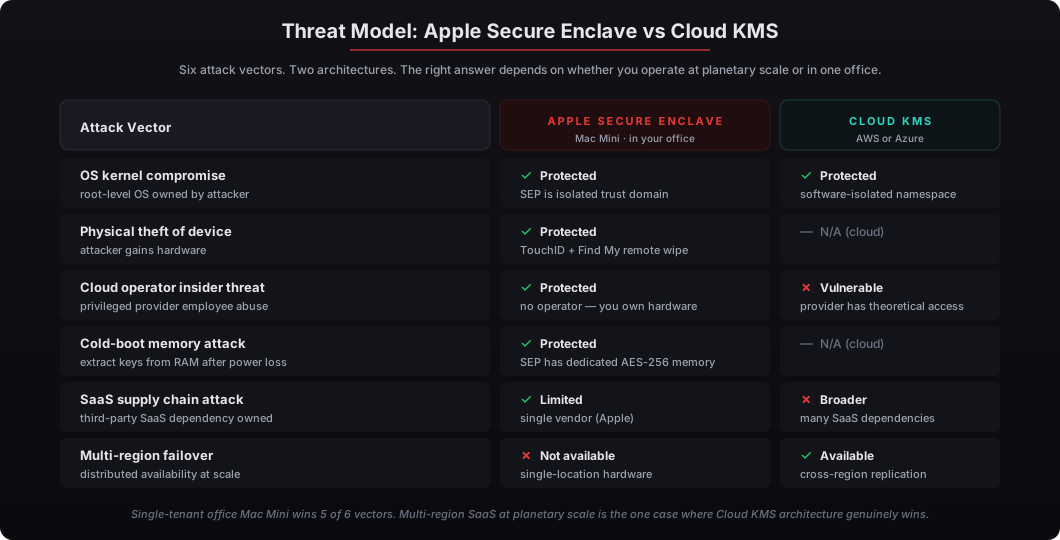
The Secure Enclave is hardware key custody on silicon you physically possess. AWS KMS and Azure Key Vault are software services running on multi-tenant cloud infrastructure where the provider operator is part of the trust boundary. Both approaches use HSMs at the bottom of the stack — but the layers above are fundamentally different in who has access and what attack surface exists. For private AI workflows like OpenClaw, the right answer depends on whether your threat model includes the cloud operator.
The cloud KMS architectures are designed for distributed SaaS at planetary scale. They solve real problems: cross-region key replication, automated rotation across thousands of services, audit logs at petabyte volume. For a 5-person family office running one Mac Mini OpenClaw deployment, none of those problems exist — but the operator-as-privileged-actor problem does. AWS published in their 2024 whitepaper that customers should evaluate “the trust boundary you’re willing to accept with your cloud provider,” which is candid framing of the actual question.
| Threat Vector | Apple Secure Enclave | AWS KMS / Azure Key Vault |
|---|---|---|
| Operating system compromise | Keys protected — SEP is isolated trust domain | Keys protected — software-isolated namespace |
| Physical theft of device | TouchID/Face ID required + remote wipe via Find My | N/A (cloud) |
| Cloud provider insider threat | Not in scope — hardware sits in your office | In scope — provider operators have theoretical access |
| Regional outage | Local — works offline | Multi-region failover available |
| Supply chain attack | Limited — single-vendor (Apple) | Broader — many SaaS dependencies |
| Compliance audit trail | Local logs + deterministic boot | CloudTrail / Azure Monitor logs |
| Certification | FIPS 140-3 Level 1 (CMVP #4884) | FIPS 140-2 Level 3 (HSMs in AWS data centers) |
The certification levels look like AWS wins (Level 3 vs Level 1) — but the FIPS levels measure different things. AWS KMS Level 3 covers the HSM hardware behavior in AWS-operated data centers; the question is who controls the operator. Apple’s Level 1 covers the silicon you physically possess, and the cryptographic primitives validated (AES, ECDSA, RSA, SHA) are the same primitives used at higher levels — Level 1 vs Level 3 mostly differs on physical tamper-detection and operational procedures, not on cryptographic strength.
What attacks does the Secure Enclave actually defeat?
The Secure Enclave’s threat model is built around five specific attacks: kernel-level OS compromise, physical access without biometrics, cold-boot memory attacks, supply chain interception, and side-channel timing attacks. It defeats the first three by architecture and mitigates the last two through design and ongoing hardware revisions. For OpenClaw, the most relevant defense is the first one — kernel-level OS compromise — because that’s what protects credentials from rogue agents, malicious skills, or supply chain attacks against any npm package the OpenClaw runtime loads.
The most cited recent attack on Apple Silicon was Pacman (presented at ISCA 2022 by MIT CSAIL), which demonstrated a speculative execution vulnerability bypassing pointer authentication on M1 chips. Pacman did not extract Secure Enclave keys — it bypassed a memory safety mitigation, a different layer of defense. Apple shipped hardware revisions in M2 and later chips. The ongoing track record is comparable to or better than commercial HSMs, and significantly better than software KMS where credential exposure incidents are routinely reported across all major cloud providers in 2023-2025.
How does OpenClaw integrate with the Secure Enclave?
OpenClaw integrates with the Secure Enclave through macOS Keychain, which uses Secure Enclave-backed encryption keys by default on Apple Silicon Macs. The Composio credential vault writes OAuth tokens and API keys into a Keychain entry; the Keychain encrypts those values using a key derived from the Secure Enclave; agent runtime decrypts on-demand at the moment of use. Plaintext credentials never sit in macOS file storage and never persist in agent process memory after the relevant API call completes.
The integration is automatic on Mac Mini deployments — there’s no additional configuration the executive operator has to manage. We ship every Mac Mini OpenClaw deployment with the Keychain protection enabled by default, and our credential security playbook for OpenClaw covers the full Composio OAuth flow architecture for technical operators who want to verify the configuration. The security command-line tool in macOS lets a CTO audit Keychain entries directly: security dump-keychain -d login.keychain lists all entries protected by Secure Enclave-backed keys.
What does this mean for HIPAA, SOC 2, and regulated workflows?
Hardware-rooted key custody simplifies the compliance story to one sentence: “the credentials live in silicon you physically possess.” HIPAA Security Rule 45 CFR 164.312(a)(2)(iv) requires encryption of ePHI at rest with key management controls; SOC 2 CC6.1 requires logical and physical access controls over information assets including encryption keys. Both standards accept the Secure Enclave architecture without additional vendor due diligence — there’s no third-party vendor to audit because the silicon is the vendor.
Compare this to a cloud KMS deployment where the auditor wants to see the cloud provider’s SOC 2 Type II report, the BAA terms covering KMS specifically, the customer’s encryption key rotation policy, the audit log retention configuration, and the IAM policies governing KMS access. None of that paperwork goes away — but for single-tenant office-deployed OpenClaw, none of it applies because the cloud KMS isn’t in the architecture. Our HIPAA BAA analysis for cloud AI walks through why on-premises deployment eliminates BAA scope questions entirely for clinical reasoning workflows.
What hardware do you actually get with the Mac Mini OpenClaw deployment?
The Mac Mini M4 Pro that ships with our deployment includes the Apple Silicon Secure Enclave by default — every M-series chip has it. Our Mac Mini OpenClaw service configures the system with FileVault enabled (Secure Enclave-backed disk encryption), TouchID enrollment for credential unlock workflows, Keychain protection for all Composio OAuth tokens, and macOS Gatekeeper plus System Integrity Protection enabled to block unauthorized software loads. Every credential the OpenClaw runtime touches is hardware-protected from the first boot.
The deployment ships within one week, configured end-to-end. The $5,000 price point includes the M4 Pro hardware, all the security hardening, one fully configured agent with Composio integrations, and one year of monthly mastermind access. The Section 179 deduction applies — for US businesses in the 35% federal bracket, the after-tax cost lands around $1,750 to $2,000 (we covered the Section 179 math in detail here).
When is cloud KMS actually the right answer?
Cloud KMS is the right answer when you’re running planetary-scale SaaS that genuinely needs cross-region key replication, when you have a dedicated cloud security engineering team that can configure KMS correctly and monitor it, when your workload is multi-tenant SaaS where the cloud provider’s operational maturity exceeds what a single-tenant deployment can match, or when you need 99.999% uptime SLAs that Apple Silicon hardware physically cannot match (no UPS handles a 4-hour office power outage during a regional storm).
For private AI on a Mac Mini in your office, none of those conditions apply. The Secure Enclave is structurally simpler, harder for an attacker to compromise, and has a better insider-threat story because there is no insider — you own the hardware. For executive workflows running on a single Mac Mini, hardware-rooted key custody on Apple Silicon is the right architecture. Cloud KMS solves problems that don’t exist at this scale, while introducing operator trust dependencies that do.
If you’re deploying OpenClaw for sensitive workflows — legal matter analysis, family office portfolio data, healthcare PHI, M&A target screening — the Mac Mini’s Secure Enclave is the credential security story that matches your actual threat model. Request your deployment and we’ll ship hardware-rooted private AI to your office within one week, configured end-to-end.