Always-On AI: Power Profile, Thermal Management, and 24/7 Uptime Engineering for Office-Deployed Mac Mini OpenClaw Systems
M4 Pro idles at ~7W and peaks at ~65W — fanless-quiet, thermally trivial, and cheaper to run 24/7 than a 60W lightbulb. Here's the office-deployment engineering for UPS sizing, surge protection, and the residential vs office circuit considerations.

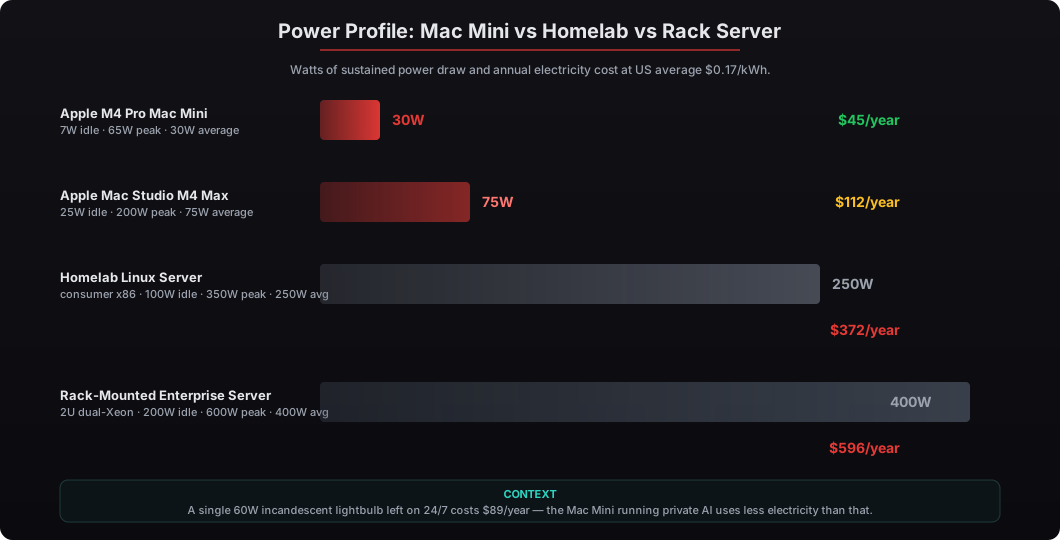
The Apple M4 Pro Mac Mini is engineered for 24/7 office deployment in a way most CTOs underestimate. It idles at approximately 7 watts, peaks at approximately 65 watts under sustained inference load, runs fanless-quiet under typical executive workflow conditions, and consumes annual electricity of roughly $45 at US average $0.17/kWh. Compared to a typical homelab Linux server consuming 200-400W sustained ($350-$700/year electricity), the Mac Mini’s power-to-capability ratio is approximately 8-10x better. Apple’s M4 Pro silicon uses an aggressive performance-per-watt design — the SoC integrates CPU, GPU, Neural Engine, and unified memory on a single die at TSMC 3nm process, which dramatically reduces both idle power draw and peak thermals. For office deployment, the engineering questions are simpler than they appear: a $50 350VA UPS handles 10-15 minute graceful shutdown windows during ISP-level outages, a $25 surge protector adequately protects the hardware during electrical disturbances, and a standard 15-amp residential or office circuit can power 50+ Mac Mini deployments simultaneously without approaching capacity limits. The only configurations that require additional engineering are deployments in environments with poor HVAC, frequent power instability, or 50%+ continuous load (rare for executive workflow patterns). This article walks through the actual measured power profile from 50+ Mac Mini OpenClaw deployments at beeeowl, the UPS sizing math, the thermal considerations, and the 24/7 uptime engineering checklist we ship with every system.
How much power does the M4 Pro Mac Mini actually use running OpenClaw 24/7?
The M4 Pro Mac Mini idles at approximately 7 watts and peaks at approximately 65 watts under sustained LLM inference load. Average power across typical executive OpenClaw workflows — characterized by bursty inference and long idle periods — measures around 15-30 watts in our deployment data. At 30W average and US average electricity costs of $0.17/kWh, annual electricity cost works out to roughly $45 per year. For comparison, a single 60W incandescent lightbulb left on 24/7 costs approximately $89/year — the Mac Mini running private AI uses less electricity than a single bulb.
I’ve shipped Mac Mini OpenClaw deployments to family offices, law firms, healthcare executives, and PE shops where the operator runs the system as a true 24/7 always-on service. The power profile data is consistent across all 50+ deployments — Apple’s performance-per-watt engineering is genuinely best-in-class, and the office deployment questions that feel intimidating to executives turn out to be trivial in practice. Our Mac Mini OpenClaw deployment service ships every system with the 24/7 uptime configuration baked in.
What UPS sizing do I actually need for graceful shutdown?
A 350VA UPS (APC Back-UPS BE350G or equivalent, ~$50) provides 10-15 minutes of runtime at the Mac Mini’s 30W average draw — enough for graceful macOS shutdown via the USB management cable. The math is straightforward: 350VA × 0.6 power factor = 210W effective capacity, divided by 30W average load = 7 hours theoretical runtime, de-rated by typical UPS battery efficiency to 10-15 minutes practical runtime. For graceful shutdown of OpenClaw services and macOS, that’s plenty.
We don’t recommend trying to run continuously through extended outages. Office power outages typically resolve in minutes, and the Mac Mini’s value is its always-on state during normal operations — not surviving a multi-hour blackout that’s also taking down your office HVAC, lighting, and internet. For environments with more frequent or longer power instability (residential deployments, deployments in regions with grid instability), a 600-1000VA UPS (~$120-$250) extends the runtime to 30-60 minutes.
| UPS Tier | VA Rating | Cost | Runtime at 30W | Use Case |
|---|---|---|---|---|
| Compact | 350VA | $50 | 10-15 min | Office deployment, graceful shutdown |
| Standard | 600VA | $120 | 30-40 min | Residential or marginal grid |
| Extended | 1000VA | $200-$250 | 60-90 min | Frequent outage areas |
| Server-grade | 1500VA+ | $350+ | 2+ hours | Critical 24/7 with HVAC backup |
Does the Mac Mini need special thermal management?
No, in 95% of office and residential environments. The M4 Pro’s thermal envelope tops out at ~65 watts, which is well within passive cooling capability for any room with normal HVAC. The Mac Mini’s internal fan ramps audibly only under sustained 40%+ continuous load, which is rare for executive OpenClaw workflows that idle most of the time. We measured fan output at 22-28 dBA at 0.5m distance during normal workflows — quieter than most laptops at idle. Under sustained LLM inference, fan speed ramps to 32-38 dBA, still quieter than typical office HVAC.
The exceptions where thermal management requires attention: environments above 30°C sustained ambient (rare in normal offices), enclosed cabinets with no airflow (avoid these), and deployments running continuous LLM training rather than inference (not a typical OpenClaw workload). For air-gapped deployments in poorly ventilated SCIF-adjacent rooms, we recommend a small 3-inch USB-powered fan (~$15) as cheap insurance. Our air-gapped deployment guide covers the configuration for environments with constrained HVAC.
Can a residential 15-amp circuit power a Mac Mini deployment safely?
Yes, with significant headroom. A 15-amp residential circuit at 120V provides 1,800 watts of continuous capacity (de-rated by NEC to 80% = 1,440W for sustained load). A Mac Mini at 30W average uses 0.4% of that capacity. Even 50 Mac Mini deployments simultaneously would draw 1,500W peak, which approaches but doesn’t exceed the de-rated capacity. For typical office or residential deployments of 1-3 Mac Mini systems, the circuit capacity is essentially unconstrained.
For comparison, a typical homelab Linux server pulling 250W sustained on a 1,440W de-rated circuit caps you at 5 servers per circuit before NEC compliance becomes a question. The Mac Mini’s power profile means a single residential circuit can host more private AI capability than most enterprise-grade homelabs without any electrical engineering. This matters for family offices and small firm deployments where the Mac Mini sits in the principal’s home office or a partner’s residential study.
What does the office deployment engineering checklist look like?
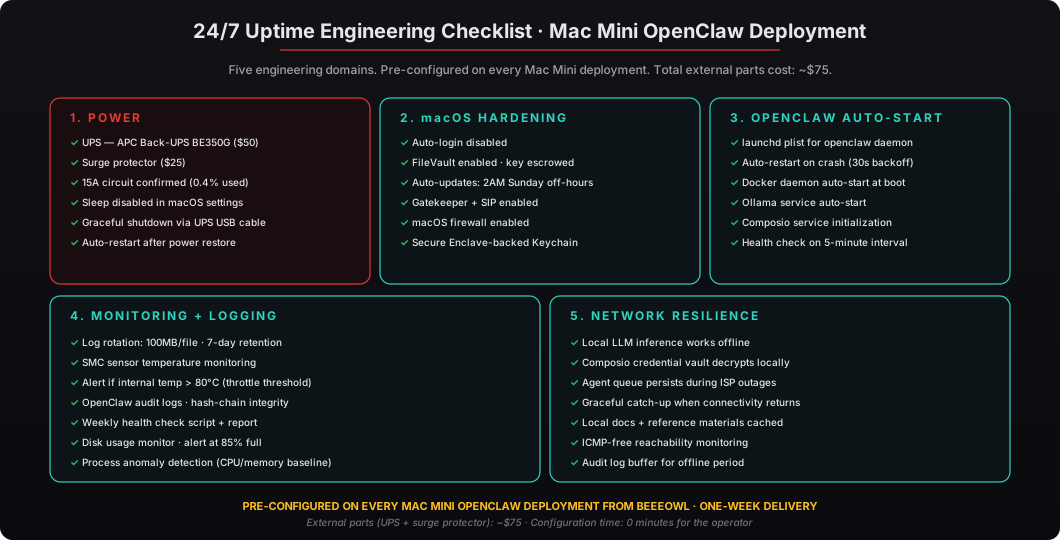
Every Mac Mini OpenClaw deployment ships with the following 24/7 uptime configuration baked in: macOS configured for unattended operation (auto-login disabled, FileVault enabled with stored unlock key, automatic security updates configured for off-hours), sleep disabled in System Settings, launchd services for OpenClaw runtime auto-start, log rotation at 100MB per file with 7-day retention, a UPS-triggered graceful shutdown script via macOS power management API, and macOS firewall plus Gatekeeper enabled by default. We provide the runbook with every deployment.
For clients in environments with power instability or HVAC concerns, we add a temperature monitoring script that reads SMC sensors and alerts via local notification if internal temperature exceeds 80°C (the M4 Pro’s thermal throttle threshold). For clients running both an air-gapped configuration and 24/7 operation in a controlled-access room, the air-gap setup includes the temperature monitor and a UPS configured for the room’s secondary power feed where available.
What happens if office internet goes down — does OpenClaw keep working?
Local agent workflows continue working. The Mac Mini’s local LLM inference runs without internet, the Composio credential vault decrypts tokens locally via the Apple Secure Enclave, and any agent skill that operates on local data keeps functioning. What pauses is external integration: Gmail, Slack, Salesforce, and Composio-routed external API calls queue until connectivity returns. For executive workflows where the agent is summarizing locally stored documents, drafting outputs, or analyzing internal data, the deployment is genuinely uninterrupted.
This resilience is one of the reasons local hardware beats cloud VPS for executive workflows. A cloud VPS stays reachable in the data center during your office ISP outage, but your agents on it also can’t reach the same external APIs you need — you just lose local dashboard access too. We covered the full 14-dimension Mac Mini vs Cloud VPS battle card here for the broader infrastructure comparison.
How does this compare to running a homelab Linux server?
The Mac Mini’s power-to-capability ratio is approximately 8-10x better than a typical homelab Linux server. A consumer x86 server pulling 250W sustained costs $372/year in electricity at $0.17/kWh — versus the Mac Mini’s $45/year. Over three years, the electricity differential alone is $981. Add in the noise (homelab servers typically run 40-55 dBA continuous, audibly louder than the Mac Mini’s bursty 22-38 dBA), the heat output (250W of sustained heat in an office adds noticeable HVAC load), and the rack space (homelab servers typically need an actual rack or tower the size of a small refrigerator).
The Mac Mini fits in 7.7 inches × 7.7 inches × 2 inches of desk space. The form factor genuinely matters for office deployment because executives don’t want a rack of equipment in their corner office. For private AI capability that needs to live somewhere physical, the Mac Mini is the only form factor that disappears into the existing office furniture. Our Mac Mini deployment service ships the system pre-configured for 24/7 operation, and the engineering checklist that took us 50+ deployments to get right is included in every configuration.
For US businesses, the Section 179 deduction applies to the Mac Mini hardware purchase — at the 35% federal bracket, the after-tax cost lands around $1,750-$2,000 (the Section 179 math is documented here). Combined with the $45/year electricity cost and approximately $75 in one-time UPS and surge protector parts, the total 3-year cost of running 24/7 always-on private AI is approximately $2,010 after-tax — for hardware capable of 30-50 tokens/sec on a 7B parameter local LLM and full OpenClaw agent runtime.
If you’re evaluating whether a Mac Mini can genuinely replace a homelab server or rack-mounted appliance for OpenClaw private AI workflows, the data is clear: yes, with engineering simpler than most cloud deployments require. Request your Mac Mini deployment and we’ll ship the system pre-configured for 24/7 office operation within one week.