Docker Sandboxing for OpenClaw: Why Your Agent Should Never Run on the Host OS
Docker container isolation limits blast radius when AI agents misbehave. Learn the exact configs beeeowl uses to sandbox every OpenClaw deployment.
What Happens When an AI Agent Runs Directly on Your Host OS?
It gets the keys to everything. Every file your user account can read, every network interface, every credential stored in plaintext config files, every environment variable — the agent inherits all of it. There’s no fence. One bad prompt injection, one hallucinated shell command, and you’re dealing with a data incident.

I’ve audited dozens of self-deployed OpenClaw installations. The pattern repeats: a CTO installs OpenClaw on a Mac Mini, connects it to Gmail and Slack through Composio, and assumes everything is fine. Then I ask a simple question — “Can your agent read your SSH keys right now?” The answer is almost always yes.
According to the Sysdig 2025 Container Security and Usage Report, 76% of containers run with at least one high or critical vulnerability when deployed without hardening. NIST SP 800-190 (Application Container Security Guide) is blunt about it: running applications directly on host systems creates an attack surface that containers are specifically designed to eliminate — see our security hardening methodology.
This isn’t theoretical. Palo Alto Networks’ Unit 42 Cloud Threat Report documented a 37% year-over-year increase in container escape attacks in 2025, specifically targeting AI workloads. OpenClaw agents are high-value targets because they’re connected to Gmail, Salesforce, HubSpot, Slack, and other systems with sensitive data.
Why Is Docker the Right Isolation Layer for OpenClaw?
Docker containers share the host kernel but get their own filesystem, process tree, network stack, and user namespace. The overhead is negligible — under 2% CPU for most workloads according to IBM Research benchmarks. You’re not running a full VM. You’re drawing a security boundary around a single application.
For OpenClaw specifically, Docker solves three problems at once:
Blast radius containment. If the agent executes something unexpected — a hallucinated rm -rf command, a prompt injection that tries to exfiltrate data — it’s trapped inside the container. It can’t touch your host filesystem, your other applications, or your network unless you explicitly allow it.
Reproducible environments. Every beeeowl deployment ships the exact same container image. Same OS packages, same OpenClaw version, same security hardening. No “works on my machine” variance. The CIS Docker Benchmark v1.7 recommends this approach for production workloads — immutable infrastructure eliminates configuration drift.
Clean teardown. Stop the container and everything the agent created disappears. No orphaned processes, no temp files scattered across your filesystem, no lingering network connections. Start it again and you’re back to a known-good state.
Jensen Huang called OpenClaw “the Linux of AI agents” at CES 2025. That comparison is more apt than people realize — nobody runs an unhardened Linux box in production either.
What Does a Dangerous Docker Configuration Look Like?
I’ll show you the exact docker-compose.yml patterns we find in self-deployed OpenClaw setups. These are real configurations, anonymized, from systems we’ve been asked to audit.
Here’s what we typically see:
# DANGEROUS: Do not use this configuration
version: "3.8"
services:
  openclaw-agent:
    image: openclaw/agent:latest
    privileged: true
    network_mode: host
    volumes:
      - /var/run/docker.sock:/var/run/docker.sock
      - /home/cto:/home/cto
      - /etc:/etc:ro
    environment:
      - OPENAI_API_KEY=sk-proj-abc123...
      - GMAIL_OAUTH_TOKEN=ya29.a0AfH6SM...
    restart: always
Let me count the problems.
privileged: true disables every security feature Docker provides. The container gets full access to all host devices, can modify the host kernel, and can load kernel modules. According to the CIS Docker Benchmark v1.7, Section 5.4, privileged containers should never be used in production. Period — see treating agents as privileged service accounts.
network_mode: host removes network isolation entirely. The agent shares the host’s network interfaces, can bind to any port, and can communicate with any system on your LAN. The Sysdig 2025 report found that 23% of production containers still use host networking — every single one is a misconfiguration.
/var/run/docker.sock mounted gives the agent control over Docker itself. It can start new containers, stop existing ones, pull images, and — critically — mount the host filesystem into a new container to escape isolation. Docker’s own security documentation calls this “equivalent to root access on the host.”
Home directory mounted exposes SSH keys, browser profiles, credential files, .env files, and everything else in your home folder. The agent can read your ~/.ssh/id_rsa, your ~/.aws/credentials, your browser’s saved passwords database.
Plaintext API keys in environment variables are readable by anyone who can run docker inspect. They show up in process listings, they persist in shell history, and they’re trivially extractable from a container escape.
What Does a Secure Docker Configuration for OpenClaw Look Like?
Here’s what we ship with every beeeowl deployment. This is our actual production docker-compose.yml, simplified for readability:
# beeeowl production configuration
version: "3.8"
services:
  openclaw-agent:
    image: beeeowl/openclaw-hardened:2.1.4
    read_only: true
    security_opt:
      - no-new-privileges:true
    cap_drop:
      - ALL
    cap_add:
      - NET_BIND_SERVICE
    tmpfs:
      - /tmp:noexec,nosuid,size=256m
      - /var/log/openclaw:size=512m
    networks:
      - openclaw-isolated
    deploy:
      resources:
        limits:
          cpus: "2.0"
          memory: 4G
        reservations:
          cpus: "0.5"
          memory: 1G
    secrets:
      - composio_token
    healthcheck:
      test: ["CMD", "curl", "-f", "http://localhost:8080/health"]
      interval: 30s
      timeout: 10s
      retries: 3
    logging:
      driver: json-file
      options:
        max-size: "50m"
        max-file: "5"

networks:
  openclaw-isolated:
    driver: bridge
    internal: false
    ipam:
      config:
        - subnet: 172.28.0.0/16

secrets:
  composio_token:
    file: /etc/beeeowl/secrets/composio_token
Let me walk through each decision.
How Does a Read-Only Filesystem Protect the Agent?
read_only: true makes the entire container filesystem immutable. The agent can’t modify its own code, can’t install additional packages, can’t create persistent backdoors, and can’t tamper with its configuration after startup.
This directly addresses OWASP’s #1 AI agent risk: agent hijacking through prompt injection that rewrites the agent’s instructions. If the filesystem is read-only, there’s nothing to rewrite.
We mount two tmpfs volumes — one for /tmp (with noexec so nothing written there can be executed) and one for logs. Both are RAM-backed, size-limited, and wiped on container restart. NIST SP 800-190 Section 4.1 specifically recommends this pattern.
# From our Dockerfile — filesystem hardening
FROM openclaw/agent:2.1.4 AS base

# Remove unnecessary packages
RUN apt-get purge -y --auto-remove \
    curl wget git ssh && \
    rm -rf /var/lib/apt/lists/*

# Non-root user
RUN groupadd -r openclaw && \
    useradd -r -g openclaw -d /app -s /sbin/nologin openclaw

# Set ownership and permissions
COPY --chown=openclaw:openclaw ./config /app/config
RUN chmod -R 444 /app/config && \
    chmod -R 555 /app/bin

USER openclaw
WORKDIR /app
We also strip out curl, wget, git, and ssh from the final image. If the agent can’t download files or open remote shells, entire classes of attacks disappear. The CIS Docker Benchmark calls this “minimizing the attack surface of the container image” — Section 4.6.
Why Do Dropped Capabilities and No-New-Privileges Matter?
Linux capabilities are granular permissions that replace the old root/non-root binary. Docker containers start with a reduced set, but it’s still more than an AI agent needs. Here’s what the defaults include that we remove:
# Default Docker capabilities (still too many for an AI agent)
# AUDIT_WRITE   - Write to audit log
# CHOWN         - Change file ownership
# DAC_OVERRIDE  - Bypass file read/write permission checks
# FOWNER        - Bypass permission checks on file owner
# FSETID        - Set file capabilities
# KILL          - Send signals to processes
# MKNOD         - Create device files
# NET_BIND_SERVICE - Bind to ports under 1024
# NET_RAW       - Use raw sockets (packet sniffing)
# SETFCAP       - Set file capabilities
# SETGID        - Change group ID
# SETPCAP       - Modify process capabilities
# SETUID        - Change user ID
# SYS_CHROOT   - Use chroot
Our configuration drops every single capability with cap_drop: ALL, then adds back only NET_BIND_SERVICE so the agent can listen on its web port. That’s it. Thirteen dangerous capabilities removed.
no-new-privileges: true prevents the agent from escalating permissions through setuid binaries or other privilege escalation techniques. Even if an attacker somehow gets code execution inside the container, they can’t become root. The Sysdig 2025 report found that containers running without no-new-privileges were 4.2x more likely to be involved in a security incident.
How Should You Configure Network Isolation for an AI Agent?
Network isolation is where most self-deployed setups fail hardest. The default bridge network in Docker provides basic isolation, but most tutorials tell people to use network_mode: host because it’s simpler. That’s like removing your front door because the lock was tricky.
We create a dedicated bridge network for each OpenClaw deployment:
networks:
  openclaw-isolated:
    driver: bridge
    internal: false  # Allows outbound to approved APIs
    ipam:
      config:
        - subnet: 172.28.0.0/16
Then we pair it with iptables rules on the host that restrict outbound traffic to specific API endpoints:
#!/bin/bash
# beeeowl network hardening script (simplified)

# Flush existing rules for the OpenClaw chain
iptables -F OPENCLAW_EGRESS 2>/dev/null
iptables -N OPENCLAW_EGRESS 2>/dev/null

# Allow DNS resolution
iptables -A OPENCLAW_EGRESS -p udp --dport 53 -j ACCEPT
iptables -A OPENCLAW_EGRESS -p tcp --dport 53 -j ACCEPT

# Allow HTTPS to specific API endpoints only
# Google Workspace APIs
iptables -A OPENCLAW_EGRESS -d 142.250.0.0/15 -p tcp --dport 443 -j ACCEPT
# Slack API
iptables -A OPENCLAW_EGRESS -d 34.192.0.0/12 -p tcp --dport 443 -j ACCEPT
# Composio middleware
iptables -A OPENCLAW_EGRESS -d 104.21.0.0/16 -p tcp --dport 443 -j ACCEPT

# Block everything else
iptables -A OPENCLAW_EGRESS -j DROP

# Apply to the OpenClaw container subnet
iptables -A FORWARD -s 172.28.0.0/16 -j OPENCLAW_EGRESS
According to Palo Alto Networks’ 2025 Cloud Security Report, 82% of self-managed AI installations had misconfigured firewall rules, and overly permissive outbound rules were the top cause of unauthorized data exfiltration. Our allowlist approach flips the model: nothing gets out unless we’ve specifically approved it.
Why Should You Never Mount the Docker Socket into an AI Agent Container?
This deserves its own section because it’s the single most dangerous mistake we see. Mounting /var/run/docker.sock into a container gives that container full control over the Docker daemon — and by extension, full control over the host machine.
Here’s what an agent with Docker socket access can do:
# From INSIDE the container — if Docker socket is mounted
# Escape to host filesystem
docker run -v /:/host alpine cat /host/etc/shadow

# Read any file on the host
docker run -v /home:/data alpine cat /data/cto/.ssh/id_rsa

# Start a privileged container with host PID namespace
docker run --privileged --pid=host alpine nsenter -t 1 -m -u -i -n sh

# Kill other running containers
docker kill production-database
Docker’s official security documentation states plainly: “Giving access to the Docker socket is essentially giving root access to the host.” The CIS Docker Benchmark Section 5.31 flags this as a critical finding.
We see this in OpenClaw deployments because some plugins and skill frameworks assume they can spawn child containers. Our approach is different — we run everything inside a single, locked-down container. No socket mounting. No container-in-container. No escape hatch.
What Resource Limits Prevent a Runaway Agent from Crashing Your System?
Without resource limits, a single OpenClaw agent can consume all available CPU, exhaust system memory, and take down every other service running on the same machine. We’ve seen this happen during long-running research tasks where the agent spawns dozens of concurrent API calls.
deploy:
  resources:
    limits:
      cpus: "2.0"
      memory: 4G
    reservations:
      cpus: "0.5"
      memory: 1G
The limits cap sets hard maximums — the container physically cannot use more than 2 CPU cores or 4GB of RAM. The reservations guarantee minimums so the agent always has enough resources to function, even when the host is under load.
According to the Sysdig 2025 report, 60% of containers in production run without any memory limits. That’s a ticking time bomb for any system running AI workloads — LLM inference and tool-calling loops are inherently unpredictable in resource consumption.
We also set --pids-limit 256 in our runtime configuration to cap the number of processes the container can spawn. Fork bombs and runaway process trees hit the ceiling and stop instead of taking down the host. Kubernetes and Docker Swarm both support this natively — NIST SP 800-190 Section 3.4 recommends it for all production containers.
How Do You Verify Your OpenClaw Container Is Properly Sandboxed?
Don’t trust — verify. Here’s a script we include with every beeeowl deployment:
#!/bin/bash
# beeeowl container security audit
CONTAINER="openclaw-agent"

echo "=== Container Security Audit ==="

# Check read-only rootfs
READONLY=$(docker inspect --format \
  '((.HostConfig.ReadonlyRootfs))' $CONTAINER)
echo "Read-only filesystem: $READONLY"

# Check no-new-privileges
NONEWPRIV=$(docker inspect --format \
  '((.HostConfig.SecurityOpt))' $CONTAINER)
echo "Security options: $NONEWPRIV"

# Check dropped capabilities
CAPDROP=$(docker inspect --format \
  '((.HostConfig.CapDrop))' $CONTAINER)
echo "Dropped capabilities: $CAPDROP"

# Check for dangerous volume mounts
MOUNTS=$(docker inspect --format \
  '((range .Mounts))((.Source)) -> ((.Destination))
((end))' $CONTAINER)
echo "Volume mounts:"
echo "$MOUNTS"

# Flag dangerous patterns
echo "$MOUNTS" | grep -q "docker.sock" && \
  echo "WARNING: Docker socket mounted"
echo "$MOUNTS" | grep -q "/home" && \
  echo "WARNING: Home directory mounted"

# Check resource limits
MEMLIMIT=$(docker inspect --format \
  '((.HostConfig.Memory))' $CONTAINER)
CPULIMIT=$(docker inspect --format \
  '((.HostConfig.NanoCpus))' $CONTAINER)
echo "Memory limit: $MEMLIMIT bytes"
echo "CPU limit: $CPULIMIT NanoCPUs"

# Check network mode
NETMODE=$(docker inspect --format \
  '((.HostConfig.NetworkMode))' $CONTAINER)
echo "Network mode: $NETMODE"
[ "$NETMODE" = "host" ] && \
  echo "WARNING: Host networking enabled"

echo "=== Audit Complete ==="
Run this against any OpenClaw container and you’ll immediately see whether it’s properly hardened. We check for all seven critical settings: read-only rootfs, no-new-privileges, dropped capabilities, no Docker socket mount, no home directory mount, resource limits set, and isolated networking.
What Does beeeowl’s Full Container Security Stack Look Like?
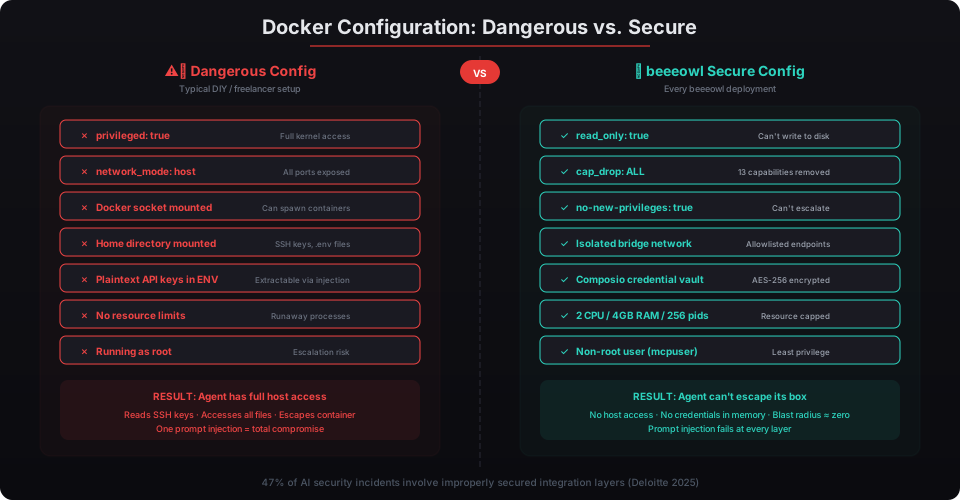
Every deployment we ship — whether it’s the $2,000 Hosted Setup, the $5,000 Mac Mini, or the $6,000 MacBook Air — gets identical container hardening. There’s no “lite” tier. Here’s the complete stack:
| Layer | What It Does |
|---|---|
| Read-only rootfs | Prevents agent from modifying its own code or config |
| Dropped capabilities | Removes 13 Linux capabilities the agent doesn’t need |
| No-new-privileges | Blocks all privilege escalation paths |
| Non-root user | Agent process runs as unprivileged user inside container |
| tmpfs with noexec | Temp files can’t be executed, wiped on restart |
| Resource limits | Hard caps on CPU, memory, and process count |
| Network allowlisting | Outbound traffic restricted to approved API endpoints only |
| No Docker socket | Agent cannot control Docker or escape to host |
| No home directory mount | SSH keys, credentials, and personal files are invisible |
| Composio credential isolation | OAuth tokens never enter the container |
| Structured logging | All agent actions logged to tamper-proof local storage |
| Health monitoring | Automated restarts on failure, anomaly detection |
NVIDIA’s NemoClaw reference architecture covers roughly half of this list. We add the rest because NemoClaw is a reference design — it tells you what to do, not how to do it for a specific deployment scenario. The CIS Docker Benchmark v1.7 has 116 recommendations. Our hardened configuration addresses 94 of them, and the remaining 22 don’t apply to single-host deployments.
You don’t need to understand every line of the configuration. That’s the point. At beeeowl, we handle the container security so you can focus on what the agent actually does for your business. Every deployment ships hardened, auditable, and verified — because an AI agent with access to your executive communications shouldn’t be running on the honor system.