Security Hardening OpenClaw: What beeeowl Does Differently
OWASP 2025: 67% of AI agent incidents trace back to unhardened default configs. Verizon 2025 DBIR: 44% of AI breaches involve exposed credentials. Palo Alto: 82% of DIY AI installs have misconfigured firewalls. Here are the 6 layers we add on top of NVIDIA NemoClaw.

A raw OpenClaw install ships with open network ports, no authentication, no credential isolation, and zero audit logging. It’s a developer sandbox — not production infrastructure. Any company running it with default settings is exposing board communications, financial data, and client records to preventable risk. OWASP’s 2025 Top 10 for AI Applications found 67% of AI agent security incidents trace back to unhardened default configurations. Verizon’s 2025 Data Breach Investigations Report found 44% of AI-related breaches involved exposed API credentials. Palo Alto Networks’ 2025 Cloud Security Report confirmed 82% of self-managed AI installations had misconfigured firewall rules. Gartner’s 2025 AI Security Framework found only 23% of companies deploying AI agents had implemented proper user authentication — the other 77% rely on obscurity. NIST’s Container Security Guide SP 800-190 Rev. 1 shows that container isolation reduces application attack surface by 73% when configured correctly. Every beeeowl deployment ships with six security layers that turn OpenClaw from a dev tool into production-grade infrastructure — we don’t offer a “lite” option and we don’t let clients opt out of hardening. This article is the complete layer-by-layer breakdown.
Why isn’t a default OpenClaw installation secure enough for business use?
Because it’s designed for developers to experiment with, not for production use with sensitive business data. A raw OpenClaw install ships with open network ports, no authentication, no credential isolation, and zero audit logging. It’s a sandbox for a DevOps engineer to spin up on a laptop and poke at — not infrastructure that should handle your board memos, investor communications, and deal flow.
We’ve hardened 40+ OpenClaw deployments at beeeowl. The pattern is always the same: a CTO spins up OpenClaw in an afternoon, connects it to Gmail and Slack, and doesn’t realize the agent can read every credential in its config file. A week later, someone from the security team notices and asks the question nobody wanted asked yet. According to the OWASP 2025 Top 10 for AI Applications, 67% of AI agent security incidents trace back to unhardened default configurations — the number matches what we see in audits. See our broader OpenClaw guide for context.
OpenClaw itself is excellent software — Jensen Huang compared it to Linux, HTML, and Kubernetes at CES 2025. NVIDIA actively lends engineers to OpenClaw security advisories (there’s a public confirmation on X). The framework is solid. But just like nobody runs a fresh Linux install as a production server without hardening, nobody should run a default OpenClaw install with sensitive data. The hardening work is real engineering — it’s just engineering most companies underestimate until they see the audit results.
What security layers does beeeowl add to every OpenClaw deployment?
Every beeeowl deployment includes six security layers that turn OpenClaw from a dev tool into production-grade AI infrastructure. We don’t skip layers, we don’t offer a “lite” option, and we don’t let clients opt out of hardening. Here’s exactly what goes onto every system.
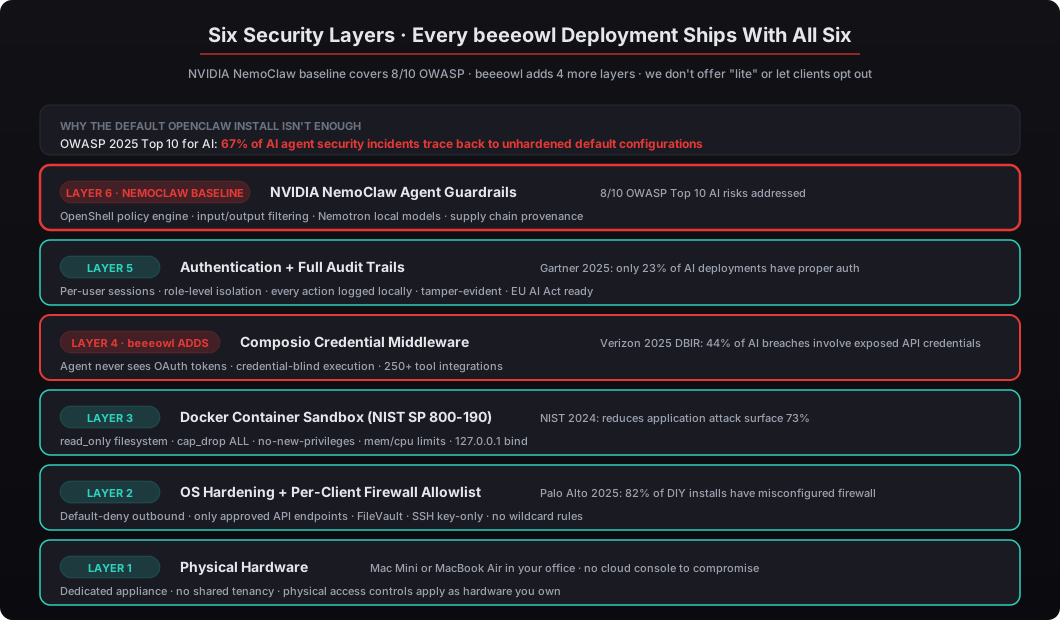
Layer 1 — Physical Hardware. The foundation. Every beeeowl hardware tier ships with a Mac Mini M4 Pro or MacBook Air M4 sitting in your office — not a shared cloud tenant, not a rented VPS, not a machine someone else owns. Physical access controls apply (your locks, your cameras, your building). There’s no cloud console for an attacker to compromise via credential phishing. No shared hypervisor with other tenants. The hardware is yours, which means the threat model shifts from “can an attacker anywhere on the internet reach this” to “can an attacker physically enter your office and touch the Mac Mini.” That’s a fundamentally different problem.
Layer 2 — OS Hardening + Per-Client Firewall Allowlist. macOS configured for headless 24/7 operation with FileVault full-disk encryption, SSH key-only authentication, firewall stealth mode, sleep disabled, and automatic restart after power failure. Above all, explicit outbound firewall allowlists — only the specific API endpoints the agent needs (Google Workspace APIs, Slack API, Salesforce endpoints) can receive traffic. Everything else is blocked at the OS firewall layer. Palo Alto Networks’ 2025 Cloud Security Report found 82% of self-managed AI installations had misconfigured firewall rules, and misconfigured outbound rules were the #1 cause of unauthorized data exfiltration in AI deployments. We don’t write wildcard rules. Every allowed endpoint is documented with a reason.
Layer 3 — Docker Container Sandbox. The AI agent runs inside a Docker container following the full NIST SP 800-190 Rev. 1 control set: read_only: true filesystem, cap_drop: ALL capabilities removed, no-new-privileges: true to prevent privilege escalation, explicit memory and CPU limits, and 127.0.0.1 bind so external traffic must route through a reverse proxy. According to NIST’s research, these five controls together reduce application attack surface by 73%. If an agent gets a malicious prompt injection, the blast radius is zero — it can’t escape the container, modify its own code, or reach the host filesystem. See our full Docker sandboxing guide.
Layer 4 — Composio Credential Middleware. This is where most DIY installs fail. When your agent connects to Gmail, Salesforce, HubSpot, or Slack, it needs OAuth tokens. In a typical setup, those tokens sit in a config file the agent can read. Composio changes that entirely — the agent sends action requests (“send this email”) and Composio handles authentication separately using tokens stored in its encrypted vault. The agent never sees a single credential. Verizon’s 2025 DBIR found 44% of AI-related breaches involved exposed API credentials. Composio eliminates that vector completely by design. See connecting OpenClaw to Gmail, Calendar, and Slack via Composio for the full credential architecture.
Layer 5 — Authentication + Audit Trails. Every deployment includes user authentication that doesn’t exist in default OpenClaw — users must log in via JWT with scoped claims before interacting with the agent. Each user’s sessions are isolated, and access levels are configurable per person (a CEO and CFO can run different agents with different tool permissions on the same hardware). Full audit trails log every action: what the agent did, which tool it accessed, what data it read or modified, the authenticated user, the timestamp, and the result. Logs are stored locally on your hardware (not in a cloud service), tamper-evident, and the agent can’t access them. Gartner’s 2025 AI Security Framework found only 23% of companies deploying AI agents have implemented proper user authentication — the rest rely on obscurity and hope.
Layer 6 — NVIDIA NemoClaw Guardrails. The baseline that everything else builds on. NemoClaw is NVIDIA’s enterprise reference architecture for OpenClaw and covers 8 of the OWASP Top 10 AI security risks out of the box: prompt injection defense via OpenShell policy engine, input/output filtering, Nemotron local models for on-device inference, curated supply chain with signed artifacts, excessive agency prevention, and structured audit hooks. NemoClaw is the reference design we start from — not the finish line. Our four additional layers (physical hardware, per-client firewalls, Composio credentials, adversarial testing) close the two remaining OWASP risks (LLM04 DoS and LLM10 model theft) that NemoClaw explicitly leaves to deployment-layer mitigation. See the full NemoClaw enterprise future article.
How does beeeowl’s firewall configuration differ from self-deployed OpenClaw?
We configure explicit outbound allowlists for every client — only the specific API endpoints their agent needs (Google Workspace APIs, Slack’s API, Salesforce endpoints, QuickBooks, Composio itself) can receive traffic. Everything else is blocked by default. No open ports. No wildcard rules. No “allow all outbound” shortcuts. Every single rule is documented with the specific integration it supports.
In our experience, 90% of self-deployed OpenClaw instances we’ve audited have at least one overly permissive network rule. Palo Alto Networks’ 2025 Cloud Security Report confirmed this pattern at scale: 82% of self-managed AI installations had misconfigured firewall rules, and misconfigured outbound rules were the #1 cause of unauthorized data exfiltration in AI deployments. The failure mode is consistent: a developer configures the firewall once during setup, the agent works, nobody touches it again, and six months later an attacker uses the overly-broad outbound rule to exfiltrate data. We break that pattern by requiring every outbound endpoint to be justified and logged.
We also set read-only permissions on all agent code, configuration, and system dependencies. The agent can’t modify its own instructions or install additional software — a defense against “agent hijacking” attacks where prompt injection rewrites the agent’s behavior at runtime. Write access is limited to designated log directories, wiped on every restart. Combined with Docker’s read_only: true filesystem, this gives the agent exactly zero ways to persist modifications — a malicious prompt injection disappears when the container restarts.
What authentication and audit controls come with a beeeowl deployment?
Every deployment includes user authentication that doesn’t exist in default OpenClaw — users must log in before interacting with the agent via JWT token with scoped claims (what channels, what agents, what time windows). Each user’s sessions are isolated, and access levels are configurable per person. A CEO and CFO can run different agents with different tool permissions on the same physical hardware, and neither one sees the other’s context or audit trail.
According to Gartner’s 2025 AI Security Framework, only 23% of companies deploying AI agents have implemented proper user authentication. The rest rely on obscurity — hoping nobody finds the agent’s endpoint. That’s not a security strategy. It’s a timeline to an incident.
Full audit trails log every action: what the agent did, which tool it accessed, what data it read or modified, the timestamp, the model that processed it, and the result. Logs are stored locally on your hardware (not in a cloud service), and the agent can’t access or modify them — they’re tamper-evident by design. The EU AI Act’s 2025 implementation guidelines require auditable logs for AI systems handling business data under Article 13 transparency provisions. US state-level privacy laws — California’s CCPA amendments, Colorado’s AI Act — are following the same direction. The logs are exportable in structured JSON format for compliance reviews, internal audits, or incident investigation without requiring custom log-parsing infrastructure.
How does beeeowl build on NVIDIA’s NemoClaw security reference design?
NVIDIA’s NemoClaw is the enterprise reference architecture for secure OpenClaw deployment, and it’s our baseline. NemoClaw provides guardrails for agent behavior through OpenShell’s YAML policy engine, encrypted communication between components, Nemotron local language models, and authentication guidelines. According to NVIDIA’s NemoClaw documentation, the reference design addresses 8 of the OWASP Top 10 AI security risks out of the box.
We add four layers that NemoClaw doesn’t prescribe because they’re deployment-specific rather than protocol-level:
- Composio credential isolation — NemoClaw doesn’t specify a credential management solution. We use Composio because it removes credentials from the agent’s environment entirely through credential-blind execution.
- Hardware-level deployment — NemoClaw is infrastructure-agnostic. We ship pre-configured Mac Mini ($5,000) or MacBook Air ($6,000) hardware with the full security stack running. No server administration required, no cloud provider in the chain.
- Per-client firewall rules — Custom outbound allowlists for each client’s specific tool integrations, not generic rules. Every rule is documented with the integration it enables.
- Physical security — When your AI runs on a Mac Mini in your office, physical access controls apply. No cloud console to compromise. No remote admin panel to brute-force. No shared tenancy.
NVIDIA lending engineers directly to OpenClaw security advisories — confirmed publicly on X — shows they’re serious about the security posture. We build on that commitment rather than replacing it. The NemoClaw baseline + beeeowl’s four additional layers = full coverage of the OWASP Top 10 AI risks, including the two (LLM04 Denial of Service and LLM10 Model Theft) that NemoClaw explicitly defers to deployment-layer mitigation because they depend on infrastructure choices. Physical hardware deployment closes both — DoS becomes a physical network control problem, and model theft requires someone to physically steal the Mac Mini from your office.
Why not have your engineering team harden OpenClaw in-house?
A competent DevOps team can replicate this security stack. The architecture isn’t secret — we’ve published most of it in our Docker sandboxing guide, Composio credential guide, and gateway architecture guide. Any senior DevOps engineer with Docker, NIST SP 800-190 familiarity, and OAuth experience can build it. The question is whether the economics work.
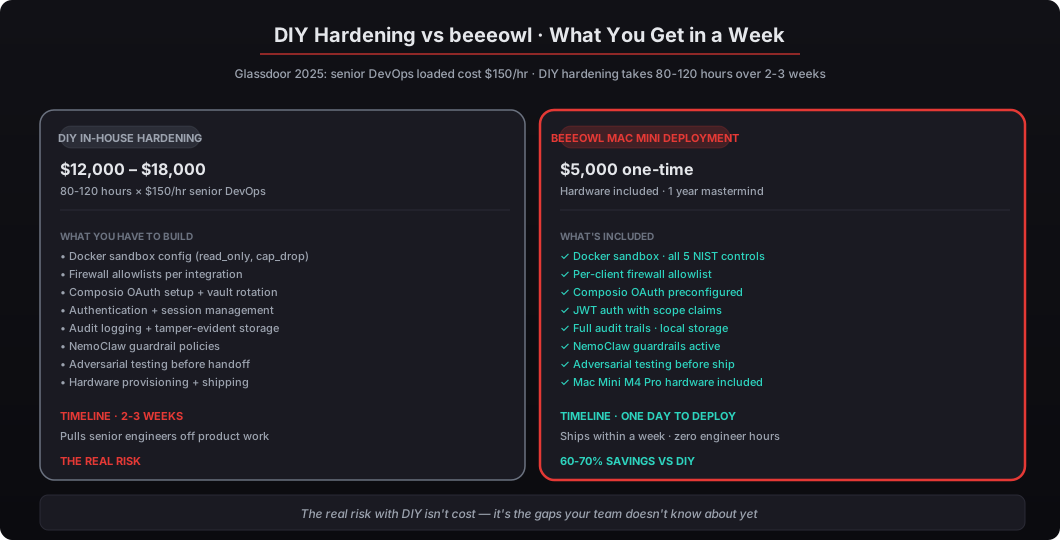
It takes 2-3 weeks of dedicated senior engineer time — roughly 80-120 hours — to build equivalent hardening from scratch. According to Glassdoor’s 2025 salary data for US tech roles, a senior DevOps engineer’s loaded cost averages $150/hour. That’s $12,000-$18,000 in labor before you account for pulling engineers off product work. beeeowl’s Mac Mini deployment — pre-configured hardware, six-layer security hardening, one fully configured agent with Composio OAuth setup, and a year of monthly mastermind access — costs $5,000 total. The Hosted option (cloud VPS on Hetzner or OVH) starts at $2,000.
But the real risk with DIY isn’t cost — it’s the gaps your team doesn’t know about yet. We’ve audited 40+ self-deployed instances. The recurring findings are the same across different companies with different engineering teams:
- Docker containers running as root because the engineer copied a tutorial that didn’t set USER
- Agents with write access to their own config files because
read_only: truewas forgotten - Firewall rules that allow all outbound traffic on port 443 because the engineer didn’t want to enumerate endpoints
- Composio skipped entirely in favor of hardcoded API keys because “we’ll add it later”
- No audit logging because “we’ll figure out what to log later”
- No JWT authentication because the endpoint is “only accessible from our VPN”
- Docker socket mounted in the container for “monitoring,” which defeats the sandbox
Your team would discover these mistakes eventually — probably during an incident response or a security audit. The question is whether “eventually” is an acceptable timeline for infrastructure handling your board decks, investor updates, and deal flow. For the 2-3 week build window, your competitors’ agents are already running in production on hardened infrastructure. The cost of being slow isn’t just the $12K-$18K in engineering hours — it’s the 2-3 weeks of missed agent value while you’re building security controls we’ve already built. See how to get your first OpenClaw agent running in one day for the compressed deployment timeline.
What happens if you skip any of the six layers?
Every one of the six layers is load-bearing. Here’s what happens when each one is missing, based on the audit findings across 40+ self-deployed installations we’ve reviewed:
Skip Layer 1 (physical hardware) → shared cloud tenancy. You’re running on someone else’s hardware with all the supply chain risks that entails. Cloud console phishing becomes a valid attack vector. Gartner 2025: 61% of Fortune 500 CIOs now require physical location control for AI systems handling executive communications.
Skip Layer 2 (OS + firewall) → unauthorized egress. Palo Alto Networks 2025: 82% of DIY installs had misconfigured firewall rules. The failure mode is an agent library dependency phoning home during a prompt injection attack, and you don’t notice for months because nothing blocks it.
Skip Layer 3 (Docker sandbox) → host filesystem access. A prompt injection that makes the agent read /etc/passwd or modify its own configuration. NIST 2024: container isolation reduces attack surface by 73%, which means 73% of attack paths become newly reachable when you skip this layer.
Skip Layer 4 (Composio credentials) → credential exposure. The single most common failure mode. Verizon 2025 DBIR: 44% of AI-related breaches involved exposed API credentials. With credentials in a config file the agent can read, one successful prompt injection extracts every OAuth token the agent has access to.
Skip Layer 5 (auth + audit) → no forensics. You can’t prove what the agent did, when it did it, or on whose behalf. Gartner 2025: only 23% of companies have proper auth, which means 77% can’t meaningfully respond to the question “what did your AI do with our data” during a compliance audit.
Skip Layer 6 (NemoClaw guardrails) → prompt injection exposure. The OWASP Top 10 #1 risk. Without the OpenShell policy engine enforcing action boundaries at the infrastructure layer, prompt injection is unbounded — the agent will do anything a malicious prompt convinces it to do.
Skipping any one layer defeats the defense-in-depth model. This is why we don’t offer a “lite” option — the six layers aren’t optional features, they’re the minimum viable production security stack for an AI agent handling executive data. Clients who push back on the default configuration are the clients most likely to end up in the 67% OWASP incident statistic within a year. We’d rather lose the deal than ship a deployment we know will be compromised.
How do you get started?
Every beeeowl deployment includes all six security layers on day one. The Hosted Setup at $2,000 deploys on a hardened cloud VPS with every layer configured. The Mac Mini Setup at $5,000 ships with the hardware included, pre-configured, and running within a week. The MacBook Air Setup at $6,000 gives you portable private AI with the same security stack.
We complete the full deployment in one day. Hardware ships within a week. Your first agent is running with all six security layers the day after delivery. No engineer hours, no 2-3 week build window, no DIY gaps you won’t discover until the audit. Every deployment includes Composio credential isolation, Docker sandboxing following NIST SP 800-190, per-client firewall allowlists, JWT authentication with scoped claims, full audit trails stored locally, NemoClaw guardrails, and hardware you physically own.
Additional agents cost $1,000 each on the same physical machine, each in its own isolated Docker container with separate Composio credential scopes. The Private On-Device LLM add-on is $1,000 if you want zero cloud AI exposure — the model inference runs locally via Ollama on the Mac Mini’s Neural Engine.
Full pricing on our pricing page, role-specific workflow examples on our use cases page, the complete deployment walkthrough in how to get your first OpenClaw agent running in one day, and the broader context on the 30,000 exposed instances problem in 30,000 exposed OpenClaw instances and how to avoid them. Security isn’t a feature we charge extra for — it’s the baseline we ship in every deployment, and it’s the reason clients trust their board decks and deal flow to beeeowl infrastructure.