How to Vet and Audit OpenClaw Skills Before Installing Them
824 malicious skills were found in ClawHub's ClawHavoc campaign. Learn how to audit OpenClaw skills for security risks before they touch your production data.
How Did 824 Malicious Skills End Up on ClawHub?
ClawHub’s publishing process requires almost nothing — a GitHub account that’s seven days old and a valid skill.json manifest. That’s it. No code review, no signing requirement, no behavioral analysis. Sangfor’s cybersecurity team discovered that attackers exploited these low barriers to plant 824 malicious skills in what they named the ClawHavoc campaign, documented in their March 2026 threat intelligence report.

The attack pattern was methodical. Threat actors created dozens of publisher accounts, waited out the seven-day cooling period, then uploaded skills that mimicked popular legitimate ones. Name-squatting, typosquatting, functionality cloning — the same playbook that’s worked on npm and PyPI for years. Sonatype’s 2025 State of the Software Supply Chain Report documented a 245% year-over-year increase in malicious packages across open-source registries. ClawHub is just the newest target.
What made ClawHavoc worse is that OpenClaw skills run with real permissions. They’re connected to your Gmail, your Slack, your CRM, your calendar. A compromised skill doesn’t just crash a build — it reads your board deck drafts. We’ve covered the broader supply chain risk in ClawHub skills before, but the scale of this campaign demands a deeper look at vetting.
What Were the Nine CVEs Disclosed in Four Days?
Between March 18 and March 21, 2026, nine separate CVEs were disclosed affecting OpenClaw’s core platform. One scored 9.9 out of 10 on the CVSS severity scale — a remote code execution vulnerability that allowed unauthenticated attackers to execute arbitrary commands through a crafted skill manifest.
The other eight ranged from authentication bypasses to privilege escalation in the skill permission model. Four of the nine were actively being exploited in the wild at the time of disclosure. Microsoft’s Security Blog had published guidance on running OpenClaw safely just weeks earlier in February 2026, warning that the platform’s rapid growth had outpaced its security review capacity.
This wasn’t a one-off incident. It was a pattern accelerating. The OWASP Top 10 for AI Applications lists insecure plugin and skill design as a top-three risk for agent platforms. When nine vulnerabilities drop in four days, the attack surface isn’t theoretical anymore — it’s active.
For CTOs who’ve already deployed, we published a complete security hardening checklist that covers patching cadence alongside skill vetting.
What Are the Red Flags Before Installing Any Skill?
Six warning signs should stop you before any skill touches your production environment: unsigned code, excessive permissions, obfuscated logic, unknown network calls, new publisher accounts, and missing documentation. Any single one of these should trigger a manual review. Two or more? Don’t install it.
Unsigned code means the skill publisher hasn’t attached a cryptographic signature to their release. ClawHub doesn’t require signing, which means there’s no way to verify that the code you’re downloading was actually published by the account that claims ownership. This is the most fundamental gap.
Excessive permissions are the clearest signal. A meeting scheduler that requests credential-store read access to every connected integration isn’t scheduling meetings — it’s harvesting tokens. Mandiant’s 2025 M-Trends Report found stolen OAuth tokens were the initial access vector in 31% of cloud intrusions they investigated.
Obfuscated logic includes base64-encoded payloads, dynamically constructed URLs, and eval statements that execute strings built at runtime. Legitimate skills have no reason to hide their behavior. If you can’t read what the code does in plain text, it’s doing something the author doesn’t want you to see.
Network calls to unknown endpoints beyond the declared LLM APIs are a data exfiltration signal. CrowdStrike’s 2026 Global Threat Report noted AI agent-based exfiltration doubled in the second half of 2025. The callbacks are often disguised as telemetry or error reporting.
New publisher accounts with no history and no other published skills are disposable identities. The ClawHavoc campaign used 47 separate accounts, all created within a two-week window.
How Do You Manually Audit a Skill’s Code?
Start with the manifest file. Every ClawHub skill ships a skill.json that declares its permissions, network endpoints, and dependencies. Download it without installing anything.
# Inspect skill manifest without installing
openclaw skill inspect clawhub/expense-report-parser --manifest-only

# Expected output for a legitimate skill:
# permissions:
#   - files:read (./workspace)
#   - network:outbound (api.anthropic.com)
#   - credentials:none
Compare what the skill declares against what it should need. An expense report parser needs file read access and an LLM API call. It doesn’t need credential access, write permissions outside its workspace, or outbound calls to arbitrary endpoints.
Next, pull the source and trace execution paths manually.
# Clone source for review
openclaw skill source clawhub/expense-report-parser --output ./review/

# Search for credential access patterns
grep -rn "credential\|token\|secret\|api_key\|oauth" ./review/

# Search for network calls beyond declared endpoints
grep -rn "fetch\|http\|request\|curl\|urllib\|socket" ./review/

# Search for obfuscation patterns
grep -rn "eval\|exec\|base64\|atob\|btoa\|charCodeAt\|fromCharCode" ./review/
If any of those searches return hits, read the surrounding code line by line. Legitimate skills sometimes use fetch for their declared API calls — that’s fine. But a base64.decode() feeding into an eval() is never legitimate.
Check the publisher’s profile. How old is the account? How many other skills have they published? Do those skills have downloads and reviews, or are they ghost accounts? The MITRE ATLAS framework added “Agent Skill Injection” as a documented technique in January 2026, and disposable publisher accounts were a key indicator.
What Automated Tools Can Catch What Manual Review Misses?
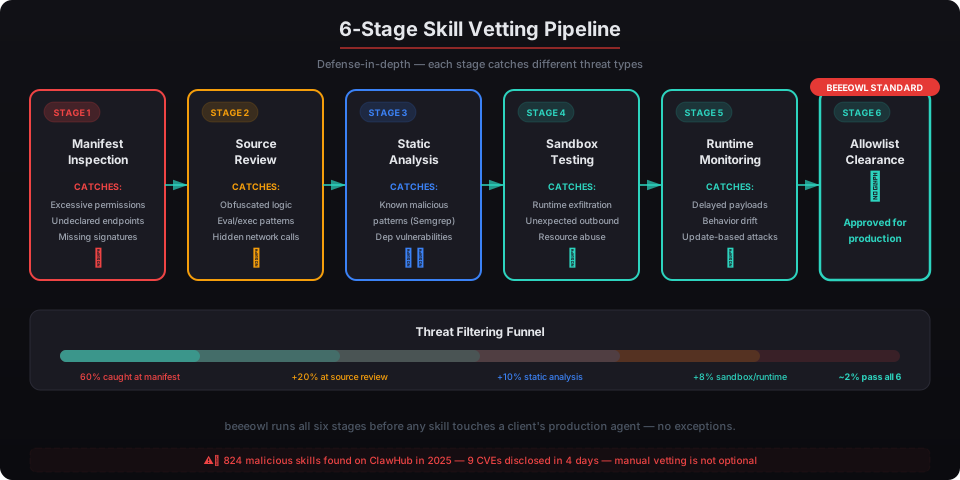
Static analysis tools scan skill code for known malicious patterns without executing it. They’re faster than manual review and catch the obvious stuff — encoded payloads, undeclared network calls, permission mismatches between manifest and code. They won’t catch sophisticated supply chain attacks, but they’ll filter out 80% of the noise.
Run skills in an isolated sandbox before promoting them to production. This means a throwaway Docker container with no network access, no credential mounts, and no persistent storage. Execute the skill against synthetic data and monitor its behavior.
# Create isolated test environment
docker run --rm --network none \
  --read-only --tmpfs /tmp \
  --cap-drop ALL \
  -v ./review:/skill:ro \
  openclaw/sandbox:latest \
  openclaw skill test /skill --synthetic-data

# Monitor system calls during execution
strace -f -e trace=network,file \
  openclaw skill run /skill --dry-run 2>&1 | \
  grep -v "api.anthropic.com"
Runtime monitoring catches skills that pass static analysis but behave differently during execution. Sysdig’s 2025 Container Security Report found that 34% of container runtime threats were invisible to static scanning tools. The skill might look clean in source code but download a secondary payload at runtime.
The combination matters. Static analysis first, sandbox testing second, runtime monitoring in production. None of these alone is sufficient. Together, they create layered defense — the same principle behind our Docker sandboxing approach for every deployment.
Why Doesn’t ClawHub Solve This Problem Itself?
ClawHub prioritizes growth over security. With over 12,000 published skills as of March 2026, they’ve built a marketplace model that depends on frictionless publishing. Adding mandatory code review, signing requirements, or behavioral analysis would slow the supply side — and ClawHub’s value proposition is breadth of integrations.
This isn’t unique to ClawHub. Docker Hub spent years without content trust enforcement. npm added mandatory 2FA for top packages only after multiple high-profile supply chain attacks. PyPI implemented trusted publishers in 2023 after a wave of typosquatting campaigns. Marketplaces fix security retroactively, after incidents force their hand.
The nine CVEs in four days may be that forcing function for ClawHub. But waiting for them to fix it means running unvetted code on systems connected to your executive team’s email, calendar, and financial data in the meantime. That’s not a risk posture any CTO should accept.
We wrote about why agent governance is the control problem for 2026. Skills are the sharpest edge of that problem.
How Does beeeowl Handle Skill Vetting?
We don’t trust ClawHub’s publishing controls. Every beeeowl deployment uses a curated, pre-vetted skill set that our engineering team has reviewed line by line. No skill runs on client infrastructure without passing our review process.
Here’s what that looks like in practice:
Pre-vetted skill sets. We maintain an internal registry of approved skills. Each skill has been source-audited, sandbox-tested, and monitored in a staging environment before it’s cleared for client deployments. We currently maintain 43 vetted skills covering the most common executive workflows — email triage, calendar management, document summarization, CRM updates, and reporting.
Execution allowlists. The OpenClaw gateway configuration on every beeeowl deployment includes an explicit allowlist. Skills not on the list can’t execute, period. This blocks both malicious skills and well-intentioned but unreviewed ones.
# beeeowl gateway skill allowlist (excerpt)
skills:
  allowlist:
    - beeeowl/email-triage@v2.4.1-signed
    - beeeowl/calendar-manager@v1.8.0-signed
    - beeeowl/document-summarizer@v3.1.2-signed
  policy: deny-all-except-allowlist
  auto_update: false
Docker sandboxing. Even vetted skills run inside isolated containers with read-only filesystems, dropped capabilities, and outbound network allowlists. If a skill we’ve approved is later compromised through a supply chain attack on one of its dependencies, the container limits the blast radius to near zero. We’ve detailed our full container hardening approach separately.
Version pinning. We lock every skill to a specific version hash. No auto-updates. When a skill releases a new version, our team reviews the diff before promoting it. This prevents the scenario where a clean skill pushes a malicious update that auto-deploys to every client.
Should Executives Audit Skills Themselves?
No. Understanding the risk is important — it’s why we wrote this post. But the actual work of auditing code, running sandbox tests, and monitoring runtime behavior requires dedicated engineering time and security expertise. That’s not how a CEO, CFO, or managing partner should be spending their hours.
The practical question is whether your organization has the internal capacity to maintain a skill vetting process on an ongoing basis. Not a one-time audit — a continuous process. New skills, new versions, new vulnerabilities. The nine CVEs in four days demonstrated how fast the threat landscape moves.
For organizations deploying OpenClaw at the executive level, the calculus is straightforward. You can build an internal skill review pipeline with dedicated security engineering time. Or you can use a managed deployment where vetting is built into the service.
Every beeeowl deployment — whether it’s the $2,000 hosted setup or the $5,000 Mac Mini package — includes pre-vetted skills, execution allowlists, Docker sandboxing, and ongoing version management. The skill supply chain problem doesn’t disappear, but it becomes someone else’s full-time job instead of your CTO’s side project.
If you’re running OpenClaw with unvetted ClawHub skills connected to executive accounts, the window between “this is probably fine” and the next ClawHavoc campaign is shrinking. Request your deployment and we’ll handle the vetting from day one.