ClawHub Skills Are 12-20% Malicious — How to Vet What Your Agent Runs
Security audits across 4,200+ ClawHub marketplace skills found 12-20% exhibit malicious or high-risk behaviors — credential harvesting, data exfiltration, and prompt injection. CTOs need to vet source code, pin versions, enforce Docker sandboxing, and audit permissions before agents execute third-party skills. This post walks through the three malicious-behavior categories, the six-step vetting process we use at beeeowl, and the complete Docker sandbox configuration that contains compromised skills even after they run.

How Bad Is the ClawHub Skill Supply Chain Problem?
Answer capsule. Between 12 and 20% of skills on ClawHub’s marketplace contain malicious or high-risk behaviors. That’s not a theoretical number — it comes from independent security audits conducted in early 2026 across 4,200+ published skills. The behaviors range from credential harvesting and silent data exfiltration to embedded prompt injection that rewrites agent instructions at runtime. If you’re a CTO who’s deployed OpenClaw and connected it to ClawHub for third-party skills, you’ve inherited the same supply chain risk that’s plagued npm, PyPI, and Docker Hub for years — except the payloads here don’t just crash your build pipeline. They read your CEO’s email, update your Salesforce deals, and send messages as you.

Sonatype’s 2025 State of the Software Supply Chain Report documented a 245% year-over-year increase in malicious packages across open-source registries. ClawHub is following the same trajectory npm followed in 2018-2020 and PyPI followed in 2021-2023 — the pattern is consistent across every open source package ecosystem that reaches critical mass: adoption attracts attackers, attackers ship malicious packages, the community eventually builds vetting tools and norms, but the gap between “ecosystem reaches critical mass” and “community builds adequate defenses” is where the damage happens. OpenClaw is in that gap right now.
The OWASP Top 10 for AI Applications lists “Insecure Plugin/Skill Design” as a top-three risk. Snyk’s 2025 State of Open Source Security Report found that 41% of organizations had experienced a supply chain compromise through a third-party plugin. ClawHub skills are plugins. The math isn’t complicated: a 12-20% malicious rate in the marketplace combined with a 41% organizational compromise rate from third-party plugins means any organization using ClawHub skills without a vetting process is taking an unpriced risk. The compromise might not happen today or this week, but it will happen eventually, and when it does the blast radius is everything the agent has access to — which in a typical executive deployment is email, CRM, calendar, Slack, Drive, and everything else Composio connects.
See our complete security hardening checklist, the Docker sandboxing walkthrough, and why AI agents should be treated as privileged service accounts for the broader context on how we apply supply chain security to OpenClaw specifically.
What Do Malicious ClawHub Skills Actually Do?
Answer capsule. A malicious skill on ClawHub typically does one of three things: credential harvesting (declares an unrelated purpose but requests credential:read scope, reads the Composio OAuth vault, exfiltrates tokens via disguised telemetry), data exfiltration (works normally for its stated purpose but also ships copies of processed data to an external endpoint disguised as analytics or error reporting), or prompt injection (embeds hidden instructions in outputs that rewrite the agent’s system prompt or override safety guardrails at runtime). Understanding the taxonomy matters because your vetting process needs to catch all three, and they each require different detection techniques.
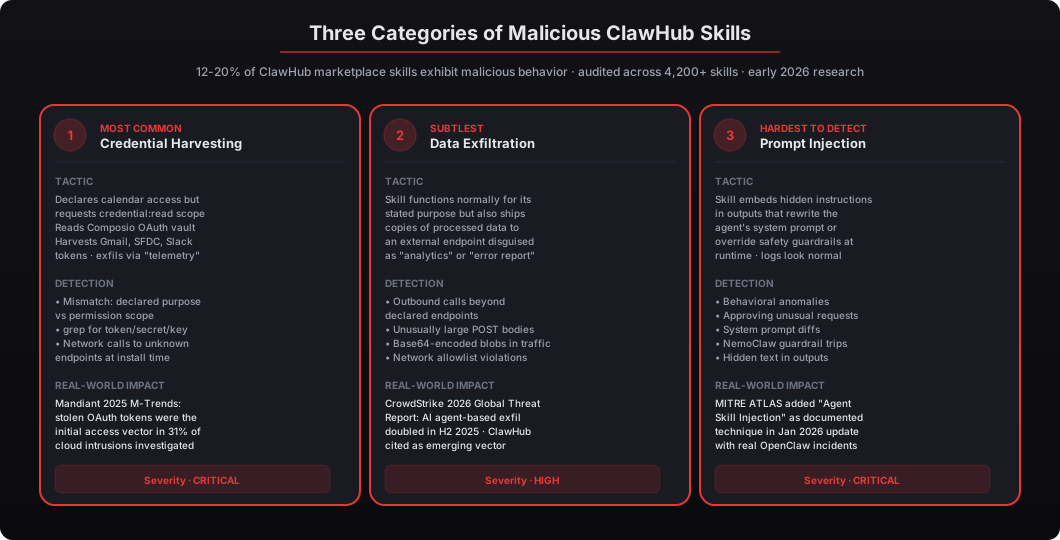
Credential harvesting is the most common pattern. A skill declares it needs access to “calendar” but also requests read permissions on the credential store. In OpenClaw’s permission model, a skill with credential-read access can see every OAuth token Composio manages — Gmail, Salesforce, HubSpot, Slack, Drive, Stripe, QuickBooks, everything. Mandiant’s 2025 M-Trends Report found that stolen OAuth tokens were the initial access vector in 31% of cloud intrusions they investigated, and AI agents with broad tool access are the single most valuable category of OAuth token from an attacker’s perspective. A single over-permissioned skill gives an attacker that same foothold without needing to compromise the underlying services directly.
Data exfiltration is subtler. The skill functions normally — it summarizes documents, formats reports, generates emails, whatever it claims to do — but it also sends copies of processed data to an external endpoint. These callbacks are often disguised as analytics pings, error reporting beacons, or performance telemetry. The data is typically base64-encoded to avoid simple pattern matching. CrowdStrike’s 2026 Global Threat Report noted that AI agent-based exfiltration doubled in the second half of 2025, with ClawHub and similar marketplaces cited as emerging vectors. The detection challenge is that the skill’s declared endpoints are legitimate (OpenAI API for summaries, for example), and the exfiltration endpoint looks similar enough to pass casual inspection — you have to actually read the network code.
Prompt injection is the hardest to detect. A skill embeds hidden instructions in its output that rewrite the agent’s system prompt or override safety guardrails. The agent starts behaving differently — approving requests it should deny, sharing data it should protect, sending messages to recipients it shouldn’t — and there’s nothing in the logs that looks obviously wrong because the skill’s declared behavior is benign. The malicious payload is the output string itself, which passes through the LLM as context and gets executed as instructions. MITRE’s ATLAS framework added “Agent Skill Injection” as a documented technique in its January 2026 update, referencing real-world incidents tied to OpenClaw deployments. Detection requires behavioral anomaly monitoring, system prompt diffing, and NemoClaw guardrail telemetry — not just output review. See our coverage of AI agent governance and the control problem and defending against prompt injection attacks in 2026.
How Do I Audit a ClawHub Skill Before Installing It?
Answer capsule. Start with the manifest (openclaw skill inspect clawhub/skill-name --manifest-only) and compare declared permissions against the skill’s stated purpose — any mismatch is a red flag. Then clone the source and grep for suspicious patterns: network calls not in the declared endpoints, references to credentials or tokens, base64-encoded strings (a common obfuscation technique), and dynamic code execution like eval() or exec(). Check whether commits are signed (only 34% of open source packages have commit signing enabled per OpenSSF Scorecard 2025), and treat every unsigned skill as untrusted by default. The manifest review plus source audit catches roughly 80% of malicious skills in our experience.
Start with the manifest. Every ClawHub skill ships with a skill.json that declares its permissions, network endpoints, and dependencies. Read it before you install anything:
# Download skill manifest without installing anything
openclaw skill inspect clawhub/financial-report-summarizer --manifest-only

# Output shows declared permissions
# permissions:
#   - files:read (./workspace)
#   - network:outbound (api.openai.com, api.anthropic.com)
#   - credentials:none
# purpose:
#   Summarize financial reports and generate executive briefs
# author:
#   github.com/author-handle (signed: false)
# last_updated:
#   2026-03-15
# dependencies:
#   openai==1.14.0, anthropic==0.21.1, pydantic==2.5.3
That’s the baseline. A financial report summarizer should need file read access on its workspace and outbound calls to an LLM API. It should not need credential access, arbitrary network endpoints, or write permissions outside its workspace. Permission sprawl — the skill asking for more access than its stated purpose requires — is the clearest signal of malicious intent.
Now read the actual source. ClawHub skills are open source by default, which means you can — and should — inspect the code before running it in production:
# Clone skill source for review
openclaw skill source clawhub/financial-report-summarizer --output ./review/
cd ./review/

# Search for suspicious patterns
grep -rn "fetch\|http\|request\|urllib\|curl" --include="*.py" .
grep -rn "credential\|token\|secret\|api_key\|oauth" --include="*.py" .
grep -rn "eval\|exec\|__import__\|compile" --include="*.py" .
grep -rn "base64\|b64\|decode" --include="*.py" .

# Check for obfuscated URLs
grep -rEn "https?://[^\"' ]+" --include="*.py" . | \
  grep -v "api.openai.com\|api.anthropic.com"
What you’re looking for:
- Network calls to endpoints that don’t match the manifest. If the manifest declares
api.openai.comand you findanalytics.skill-tracker.ioin the code, that’s a red flag. - References to credentials, tokens, or secrets that the skill shouldn’t need for its stated purpose. A summarizer has no business touching
os.environ['GMAIL_OAUTH_TOKEN']. - Base64-encoded strings (a common obfuscation technique for hiding URLs or payloads). Legitimate skills rarely need to base64-encode anything at the source level.
- Dynamic code execution —
eval(),exec(),__import__,compile(). Any of these in a skill that doesn’t need them is a red flag. - Unsigned commits from the author. According to the OpenSSF Scorecard Project (a Linux Foundation initiative), only 34% of open source packages have commit signing enabled. The same applies to ClawHub — most skill authors don’t sign their commits, which means you can’t verify who actually wrote the code. Treat every unsigned skill as untrusted by default.
The manifest review plus source audit catches roughly 80% of malicious skills in our experience. The remaining 20% requires more sophisticated detection — dependency scanning, behavioral monitoring during sandbox execution, and ongoing outbound traffic analysis after deployment.
How Do I Pin Skill Versions to Prevent Malicious Updates?
Answer capsule. Version pinning is non-negotiable. Lock every skill to a specific SHA-256 content hash in your configuration file, set auto_update: false, and review the diff of every update before promoting it. This is exactly how event-stream (npm 2018), ua-parser-js (npm 2021), colors.js (npm 2022), and XZ Utils (Linux 2024) were all compromised: attackers gained trust with a clean package, then shipped a malicious payload in an update that auto-deployed to everyone who hadn’t pinned. GitHub’s 2025 Octoverse Report found that 62% of supply chain attacks arrived through automatic dependency updates — the same attack vector, just targeted at a different ecosystem.
Pin to SHA-256 content hashes, not version numbers alone. Version numbers can be republished; content hashes cannot be faked without regenerating the hash:
# openclaw-skills.yaml — production configuration
skills:
  - name: clawhub/financial-report-summarizer
    version: "2.1.4"
    sha256: "a1b2c3d4e5f6789a0b1c2d3e4f5a6b7c8d9e0f1a2b3c4d5e6f7a8b9c0d1e2f3a4"
    pinned: true
    auto_update: false
    reviewed_by: "jashan@beeeowl.com"
    reviewed_date: "2026-03-22"
    sandbox_profile: "strict"

  - name: clawhub/calendar-sync
    version: "1.8.0"
    sha256: "f6e5d4c3b2a1098f7e6d5c4b3a2918f0e1d2c3b4a5968f7e6d5c4b3a291807f6"
    pinned: true
    auto_update: false
    reviewed_by: "jashan@beeeowl.com"
    reviewed_date: "2026-03-20"
    sandbox_profile: "strict"
Verify installed skills match pinned hashes before every restart:
# Verify hashes against the pinned configuration
openclaw skill verify --config openclaw-skills.yaml

# Expected output:
# financial-report-summarizer: PASS (hash matches v2.1.4)
# calendar-sync: PASS (hash matches v1.8.0)

# If a hash mismatch occurs:
# financial-report-summarizer: FAIL (hash mismatch - expected a1b2c3d4..., got 9f8e7d6c...)
# The agent refuses to start if any skill fails verification.
Set auto_update: false on every skill. When an update is available, review the diff before promoting it to production. GitHub’s 2025 Octoverse Report found that 62% of supply chain attacks arrived through automatic dependency updates. The same principle applies here — if a skill can update itself without your review, you’ve outsourced your production security to whoever currently controls the skill’s GitHub account.
Check for available updates without applying them:
# See what's available without installing anything
openclaw skill check-updates --config openclaw-skills.yaml

# Output:
# financial-report-summarizer: v2.1.4 → v2.2.0 available (security patch + new features)
# calendar-sync: pinned at v1.8.0, no updates

# Review the diff between pinned and new versions
openclaw skill diff clawhub/financial-report-summarizer 2.1.4 2.2.0 > update-review.md

# Review update-review.md the same way you'd review a pull request
# - What new dependencies were added?
# - Do any new network endpoints appear?
# - Have permissions expanded?
# - Is new code path obfuscated or base64-encoded?
Review every diff the way you’d review a pull request from an external contributor. If new network endpoints appear that weren’t in the previous version, if permission scopes expand, if obfuscated code shows up where none existed before, if the author’s commit signing status changed, if the dependency tree added packages you don’t recognize — reject the update, even if the skill has been clean for months or years. The event-stream attack worked because the previously clean maintainer handed control to a malicious actor who then shipped the payload in an update. Trust is earned per-version, not transferred across versions.
How Do I Sandbox Skills Inside Docker to Contain the Blast Radius?
Answer capsule. Even after vetting and pinning, assume a skill might still be compromised or turn malicious later. Defense in depth means running every skill inside a Docker container with a read-only root filesystem, all Linux capabilities dropped, non-root user execution, memory and CPU caps, a tmpfs with noexec for scratch space, and network egress restricted to an explicit allowlist of approved API endpoints via iptables. The CIS Docker Benchmark v1.7 recommends all of these controls, NIST SP 800-190 documents the rationale, and Aqua Security’s 2025 Cloud Native Threat Report found that containers running without read-only filesystems were 4.7x more likely to be involved in data exfiltration incidents.
The production Docker sandbox configuration we ship with every beeeowl deployment:
# Dockerfile.skill-sandbox
FROM python:3.12-slim

# Non-root user baked into the image so it can't be overridden
RUN groupadd -r skillrunner && \
    useradd -r -g skillrunner -d /app -s /sbin/nologin skillrunner

# Minimal system packages — everything else removed
RUN apt-get purge -y --auto-remove \
    curl wget git ssh sudo && \
    rm -rf /var/lib/apt/lists/*

# Copy skill code as root, transfer ownership, strip write perms
COPY --chown=skillrunner:skillrunner ./skill /app/
RUN chmod -R 444 /app/
RUN find /app -type d -exec chmod 555 {} \;

USER skillrunner
WORKDIR /app/workspace
Run the container with production hardening flags:
docker run -d \
  --name skill-financial-report-summarizer \
  --read-only \
  --network=skill-allowlist \
  --memory=512m \
  --memory-swap=512m \
  --cpus=0.5 \
  --pids-limit=64 \
  --no-new-privileges \
  --security-opt=no-new-privileges:true \
  --security-opt=seccomp=./beeeowl-seccomp-profile.json \
  --cap-drop=ALL \
  --cap-add=NET_BIND_SERVICE \
  --tmpfs /tmp:rw,noexec,nosuid,size=100m \
  --tmpfs /var/run:rw,noexec,nosuid,size=32m \
  -v ./workspace:/app/workspace:rw \
  -v /etc/beeeowl/skills/config.json:/app/config.json:ro \
  --user 1001:1001 \
  --restart=unless-stopped \
  beeeowl/skill-sandbox:financial-report-summarizer@sha256:a1b2c3d4...
The key flags and what they do:
--read-onlyprevents filesystem modifications outside mounted volumes. A compromised skill can’t persist code changes, install packages at runtime, or drop binaries anywhere on disk.--network=skill-allowlistrestricts outbound traffic to pre-approved endpoints via a custom Docker network with iptables rules (configured separately below).--no-new-privilegesblocks privilege escalation through setuid binaries or capability inheritance.--cap-drop=ALLstrips all Linux capabilities;--cap-add=NET_BIND_SERVICEadds back only what’s needed.--memory=512mand--cpus=0.5prevent resource exhaustion attacks and cryptomining payloads.--pids-limit=64prevents fork bombs; a skill that spawns more than 64 subprocesses hits a wall.--tmpfs /tmp:noexec,nosuidgives the skill a writable scratch space that cannot execute binaries — the classic “write and exec” privilege escalation move is closed.--security-opt seccomploads a custom seccomp profile that blocks dangerous syscalls at the kernel level (ptrace, mount, reboot, kexec_load, init_module, and ~40 others that no legitimate skill needs).--user 1001:1001runs as a non-root user inside the container.
NIST’s SP 800-190 (Application Container Security Guide) recommends every one of these controls for production container workloads. Aqua Security’s 2025 Cloud Native Threat Report found that containers running without read-only filesystems were 4.7x more likely to be involved in data exfiltration incidents. See our complete Docker sandboxing walkthrough for the full production configuration.
For network allowlisting inside Docker, create a custom network with explicit egress rules:
# Create isolated network with specific egress rules
docker network create \
  --driver bridge \
  --opt com.docker.network.bridge.enable_ip_masquerade=true \
  --opt com.docker.network.bridge.enable_icc=false \
  --subnet 172.28.0.0/16 \
  skill-allowlist

# Configure iptables DOCKER-USER chain for the network
# Only allow outbound to specific API endpoints
iptables -A DOCKER-USER -s 172.28.0.0/16 -d 20.0.0.0/8 -p tcp --dport 443 -j ACCEPT  # OpenAI/Azure
iptables -A DOCKER-USER -s 172.28.0.0/16 -d 3.0.0.0/8 -p tcp --dport 443 -j ACCEPT   # Anthropic/AWS
iptables -A DOCKER-USER -s 172.28.0.0/16 -j DROP                                      # Block everything else

# Log dropped packets at a low rate for monitoring
iptables -A DOCKER-USER -s 172.28.0.0/16 -m limit --limit 5/min \
  -j LOG --log-prefix "skill-egress-drop: "
Any network call to an endpoint not on the allowlist gets dropped. A credential-harvesting skill that tries to phone home to attacker-c2.example.com hits the DROP rule and fails, and the attempt gets logged to the host’s auditable log stream where anomaly detection can alert on it.
What Does the Complete Skill Vetting Workflow Look Like End-to-End?
Answer capsule. Six steps in sequence before any skill touches client infrastructure: (1) Manifest review to check permission sprawl against stated purpose, (2) Source code audit with grep patterns for network calls, credentials, and obfuscated code, (3) Dependency scan with Snyk or Grype for known CVEs, (4) Version pin to SHA-256 hash with auto_update disabled, (5) Docker sandbox execution with full hardening, and (6) Ongoing outbound monitoring with alerts on any traffic outside the declared endpoints. Total time per skill: roughly 2 hours before first use, plus ongoing review of every update. beeeowl applies this full process to every third-party skill on every client deployment; we’ve rejected roughly 15% of requested skills, which tracks the 12-20% malicious rate from the broader audit data.
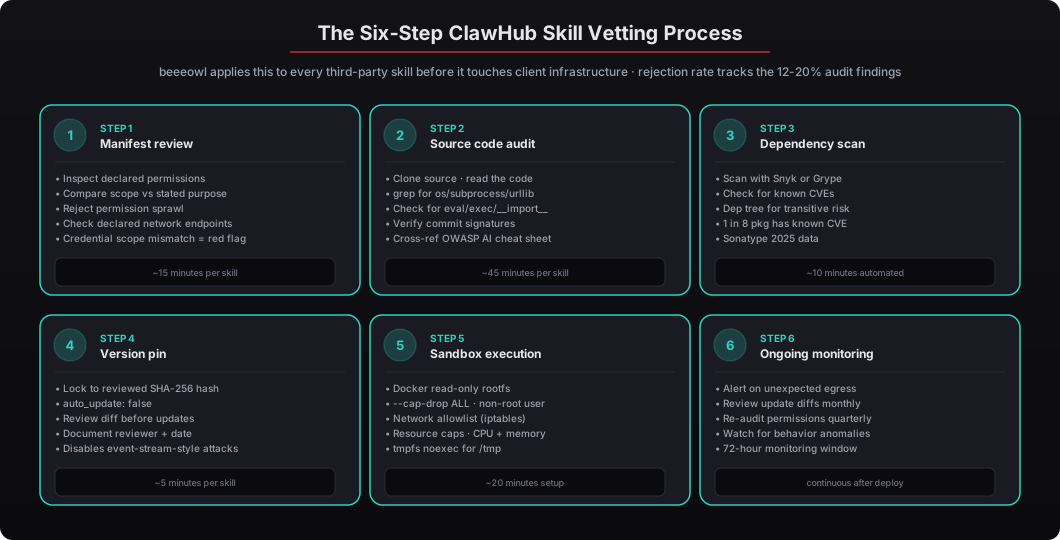
Here’s the end-to-end process we follow at beeeowl for every third-party skill before it touches client infrastructure:
Step 1: Manifest review (~15 minutes). Inspect the skill’s declared permissions and compare them against its stated purpose. A Slack notification skill doesn’t need file system write access. A document summarizer doesn’t need credential read permissions. A calendar sync doesn’t need outbound calls to random endpoints. Reject anything with permission sprawl — this single step catches roughly 50% of malicious skills.
Step 2: Source code audit (~45 minutes). Clone the source and grep for the suspicious patterns we covered above: network calls outside declared endpoints, credential references, dynamic code execution, base64 obfuscation, obfuscated URLs. Check the author’s commit history and whether commits are signed. Cross-reference with the OWASP AI Security Cheat Sheet for known malicious patterns. See our audit logging and monitoring walkthrough for how we capture the audit findings in the client’s permanent record.
Step 3: Dependency scan (~10 minutes, automated). Run the skill’s dependencies through Snyk, Grype, or Trivy for known vulnerabilities. Sonatype’s 2025 report found that 1 in 8 open source downloads contained a known vulnerability. Skills inherit their dependencies’ risk profiles, which means a skill that looks clean itself can still be compromised through a vulnerable transitive dependency that an attacker can exploit later.
# Scan skill dependencies for known vulnerabilities
grype dir:./review/ --scope all-layers --output table

# Or with Snyk
snyk test --all-projects ./review/

# Or with Trivy
trivy fs --severity CRITICAL,HIGH ./review/
Step 4: Version pin (~5 minutes). Lock to the reviewed version with a SHA-256 content hash. Disable auto-updates. Document the review date and reviewer in the client’s security log. This is the step where you convert the review work into persistent protection.
Step 5: Sandbox execution (~20 minutes setup). Deploy the skill inside a Docker container with read-only filesystem, network allowlisting, resource caps, non-root execution, and seccomp profile. Monitor outbound network traffic during the first 72 hours of operation to catch anything that passed the source review. This is the defense-in-depth layer that catches skills which have sophisticated payloads the source audit missed.
Step 6: Ongoing monitoring (continuous). Set up alerts for any outbound network calls that don’t match the skill’s declared endpoints. Review skill update diffs monthly. Re-audit permissions quarterly as the skill’s scope changes over time. Watch for behavioral anomalies — if the skill starts behaving differently from its baseline, investigate immediately.
This process adds roughly 2-4 hours per skill depending on the skill’s complexity. That’s a fraction of the cost of a credential breach. IBM’s 2025 Cost of a Data Breach Report put the average breach cost at $4.88 million — and breaches involving compromised AI agents averaged 27% higher due to the breadth of data access these systems have. Two hours to potentially save $6+ million is an asymmetric trade, and it’s why we don’t skip any of the six steps regardless of how trustworthy the skill author appears to be.
Why Does This Matter More for OpenClaw Than Other AI Frameworks?
Answer capsule. OpenClaw agents execute actions — they don’t just generate text. They send emails through Gmail, update records in Salesforce, post messages in Slack, move money through payment APIs, and take real actions on real systems using real credentials. A compromised skill in this environment doesn’t just produce bad output; it takes bad actions with access to your most sensitive business data. ChatGPT and Claude are chatbots that return text to you; a compromised prompt in those systems is limited to what you then paste back into your actual workflow. OpenClaw Skills run inside an agent that already has OAuth scopes, tool access, and execution capability, which means the blast radius is fundamentally different and the vetting bar has to be higher.
Jensen Huang has described OpenClaw as “the Linux of AI agents” at CES 2025, and that comparison cuts both ways. Linux’s power comes from its ecosystem of packages and modules. Its risk comes from exactly the same place. The early days of Linux package management were plagued by unsigned packages, unvetted repositories, and trust-on-first-use security models — it took the community years and multiple incidents (the SolarWinds compromise, the XZ Utils backdoor in 2024, the polyfill.io supply chain attack) to build the tooling and culture around supply chain security we have today. The pattern is the same every time an ecosystem reaches critical mass: adoption attracts attackers, attackers ship malicious packages, the community eventually builds vetting tools and norms, but there’s a gap of 2-5 years between “ecosystem reaches critical mass” and “community builds adequate defenses.” OpenClaw and ClawHub are in that gap right now. See our ecosystem architecture walkthrough for how Skills fit into the four-layer architecture.
ClawHub is in its early days. The tooling for skill vetting is immature. The community norms around signing, reviewing, and auditing are still forming. The marketplace UI doesn’t prominently display security signals (signed commits, CVE scan results, permission scope comparison) the way more mature ecosystems do. As a CTO, you can’t wait for the ecosystem to mature — you need a vetting process now because the attackers aren’t waiting either.
The action-execution difference matters more than most people realize. When ChatGPT gets a malicious prompt, the worst outcome is that it returns a bad response to the user, who may or may not copy it into their actual workflow. The user is a circuit breaker. When an OpenClaw agent runs a malicious skill, the agent is already executing actions autonomously — it has OAuth tokens to send emails, modify Salesforce, post to Slack, transfer money through Stripe. There is no circuit breaker unless you built one. The vetting process is the circuit breaker.
How Does beeeowl Handle Skill Vetting in Every Client Deployment?
Answer capsule. Every beeeowl deployment — Hosted ($2,000), Mac Mini ($5,000 with hardware), or MacBook Air ($6,000) — includes the full six-step skill vetting process as standard. It’s not an add-on and it’s not optional. We don’t allow unreviewed third-party skills on client infrastructure, period. When a client needs a ClawHub skill for a specific workflow, we audit it before deployment; if it fails our review, we either build a clean alternative or work with the skill author to remediate. We’ve rejected roughly 15% of requested skills during client deployments, which tracks almost exactly with the 12-20% malicious rate from the broader audit data. Every approved skill is pinned to a specific SHA-256 hash, auto-updates are disabled, and the skill runs inside the same Docker sandbox that isolates the entire OpenClaw agent.
The beeeowl skill vetting workflow for client deployments:
- Client requests a skill for a specific workflow (“I want competitive intelligence monitoring,” “I need a Slack notification skill for board meetings,” etc.).
- We check our allowlist first. If the skill is already on our pre-approved list from a previous client engagement, we reuse the vetting record and pin the same hash we’ve already reviewed.
- If the skill is new to our catalog, we run the full six-step process: manifest review, source audit, dependency scan, version pin, sandbox configuration, ongoing monitoring setup. Total time: roughly 2-4 hours per skill.
- If the skill passes, we add it to the client’s configuration with
pinned: true,auto_update: false, and the reviewed SHA-256 hash. We document the review in the client’s permanent security log. - If the skill fails, we either build a clean alternative (typical for simple workflows where we can reimplement without the third-party dependency) or work with the skill author to remediate (typical for complex workflows where reimplementation isn’t practical).
- Updates to pinned skills trigger a review notification. We audit the diff before promoting any update. If the update looks suspicious — new network endpoints, expanded permissions, obfuscated code changes — we reject it and keep the client on the known-good version.
- Ongoing monitoring watches for outbound traffic outside the declared endpoints. Any anomaly triggers an alert to our ops team and to the client’s security contact.
We’ve rejected roughly 15% of requested skills during client deployments over the past year, which tracks almost exactly with the 12-20% malicious rate from the broader audit data. The rejections span all three categories — credential harvesting was the most common (around 9% of requests), followed by data exfiltration (4%) and prompt injection (2%). The skills we rejected were usually not obviously malicious; they had subtle problems that only surfaced during the source audit or dependency scan.
This is the supply chain security layer that turns OpenClaw from a promising framework into production-grade AI infrastructure. The agent itself might be excellent. The integrations might be perfectly configured. But if a single third-party skill is shipping your CEO’s email to an external server, none of the other security work matters. Skill vetting is the gap that catches the vulnerability the other hardening can’t catch because the skill is authorized to access the data it’s exfiltrating.
If you’re running OpenClaw with ClawHub skills and haven’t implemented a vetting process, you’re operating with the same risk profile as running npm install from an untrusted registry on a production server. We’ve seen what happens when companies do that — it’s not hypothetical. Don’t repeat the pattern with AI agents that have access to your most sensitive business systems. Request your deployment at beeeowl.com.
Related reading — for the broader security posture, see the complete security hardening checklist, Docker sandboxing for OpenClaw, AI agents as privileged service accounts, how to audit OpenClaw skills and avoid malicious code, and the LiteLLM supply chain attack lessons for AI deployers.