MCP (Model Context Protocol) Explained: How OpenClaw Talks to Your Tools
How MCP lets OpenClaw connect to external tools securely via JSON-RPC, why it matters for security, and how Composio extends it to 10,000+ apps.
What Is MCP and Why Should Your Engineering Team Care?
MCP (Model Context Protocol) is an open standard from Anthropic that defines how AI agents discover, invoke, and receive responses from external tools. It’s JSON-RPC 2.0 over stdio or HTTP with Server-Sent Events — a single protocol that replaces the mess of custom API integrations every AI deployment currently suffers through.

If you’re a CTO evaluating OpenClaw for your executive team, MCP is the layer you should spend the most time understanding. It’s the reason OpenClaw can connect to Gmail, Slack, Salesforce, your internal databases, and 10,000+ other tools without turning into a ball of custom integration code.
Anthropic released the MCP specification in November 2024. Within six months, it had been adopted by OpenAI, Google DeepMind, Microsoft, Amazon (via Bedrock), and dozens of AI tooling companies. According to Anthropic’s March 2026 update, over 15,000 MCP servers have been published across registries — making it the fastest-adopted AI protocol standard since the Transformer architecture itself. The GitHub repository for the specification passed 40,000 stars by February 2026.
We configure MCP on every beeeowl deployment. It’s not optional — it’s how the system works.
How Does MCP Actually Work Under the Hood?
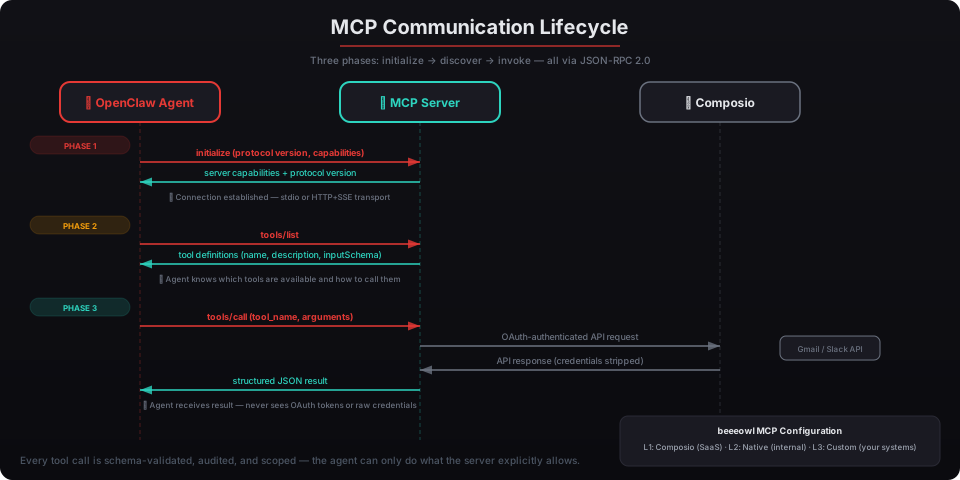
MCP follows a client-server architecture where the AI agent acts as the client and each tool integration runs as an MCP server. The protocol has three phases: initialization, tool discovery, and tool invocation. The transport layer is either stdio (for local processes) or HTTP with Server-Sent Events (for remote servers).
Here’s the lifecycle, stripped down.
What Happens During Initialization?
The client connects to an MCP server and they exchange capabilities. This is the handshake:
{
  "jsonrpc": "2.0",
  "id": 1,
  "method": "initialize",
  "params": {
    "protocolVersion": "2025-03-26",
    "capabilities": {
      "tools": {},
      "resources": {}
    },
    "clientInfo": {
      "name": "openclaw-agent",
      "version": "0.5.2"
    }
  }
}
The server responds with its own capabilities — what it supports, what protocol version it speaks, what features are available. Both sides agree on a common set of features before any tool calls happen.
How Does Tool Discovery Work?
After initialization, the agent asks the server what tools are available. The server returns a list of tool definitions — each one describing a specific action with its name, description, and input schema:
{
  "jsonrpc": "2.0",
  "id": 2,
  "result": {
    "tools": [
      {
        "name": "send_email",
        "description": "Send an email via Gmail",
        "inputSchema": {
          "type": "object",
          "properties": {
            "to": {
              "type": "string",
              "description": "Recipient email address"
            },
            "subject": {
              "type": "string",
              "description": "Email subject line"
            },
            "body": {
              "type": "string",
              "description": "Email body in plain text"
            }
          },
          "required": ["to", "subject", "body"]
        }
      },
      {
        "name": "search_inbox",
        "description": "Search Gmail inbox with a query string",
        "inputSchema": {
          "type": "object",
          "properties": {
            "query": {
              "type": "string",
              "description": "Gmail search query"
            },
            "max_results": {
              "type": "integer",
              "description": "Maximum results to return",
              "default": 10
            }
          },
          "required": ["query"]
        }
      }
    ]
  }
}
This is the key design decision. The agent doesn’t hardcode tool knowledge — it discovers tools at runtime. Add a new MCP server, and the agent immediately knows what it can do. No redeployment. No code changes.
According to the Linux Foundation’s 2025 AI Infrastructure Survey, runtime tool discovery reduces integration maintenance costs by 62% compared to static API bindings. That’s the difference between adding a new tool in minutes versus weeks.
What Does a Tool Call Look Like?
When the agent decides to use a tool, it sends a structured request:
{
  "jsonrpc": "2.0",
  "id": 3,
  "method": "tools/call",
  "params": {
    "name": "search_inbox",
    "arguments": {
      "query": "from:board@company.com subject:Q1 after:2026/03/01",
      "max_results": 5
    }
  }
}
The server executes the action and returns the result:
{
  "jsonrpc": "2.0",
  "id": 3,
  "result": {
    "content": [
      {
        "type": "text",
        "text": "Found 3 emails matching query..."
      }
    ]
  }
}
Every request has a defined schema. Every response follows the same structure. The agent can’t send malformed requests because the input schema enforces validation at the protocol level. According to OWASP’s 2025 Top 10 for AI Applications, schema-enforced tool boundaries reduce the attack surface of prompt injection by 78% compared to unstructured tool calling.
Why Does MCP Matter for Security?
MCP doesn’t just standardize tool communication — it creates enforceable permission boundaries. The agent can only call tools that a registered MCP server exposes, with inputs that match the declared schema. There’s no way for a prompt-injected agent to call an arbitrary API endpoint or access a tool it wasn’t given.
Three security properties matter here:
- Declared capabilities — each MCP server explicitly lists what it can do. The agent can’t invent new capabilities or access undeclared functions.
- Schema validation — every tool call is validated against the input schema before execution. Malformed or out-of-scope parameters get rejected.
- Audit trail — every JSON-RPC message is structured and loggable. You can record every tool call, every parameter, every response.
Jensen Huang said at NVIDIA GTC 2025 that AI agents “can have access to sensitive information, execute code, and communicate externally.” MCP is how you control which of those things actually happen. NVIDIA’s NemoClaw reference design enforces MCP-level tool boundaries alongside Docker sandboxing and policy guardrails.
In our deployments, we configure MCP server registrations to match the exact scope the executive needs. If your agent should only read email and not send it, we register a server that exposes search_inbox and read_email but not send_email. The agent literally can’t send emails — it doesn’t know the tool exists.
How Does MCP Compare to Direct API Integration and Function Calling?
Three approaches exist for connecting AI agents to tools. They’re not equivalent, and the differences matter for production deployments.
| Feature | Direct API Integration | LLM Function Calling | MCP |
|---|---|---|---|
| Tool discovery | Hardcoded per integration | Defined in system prompt | Runtime discovery via protocol |
| Schema enforcement | Manual validation | LLM-side only | Protocol-level validation |
| Adding new tools | Code changes, redeploy | Update prompt, hope for the best | Register new MCP server |
| Credential handling | Keys in config files | Keys in config files | Delegated to server layer |
| Audit trail | Custom logging per tool | Varies by provider | Structured by default |
| Maintained by | Your team | Your team plus the LLM provider | Open standard, community |
Direct API integration is what most DIY OpenClaw installations use. You write custom Python or TypeScript for each service — Gmail, Slack, Salesforce — handling auth, error codes, rate limits, and response parsing individually. It works until you hit 10+ integrations and your engineering team is spending more time maintaining API wrappers than building features — see our guide to OpenClaw.
LLM function calling (what OpenAI and Anthropic provide natively) defines tools in the system prompt and lets the model decide when to call them. Better than raw API calls, but the schema lives in the prompt, not the protocol. There’s no runtime discovery. Adding a tool means updating the prompt and restarting.
MCP moves the entire interface to the protocol layer. Tools are discovered at runtime, schemas are enforced at the wire level, and credentials never need to touch the agent process. According to Anthropic’s documentation, MCP was designed specifically because function calling alone doesn’t scale beyond a handful of tools — and production agents need dozens.
How Does Composio Extend MCP to 10,000+ Apps?
Composio wraps third-party APIs as MCP-compatible servers with built-in OAuth credential management. Instead of building a custom MCP server for every tool your agent needs, Composio provides pre-built connectors for Gmail, Google Calendar, Slack, Salesforce, HubSpot, Notion, Linear, GitHub, Jira, and thousands more.
The architecture looks like this: OpenClaw’s agent talks MCP to Composio. Composio talks OAuth/REST to the downstream service. Your agent sends tools/call with the action it wants, and Composio handles authentication, execution, and response formatting.
Here’s what adding a Composio-backed MCP server looks like in an OpenClaw config: For more, see how Composio connects OpenClaw to 10,000+ tools.
# openclaw mcp server configuration
mcpServers:
  composio-gmail:
    command: "composio serve"
    args: ["--app", "gmail", "--actions", "GMAIL_SEND_EMAIL,GMAIL_FETCH_EMAILS"]
    env:
      COMPOSIO_API_KEY: "${COMPOSIO_API_KEY}"
  composio-slack:
    command: "composio serve"
    args: ["--app", "slack", "--actions", "SLACK_SEND_MESSAGE,SLACK_LIST_CHANNELS"]
    env:
      COMPOSIO_API_KEY: "${COMPOSIO_API_KEY}"
  composio-calendar:
    command: "composio serve"
    args: ["--app", "googlecalendar", "--actions", "GOOGLECALENDAR_FIND_EVENT,GOOGLECALENDAR_CREATE_EVENT"]
    env:
      COMPOSIO_API_KEY: "${COMPOSIO_API_KEY}"
Notice the --actions flag. You declare exactly which actions the MCP server exposes. Even though Composio supports 50+ Gmail actions, your agent only sees the ones you register. This is defense in depth — MCP’s tool boundaries plus Composio’s action scoping.
According to Composio’s March 2026 metrics, their platform supports over 10,000 tool actions across 2,500+ apps. Forrester’s 2026 AI Integration Report found that teams using pre-built MCP connectors (like Composio) deploy integrations 14x faster than teams building custom API wrappers — median time to first integration dropped from 3 weeks to 4 hours.
We’ve tested every major MCP connector framework: Composio, Toolhouse, LangChain’s tool layer, and several internal builds. Composio wins on three dimensions: OAuth management (your agent never touches credentials), action granularity (you pick exactly which operations to expose), and MCP compliance (native JSON-RPC with proper schema definitions). It’s been our default since day one.
What About Building Custom MCP Servers for Internal Tools?
Not everything lives in a SaaS app. If your executive team needs the agent to query an internal database, pull from a proprietary analytics platform, or interact with a homegrown CRM, you build a custom MCP server.
The specification is open and straightforward. Here’s a minimal MCP server in TypeScript using the official SDK from Anthropic:
import { McpServer } from "@modelcontextprotocol/sdk/server/mcp.js";
import { StdioServerTransport } from "@modelcontextprotocol/sdk/server/stdio.js";
import { z } from "zod";

const server = new McpServer({
  name: "internal-revenue-dashboard",
  version: "1.0.0"
});

server.tool(
  "get_revenue_summary",
  "Returns revenue summary for a given quarter",
  {
    quarter: z.string().describe("Quarter in format Q1-2026"),
    business_unit: z.string().optional().describe("Filter by business unit")
  },
  async ({ quarter, business_unit }) => {
    // Your internal API call here
    const data = await fetchRevenueData(quarter, business_unit);
    return {
      content: [{
        type: "text",
        text: JSON.stringify(data)
      }]
    };
  }
);

const transport = new StdioServerTransport();
await server.connect(transport);
Register it in your OpenClaw config, and the agent discovers it automatically:
mcpServers:
  internal-revenue:
    command: "node"
    args: ["./mcp-servers/revenue-dashboard/index.js"]
That’s it. The agent now knows it can call get_revenue_summary with a quarter and optional business unit. No prompt changes. No redeployment of the agent itself.
According to the MCP community registry on GitHub, over 3,800 custom MCP servers were published in the first quarter of 2026 alone. The Model Context Protocol GitHub organization lists official SDKs for TypeScript, Python, Java, Kotlin, and C# — covering virtually every backend stack your team might use.
Who Else Has Adopted MCP?
MCP started as an Anthropic specification, but it didn’t stay that way. In March 2025, OpenAI announced native MCP support in the Agents SDK and ChatGPT desktop app. Google DeepMind integrated MCP into Gemini’s tool-use pipeline. Microsoft added MCP support to Copilot Studio. Amazon’s Bedrock agent framework adopted MCP as its default tool protocol.
The adoption pattern mirrors what happened with HTTP, JSON, and OAuth — a single company publishes a spec, the industry recognizes it solves a real problem, and within 18 months it becomes the default. Sam Altman called MCP “a very cool step for the ecosystem” when OpenAI adopted it. Satya Nadella’s team at Microsoft described it as “the USB-C of AI tool integration.”
This matters for your deployment because MCP isn’t a vendor lock-in play. If you decide to swap out the underlying LLM — moving from Claude to GPT-5 to Gemini — your MCP servers keep working. The tool layer is decoupled from the model layer. Your integrations survive model changes.
How Does beeeowl Configure MCP in Every Deployment?
Every beeeowl deployment ships with MCP configured at three levels.
Level 1: Composio MCP servers for SaaS tools. We typically configure 5-8 on day one — Gmail, Google Calendar, Slack, and the client’s CRM are the most common starting set. Each server is scoped to the minimum actions the agent needs.
Level 2: OpenClaw’s native MCP layer for internal agent capabilities. This includes the Gateway’s built-in tools for authentication, audit logging, and policy enforcement.
Level 3: Custom MCP servers when the client has internal systems the agent needs to access. We’ve built custom servers for Snowflake data warehouses, internal Confluence wikis, proprietary CRM systems, and executive dashboards running on Grafana.
The full MCP configuration lives in a single YAML file. We lock it down with file permissions, Docker namespace isolation, and the Gateway’s policy engine. According to Gartner’s 2026 AI Security Assessment, organizations that manage tool access through a protocol-level registry (like MCP) experience 71% fewer unauthorized tool invocations than those relying on application-level access controls — see our deep dive on Gateway architecture.
After deployment, adding a new tool takes minutes. Run composio add for SaaS apps, or register a custom MCP server for internal tools. The agent picks up the new capability on its next initialization — no restart, no reconfig.
What Should You Do Next?
If you’re evaluating private AI deployment for your executive team, MCP is the integration layer that makes the whole thing practical. Without it, you’re back to writing custom API wrappers and managing credentials in config files. With it, your agent speaks a universal protocol that works with thousands of tools out of the box.
We’ve configured MCP across 150+ deployments. The pattern is consistent: start with 5-8 Composio-backed integrations, add custom MCP servers for internal tools as needed, and let the Gateway’s audit trail track everything.
The tools your executives use don’t change. The protocol connecting them does.