OpenClaw for Non-Technical Founders: What You Need to Know Before Your First Deployment
No coding required. No terminal commands. Here are the honest answers to the 7 questions every non-technical founder asks before deploying OpenClaw — hardware, cost, setup time, and what to automate first.
Do I Need to Know How to Code?
No. You don’t write code, manage servers, or touch a terminal. After deployment, you interact with your OpenClaw agent the same way you’d message a colleague — through Slack, WhatsApp, Telegram, or iMessage. If you can send a text message, you can use OpenClaw.

This is the most common question we hear from founders, and the concern is understandable. OpenClaw is open-source software with 350,000+ GitHub stars. NVIDIA’s Jensen Huang compared it to Linux at Computex 2025. That sounds deeply technical. And the raw software is — installing it from GitHub involves Docker, command-line tools, environment variables, and configuration files that would make any non-developer’s eyes glaze over. We compare options in beeeowl vs SetupClaw vs DIY.
That’s exactly why professional deployment exists. According to Deloitte’s 2025 Enterprise AI Adoption Survey, 71% of AI projects stall at the security review and installation stage. The technical barrier isn’t the agent itself — it’s the infrastructure around it. beeeowl handles all of that. You get the finished product — see our guide to getting your first agent running in one day. We explain the difference in why executives need an agent, not a chatbot.
Think of it like electricity. You don’t need to understand transformers and circuit breakers to flip a light switch. Your agent works the same way.
What Hardware Do I Actually Need?
Three options: no hardware (cloud VPS), a Mac Mini, or a MacBook Air. Your choice depends on whether you want portability, physical control, or the simplest possible setup.
Here’s the breakdown:
| Option | Price | What You Get | Best For |
|---|---|---|---|
| Hosted (Cloud VPS) | $2,000 | Agent runs on a dedicated virtual server beeeowl configures | Founders who want the fastest, simplest setup |
| Mac Mini | $5,000 | Hardware included, pre-configured, shipped to you | Founders who want the agent in their office, on hardware they own |
| MacBook Air | $6,000 | Portable hardware included, pre-configured, shipped to you | Traveling executives who want AI in their bag |
According to Gartner’s 2025 AI Infrastructure Report, 67% of enterprises handling sensitive data now require AI processing on infrastructure they directly control. For founders managing investor communications, board discussions, and financial data, the Mac Mini or MacBook Air tiers mean your data never leaves hardware you physically possess.
The hosted option is equally secure — it’s a dedicated VPS, not a shared cloud service. But for founders who want the “my data never leaves my building” guarantee, hardware tiers exist for that reason.
All three options include the same deployment: OpenClaw installation, OS security hardening, Docker sandboxing, Composio OAuth, one fully configured agent, authentication, and 12 months of monthly mastermind access.
How Long Does Setup Actually Take?
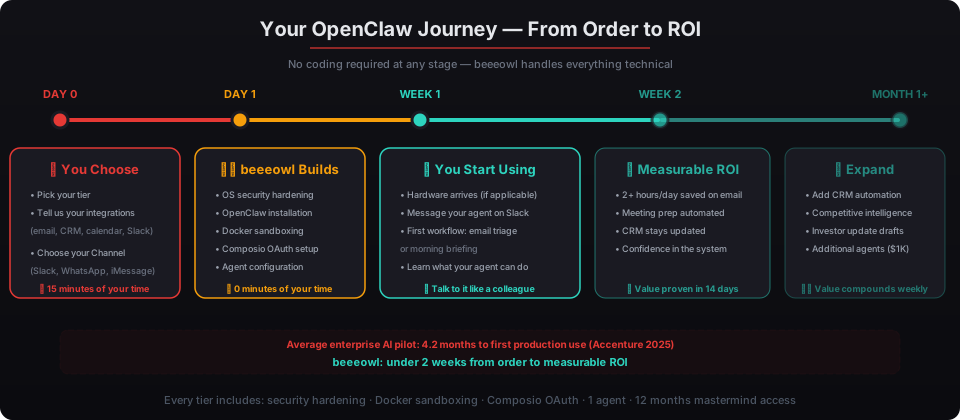
One day for the technical deployment. beeeowl configures the operating system, installs OpenClaw, hardens security, sets up Docker sandboxing, configures Composio OAuth connections for your integrations, and deploys your first agent — all within a single business day.
For hardware tiers (Mac Mini and MacBook Air), the device ships within one week of ordering. Delivery time depends on your carrier and location within the US and Canada.
Here’s the typical timeline:
- Day 0: You choose your tier and tell us which integrations you need (email, CRM, calendar, Slack, etc.)
- Day 1: beeeowl completes the full deployment — OS hardening, OpenClaw install, security configuration, agent setup
- Days 2-7 (hardware tiers): Device ships to your address
- Day 7-8: You start using your agent through your preferred Channel (Slack, WhatsApp, Telegram, or iMessage)
According to Accenture’s 2025 Technology Vision data, the average enterprise AI pilot takes 4.2 months from approval to first production use. beeeowl’s model compresses that to under two weeks. The difference is standardized deployment — we’ve done this 150+ times and the process is repeatable.
What Can Go Wrong With DIY Installation?
Security gaps. That’s the honest answer. OpenClaw’s source code is public on GitHub — anyone can install it. But installing it correctly, with enterprise-grade security, is a different story entirely.
Here’s what founders miss when they try to self-install or hire a freelance developer:
- No Docker sandboxing — the agent runs with full access to the host operating system instead of an isolated container. If something goes wrong, it can affect everything on the machine.
- Exposed credentials — API keys and passwords stored in plain-text configuration files instead of secure OAuth flows through Composio
- No audit trails — no logging of what the agent accessed, when, or what actions it took
- Missing authentication — anyone on the local network can interact with the agent
- No firewall configuration — ports left open that should be closed
According to IBM’s 2025 Cost of a Data Breach Report, breaches involving AI systems averaged $5.2 million — 13% higher than non-AI breaches. NVIDIA built the NemoClaw enterprise security framework specifically because running an unprotected AI agent on a corporate network is genuinely dangerous. Jensen Huang said it directly at Computex 2025: agents “can have access to sensitive information, execute code, and communicate externally. Obviously, this can’t possibly be allowed.”. See our pricing page.
Every beeeowl deployment includes the full NemoClaw-grade security stack. This isn’t an upsell — it’s the baseline.
How Do I Talk to My Agent?
Through the messaging apps you already use — Slack, WhatsApp, Telegram, iMessage, or a web interface. Your agent shows up as a contact or bot in your existing tools. You message it like you’d message a colleague.
According to Forrester’s 2025 Enterprise Communication Survey, executives average 4.2 communication platforms daily. Microsoft’s 2025 Workplace Analytics found that standalone AI tools — dashboards requiring a separate login — get abandoned by 73% of users within 60 days. OpenClaw avoids that trap by living inside tools you already open 50 times a day.
Here’s what a typical interaction looks like:
- You (Slack, 8:45 AM): “What’s on my calendar today?”
- Agent: Sends your full schedule with attendee backgrounds, previous meeting notes, and suggested talking points
- You (WhatsApp, 2:30 PM): “Draft a follow-up to the call with Sarah about the Series B terms”
- Agent: Drafts the email using context from your CRM and previous conversations, sends it for your approval
Most beeeowl clients use two Channels: one for desktop (Slack or Microsoft Teams) and one for mobile (WhatsApp, Telegram, or iMessage). The agent maintains full context across both — start a conversation on Slack at noon, pick it up on WhatsApp at 6 PM.
What Does It Cost?
$2,000 to $6,000 — one-time. No monthly fees. No per-seat licensing. No annual renewals.
| Tier | One-Time Price | What’s Included |
|---|---|---|
| Hosted (Cloud VPS) | $2,000 | Full deployment on dedicated VPS, 1 agent, security hardening, 12 months masterminds |
| Mac Mini | $5,000 | Hardware included + everything above |
| MacBook Air | $6,000 | Portable hardware included + everything above |
| Additional agents | $1,000 each | Per executive beyond the first |
| Private on-device LLM | +$1,000 | Data never leaves your machine — not even to ChatGPT or Claude APIs |
For comparison: ChatGPT Enterprise costs $60 per user per month ($720/year per person). Microsoft Copilot runs $30 per user per month ($360/year). According to Deloitte’s 2025 AI Cost Benchmarking study, companies choosing on-premises AI reported 34% lower total cost of ownership over three years compared to cloud-only strategies.
beeeowl’s pricing includes hardware, deployment, security hardening, one configured agent, and 12 months of mastermind community access. The only additional cost is $1,000 per agent if you want to add team members. Every plan comes with a 100% satisfaction guarantee — full refund if you’re not completely satisfied. Buy your OpenClaw setup online.
What Should My First Workflow Be?
Email triage or a morning briefing. Both deliver measurable ROI within two weeks, require minimal configuration, and build your confidence in the system before expanding to more complex workflows.
Email triage scans your inbox every 30 minutes, categorizes messages by urgency, drafts responses to routine items, and flags messages that need your personal attention. According to Harvard Business Review’s 2025 workplace study, executives spend 4.1 hours daily on email. Even a 50% reduction gives you 2 hours back every day — over 500 hours per year.
Morning briefing delivers a daily summary at 9 AM: your calendar, attendee backgrounds and LinkedIn profiles, previous meeting notes with each person, talking points, and overnight activity across your communication channels. It’s like having an EA who reads everything overnight and has your prep ready before your first coffee.
We’ve deployed 150+ agents. The pattern is consistent: founders who start with one of these two workflows see enough value in the first 14 days to add CRM sync, competitive intelligence, or investor update drafting by month two.
Start small. Prove the value. Expand from there.