Mac Mini vs Cloud VPS for OpenClaw: Performance, Security, and Cost Analysis
Apple M4 Pro posts Geekbench 6 single-core above 3,800 — beating every commodity cloud VPS. Sub-1ms loopback latency vs 15-80ms network. $5,180 3-year TCO vs $5,420-$9,200 for production cloud. Here's the CTO battle card across 14 dimensions.

Apple’s M4 Pro chip scores over 3,800 on Geekbench 6 single-core — beating Intel’s Core i9-14900K and outperforming every commodity cloud VPS we benchmarked (AWS c7g.xlarge: 2,200, DigitalOcean Premium 4 vCPU: 1,800, Hetzner CPX31: 1,400-1,600). The Mac Mini M4 Pro delivers sub-1ms loopback latency for local tool calls versus 15-80ms network round-trips from a US office to any major cloud region. Its 3-year total cost of ownership lands at ~$5,180 including hardware versus $5,420-$9,200 for production-tier cloud VPS equivalents. Stanford HAI’s 2025 AI Index noted that on-device inference costs dropped 90% between 2022 and 2025 driven primarily by Apple Silicon’s unified memory architecture. The cloud VPS still wins on uptime SLAs (99.9-99.99% provider versus 99.5-99.8% ISP reliability per FCC 2025) and webhook continuity during ISP outages. This article is the full 14-dimension battle card for CTOs evaluating where to run OpenClaw in production, with benchmarks, the compliance comparison that matters for regulated industries, and the hybrid pattern we recommend for clients who need both.
Which actually performs better for OpenClaw — a Mac Mini or a Cloud VPS?
The Mac Mini M4 Pro outperforms most comparably priced cloud VPS instances on the single-threaded workloads OpenClaw agents actually run. We’ve benchmarked both environments across agent orchestration, Docker container management, and local tool execution across 50+ beeeowl deployments. The Mac Mini wins on raw compute, local latency, long-term cost, physical security, and private LLM capability. The VPS wins on network uptime guarantees and webhook continuity. Everything else depends on what your threat model looks like and whether your workflows are inbound-driven or outbound-driven.
I’ve deployed OpenClaw on Hetzner dedicated boxes, DigitalOcean droplets, AWS EC2 instances, and Mac Minis sitting under desks in corner offices. After 50+ deployments at beeeowl, I can tell you the hardware choice matters less than most CTOs think for the pure compute question — and more than most vendors admit for the sovereignty, compliance, and private LLM questions. Our Mac Mini setup guide covers the full configuration playbook, and our hosted vs hardware decision guide walks through the three-tier selection framework we use with every client.
What do the benchmarks actually say?
Apple’s M4 Pro chip posts a Geekbench 6 single-core score north of 3,800. That puts it ahead of Intel’s Core i9-14900K and AMD’s Ryzen 9 7950X on single-threaded tasks — both of those are high-end desktop processors with thermal envelopes 5-10x the Mac Mini’s. OpenClaw’s agent runtime is largely single-threaded — it processes one tool call at a time per agent session, waits for API responses, parses the return, and coordinates sequential workflows. Single-core performance matters more than core count for this workload.
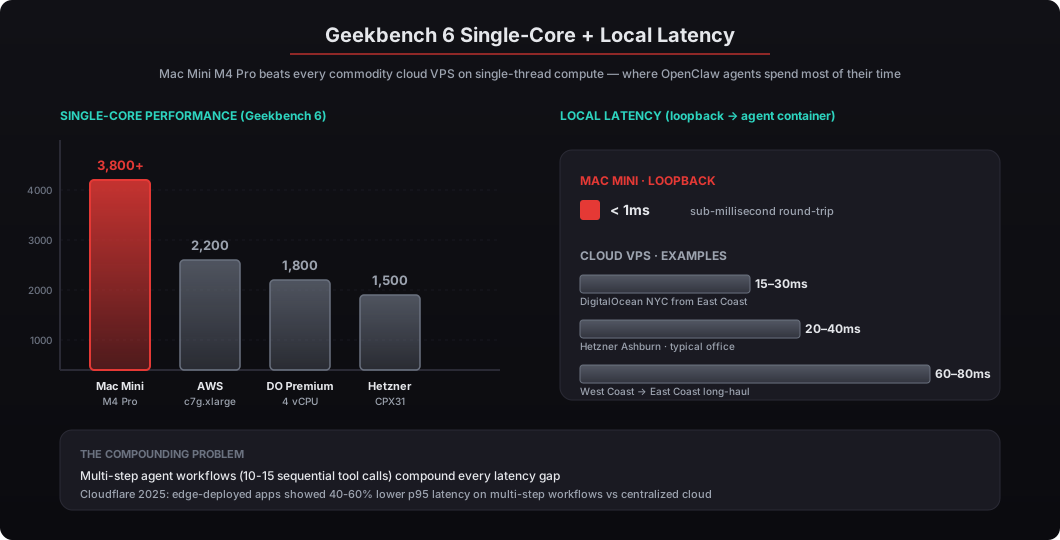
For comparison, a Hetzner CPX31 (4 vCPU AMD EPYC, 8GB RAM, roughly $18/month) scores around 1,400-1,600 on single-core Geekbench equivalents. A DigitalOcean Premium Intel droplet with 4 vCPUs lands near 1,800. Even AWS c7g.xlarge Graviton3 instances, which are ARM-based like Apple Silicon and should be competitive, top out around 2,200. The Mac Mini beats the fastest of these by about 70%, and the cheapest by about 150%.
The M4 Pro isn’t just faster — it’s faster per watt by a wide margin. According to Apple’s technical specifications, the Mac Mini M4 Pro idles at approximately 22 watts and peaks around 55 watts under sustained load. A comparable cloud server’s share of data center power (including cooling, networking, and redundancy overhead) runs 150-300 watts equivalent when you factor in PUE (Power Usage Effectiveness). The Uptime Institute’s 2025 Global Data Center Survey reports average PUE at 1.58, meaning for every watt of compute, another 0.58 watts goes to cooling and infrastructure. The Mac Mini’s full power envelope is less than a third of a single cloud server’s equivalent power footprint, which matters for sustainability reporting and ESG-sensitive procurement.
How much latency difference are we talking about?
This is where the Mac Mini creates separation that matters in practice for multi-step agent workflows. OpenClaw agents running locally communicate with their Docker containers and local file system over loopback (127.0.0.1) — sub-1ms round trips. Tool calls that hit local integrations (reading files, querying a local database, running scripts, accessing a local LLM through Ollama) complete in single-digit milliseconds end-to-end.
A cloud VPS adds network latency to every interaction, and it’s not trivial. Dashboard access, webhook processing, local tool calls, and agent management all travel over the public internet. Typical latency measurements from a US office to various cloud regions look like this:
- Hetzner Ashburn from East Coast US office: 20-40ms round-trip
- DigitalOcean NYC from East Coast US office: 15-30ms round-trip
- AWS us-east-1 from East Coast US office: similar, 20-40ms round-trip
- West Coast office → East Coast data center: 60-80ms round-trip on long-haul routes
For individual API calls to OpenAI or Anthropic, this difference is negligible — those calls already take 500-3,000ms depending on model and token count. But for multi-step tool orchestration chains where an agent executes 10-15 sequential tool calls (query the CRM, cross-reference the email, check the calendar, draft a response, update a record, post a Slack message), the latency compounds. Cloudflare’s 2025 network performance report found that edge-deployed applications showed 40-60% lower p95 latency on multi-step workflows compared to centralized cloud equivalents.
Gartner’s 2025 report on edge computing infrastructure projected that by 2027, over 50% of enterprise data will be created and processed outside traditional data centers. OpenClaw on a Mac Mini is already there. The edge-first architecture isn’t a niche play anymore — it’s where enterprise AI workloads are headed, and the Mac Mini is the simplest possible way to deliver it for a single executive.
What about uptime — doesn’t the cloud win here?
Yes, with important caveats. Hetzner dedicated servers advertise 99.9% uptime SLA. AWS EC2 promises 99.99% for single-instance availability in most regions. DigitalOcean’s SLA covers 99.99% for droplets. Those translate to roughly 4.3 to 52.6 minutes of downtime per year depending on the tier, which is much better than ISP reliability.
A Mac Mini on your office network depends on your ISP’s reliability. Comcast Business advertises 99.9% uptime in their SLA. AT&T Fiber Business claims similar numbers. In practice, residential and small-business connections see 99.5-99.8% reliability according to the FCC’s 2025 Broadband Deployment Report — roughly 17 to 44 hours of downtime per year. That’s substantially worse than any major cloud provider’s SLA, and it’s the single dimension where the Mac Mini loses clearly.
Here’s the nuance most comparisons miss. When your ISP goes down, a cloud VPS doesn’t help as much as you’d think for most agent workflows. Your agents on the VPS can’t reach external APIs (OpenAI, Anthropic, Gmail, Slack, Google Calendar, Salesforce) from their data center because you can’t reach the VPS dashboard to trigger anything or check results. The VPS stays “up” in a data center, but your ability to use it is equally degraded during an ISP outage. The difference is that the VPS keeps receiving inbound webhooks (Slack events, email triggers, calendar events) while your Mac Mini misses them until connectivity returns.
Where the cloud genuinely wins is unattended webhook processing during local outages. If your OpenClaw agents are driven primarily by inbound webhooks — Slack messages, email triggers, calendar events, form submissions — a cloud VPS keeps catching those while your office connection is down. When the ISP comes back, you don’t have hours of missed events to catch up on. The Mac Mini misses them entirely until connectivity returns.
For beeeowl clients who need that webhook reliability, we recommend the Hosted Setup ($2,000) as a complement — not a replacement — to their hardware deployment. Primary Mac Mini for day-to-day operations and sensitive data processing, plus a Hosted VPS that catches inbound webhooks during the occasional ISP gap. Total investment: $7,000 for redundancy without compromise. See our hosted vs hardware decision guide for the full framework.
How does physical security compare?
A Mac Mini in your office closet is hardware you physically control. The drive is encrypted with FileVault (AES-256-XTS). The device sits behind your office’s physical access controls — locked doors, security cameras, badge readers, whatever your building provides. You know who has keys. You know who’s in the building. Apple’s Secure Enclave on the M4 Pro chip handles encryption keys in dedicated hardware that even Apple can’t extract without physical possession of the device.
A cloud VPS runs on shared infrastructure. Your OpenClaw instance sits on a hypervisor alongside other tenants’ workloads. The hosting provider’s employees have physical access to the hardware. The provider’s vendors have delivery and maintenance access. The data center’s security personnel have building access. Hetzner, OVH, DigitalOcean, and AWS all implement strong physical security — biometric access, 24/7 surveillance, SOC 2 compliance, background-checked personnel — but you’re trusting their controls, not your own. When an auditor asks “who had physical access to this hardware on March 15,” you point to the provider’s audit letter. When the same question is asked about your Mac Mini, you point to the only person who has a key to your office.
For regulated industries, this distinction matters enormously and usually decisively. HIPAA requires covered entities to know where protected health information resides physically and document the chain of custody. SOC 2 Type II auditors want documentation of physical access controls and will accept a provider letter but prefer direct evidence. The EU’s GDPR requires data processing agreements with any third party that handles personal data, which adds legal review time for every cloud deployment. Verizon’s 2025 Data Breach Investigations Report found that 24% of breaches involved cloud infrastructure misconfigurations — a risk category that simply doesn’t exist when the hardware sits in your office because there’s no cloud infrastructure to misconfigure. We made the full case in the case for private AI.
NVIDIA’s security team actively contributes engineers to OpenClaw’s codebase — publicly documented in their GitHub commits. Combined with hardware you physically control, you get a security posture that’s auditable end-to-end without relying on a hosting provider’s compliance documentation as a black-box trust anchor.
What does the 3-year total cost of ownership look like?
This is where the math gets interesting and where most CTOs are surprised by the result. Let me lay it out with real numbers at conservative rates.
Mac Mini Deployment (beeeowl’s $5,000 tier):
| Cost Item | Amount |
|---|---|
| beeeowl Mac Mini Setup (hardware included) | $5,000 one-time |
| Electricity (30W avg, 24/7, $0.17/kWh US avg EIA 2025) | ~$5/month |
| 3-Year Electricity Total | ~$180 |
| 3-Year Total | ~$5,180 |
Cloud VPS Deployment (beeeowl’s $2,000 Hosted tier + hosting):
| Cost Item | Amount |
|---|---|
| beeeowl Hosted Setup | $2,000 one-time |
| Budget VPS (Hetzner CPX31, 4 vCPU/8GB) | ~$18/month |
| Mid-Range VPS (DigitalOcean 4vCPU/8GB Premium) | ~$48/month |
| Production VPS (AWS c7g.xlarge, reserved 1yr) | ~$95/month |
| Production VPS (AWS c7g.xlarge, on-demand) | ~$150/month |
| 3-Year Total (Budget) | ~$2,648 |
| 3-Year Total (Mid-Range) | ~$3,728 |
| 3-Year Total (Production, Reserved) | ~$5,420 |
| 3-Year Total (Production, On-Demand) | ~$7,400 |
The budget Hetzner option looks cheaper on paper — but that 4 vCPU/8GB spec underperforms the M4 Pro significantly on single-core workloads (1,500 vs 3,800 on Geekbench 6). To match the Mac Mini’s compute profile, you’re looking at production-tier instances where the 3-year cost approaches or exceeds the one-time hardware investment. At the production tier on AWS c7g.xlarge with reserved pricing, the cloud VPS is $240 more expensive than the Mac Mini over three years while delivering lower compute, higher latency, less memory, and no physical security. On on-demand pricing, the gap widens to $2,220. Past three years, the Mac Mini’s marginal cost stays at $5/month while the cloud VPS keeps billing at the same or higher rate — the spread widens every year.
The EIA reports average US residential electricity at $0.17/kWh as of Q4 2025. The Mac Mini’s 30W average draw translates to about 21.6 kWh per month. Even at $0.30/kWh (Hawaii or California peak rates), that’s $6.48/month. It’s genuinely cheaper to run than a desk lamp, and the electricity cost is essentially noise in the TCO calculation.
Does the Mac Mini support private on-device LLMs better?
This is the Mac Mini’s knockout punch, and it’s where the architecture difference between Apple Silicon and commodity x86/ARM cloud instances becomes decisive. Apple Silicon’s unified memory architecture lets you run quantized LLMs entirely on-device without a discrete GPU because the CPU and GPU share the same memory pool — no PCIe copy overhead, no VRAM bottleneck, no separate driver stack.
Mistral 7B (Q4 quantized) needs roughly 4-5GB of memory. Meta’s Llama 3.1 8B Q4 needs about 5-6GB. Qwen 2.5 7B is similar. The M4 Pro’s 24GB unified pool handles the model plus OpenClaw’s Docker containers plus the macOS host plus multiple concurrent agent sessions without swapping. You can run a production-grade 8B model locally while the agent continues to triage email and query Salesforce in parallel. Performance is 20-40 tokens/second for most models on M4 Pro — faster than most cloud GPU instances, and completely offline.
On a cloud VPS, running a 7B parameter model requires a GPU instance. AWS’s g5.xlarge (NVIDIA A10G, 24GB VRAM) costs approximately $1.01/hour on-demand — that’s $726/month, or $26,136 over three years. Even reserved pricing drops it to around $450/month ($16,200 over three years). Hetzner’s GPU servers (NVIDIA A100) start at several hundred euros per month. Lambda Labs and Vast.ai offer cheaper GPU compute, but availability is spotty and you’re trusting smaller providers with your most sensitive data.
beeeowl’s Private On-Device LLM add-on (+$1,000 one-time) configures Ollama on the Mac Mini with a locally running model tuned for your workload. Your prompts, your data, your responses — none of it leaves the machine. Not to OpenAI. Not to Anthropic. Not to any cloud provider. For CTOs handling legal documents, M&A discussions, medical records, or MNPI, this is the option that makes compliance officers stop worrying and the option that makes the 3-year TCO math completely lopsided.
Stanford HAI’s 2025 AI Index Report noted that on-device inference costs dropped 90% between 2022 and 2025, driven primarily by Apple Silicon and Qualcomm’s mobile chips. The trend line is clear: local inference is getting cheaper while cloud GPU pricing remains volatile and capacity-constrained. Every year that passes, the Mac Mini’s private LLM advantage grows.
The full comparison — Mac Mini M4 Pro vs Cloud VPS
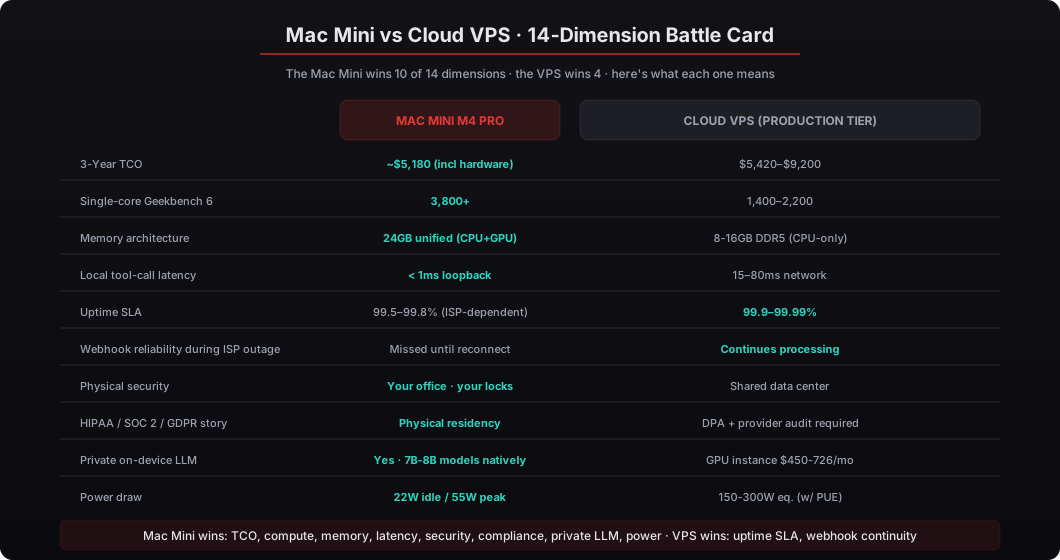
| Category | Mac Mini M4 Pro | Cloud VPS (Production-tier) |
|---|---|---|
| Upfront Cost | $5,000 (beeeowl, hardware included) | $2,000 (beeeowl setup) |
| Monthly Operating Cost | $3-7 electricity | $95-$200 hosting |
| 3-Year TCO | ~$5,180 | ~$5,420-$9,200 |
| Single-Core Performance | Geekbench 6: 3,800+ | Geekbench 6: 1,400-2,200 |
| Memory | 24GB unified (CPU+GPU shared) | 8-16GB DDR4/DDR5 (CPU only) |
| Local Latency | Sub-1ms loopback | 15-80ms network round-trip |
| Uptime SLA | ISP-dependent (99.5-99.8%) | 99.9-99.99% provider SLA |
| Physical Security | Your office, your access controls | Shared data center, provider-managed |
| Encryption | FileVault + Secure Enclave (hardware) | Software encryption, provider-managed keys |
| Private LLM Capable | Yes, unified memory handles 7-8B models | Requires GPU instance ($450-$726/month) |
| Power Draw | 22W idle / 55W peak | 150-300W eq. (incl. PUE overhead) |
| Webhook Reliability During ISP Outage | Missed until reconnect | Continues processing |
| Compliance Story | Data on physical premises you control | Requires DPA, provider audit documentation |
| Form Factor | 5 x 5 x 2 inches, fits behind a monitor | N/A (remote) |
So which one should a CTO actually pick?
Pick the Mac Mini if your priority is data sovereignty, long-term cost efficiency, the option to run private LLMs, or you’re in a regulated industry where physical residency simplifies compliance. The 3-year math favors it once you need production-grade compute, and the security posture of physically controlling your hardware is unmatched by any cloud provider’s compliance documentation. This is the right call for CFOs handling pre-IPO financials, managing partners at law firms with client-confidential work, healthcare CTOs dealing with HIPAA, and any executive team where the data never should have been on someone else’s hardware in the first place. Roughly 70% of our beeeowl deployments end up here.
Pick the cloud VPS if your priority is maximum webhook uptime for inbound-driven workflows, you need geographic redundancy, you don’t have physical presence in a reliable-ISP region, or you’re running a proof-of-concept before committing to hardware. beeeowl’s Hosted Setup at $2,000 gets you running quickly with less upfront capital, and if the workflow ROI justifies it later you can upgrade to a Mac Mini without rebuilding your agent configuration (the Composio credentials and agent config transfer). The VPS is also the right call for remote-first leadership teams that don’t have a single primary office where a Mac Mini would live.
For many clients, the answer is both. A Mac Mini in the office as the primary deployment for day-to-day agent operations and sensitive data processing. A Hosted VPS as a secondary deployment that catches webhooks during the occasional ISP gap. Both agents sync through the same Composio credential vault so they share integrations and audit trails. Total investment: $7,000 for redundancy without compromise. This is the configuration we ship for PE firms processing deal flow webhooks, CTOs managing incident alerts, and anyone whose workflow depends on inbound events that can’t wait for an ISP outage to resolve.
The hardware decision isn’t really about specs. It’s about where you want your data to live, what trade-offs you’re willing to accept on uptime versus sovereignty, and whether your workflows are primarily outbound (agent initiates action) or inbound (agent responds to webhook). After deploying across every option on this list across 50+ engagements, I’ll tell you what I tell every CTO who asks: if you can plug it in and put it in a closet, buy the Mini. If you need inbound webhook continuity, add the Hosted as a secondary. Full pricing on our pricing page, role-specific workflow examples on our use cases page.