Building a Custom MCP Server: Give Your OpenClaw Agent Access to Internal Tools
MCP lets your OpenClaw agent access internal CRMs, ERPs, and databases without direct access. Learn how to build, secure, and deploy a custom MCP server.
Why Does MCP Matter More Than Skills for Internal Tools?
Skills run code inside your OpenClaw agent. MCP (Model Context Protocol) runs code on a separate server that your agent talks to over a standardized JSON-RPC interface. That distinction is the entire security model — and it’s why MCP is the right approach when connecting to internal CRMs, ERPs, databases, and financial systems.

When a Skill executes, it has the same permissions as the agent process itself. That’s fine for self-contained tasks like formatting a morning briefing or drafting a Slack message. But when your agent needs to query a Salesforce instance with 200,000 contact records, or pull variance data from your ERP, you don’t want that access living inside the agent’s process boundary.
According to Anthropic’s March 2026 MCP adoption report, over 15,000 MCP servers have been published across public registries. But the real story is internal. Gartner’s 2026 Enterprise AI Survey found that 62% of organizations building production AI agents have deployed at least one custom MCP server for internal tool access. The protocol has moved from “interesting standard” to “how enterprise agents actually connect to things.”
We covered how MCP works under the hood previously. This post goes further: we’re building one.
What Exactly Does a Custom MCP Server Do?
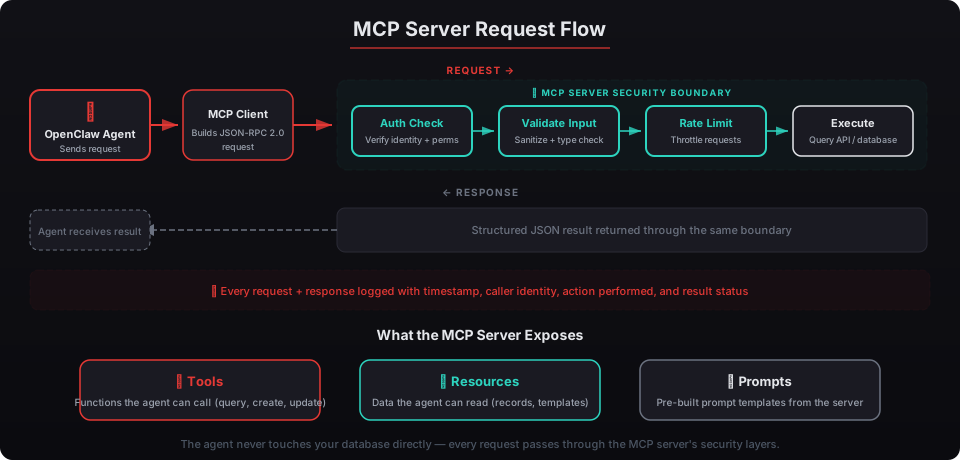
A custom MCP server wraps your internal systems behind a standardized interface that OpenClaw can discover and call. The agent never touches your database directly. It sends a JSON-RPC request to the MCP server, which validates the request, checks authorization, queries the internal system, and returns structured results.
Think of it as a controlled middleman with opinions. The MCP server decides what data the agent can access, how much, and in what format. Your agent asks “show me Q1 revenue by region” and the MCP server translates that into a safe, parameterized SQL query — not a raw database connection.
Here’s the architecture:
OpenClaw Agent → MCP Client → JSON-RPC → MCP Server → Internal API / DatabaseThe MCP server exposes three primitives:
- Tools — functions the agent can call (e.g.,
query_revenue,get_contact,create_ticket) - Resources — data the agent can read (e.g., a CRM record, a report template)
- Prompts — pre-built prompt templates the server provides (e.g., “summarize this pipeline”)
According to the MCP specification, tools are the most commonly implemented primitive. McKinsey’s 2025 AI Integration report found that organizations using standardized tool interfaces reduced integration maintenance costs by 34% compared to custom API wrappers.
Every beeeowl deployment ships with Composio handling 10,000+ third-party app connections. Custom MCP servers fill the gap for your proprietary internal systems — the ones no pre-built connector covers.
How Do You Build a Basic MCP Server in Under an Hour?
Python’s fastmcp library handles the protocol boilerplate so you can focus on the tool logic. A read-only MCP server that queries an internal API takes about 45 minutes to scaffold, test, and connect to OpenClaw.
Here’s a minimal example — an MCP server that exposes a get_revenue_summary tool from an internal financial API:
from fastmcp import FastMCP

mcp = FastMCP("internal-finance")

@mcp.tool()
def get_revenue_summary(quarter: str, year: int) -> dict:
    """Get revenue summary by quarter and year."""
    # Replace with your actual internal API call
    import requests
    response = requests.get(
        f"https://internal-api.yourcompany.com/revenue",
        params={"quarter": quarter, "year": year},
        headers={"Authorization": f"Bearer {get_service_token()}"}
    )
    response.raise_for_status()
    return response.json()

if __name__ == "__main__":
    mcp.run(transport="stdio")
That’s it. The @mcp.tool() decorator registers the function as an MCP tool, auto-generates the JSON schema from your type hints, and handles the JSON-RPC serialization. OpenClaw discovers the tool during initialization and can call it by name.
To connect it to your OpenClaw agent, you add the server to the MCP configuration — typically in mcp_config.json or through the Gateway control plane:
{
  "mcpServers": {
    "internal-finance": {
      "command": "python",
      "args": ["mcp_finance_server.py"],
      "env": {
        "INTERNAL_API_TOKEN": "${FINANCE_API_TOKEN}"
      }
    }
  }
}
The agent now has a get_revenue_summary tool available. Ask it “What was Q4 2025 revenue?” and it calls your MCP server, which calls your internal API, and returns the result — without the agent ever seeing a raw database credential.
According to the OpenClaw CLI documentation, agents discover MCP tools at startup and refresh the tool list whenever an MCP server reconnects. There’s no manual registration step beyond the initial config.
How Do You Secure an MCP Server for Production?
A working prototype is not a production system. The gap between “it runs” and “it’s safe for internal financial data” is where most teams underestimate the effort. Deloitte’s 2025 Enterprise AI Security report found that 47% of AI-related security incidents involved improperly secured integration layers — not the AI model itself.
Here are the five hardening steps we apply to every custom MCP server in beeeowl deployments.
1. Authorization in Every Handler
Never assume a request is legitimate because it came from your agent. Every tool handler should verify the caller’s permissions:
@mcp.tool()
def get_revenue_summary(quarter: str, year: int, ctx: Context) -> dict:
    """Get revenue summary by quarter and year."""
    user = ctx.get("authenticated_user")
    if not user or "finance_read" not in user.get("scopes", []):
        raise PermissionError("Insufficient permissions for revenue data")

    # Proceed with query...
The Context object carries authentication state from the transport layer. If the caller doesn’t have the right scope, the request fails before touching your internal API.
2. Input Validation
Type hints catch basic errors, but production servers need explicit validation. Reject malformed inputs before they reach your internal systems:
import re

VALID_QUARTERS = {"Q1", "Q2", "Q3", "Q4"}

@mcp.tool()
def get_revenue_summary(quarter: str, year: int) -> dict:
    if quarter not in VALID_QUARTERS:
        raise ValueError(f"Invalid quarter: {quarter}")
    if year < 2020 or year > 2030:
        raise ValueError(f"Year out of range: {year}")
    # Proceed...
This prevents prompt injection paths where an LLM might hallucinate unusual parameter values. OWASP’s 2025 LLM Security Guidelines specifically call out tool parameter validation as a critical control point.
3. Audit Logging
Every tool invocation should be logged with the caller identity, parameters, timestamp, and result status. This isn’t optional for regulated industries — and it’s smart practice for everyone:
import logging
from datetime import datetime

logger = logging.getLogger("mcp_audit")

@mcp.tool()
def get_revenue_summary(quarter: str, year: int) -> dict:
    logger.info(
        "tool_call",
        extra={
            "tool": "get_revenue_summary",
            "params": {"quarter": quarter, "year": year},
            "timestamp": datetime.utcnow().isoformat(),
            "status": "initiated"
        }
    )
    # ... execute and log result
We covered the full observability stack — including how these logs flow into Grafana and SIEM systems — in our guide to OpenClaw audit logging and monitoring.
4. Rate Limiting
Without rate limits, a looping agent can hammer your internal API thousands of times per minute. Set sensible ceilings:
from functools import wraps
import time

call_log = {}

def rate_limit(max_calls: int = 10, window: int = 60):
    def decorator(func):
        @wraps(func)
        def wrapper(*args, **kwargs):
            now = time.time()
            key = func.__name__
            calls = call_log.get(key, [])
            calls = [t for t in calls if now - t < window]
            if len(calls) >= max_calls:
                raise RuntimeError(f"Rate limit exceeded: {max_calls} calls per {window}s")
            calls.append(now)
            call_log[key] = calls
            return func(*args, **kwargs)
        return wrapper
    return decorator

@mcp.tool()
@rate_limit(max_calls=20, window=60)
def get_revenue_summary(quarter: str, year: int) -> dict:
    # ...
Forrester’s 2025 AI Agent Reliability Report found that 23% of agent-related outages were caused by uncontrolled tool call loops. Rate limiting is the simplest mitigation.
5. OAuth for Remote Transport
For MCP servers running over HTTP (not stdio), use OAuth 2.0 for transport-level authentication. The MCP specification includes a built-in OAuth flow for remote servers:
from fastmcp import FastMCP

mcp = FastMCP("internal-finance")
mcp.configure_oauth(
    issuer="https://auth.yourcompany.com",
    audience="mcp-internal-finance",
    required_scopes=["finance:read"]
)
This ensures only authenticated, authorized clients can connect. Combined with mutual TLS in production, it creates a transport layer that meets SOC 2 requirements. We detailed how credential management works with Composio and OAuth in our credential security guide.
How Should You Deploy an MCP Server in Production?
The MCP server should run in its own Docker container, on the same network as your OpenClaw agent but isolated from the host OS. This is the same Docker sandboxing approach we use for every beeeowl deployment — applied to the MCP server layer.
Here’s a production Dockerfile:
FROM python:3.12-slim

RUN pip install fastmcp requests

COPY mcp_finance_server.py /app/
WORKDIR /app

RUN adduser --disabled-password --no-create-home mcpuser
USER mcpuser

EXPOSE 8080
CMD ["python", "mcp_finance_server.py"]
And the docker-compose.yml connecting it to your OpenClaw agent:
services:
  openclaw-agent:
    image: openclaw/agent:latest
    networks:
      - agent-net

  mcp-finance:
    build: ./mcp-finance
    networks:
      - agent-net
      - internal-net
    read_only: true
    security_opt:
      - no-new-privileges:true
    deploy:
      resources:
        limits:
          memory: 256M
          cpus: "0.5"

networks:
  agent-net:
    internal: true
  internal-net:
    internal: true
Key decisions in this configuration:
- Read-only filesystem — the MCP server can’t write to disk, limiting the blast radius of any compromise
- Separate networks — the agent network and internal API network are bridged only through the MCP server container
- Resource limits — prevents runaway processes from affecting other services
- Non-root user — the server process runs as
mcpuser, not root
According to NIST SP 800-190 guidelines for container security, these controls address the four primary container threat vectors: image vulnerabilities, runtime escape, network exposure, and resource exhaustion.
What Internal Systems Should You Connect First?
Start with read-only access to one system. Not five. Not your entire internal stack. One.
We’ve deployed custom MCP servers across 150+ executive deployments. The three systems clients connect first, ranked by frequency:
- CRM data (Salesforce, HubSpot) — 41% of first custom MCP servers query CRM records for meeting prep, pipeline summaries, and contact lookups
- Financial reporting (internal ERPs, QuickBooks APIs) — 31% start with revenue dashboards, variance commentary, and cash flow snapshots
- Internal knowledge bases (Confluence, Notion, SharePoint) — 22% connect document repositories for policy lookup and competitive intelligence
The remaining 6% are industry-specific: legal case management systems, portfolio monitoring platforms, and healthcare compliance databases.
If you’re a CEO, the CRM connection alone saves an estimated 3-4 hours per week on meeting prep — pulling contact history, deal status, and recent communications into your briefing automatically. We detailed more use cases like this in our executive time savings breakdown.
For CTOs, the financial reporting connection often has the most immediate ROI. Your agent can pull variance commentary, flag anomalies, and assemble board deck data without anyone manually exporting spreadsheets. The CFO AI agent use cases post covers the financial workflows in detail.
What Are the Common Mistakes When Building Custom MCP Servers?
We’ve reviewed dozens of custom MCP servers built by internal engineering teams. The same patterns show up repeatedly.
Exposing write operations too early. Start with read-only tools. Let your team build confidence in the agent’s judgment before allowing it to create tickets, update records, or send communications. According to IBM’s 2025 AI Risk Report, 68% of organizations that started with write-enabled AI integrations experienced at least one unintended data modification within the first 90 days.
Skipping tool descriptions. The @mcp.tool() decorator lets you add a docstring that the agent reads during tool discovery. Vague descriptions like “gets data” lead to incorrect tool selection. Be specific: “Returns quarterly revenue broken down by geographic region, in USD.”
Returning raw database rows. Your MCP server should return structured, meaningful results — not raw SQL output. Shape the response for the agent: include field labels, units, and context. An agent that receives {"rev_q1": 4200000} will perform worse than one that receives {"quarterly_revenue": {"period": "Q1 2025", "amount_usd": 4200000, "region": "North America"}}.
No error handling. When your internal API is down, the MCP server should return a clear error message — not crash. Unhandled exceptions in MCP servers cause the agent to lose tool access until the server restarts.
How Does beeeowl Handle Custom MCP Server Deployments?
We build, secure, and deploy custom MCP servers as part of our additional agent configuration service. Each additional agent is $1,000 and includes custom tool development, security hardening, Docker deployment, and integration testing.
Here’s our process:
- Scoping call — we identify which internal system you need connected and what specific data or actions your agent should access
- Server development — we build the MCP server with full input validation, authorization checks, and audit logging
- Security review — we run the server through our 47-point security checklist, the same one we apply to every beeeowl deployment
- Docker deployment — the server ships containerized, integrated into your existing OpenClaw stack with proper network isolation
- Integration testing — we verify end-to-end that your agent can discover, call, and correctly use every exposed tool
The entire process typically takes 1-2 days of development work. For simple read-only connections, we’ve shipped servers same-day.
Every beeeowl package — whether it’s the $2,000 Hosted Setup or the $6,000 MacBook Air deployment — comes with one fully configured agent. Custom MCP servers extend what that agent can reach.
If your executive team needs private AI that connects to your specific internal systems — not just the 10,000+ apps Composio already covers — request your deployment and we’ll scope the MCP server development during onboarding.