Running OpenClaw on a MacBook Air: Portable AI for Traveling Executives
The MacBook Air M4 runs OpenClaw agents with 32B+ parameter local models, all-day battery life, and zero cloud dependency. Here's why traveling executives are choosing portable AI.
Why Does Portable AI Matter for Executives?
Your AI agent is useless if it’s stuck on a server in your office when you’re in a hotel room in Singapore preparing for a board meeting. Executives travel 40-60% of their working time, according to a 2024 Deloitte corporate travel survey. That means your AI infrastructure needs to travel with you — not wait for you to get back to a reliable network.

We’ve been deploying OpenClaw on Mac Minis since our first client engagement. The Mini is still our default for always-on office use. But the question we kept hearing was: “What about when I’m on the road?”
No other OpenClaw deployment provider offers a portable hardware option. Not SetupClaw, not RoofClaw, not DIY guides. beeeowl is the only company that ships a fully configured MacBook Air with OpenClaw hardened, Docker sandboxed, and ready to run agents out of the box. That’s the gap we built this tier to fill.
What Makes the MacBook Air M4 Capable of Running OpenClaw?
The M4 MacBook Air handles OpenClaw because Apple Silicon’s unified memory architecture eliminates the CPU-GPU memory bottleneck that cripples AI workloads on traditional laptops. The M4 chip gives 24GB of shared memory to the CPU, GPU, and Neural Engine simultaneously — no copying data between pools, no bandwidth penalties.
According to Apple’s M4 chip specifications, the M4 delivers a 10-core CPU, 10-core GPU, and a 16-core Neural Engine rated at 38 TOPS. That Neural Engine matters for on-device inference. When you add beeeowl’s Private On-Device LLM option (+$1,000), models like Llama 3.1 8B, Mistral 7B, and even quantized 32B+ parameter models run entirely on the local hardware.
For context, a quantized Qwen 2.5 32B model uses roughly 18-20GB of memory. The 24GB unified memory MacBook Air M4 handles that with room left for Docker containers, the OpenClaw runtime, and your normal workflow apps. Geekbench 6 ML benchmarks place the M4 MacBook Air within 5% of the Mac Mini M4 — identical silicon, identical performance ceiling.
Why Are Hotel and Airport Networks a Security Problem?
Every Wi-Fi network you don’t control is an attack surface. Hotel networks, airport lounges, conference venue Wi-Fi, and coworking spaces all share the same problem: you don’t know who else is on the network, and you can’t verify the infrastructure between your device and the internet.
A 2024 report from Kaspersky’s Global Research and Analysis Team documented that 25% of public Wi-Fi hotspots in major business travel cities had no encryption at all. Another 34% used outdated WPA2-Personal with shared passwords — effectively no better than open networks for determined attackers.
When your OpenClaw agent is processing board materials, financial forecasts, or M&A due diligence, that data is exactly what a targeted attacker wants. A cloud-hosted deployment routes that data through whatever network you’re on. A MacBook Air with an on-device LLM processes everything locally. The data never hits the network. It never leaves the machine.
This isn’t theoretical paranoia. I’ve personally sat in airport lounges watching ARP spoofing attempts show up in Wireshark. If you’re a CFO pulling variance reports or a VC reviewing a term sheet, running that through the Marriott’s guest Wi-Fi is a risk you don’t need to take.
How Does a MacBook Air Deployment Differ from a Mac Mini?
The hardware is nearly identical — same M4 chip, same unified memory architecture, same Docker sandboxing and OpenClaw configuration. The differences are all about how macOS handles a laptop versus a desktop, and we configure each accordingly.
Sleep and wake behavior. The Mac Mini runs 24/7 with sleep disabled. The MacBook Air needs intelligent sleep management. We configure macOS’s Power Nap to allow background agent tasks during sleep — your agent can still process queued workflows, sync data, and handle scheduled tasks while the lid is closed. When you open the lid, the agent is already caught up.
Lid-close behavior. By default, macOS sleeps when you close the lid. We configure clamshell mode so the agent continues running when connected to external power and a display. For travel without a monitor, we use caffeinate daemon settings to keep critical agent processes alive during short lid-close periods.
Battery optimization. We tune Docker’s resource allocation to respect battery life. OpenClaw’s orchestration layer is lightweight — it’s mostly waiting for API responses and managing tool integrations. Coder.com’s research on Docker isolation for AI agents on Apple hardware confirmed that containerized agent workloads on Apple Silicon draw 3-5 watts during typical orchestration tasks. That means 15-18 hours of battery life for standard agent operation on the M4 MacBook Air’s 66.5Wh battery.
Thermal management. The MacBook Air is fanless. Under sustained local model inference (running a 32B model for extended periods), the chip will thermal throttle. We configure inference batch sizing and scheduling to stay within the Air’s thermal envelope. For most executive use cases — briefings, summaries, email drafts — inference runs are short bursts, not sustained loads.
What Can You Actually Do With OpenClaw While Traveling?
Here are the workflows we configure for traveling executives. These aren’t hypothetical — they’re the actual agent configurations we deploy.
Pre-meeting briefings. You land in a new city for an investor meeting. Your agent has already pulled the latest portfolio company metrics, compiled recent news mentions, and drafted a one-page briefing. It ran overnight on Power Nap while your laptop was closed in your carry-on. You open the lid at the hotel and it’s waiting for you.
Competitive intelligence on demand. Sitting in a conference and a competitor announces a new product? Your agent monitors RSS feeds, press releases, and social mentions in real time. Within minutes you have a structured analysis — what changed, what it means for your positioning, and suggested talking points. See our guide to building a competitive intelligence agent for the full technical setup.
Post-meeting follow-ups. You close a meeting, dictate notes into your agent via the OpenClaw chat interface, and it generates follow-up emails, updates your CRM, and schedules next steps. All processed locally. Nothing goes through a cloud API if you’re running the on-device LLM.
Travel logistics. Your agent handles itinerary changes, flight rebooking research, restaurant reservations, and calendar shuffling through Composio integrations with Gmail, Calendar, and your preferred tools. The orchestration part needs connectivity for API calls, but the reasoning and drafting happens on-device.
According to McKinsey’s 2025 State of AI report, executives who use AI assistants for meeting preparation save an average of 6.3 hours per week. On the road, where time is compressed and every hour counts, that number goes up.
How Does the On-Device LLM Option Work?
With beeeowl’s standard deployment, your OpenClaw agent uses cloud LLMs like GPT-4o or Claude as its reasoning engine. The agent orchestrates locally, but inference calls go to OpenAI or Anthropic’s servers. For most office use, that’s fine — you’re on a trusted network.
When traveling, that changes. The Private On-Device LLM add-on ($1,000) installs a local model that runs entirely on the MacBook Air. We use Ollama as the model runtime, configured inside Docker alongside OpenClaw. Your agent sends inference requests to localhost instead of a cloud endpoint.
The tradeoff is straightforward: on-device models are smaller than GPT-4o or Claude Opus. A quantized 32B model is extremely capable — it handles summarization, analysis, email drafting, and structured reasoning well — but it won’t match a 400B+ frontier model on complex multi-step reasoning tasks. For 90% of executive agent workflows, the difference is negligible.
As marc0.dev’s guide on running AI servers on Mac Mini M4 demonstrated, Apple Silicon handles local inference with remarkably low power draw. The same applies to the MacBook Air — identical chip, identical inference performance, just in a portable form factor.
The key point: with the on-device LLM, your data never touches ChatGPT, Claude, or any external API. Not the prompts, not the responses, not the context window. Everything stays on your machine. For executives handling material non-public information, that’s not a nice-to-have — it’s a requirement.
How Does This Compare to Just Using ChatGPT on Your Phone?
ChatGPT and Claude are chat interfaces. OpenClaw is an agent framework. The difference is the gap between asking someone a question and having an employee who does things for you.
ChatGPT can summarize a document if you paste it in. Your OpenClaw agent monitors your inbox, pulls relevant documents automatically, cross-references them against your calendar, and prepares a briefing before you ask. It connects to 40+ tools through Composio — Gmail, Slack, Google Sheets, your CRM, your project management tools — and acts on your behalf.
More importantly, ChatGPT processes everything on OpenAI’s servers. Every board document you paste, every financial model you upload, every confidential email you summarize — it all goes to a third-party data center. Gartner’s 2025 AI risk survey found that 67% of enterprises restrict the use of consumer AI tools for sensitive data, and 41% have experienced data exposure incidents involving cloud AI services.
Your MacBook Air running OpenClaw with an on-device LLM doesn’t have that problem. It’s your hardware, your model, your data.
What Does the Full MacBook Air Deployment Include?
beeeowl’s MacBook Air tier is $6,000 one-time. Here’s exactly what you get:
- MacBook Air M4 (24GB unified memory, included in the price)
- OpenClaw installation and configuration — full production deployment
- macOS security hardening — FileVault encryption, firewall, Gatekeeper, SIP verification
- Docker sandboxing — agent runs in an isolated container, can’t access host filesystem
- Composio OAuth setup — your credentials are managed securely, never exposed to the agent
- Authentication — no unauthorized access to your agent interface
- 1 fully configured agent with your chosen integrations
- Audit trails and access controls — every action logged
- Travel-specific configuration — Power Nap, lid-close handling, battery optimization
- 1 year of monthly mastermind access — group calls for ongoing Q&A and workflow tips
Additional agents are $1,000 each. The Private On-Device LLM add-on is $1,000.
No recurring fees. No subscriptions. No cloud hosting bills.
We complete the setup in one day and ship within one week. You open the box, turn it on, and your agent is running.
Who Should Choose MacBook Air vs. Mac Mini vs. Hosted?
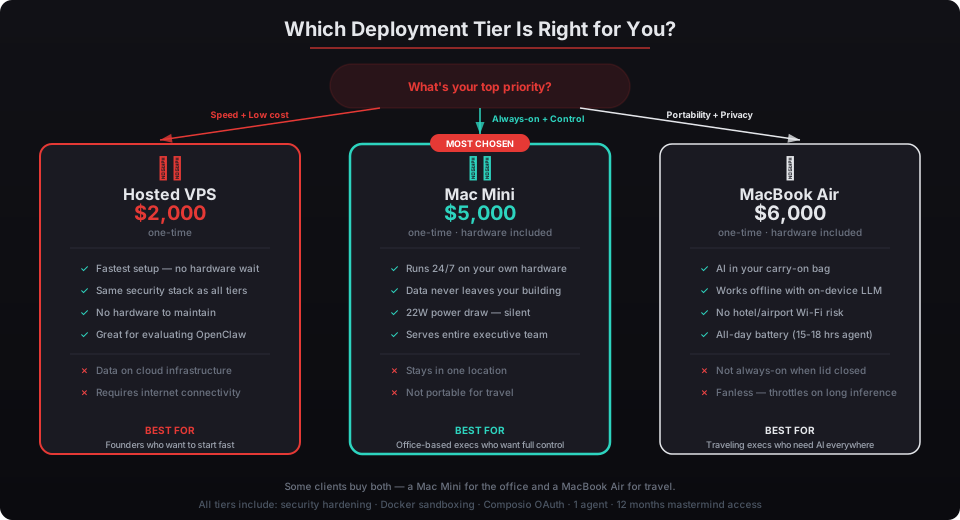
Pick the MacBook Air if you travel more than once a month and need your agent accessible everywhere. If you’re a CEO flying between board meetings, a VC doing partner meetings across three cities, or a managing partner visiting client sites, this is your tier. The portability premium is worth it — see our full comparison of hosted vs. hardware deployments.
Pick the Mac Mini ($5,000) if your agent is primarily an office tool. It runs 24/7, draws 22 watts, and sits behind your monitor. Better for always-on monitoring, overnight processing, and agents that serve your whole executive team from a central location.
Pick the Hosted tier ($2,000) if you want to start fast, don’t need physical hardware control, or want to evaluate OpenClaw before committing. We configure a cloud VPS with the same security stack.
Some clients buy both a Mac Mini for the office and a MacBook Air for travel. The two agents can be configured independently or as complementary parts of the same workflow.
Is This Actually a Unique Offering?
Yes. We’re the only OpenClaw deployment provider offering a portable hardware option. SetupClaw and RoofClaw both focus on cloud or desktop hardware deployments. DIY guides assume you’re running a home server. Nobody else ships a fully hardened, travel-ready MacBook Air with OpenClaw pre-configured.
That gap exists because portable deployment is genuinely harder than stationary. Sleep management, battery optimization, thermal constraints, lid-close behavior, and offline-capable agent configuration are all problems you don’t face with a Mac Mini plugged into a wall. We solved them because our clients asked for it, and because we believe sovereign AI infrastructure shouldn’t be something you leave behind when you board a plane.
Jensen Huang said at CES 2025 that every company needs an OpenClaw strategy. For executives who live on the road, that strategy needs to fit in a carry-on bag.
Request Your Deployment — MacBook Air tier, one-time $6,000, shipped within a week.