The OpenClaw Ecosystem Explained: Gateway, Skills, Channels, and MCP
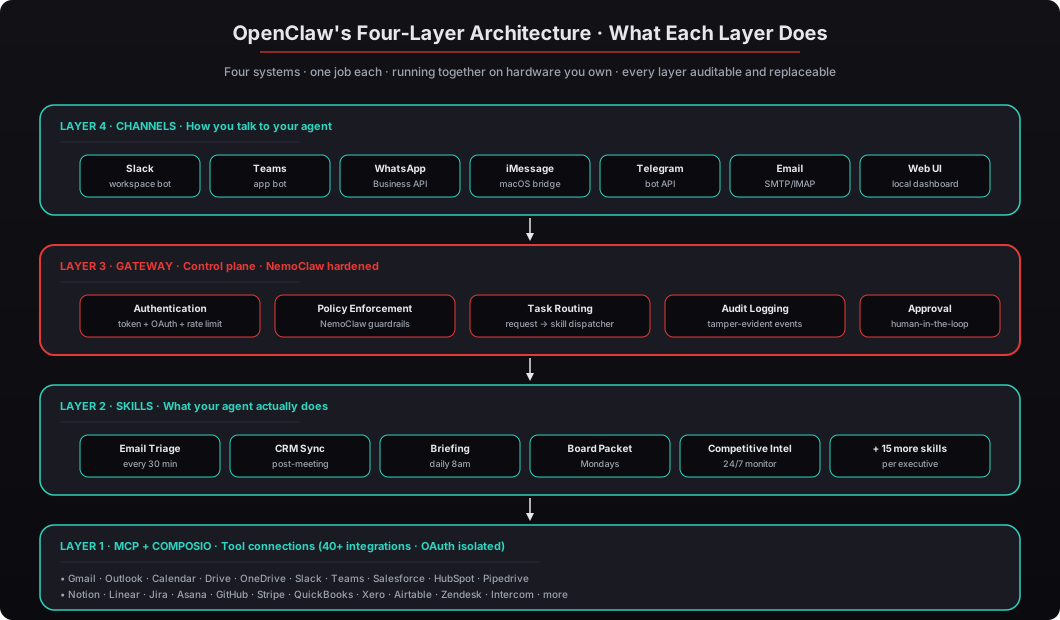
OpenClaw isn't one tool — it's four systems working together as a layered architecture. Gateway handles authentication, policy, routing, and audit. Skills define what the agent actually does. Channels determine how you talk to it. MCP plus Composio connect it to 40+ business tools through OAuth. This post walks through each layer with the full request lifecycle, the specific roles each component plays, and the deployment decisions each layer drives.

What Are the Four Layers of OpenClaw’s Architecture?
Answer capsule. OpenClaw runs on four interconnected systems: the Gateway (control plane — authentication, policy, routing, audit), Skills (the specific actions the agent performs — email triage, CRM sync, board deck assembly), Channels (how you communicate with the agent — Slack, Teams, WhatsApp, iMessage, email, web UI), and MCP + Composio (the tool connection layer providing standardized access to 40+ business tools through OAuth middleware so the agent never sees raw credentials). Each layer handles exactly one job, and together they form a production-grade AI agent that operates 24/7 on infrastructure you own. You don’t need to be a developer to understand this — but knowing the four pieces at a high level changes how you think about deployment scope, security policy, and integration priorities.

According to Gartner’s 2025 AI Infrastructure report, executives who understand their AI architecture make 43% faster procurement decisions and report higher satisfaction with deployment outcomes. We’ve walked 150+ executives through this exact breakdown in under 15 minutes, and the ones who invest those 15 minutes consistently make better choices about scope, security, and integration priorities. The executives who skip it end up committee-deciding their way into six-month pilots that stall at security review. See our complete guide to OpenClaw for business leaders for the broader context and our origin story walkthrough for how the framework came together.
Let’s walk through each layer from bottom to top, then follow a complete request from Slack message to completed action.
What Is the Gateway and Why Does It Matter So Much?
Answer capsule. The Gateway is OpenClaw’s control plane — the central system that handles authentication (verifying who is talking to the agent and what they are allowed to request), policy enforcement (applying rules about what the agent can and cannot do, including NVIDIA NemoClaw’s prompt injection defense and privacy routing), task routing (deciding which Skill to invoke for each request), audit logging (writing tamper-evident records of every action), and approval gates (pausing high-risk actions for human-in-the-loop review). If OpenClaw were a company, the Gateway would be the CEO, the COO, and the compliance officer rolled into one. Every request passes through it; no action happens without its approval.
Here’s what the Gateway actually handles on every request:
-
Authentication. Verifies the requester’s identity via a token, OAuth session, or SSO integration. Rate-limits by source IP and by authenticated user. Blocks requests from unknown sources. See our walkthrough of the security hardening checklist for the exact authentication configuration we ship.
-
Policy enforcement. Applies NemoClaw guardrails to filter prompt injection attempts, privacy routing rules to keep sensitive data on the local machine, scope restrictions to limit which Skills a given user can invoke, and action blocklists for high-risk operations that require explicit approval.
-
Task routing. Parses the incoming request, matches it to a registered Skill handler based on keywords, context, and user preferences, and dispatches the request to the correct handler with full context. A single request like “what’s on my calendar today” might route to the Briefing skill, while “find emails about Q1 revenue” routes to the Email Triage skill.
-
Audit logging. Writes every request, every Skill invocation, every tool call, and every response to a tamper-evident append-only log with full session attribution. This is the evidence trail that satisfies SOC 2 CC7.2, EU AI Act Article 12, HIPAA §164.312(b), and every other compliance framework that requires accountability for automated actions. See our audit logging and monitoring walkthrough for the full pipeline.
-
Approval gates. For high-risk actions (sending outbound emails, moving large deal stages in Salesforce, transferring funds, anything configured as requiring human approval), the Gateway pauses the action, posts a notification to the executive through the preferred Channel, and waits for explicit approval before continuing.
NVIDIA’s NemoClaw reference design adds production-grade hardening at the Gateway layer. According to NVIDIA’s 2025 documentation, NemoClaw includes prompt injection defense, privacy routing, Docker sandboxing, and human-in-the-loop approval primitives — all enforced through the Gateway. Jensen Huang stated directly at CES 2025: “Agentic systems in the corporate network can have access to sensitive information, execute code, and communicate externally. Obviously, this can’t possibly be allowed without governance.” NemoClaw is NVIDIA’s answer to that governance requirement. See our deep dive on the Gateway architecture and control plane and our NemoClaw enterprise reference design walkthrough.
Every beeeowl deployment ships with the full Gateway security stack preconfigured: authentication mandatory, NemoClaw guardrails enabled, audit logging with append-only tamper evidence, rate limiting tuned to the client’s usage patterns, and approval gates configured for the specific Skills that need them (outbound emails, contract modifications, financial transfers, anything the client’s policy requires). We don’t offer an unauthenticated tier. See the security hardening complete checklist for the specific configurations.
What Are Skills and How Do You Decide Which Ones to Deploy?
Answer capsule. Skills are the specific actions the agent performs — the things it actually does with its hands. Each Skill is a defined capability with clear input/output contracts, a scoped set of permissions, and a handler that implements the logic. Common Skills include email triage (reads inbox, drafts responses, flags urgent items), CRM sync (updates Salesforce/HubSpot from meeting transcripts), daily briefing (summarizes calendar and attendee backgrounds), board packet assembly (pulls data from 6 sources into a 9-section packet), competitive intelligence monitoring (watches 6+ sources 24/7), and variance commentary (explains accounting movement). McKinsey’s 2025 State of AI report found that companies deploying AI agents with clearly scoped Skills see a 28% reduction in executive administrative time within 90 days. Vague deployments with unlimited scope stall in security review — Deloitte’s 2025 survey found 71% of AI projects fail at exactly that stage.
Think of it this way: hiring a new employee and giving them a title doesn’t mean they know their job. You define their responsibilities. Skills work the same way — you decide what the agent can do, and the Gateway enforces those boundaries.
Common day-one Skills we configure across our 150+ deployments:
-
Email Triage — Scans inbox every 30 minutes, categorizes messages by urgency and topic, drafts responses for routine items, flags anything that genuinely needs the executive’s attention, archives noise. Connects to Gmail or Outlook. Requires
gmail.readonly+gmail.composescopes with folder restrictions. -
Daily Briefing — Delivered every morning at 8am through the preferred Channel. Includes the full calendar with attendee backgrounds pulled from LinkedIn and the CRM, talking points for each meeting, news about the companies and people involved, action items from yesterday’s meetings that need attention today, and an overnight summary of anything that happened while the executive was asleep.
-
CRM Sync — Reads meeting transcripts (from Otter, Gong, Zoom, or Read), extracts action items and key decisions, logs meeting notes to the appropriate Salesforce/HubSpot opportunity, moves deals through pipeline stages when explicit criteria are met, creates follow-up tasks for the executive to review.
-
Board Packet Assembly — Runs every Monday morning before the 9am board meeting. Pulls financial data from QuickBooks or Xero, pipeline data from Salesforce, product metrics from the data warehouse, team notes from Notion, customer health signals from support tools, and drafts a 9-section board packet ready for executive review. See AI-powered board deck assembly: from scattered data to presentation-ready.
-
Competitive Intelligence Monitor — Watches 6-8 named competitors 24/7 across press releases, funding announcements, leadership changes, job postings, pricing pages, G2 reviews, and SEC filings. Flags material changes within an hour of publication and produces a weekly summary. See building a 24/7 competitive intelligence agent that works.
-
Investor Update Drafting — Every Friday afternoon, drafts the weekly investor update by pulling the week’s metrics from the data warehouse, the week’s pipeline movement from Salesforce, the week’s product shipments from Linear, and the week’s key decisions from meeting notes. Executive reviews and sends Monday morning.
The framework for deciding which Skills to deploy first: pick one workflow that currently consumes 3-5 hours per week of the executive’s time. Deploy that Skill first, measure hours saved over two weeks, add a second Skill only after the first is running reliably. Most of the executives we deploy for start with Email Triage because the time-to-value is fastest — within the first 48 hours, the executive sees drafted replies in their drafts folder and gets a concrete sense of what the agent is doing. From there, we typically add CRM Sync by day 14, Daily Briefing by day 21, and one more Skill every week or two as trust builds.
According to Deloitte’s 2025 Enterprise AI Adoption Survey, 71% of AI projects fail at the security review stage, and the most common reason is that the proposed scope is “let the agent do everything” rather than a specific, auditable set of Skills with clear permission scopes. Vague deployments fail because compliance teams cannot write a policy around “everything.” Narrow deployments succeed because each Skill has an explicit contract: this is what it does, this is the data it touches, this is the action it can take, this is the evidence produced. See our walkthrough of how to get your first OpenClaw agent running in one day.
How Do Channels Work and Which Should You Choose?
Answer capsule. Channels are the messaging platforms where you interact with the agent — Slack, Microsoft Teams, WhatsApp, iMessage, Telegram, email, or a dedicated local web UI. You pick whichever platforms you already use, and the agent shows up there as a chat participant. Forrester’s 2025 Enterprise Communication Survey found that executives average 4.2 communication platforms daily, so asking them to open a fifth tool specifically to interact with AI is a non-starter — Microsoft’s 2025 Workplace Analytics data shows that 78% of AI dashboards get abandoned within 60 days for exactly this reason. OpenClaw meets you where you already work. Most executives use Slack or Teams for desktop work and WhatsApp or iMessage for mobile access, with the agent maintaining context across both Channels.
This matters more than it sounds. Every AI product that required executives to “open a separate dashboard” has failed, not because the AI was bad, but because executives don’t have bandwidth for another tool. The ones that succeed (Copilot-in-Outlook, Gemini-in-Gmail, Notion AI) succeed specifically because they show up in tools the executive was already using. OpenClaw applies the same principle at the agent level: the tool-integration layer that’s becoming table stakes for chatbots is built into the architecture for autonomous agents.
The specific Channels we configure per executive:
-
Desktop primary (usually Slack or Microsoft Teams). For interactive work during business hours — asking the agent questions, reviewing drafts, triggering on-demand Skills. Slack integration uses the Events API and Slack bot user; Teams uses a custom app registration in the client’s tenant. Both support the full Skill set and maintain session context.
-
Mobile primary (WhatsApp, iMessage, or Telegram). For on-the-go access when the executive is between meetings, traveling, or outside the office. WhatsApp integration uses the Business API; iMessage uses a macOS bridge on the Mac Mini; Telegram uses the bot API. The agent sends proactive notifications (meeting reminders, urgent email flags, completed task confirmations) and responds to direct messages.
-
Email fallback. For clients in environments where Slack/Teams/WhatsApp access is restricted or where the executive prefers email for formal communications. The agent reads from a dedicated inbox and responds in the same thread.
-
Web UI (local network). A dedicated dashboard accessible from the local network at
http://openclaw-internal/dashboard/for executives who want a richer interface to review audit logs, cost reports, and configuration. Never exposed to the public internet.
The critical design property is cross-Channel context continuity. The agent maintains session context across all configured Channels, so an executive can ask a question on Slack in the morning (“find the last three emails from Acme Corp”), switch to WhatsApp during a commute, and follow up on the same thread without re-explaining context (“draft a reply to the first one and schedule a meeting for Tuesday”). This is not a minor convenience — it’s the difference between “useful tool” and “invisible infrastructure,” which is the bar Jensen Huang set when he compared OpenClaw to Linux at CES 2025.
We typically configure two Channels per executive during initial deployment: one desktop, one mobile. Adding more Channels later is a configuration change that takes about 15 minutes per Channel and doesn’t require redeploying anything. See our walkthrough of how to configure OpenClaw for WhatsApp and adding voice to OpenClaw through TTS/STT for specific Channel setups.
What Is MCP and Why Should Executives Care?
Answer capsule. MCP — Model Context Protocol — is the open standard created by Anthropic in late 2024 that lets AI agents connect to external tools securely through a universal interface. Instead of building custom integrations for every application (which would mean custom code for Gmail, custom code for Slack, custom code for Salesforce, and so on indefinitely), MCP provides a standardized protocol. The USB-C analogy is apt: before USB-C, every phone manufacturer had a proprietary charger; MCP eliminates that fragmentation for AI tool integrations. GitHub’s 2025 State of Open Source report noted that MCP adoption grew 340% year-over-year across AI agent frameworks in 2025. OpenClaw uses MCP to connect to 40+ tools through Composio, which handles the OAuth authentication so the agent never sees raw credentials. For executives evaluating deployment decisions, MCP means the agent isn’t locked into specific tools — switching from Salesforce to HubSpot or from Gmail to Outlook doesn’t require rebuilding integrations from scratch.
MCP handles three specific things per Anthropic’s 2025 MCP documentation:
-
Tool discovery. The agent queries the MCP server to find out what tools are available, what each tool does, what parameters it accepts, and what it returns. The agent doesn’t need to know about every tool at compile time — it discovers them at runtime.
-
Authentication and authorization. The MCP server (in our case, Composio) holds the actual OAuth tokens and credentials. The agent sends action requests through the MCP protocol; Composio handles the credential exchange against the target service. The agent never sees the raw tokens, which means a compromised agent has a strictly limited blast radius.
-
Action execution. The agent tells Composio “send this email to this address with this subject and body” in the standardized MCP format. Composio translates that request into the specific Gmail API call, handles the OAuth exchange, executes the call, and returns the result in the standardized MCP format. The agent doesn’t need Gmail-specific code — it uses the same MCP pattern for every tool.
Why the universal protocol matters for deployment decisions:
-
Tool switching is cheap. If a client is on Salesforce and wants to migrate to HubSpot, the agent configuration changes the target tool from “salesforce” to “hubspot” and the Skills continue to work. The Skill logic (“update the CRM opportunity when a meeting ends”) is tool-agnostic; only the underlying MCP target changes. Compare this to custom integrations, where switching CRMs means rewriting every piece of code that touched Salesforce.
-
New tools are cheap to add. When Composio adds a new integration (which happens several times per month as new tools add MCP support), every OpenClaw deployment can immediately use it without any code changes on the agent side. The agent discovers the new tool through the MCP protocol and the Gateway adds it to the allowed tool list.
-
The security boundary is clear. Because credentials live in Composio’s vault and the agent never touches them directly, the attack surface for credential theft is bounded to whatever Composio explicitly allows. A prompt injection that tricks the agent into saying “forward my OAuth token to attacker.com” fails because the agent doesn’t have the OAuth token to forward. Compare this to integrations where credentials sit in environment variables or config files the agent can read — a single successful prompt injection leaks every credential.
The 2025 MCP adoption curve has been unusually steep for a protocol announcement. Claude, GPT, Gemini, Cursor, Windsurf, and OpenClaw all shipped MCP support in their first year, and the Composio team has been adding MCP-compatible integrations faster than any other AI tooling company. Our deep dive on MCP and how OpenClaw talks to tools walks through the specific protocol messages and why the design choices matter.
What Does Composio Add to OpenClaw Specifically?
Answer capsule. Composio is the integration layer that implements MCP connections to 40+ business tools — Gmail, Outlook, Google Calendar, Slack, Microsoft Teams, Salesforce, HubSpot, Google Drive, Notion, Linear, Stripe, QuickBooks, and many more. It’s the library of pre-built connections that makes OpenClaw useful on day one without requiring the client to write custom code for every tool. The critical security feature is OAuth credential isolation: Composio holds the actual authentication tokens in its vault while the agent sends action requests through Composio’s API. The agent never sees raw credentials, which means a compromised agent has a limited blast radius — the attacker can only do what Composio has been configured to permit for that agent, not whatever the raw OAuth tokens would allow.
In practice, this is what Composio means for you: the agent can read your Gmail, update your Salesforce pipeline, post a summary to Slack, create a task in Linear, and log a meeting to HubSpot — all in a single workflow — without storing your Google password, your Salesforce API key, your Slack token, or any other credential anywhere the agent process can reach. The credentials flow through Composio’s OAuth infrastructure and are never exposed to the agent or to the LLM processing the requests. See our detailed walkthrough of connecting OpenClaw to Gmail, Calendar, and Slack through Composio and OpenClaw credential security and Composio OAuth explained.
The security math is stark. IBM’s 2025 Cost of a Data Breach Report found that compromised credentials caused 16% of all data breaches, averaging $4.8 million per incident. Verizon’s 2025 DBIR found that exposed credentials were involved in 44% of breaches, and service account credentials (the category that includes AI agent credentials) were specifically called out as the most under-monitored type. Composio’s credential isolation architecture eliminates that attack surface entirely: there is no credential sitting on the agent’s filesystem or in its environment variables to steal.
Every beeeowl deployment includes Composio OAuth configuration as part of the standard setup. We handle the entire integration chain — the client doesn’t touch credentials, API keys, or developer consoles. We work with the client to identify which tools they use, we configure the Composio workspace during deployment, we run through the OAuth flow for each tool (the client authenticates normally in their browser, Composio captures the tokens), and we hand over the configured system with the client’s tools already connected and working. From the client’s perspective, the experience is “you sent me a Mac Mini and my agent can already read my Gmail and update Salesforce” — the complexity is hidden in the setup process.
What Does a Complete Request Lifecycle Look Like?
Answer capsule. A single request — “find last week’s investor emails and draft a response” — flows through all four layers in under 8 seconds: Channel (Slack message received), Gateway (authenticate, apply policy, route to Skill), Skill (Email Triage handler executes), MCP/Composio (OAuth call to Gmail search), Skill (LLM reasoning to draft reply), Gateway (audit log write for every step), and finally Channel (response delivered in the same Slack thread). Every step is logged with full attribution, every decision is auditable, and the total time from “user typed the question” to “agent delivered the answer” is typically 5-10 seconds depending on the complexity of the underlying tool calls.
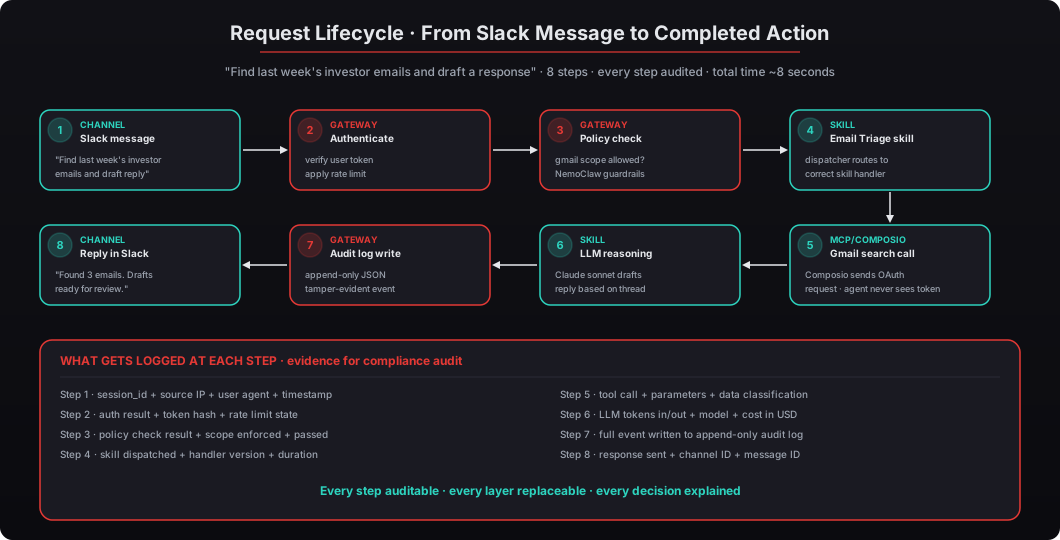
Let me walk through the steps in detail using the concrete example of “find last week’s investor emails and draft a response” sent via Slack:
-
Channel — Slack message received. The executive types the question in the Slack channel where the OpenClaw bot is a member. Slack delivers the message to the bot via the Events API. The Channel layer captures the source (Slack), the user (Slack user ID + email), the timestamp, and the raw message text.
-
Gateway — Authentication. The Gateway receives the incoming request from the Channel and verifies the user’s identity. Is this a known user? Does their authentication token check out? Have they exceeded their rate limit (60 requests/minute by default)? If any check fails, the request is rejected and logged.
-
Gateway — Policy check. Before dispatching to a Skill, the Gateway applies NemoClaw guardrails to the raw message. Does this look like prompt injection? Does the request fall within the user’s authorized scope? Is there any sensitive data in the request that should trigger privacy routing? The check takes ~20ms and either passes the request through or blocks it with a policy-violation response.
-
Gateway/Skill — Skill dispatch. The Gateway parses the intent (“find investor emails and draft a response”), matches it to the Email Triage Skill handler, and dispatches the request with full context: user identity, permissions, and the original message text. Every dispatch is logged with the skill version, handler ID, and dispatch timestamp.
-
Skill → MCP/Composio — Gmail search. The Email Triage Skill calls the MCP tool
composio.gmail.searchwith the query “from:investor subject:Q1 revenue”. Composio receives the request, translates it into the Gmail API call format, handles the OAuth token exchange (the agent never sees the token), executes the call against Google’s servers, and returns the results in MCP format. Duration: ~800ms. -
Skill — LLM reasoning. The Skill takes the search results (3 matching emails from the previous week), constructs a prompt for the LLM (“here are 3 investor emails. Draft a response to the most recent one about Q1 revenue.”), sends the prompt to Claude Sonnet 4.5 via the local inference backend, and receives the drafted response. Duration: ~3-5 seconds depending on response length. Cost: logged to the cost monitoring pipeline.
-
Gateway — Audit log write. The Gateway writes a structured JSON audit event to the append-only log: session ID, user ID, tool called, parameters, response summary, duration, data classification, LLM cost, and permission check result. The write is atomic and tamper-evident; the agent process cannot modify the log even if compromised. Duration: ~2ms.
-
Channel — Response delivered. The Gateway sends the response back through the Channel layer to Slack, posting the drafted reply in the same thread where the original message was received. The executive sees “Found 3 investor emails. I’ve drafted a reply to the most recent one — review in your drafts folder.” and can click through to review, edit, or send.
Total wall-clock time: roughly 6-8 seconds for this specific request. Cost: roughly $0.02 in LLM tokens and $0 in Composio/Gmail API calls (both are flat-rate or free tier). Audit evidence: 8 distinct log events spanning the full request lifecycle, exportable to SIEM for compliance review.
How Does Understanding Architecture Help Deployment Decisions?
Answer capsule. Knowing the four layers helps you answer three questions that determine deployment success: “What should my agent do first?” (Skills decision), “How tight should security be?” (Gateway policy decision), and “When do I add the next agent?” (scaling decision). Accenture’s 2025 Technology Vision report found that 83% of C-suite executives plan to deploy AI agents within 18 months but only 12% have started — the gap between intention and action is almost always architectural uncertainty. Executives who understand the four-layer model move faster because they can see where each decision lives and can scope deployments tightly enough to pass security review without sacrificing value.
Here’s the practical deployment framework we use with every client:
-
Start with one Skill, one Channel. Email triage through Slack is the most common starting point because the time-to-value is fastest. Prove value in 2 weeks before adding anything else. See how to get your first OpenClaw agent running in one day.
-
Review the Gateway audit logs at day 14. You’ll see exactly what the agent did, when, and what it accessed. This builds trust through evidence, not promises, and gives the CTO a concrete sense of what “scope” actually means. If anything in the logs looks wrong, we tune the Skill configuration or tighten the Gateway policy before expanding.
-
Add a second Skill at day 30. Usually CRM Sync or Daily Briefing depending on where the executive spends the most time. The second Skill reuses the same Gateway, the same authentication, and the same audit pipeline — only the handler logic is new.
-
Add a second Channel at day 45. WhatsApp or iMessage for mobile access while the executive is commuting, traveling, or between meetings. The agent maintains context across Channels so the executive can start a conversation on Slack at 2pm and finish it on iMessage at 6pm without re-explaining.
-
Add additional agents at day 60+. Each additional executive on the team gets their own agent with their own scope, their own permissions, and their own audit trail. Additional agents are $1,000 each under the beeeowl pricing model, and they share the same hardware (one Mac Mini can run 3-5 agents comfortably) so the marginal cost per additional executive is low.
The architecture isn’t something you need to manage day-to-day. It’s something that, once you understand it, makes every subsequent decision clearer. Gateway handles security — that’s where authentication, audit logging, and policy live. Skills define scope — that’s where you decide what the agent can actually do. Channels determine accessibility — that’s where you pick which messaging platforms your team already uses. MCP + Composio handles integration flexibility — that’s where new tools appear and credentials stay isolated from the agent.
The four layers are also the four places DIY deployments go wrong. Gateway: deployed without authentication or audit logging, which fails every compliance audit. Skills: configured with unlimited scope (“let the agent do everything”), which fails security review. Channels: set up on a dashboard nobody opens, which gets abandoned in 60 days. MCP: skipped entirely in favor of raw OAuth tokens in environment variables, which becomes the credential theft vector in the first incident. Every beeeowl deployment addresses all four layers with production-grade defaults, which is why our deployments clear security review in days rather than months.
Your deployment. Your hardware. Your rules. Request your deployment at beeeowl.com — $2,000 Hosted, $5,000 Mac Mini, $6,000 MacBook Air, one-day setup, shipped within a week, every layer hardened from day one.
Related reading — for deeper coverage of specific layers, see the Gateway architecture and control plane deep dive, the NemoClaw enterprise reference design walkthrough, MCP and how OpenClaw talks to tools, Composio credential security and OAuth explained, the audit logging and monitoring walkthrough, and the complete security hardening checklist.