How CTOs Are Using OpenClaw for Technical Due Diligence and Incident Post-Mortems
Gartner 2025: 71% of CTOs spend 10+ hours/week on operational reporting. Deloitte: 89% of M&A data room NDAs ban cloud AI. LinkedIn 2025: 13.2% voluntary attrition. Here are 4 OpenClaw workflows that solve these problems on private infrastructure.

Gartner’s 2025 CTO and Senior Technical Executive Survey found that 71% of CTOs spend more than 10 hours per week on operational reporting and compliance tasks that could be automated. The bottleneck isn’t capability — it’s confidentiality. You can’t paste acquisition targets’ architecture diagrams into ChatGPT. You can’t upload your team’s 1:1 notes to Claude. You can’t send your security posture to Anthropic’s API. Deloitte’s 2025 M&A Trends Survey reported 89% of data room access agreements explicitly prohibit sharing contents with third-party AI services. PagerDuty’s 2025 State of Digital Operations: median enterprise experiences 774 incidents per year with 23% classified as major. Google SRE has published that cross-incident pattern analysis reduces repeat incidents by 40% — but fewer than 15% of organizations do it because nobody has time to read 100+ post-mortems together. LinkedIn 2025 Workforce Report: voluntary attrition in software engineering hit 13.2% in 2025, up from 10.8% in 2024, and SHRM puts the cost of replacing a senior engineer at $150K-$400K. Vanta 2025: average company completes 47 security questionnaires per year at 5-10 hours each. Drata: 82% of questionnaire questions are repeated across assessments. Forrester 2025: 67% of enterprises have blocked at least one AI tool due to data exfiltration concerns, jumping to 84% in regulated industries. This article is the complete four-workflow deployment pattern for CTOs who need the automation but can’t use the cloud tools to deliver it.
Why are CTOs building private AI agents for their own workflows?
Because the four biggest time sinks in a CTO’s week all involve data too sensitive for cloud AI. Due diligence pre-reads touch acquisition targets’ source code under NDA. Incident post-mortem analysis touches your company’s exact failure modes and infrastructure weaknesses. Attrition risk monitoring touches individual engineers’ behavioral data. Security questionnaire completion touches your company’s detailed security posture and vulnerability history. Every one of these demands automation, and every one categorically can’t leave your network.
I spent three years as a CTO before starting beeeowl. I’ve sat in M&A data rooms at 11 PM trying to assess a target’s tech debt before a Monday board meeting. I’ve read 200+ post-mortems trying to find the systemic pattern behind a string of outages. I’ve filled out the same SOC 2 questionnaire for the fourth vendor that quarter and felt the specific flavor of frustration that comes from writing the same answer for the fourth time. Every one of these workflows follows the same pattern: pull data from multiple sources, synthesize it, produce a structured output. That’s exactly what an OpenClaw agent does — except the agent does it in minutes instead of days, and does it on hardware I own.
Gartner’s 2025 CTO and Senior Technical Executive Survey found that 71% of CTOs spend more than 10 hours per week on operational reporting and compliance tasks that could be automated. The bottleneck isn’t capability — it’s confidentiality. You can’t paste acquisition targets’ architecture diagrams into ChatGPT. You can’t upload your team’s 1:1 notes to Claude. You can’t send your security posture to any third-party API. An on-premise OpenClaw agent removes that constraint entirely. Here are the four workflows we deploy most often for CTO clients at beeeowl, in the order they typically rank by time recovered.
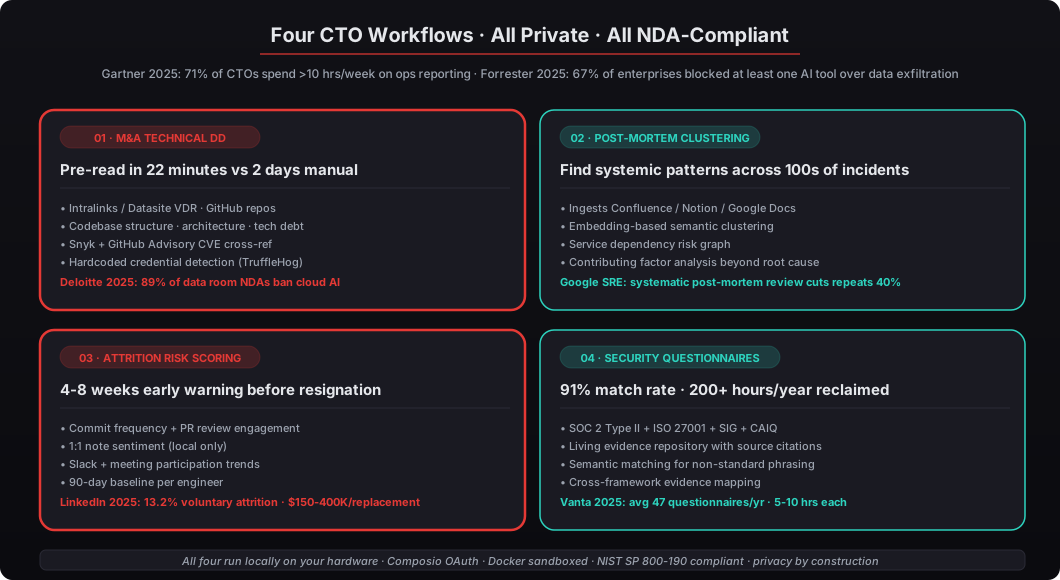
How does the technical due diligence pre-read agent work?
The agent connects to virtual data rooms — Intralinks, Datasite, or shared GitHub repos — pulls technical artifacts, and produces a structured assessment covering codebase quality, architecture patterns, tech debt indicators, and risk flags. It turns a 40-hour manual review into a 2-hour pre-read you can bring to the investment committee with specific data points instead of hand-waving.
McKinsey’s 2025 M&A Technology Integration report found that 63% of acquisitions that underperform expectations had inadequate technical due diligence. Bain Capital’s technology team has said publicly that they now spend 3x more time on technical diligence than they did five years ago because the volume of code, infrastructure, and tooling in even a 50-person startup makes manual review impractical at deal speed. The agent runs five analysis passes on the target’s technical assets:
Codebase structure analysis. It maps repository organization, language distribution, framework versions, and dependency health. The agent flags outdated dependencies using data from Snyk’s vulnerability database and GitHub Advisory Database. A target running Django 3.2 in 2026 tells you something different than one running Django 5.1 — and the agent surfaces that distinction without you having to parse a requirements.txt manually.
Architecture assessment. The agent reads infrastructure-as-code files (Terraform, Pulumi, CloudFormation), Docker configurations, and CI/CD pipelines to reconstruct the deployment architecture. It identifies single points of failure, missing redundancy, and scaling constraints. If there’s no IaC at all, that itself is a finding — manual AWS console deployments at a Series B company are a tech debt signal.
Tech debt scoring. Using patterns from CodeClimate, SonarQube configs, and commit history analysis, the agent produces a weighted tech debt score. It looks at test coverage trends (declining coverage is worse than low coverage), TODO/FIXME density, code churn in core modules, and the ratio of feature commits to maintenance commits over the past 12 months.
Risk flag generation. The agent surfaces specific concerns: hardcoded credentials in repos (detected via TruffleHog patterns), missing rate limiting on APIs, absence of database migration tooling, and vendor lock-in indicators. This is the part that usually catches buyers off guard in a deal — “the VDR review missed three API keys in plaintext configuration files” is a conversation that happens too often post-close.
Bus factor analysis. The agent counts how many engineers have substantive commits to each core module and flags cases where a single engineer is responsible for more than 40% of changes. Bus factor is an M&A risk that cloud AI can’t help you evaluate because the commit data is under NDA — but a private agent can.
Here’s an example output snippet from a real pre-read (company details anonymized):
TECHNICAL DUE DILIGENCE PRE-READ
Target: [Redacted] — Series B SaaS, 62 employees
Data Room Access: Datasite VDR-4471

CODEBASE SUMMARY
- Primary: Python 3.11 (68%), TypeScript 4.9 (24%), Go 1.21 (8%)
- Repositories: 14 active, 23 archived
- Total commits (12mo): 8,412 across 31 contributors
- Test coverage: 47% (down from 61% six months ago — declining trend)

ARCHITECTURE FLAGS
- Monolithic Django application serving API and admin UI
- PostgreSQL 14 with no read replicas (single writer)
- Redis used for both caching and job queuing (shared instance)
- No infrastructure-as-code detected — manual AWS console deployments likely

TECH DEBT INDICATORS (SCORE: 72/100 — MODERATE-HIGH)
- 1,247 TODO/FIXME comments across codebase
- Core billing module has 340 commits in 12 months (high churn, potential instability)
- 14 dependencies with known CVEs (3 critical via Snyk database)
- No database migration rollback procedures documented

RISK FLAGS
- 3 instances of hardcoded API keys in application config (not rotated)
- No rate limiting on public API endpoints
- Single AWS region deployment (us-east-1) with no DR plan documented
- Bus factor: 1 engineer authored 43% of core module commits
That pre-read took the agent 22 minutes to generate. A senior engineer doing the same work manually told us it would take two full days. The confidentiality angle matters here — Deloitte’s 2025 M&A Trends Survey reported that 89% of data room access agreements explicitly prohibit sharing contents with third-party AI services. When you run OpenClaw on a Mac Mini sitting in your office, the data room contents never leave your network. The NDA compliance question disappears because the agent is inside your control perimeter.
How does incident post-mortem aggregation find hidden patterns?
The agent ingests every post-mortem document your team has written — from Confluence, Notion, Google Docs, or Markdown files in a repo — clusters them by root cause, affected service, and contributing factors, and surfaces systemic patterns that individual incident reviews miss. This is the workflow that turns “we have 100 post-mortems nobody reads together” into “here are the 3 systemic patterns driving 60% of our incidents.”
PagerDuty’s 2025 State of Digital Operations report found that the median enterprise experiences 774 incidents per year, with 23% classified as major. Google’s SRE team has published that cross-incident pattern analysis reduces repeat incidents by 40%, but fewer than 15% of organizations do it systematically. The problem isn’t that teams skip post-mortems — according to the Accelerate State of DevOps Report from DORA (Google Cloud), 78% of high-performing teams write post-mortems. The problem is that nobody reads all of them together, and the tools to do it at scale didn’t exist until now.
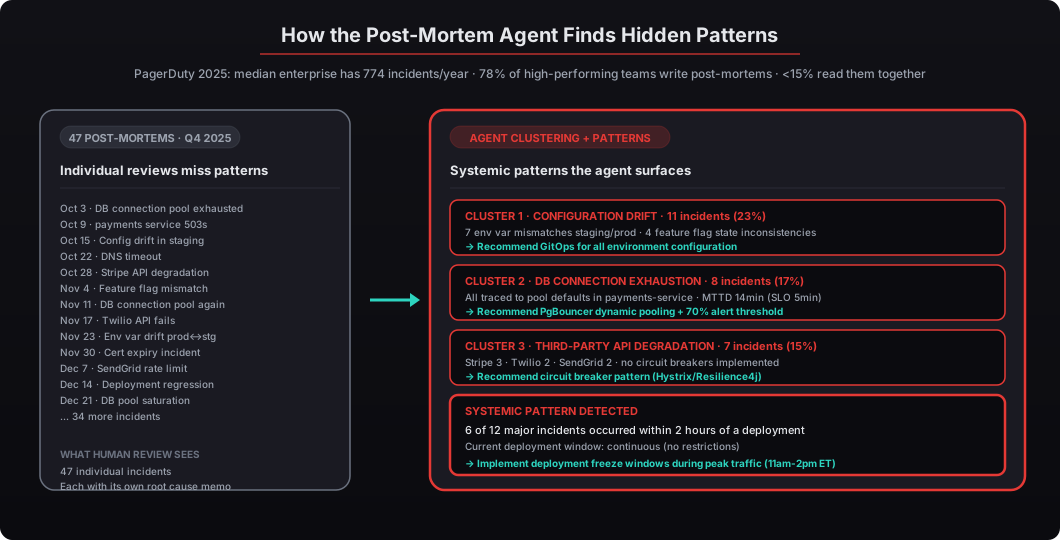
The agent performs three types of analysis:
Root cause clustering. It reads every post-mortem and categorizes root causes into a taxonomy: configuration error, capacity failure, dependency outage, deployment regression, security incident, and data corruption. Then it clusters related incidents using embedding-based semantic similarity rather than keyword matching. That DNS issue in March and the certificate expiry in June might share a root cause — missing certificate automation — that keyword search would never connect because the words “DNS” and “certificate” don’t co-occur in either document.
Service dependency mapping. By tracking which services appear in incidents, the agent builds a risk-weighted dependency graph. If your payments service shows up in 34% of major incidents but only handles 12% of traffic, that’s a signal the architecture needs attention. The graph also surfaces indirect dependencies — “every time the database fails, payments and billing both fail because they share the same connection pool.”
Contributing factor analysis. Beyond root cause, the agent tracks contributing factors: alert fatigue, runbook gaps, on-call handoff failures, missing monitoring. These often matter more than the technical root cause because they explain why incidents take longer to resolve than they should. An incident that took 90 minutes because nobody saw the alert for 30 minutes has a different fix than one that took 90 minutes because the runbook was wrong.
Example agent output from a quarterly incident review:
INCIDENT POST-MORTEM ANALYSIS — Q4 2025
Total incidents analyzed: 47 (12 major, 35 minor)

TOP ROOT CAUSE CLUSTERS:
1. Configuration drift (11 incidents, 23%)
   - 7 related to environment variable mismatches between staging/production
   - 4 related to feature flag state inconsistencies
   - Recommendation: Implement GitOps for all environment configuration

2. Database connection exhaustion (8 incidents, 17%)
   - All traced to connection pool defaults in payments-service
   - Mean time to detect: 14 minutes (above 5-minute SLO)
   - Recommendation: Dynamic connection pooling via PgBouncer, alert threshold at 70%

3. Third-party API degradation (7 incidents, 15%)
   - Stripe: 3 incidents, Twilio: 2 incidents, SendGrid: 2 incidents
   - No circuit breakers implemented on any external dependency
   - Recommendation: Implement circuit breaker pattern (Hystrix/Resilience4j)

SYSTEMIC PATTERN DETECTED:
- 6 of 12 major incidents occurred within 2 hours of a deployment
- Current deployment window: continuous (no restrictions)
- Recommendation: Implement deployment freeze windows during peak traffic (11am-2pm ET)

CONTRIBUTING FACTORS (CROSS-INCIDENT):
- Alert fatigue: 3 incidents had alerts firing for 30+ minutes before human response
- Runbook gaps: 5 incidents had no runbook; responders relied on tribal knowledge
- On-call handoff: 2 incidents escalated during shift change with context loss
Jellyfish’s 2025 Engineering Management Benchmarks showed that engineering teams spend 22% of their time on unplanned work — incidents, hotfixes, and firefighting. The post-mortem aggregation agent doesn’t reduce incidents directly. It tells you where to invest engineering time to reduce them systematically. Three of our CTO clients have used this output to justify infrastructure investments to their boards with hard data instead of intuition — “here’s the specific pattern that’s eating 22% of our engineering time, here’s the specific fix, here’s the specific cost of not fixing it.”
Can AI actually score engineering attrition risk?
Yes — by analyzing commit patterns, PR review engagement, Slack activity shifts, and meeting attendance trends. The agent produces a risk score per engineer (and per team) that surfaces disengagement signals 4-8 weeks before a resignation, giving you time to intervene with a retention conversation instead of reacting to a resignation letter.
LinkedIn’s 2025 Workforce Report found that voluntary attrition in software engineering roles hit 13.2% in 2025, up from 10.8% in 2024. The cost of replacing a senior engineer ranges from $150,000 to $400,000 when you factor in recruiting, onboarding, and lost productivity, according to the Society for Human Resource Management. Josh Bersin’s HR technology research estimates that most managers detect attrition signals only 2-3 weeks before an engineer’s resignation — far too late for a meaningful retention conversation. The agent monitors these signals:
Commit frequency and patterns. A sustained drop in commit frequency (not a one-week dip — the agent establishes a 90-day baseline per engineer and flags deviations beyond 2 standard deviations) combined with shorter commit messages and smaller diffs often indicates disengagement. Engineers who are mentally checked out commit less, and the commits they do make are smaller.
PR review engagement. Engineers who stop providing substantive code review comments — moving from detailed feedback to “LGTM” approvals — often show this pattern 6-8 weeks before leaving. The agent tracks review comment length, review turnaround time, and requested-vs-voluntary review ratios. An engineer who used to volunteer for reviews and now only does assigned ones is a signal.
1:1 note sentiment. If you keep 1:1 notes in a structured format (even in a private Google Doc or Notion page), the agent performs sentiment analysis on themes: career growth mentions, frustration indicators, workload concerns, team dynamic comments. It trends sentiment over time rather than flagging single negative notes — a single frustrated 1:1 is noise; a pattern of “growth ceiling” mentions across three consecutive 1:1s is signal.
Meeting and Slack participation. Declining camera-on rates in team meetings, reduced Slack message volume in team channels, and withdrawal from optional channels (watercooler, social) are all trackable signals that compound with the others.
Example risk output:
ENGINEERING ATTRITION RISK REPORT — March 2026
Team: Platform Engineering (8 engineers)
Overall Team Risk: MODERATE (3.2/5.0)

INDIVIDUAL RISK FLAGS:
- Engineer #4: HIGH RISK (4.1/5.0)
  Signals: Commit frequency down 62% over 8 weeks, PR review comments
  shortened from avg 47 words to 8 words, declined 3 of last 4
  optional team events, 1:1 notes show recurring "growth ceiling" theme
  Recommended action: Career development conversation within 1 week

- Engineer #7: ELEVATED (3.4/5.0)
  Signals: Working hours shifted (commits now clustered 6-8pm instead of
  distributed), Slack activity down 40% in team channels, increased
  activity in #jobs-board channel
  Recommended action: Check-in conversation, discuss workload and flexibility

TEAM-LEVEL PATTERNS:
- Overall PR review turnaround time increased 34% in 60 days
- 3 engineers have not updated their growth plans in 90+ days
- Team satisfaction proxy (optional event attendance) trending downward
This is where the privacy argument becomes non-negotiable. You’re analyzing individual engineers’ behavioral data — commit histories, communication patterns, sentiment from private 1:1 notes. Lattice, CultureAmp, and other HR platforms process this in the cloud. If an engineer discovered their behavioral data was being sent to OpenAI’s servers for analysis, you’d have a trust crisis that would accelerate the attrition you were trying to prevent. With OpenClaw running on hardware in your office, the data physically cannot leave. That’s not a feature — it’s a requirement, and it’s the reason private infrastructure is the only defensible architecture for this workflow. GitHub’s Octoverse 2025 Report showed that the most effective engineering organizations retain senior engineers 2.1x longer than average. Early detection isn’t surveillance — it’s the difference between a retention conversation and a resignation letter.
How does the security questionnaire auto-fill agent save 200+ hours per year?
The agent maintains a living evidence repository — your SOC 2 Type II reports, ISO 27001 documentation, penetration test results, and policy documents — and automatically matches incoming questionnaire questions to existing evidence. It produces draft responses with source citations that your security team reviews instead of writes from scratch. This is the workflow that delivers the most hours-per-quarter back to the security team, which is usually the most bottlenecked function in a growing company.
Vanta’s 2025 State of Trust Report found that the average company completes 47 security questionnaires per year, with each one taking 5-10 hours of engineering and security team time. Drata’s compliance benchmark data shows that 82% of security questionnaire questions are repeated across different vendor assessments, yet most teams answer them from scratch every time. That’s 200+ hours per year spent on duplicated work — and those are hours the security team isn’t spending on actual security. The agent handles four questionnaire types:
SOC 2 Type II — Maps your controls to the Trust Services Criteria (CC1 through CC9, plus availability, processing integrity, confidentiality, and privacy). When a prospect sends their custom SOC 2 questionnaire, the agent matches each question to the relevant TSC category and pulls your documented evidence.
ISO 27001 — Covers all 93 controls in Annex A of the 2022 revision. The agent cross-references your Information Security Management System documentation and maps evidence to specific control clauses.
Custom vendor assessments — The SIG (Standardized Information Gathering) questionnaire from Shared Assessments, CAIQ (Consensus Assessments Initiative Questionnaire) from the Cloud Security Alliance, and bespoke questionnaires from enterprise prospects. The agent uses semantic matching to handle non-standard question phrasing that keyword matching would miss.
Penetration test and vulnerability management questions — These come up in almost every assessment. The agent pulls from your latest Cobalt, HackerOne, or Bugcrowd reports and maps findings to remediation status.
Example auto-fill output:
SECURITY QUESTIONNAIRE AUTO-FILL
Requesting company: [Enterprise Prospect]
Questionnaire type: Custom (87 questions, SIG-based)
Match rate: 91% (79 of 87 questions matched to existing evidence)

SAMPLE RESPONSES:

Q23: "Describe your encryption standards for data at rest and in transit."
DRAFT RESPONSE: "Data at rest is encrypted using AES-256 via AWS KMS with
customer-managed keys (CMK). Data in transit uses TLS 1.3 for all external
communications and mTLS for internal service-to-service communication.
Encryption configurations are enforced via AWS Config rules and audited
quarterly."
SOURCE: SOC 2 Type II Report (2025), Section 4.3; AWS KMS Policy Doc v2.4
CONFIDENCE: HIGH (direct evidence match)

Q41: "What is your incident response plan and average response time?"
DRAFT RESPONSE: "Our incident response plan follows NIST SP 800-61r2
guidelines with four phases: preparation, detection/analysis, containment/
eradication, and post-incident activity. Mean time to acknowledge (MTTA)
for P1 incidents: 4 minutes. Mean time to resolve (MTTR) for P1: 47 minutes.
The plan is tested quarterly via tabletop exercises."
SOURCE: Incident Response Plan v3.1; PagerDuty MTTR Dashboard (Q4 2025)
CONFIDENCE: HIGH (direct evidence match)

UNMATCHED QUESTIONS (8):
- Q12: Physical access controls at co-location facilities (no evidence on file)
- Q34: Employee background check procedures (HR policy not yet ingested)
[... 6 additional unmatched questions requiring manual input]
The Ponemon Institute’s 2025 Cost of Compliance Study reported that mid-market companies spend an average of $3.5 million annually on compliance activities, with security questionnaires representing 12-15% of that cost. The auto-fill agent doesn’t eliminate your security team’s work — it eliminates the repetitive retrieval and formatting work so they can focus on edge cases and the 9% of questions that need original answers. A 91% match rate means 91% of questions go from “write from scratch” to “review and approve,” which is roughly a 10x productivity improvement on the bulk of the work.
Why does private infrastructure matter for CTO workflows?
Every workflow described above touches data that would create material risk if it reached external servers. Acquisition targets’ codebases under NDA. Your engineers’ behavioral and sentiment data. Your company’s detailed security posture and vulnerability history. The common thread is that these are the workflows where automation delivers the highest ROI and where cloud AI creates the highest risk. You can’t accept one without the other, which is why most CTOs end up not automating these workflows at all.
Forrester’s 2025 Enterprise AI Security Survey found that 67% of enterprises have blocked at least one AI tool due to data exfiltration concerns. That number jumps to 84% among companies in regulated industries. The CTO’s dilemma is real: you need AI-powered automation to keep up with operational demands, but your data governance obligations prevent you from using most AI tools. The answer isn’t to accept the risk or skip the automation — it’s to change the infrastructure.
OpenClaw deployed on private hardware solves this. The agent runs on a Mac Mini or MacBook Air in your office. It connects to your tools through Composio OAuth — credentials are never exposed to the agent itself. All processing happens locally. Audit trails log every action. Docker sandboxing isolates the agent from the host system with NIST SP 800-190 compliant controls. See our audit logging and monitoring guide and security hardening methodology.
At beeeowl, we deploy these CTO workflows in a single day. The hardware ships within a week, fully configured with OpenClaw, security hardening, Docker sandboxing, firewall rules, and your first agent ready to run. Every deployment includes authentication built in, audit trails, Composio OAuth credential isolation, and one year of monthly mastermind access where CTOs share workflow patterns and configuration tips with peers running similar deployments. Additional agents cost $1,000 each as you expand beyond the first workflow.
What should a CTO deploy first?
Start with the workflow that costs you the most time this quarter. If you’re in active M&A, the due diligence pre-read agent pays for itself on a single deal — the Mac Mini costs less than one hour of a senior engineer’s diligence time, and the agent replaces 80 hours of it on a single transaction. If your team is fighting repeat outages, the post-mortem aggregation agent will show you the systemic pattern within a week and give you data to justify infrastructure investments to your board. If you’re losing senior engineers at the LinkedIn 13.2% rate, the attrition risk agent gives you a 4-8 week early warning system and a structured retention conversation framework. If your security team is drowning in questionnaires at Vanta’s 47-per-year average, the auto-fill agent reclaims 200+ hours per year immediately.
Most of our CTO clients start with one agent and add a second within 30 days once they see how the pattern works. The infrastructure is already deployed — adding agents is incremental at $1,000 each, and the second workflow compounds the value of the first because the data is already flowing through the same Composio integrations. The hardware ships within a week, the first agent runs the day after delivery, and the ROI compounds from week 1 forward.
Request your deployment at beeeowl and we’ll have your first CTO workflow agent running within a week. Full pricing on our pricing page, role-specific workflow examples on our use cases page, and the deployment walkthrough in how to get your first OpenClaw agent running in one day.