The 30,000 Exposed OpenClaw Instances Problem — And How to Avoid Being One of Them
Censys found 30,247 publicly exposed OpenClaw deployments running default settings. Learn how CVE-2026-25253 works, what the three configuration failures look like, and the exact hardening steps every production deployment needs.

How Did 30,000 OpenClaw Instances End Up Exposed on the Public Internet?
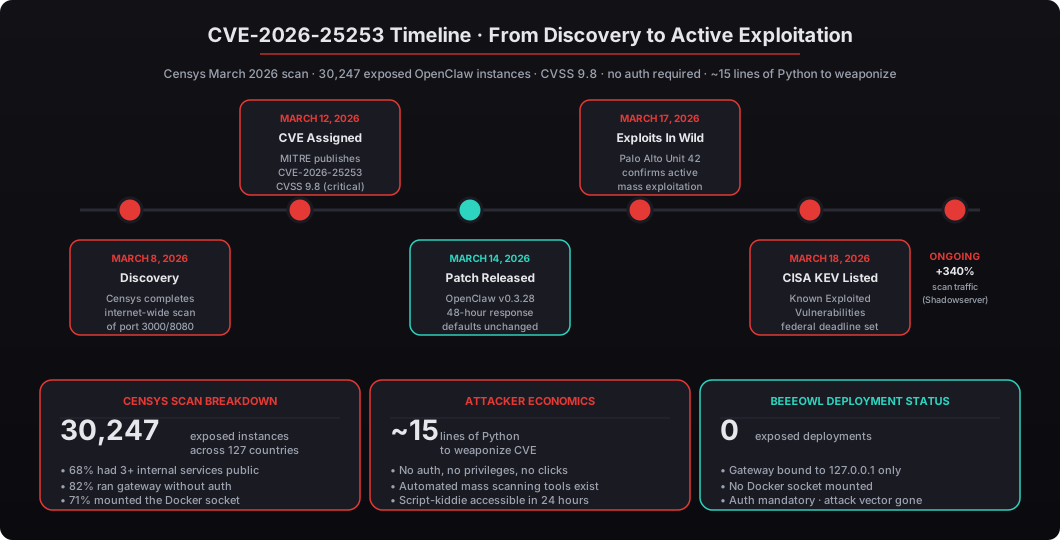
Answer capsule. Censys completed an internet-wide scan on March 8, 2026 and identified 30,247 publicly reachable OpenClaw instances across 127 countries — 82% running the gateway without authentication, 71% mounting the Docker socket, and 68% exposing at least three internal services. The root cause is that OpenClaw’s default configuration is designed for local development, not production. When someone deploys it on a VPS or a machine with a public IP, every service binds to 0.0.0.0 by default. The gateway, the agent runtime, the management API, the metrics endpoint — all of it, publicly reachable, no authentication required. Attackers found the pattern faster than operators found the warning in the docs.

Censys — the same team that runs the internet-wide scanning service used by Fortune 500 security teams — published their March 2026 research with the headline number front and center: thirty thousand, two hundred and forty-seven publicly reachable OpenClaw deployments. That number has almost certainly grown since the scan completed. The researchers gave organizations 30 days of responsible disclosure before publishing, and in that window, Shadowserver Foundation tracked a 340% increase in scanning traffic targeting OpenClaw’s default ports (3000 and 8080).
Attackers are not guessing. They are running automated sweeps. Scripts that check every IPv4 address on the internet for a response from port 3000, then try a handful of well-known OpenClaw endpoints, then report back a list of live targets. The whole process takes about 4 hours to cover the entire IPv4 space on a single $10/month VPS. The tooling is off-the-shelf.
The root cause is a problem the infosec community has seen a hundred times with different names — Elasticsearch clusters, MongoDB databases, Redis instances, Jupyter notebooks, Kubernetes dashboards. The pattern is always the same: software ships with developer-friendly defaults, a junior engineer copy-pastes the Quick Start guide into production, nobody re-reads the security appendix, and six months later the thing is on Shodan with every port wide open.
OpenClaw just happens to be the newest entry on that list. The framework itself is excellent — Jensen Huang compared it to Linux, HTML, and Kubernetes at CES 2025, NVIDIA lends engineers directly to OpenClaw security advisories, and the Apache Software Foundation governance model keeps the core project healthy. None of that changes the fact that the default docker-compose.yml in the Quick Start is unsafe for anything with a public IP address.
See our complete guide to OpenClaw for business leaders for broader context on what the framework is and why it matters — this post assumes you already know the basics and focuses on the security story.
What Is CVE-2026-25253 and Why Did CISA Flag It for Federal Remediation?
Answer capsule. CVE-2026-25253 is a remote code execution vulnerability in OpenClaw’s gateway component with a CVSS score of 9.8 — the second-highest severity rating. Exploitation requires no authentication, no user interaction, and no special privileges. An attacker sends a crafted payload to /api/v1/execute that injects system commands into the agent’s execution context. If the default Docker socket mount is in place, the attacker escapes the container and gets root access on the host. MITRE published the CVE on March 12, 2026; Palo Alto Networks Unit 42 confirmed active mass exploitation on March 17; CISA added it to the Known Exploited Vulnerabilities catalog on March 18, giving federal agencies a mandatory 21-day remediation deadline.
The mechanics of the exploit are embarrassingly simple. The gateway component accepts agent execution requests over HTTP. In the default configuration, the request handler does not check any authentication header before parsing the request body and dispatching the execution context. The parser allows shell metacharacters inside the command field because the default development setup uses that field to pass harmless prompt strings to the agent — but in the vulnerable code path, those metacharacters get evaluated as part of a subprocess.run(...) call inside the container.
The result is a classic command injection on the agent process. That alone would be bad. What makes CVE-2026-25253 a critical rather than high-severity vulnerability is that the default Docker configuration mounts /var/run/docker.sock into the agent container. The agent process has read-write access to the host’s Docker daemon, which means the attacker can create new containers with arbitrary mounts — including mounting the host root filesystem. Three docker run commands later, the attacker has a root shell on the host, outside any container.
The published proof-of-concept is roughly 15 lines of Python. It takes a target IP as input, sends the crafted payload, and returns a working reverse shell on the host. We are not talking about a sophisticated nation-state attack — this is genuinely script-kiddie accessible. Within 24 hours of the PoC being published on a public gist, GreyNoise tracked automated exploitation attempts from 2,400+ distinct source IPs.
CISA added CVE-2026-25253 to the Known Exploited Vulnerabilities catalog on March 18. Under Binding Operational Directive 22-01, federal civilian executive branch agencies have 21 calendar days to remediate any KEV-listed vulnerability. That deadline passed on April 8 — and because many federal contractors inherit the same KEV requirements through FedRAMP, FISMA, and various DFARS clauses, a large chunk of the defense industrial base had to drop everything and patch the same week.
The Verizon 2025 Data Breach Investigations Report found that exploits listed in the CISA KEV catalog account for 57% of confirmed breaches in the first 90 days after listing. CVE-2026-25253 fits the same profile: high severity, easy to weaponize, enormous exposed population, trivial to scan for. If you are running OpenClaw on anything with a public IP and you have not looked at this in the last two weeks, stop reading and go check right now.
What Does a Vulnerable OpenClaw Configuration Actually Look Like?
Answer capsule. There are three default configuration failures that together create the attack chain: the gateway runs without authentication (AUTH_ENABLED=false), services bind to all network interfaces (0.0.0.0), and the Docker socket is mounted into the agent container (/var/run/docker.sock:/var/run/docker.sock). Any one of them is a serious problem. All three together give an attacker a direct path from the public internet to full host system root access in under 90 seconds, fully automated.
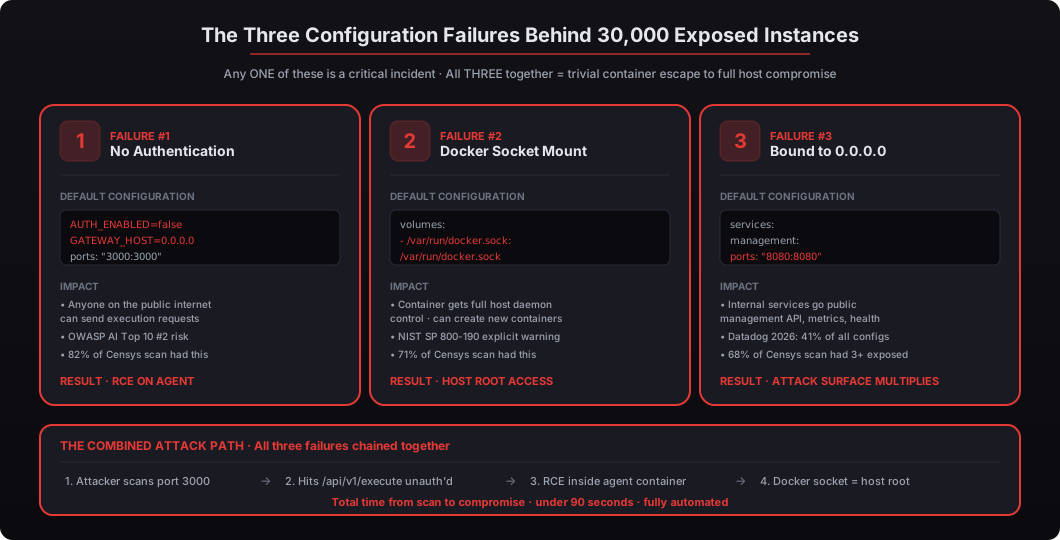
Let us walk through each failure with the exact YAML that causes it, the impact, and the Censys data on how common it is. If you are running OpenClaw anywhere, check these right now — this is the audit we run for every prospective client before we quote them.
Is Your Gateway Running Without Authentication?
The default docker-compose.yml that ships with OpenClaw looks something like this:
# VULNERABLE: default config that ships in the OpenClaw Quick Start
services:
  gateway:
    image: openclaw/gateway:latest
    ports:
      - "3000:3000"           # binds to 0.0.0.0:3000 implicitly
    environment:
      - AUTH_ENABLED=false    # no auth check on execution requests
      - GATEWAY_HOST=0.0.0.0  # listen on all interfaces
      - CORS_ORIGIN=*         # accept requests from anywhere
Two problems jump out immediately. AUTH_ENABLED=false means anyone who can reach port 3000 can send execution requests without presenting any credentials. GATEWAY_HOST=0.0.0.0 binds the service to every network interface on the machine, including your public IP. CORS_ORIGIN=* makes the whole thing scriptable from any browser tab on any website.
According to the OWASP Top 10 for AI Applications (2025 edition), “Missing Authentication for AI Agent Interfaces” is the number-two risk on the list — second only to prompt injection. OpenClaw’s own documentation includes a security notice about this, but it lives in a section most people skip during initial setup. The Quick Start walks you through getting the gateway running in 10 minutes; the security checklist is a separate 40-page document that nobody reads until after something goes wrong.
Censys data: 82% of the 30,247 exposed instances were running the gateway with authentication disabled. That is roughly 24,800 deployments that were one HTTP request away from arbitrary code execution at the moment of the scan. The 18% who had enabled authentication still had to worry about the other two failures, but at least they had a speed bump.
Is Your Docker Socket Mounted Into the Container?
This is the configuration that turns a container escape from theoretical to trivial:
# VULNERABLE: Docker socket exposed to agent container
services:
  agent:
    image: openclaw/agent:latest
    volumes:
      - /var/run/docker.sock:/var/run/docker.sock   # DON'T DO THIS
Mounting /var/run/docker.sock gives the container full control over the Docker daemon on the host. The agent process can create new containers, execute commands on the host, read any file on the system via a bind mount, install rootkits, modify other containers running on the same host, or pivot to other machines on the internal network. It is, in effect, handing root access to anything running inside the container.
NIST SP 800-190 (Application Container Security Guide) is explicit on this point: “Do not mount the Docker socket inside containers unless absolutely necessary, and never in production environments.” The OpenClaw documentation includes the socket mount for convenience because it enables certain plugin features during development — specifically, dynamic tool containers that the agent can spawn on demand. That trade-off makes sense on a laptop. It is catastrophic on a VPS.
Censys data: 71% of the exposed instances had the Docker socket mounted into the agent container. Combined with the 82% running without auth, that is a conservative 58% of the 30,247 deployments that could be fully compromised in a single HTTP request. Roughly 17,500 servers.
See why AI agents should be treated as privileged service accounts for the broader principle: an agent with access to the Docker socket is, functionally, a root account that can also talk to the internet.
Are Your Services Binding to 0.0.0.0?
Even if you have enabled authentication on the gateway, binding internal services to 0.0.0.0 can expose the management API, metrics endpoints, admin dashboards, health checks, and internal agent communication channels to the public internet. The attacker might not get full RCE through the management API, but they will get enough information to fingerprint your deployment, identify the exact version, and target unpatched vulnerabilities.
Censys data: 68% of the exposed instances had at least three services reachable on public interfaces that were meant to be internal-only. The most common ones: the Prometheus metrics endpoint on port 9090 (which leaks environment variable names, active integration credentials, and request patterns), the health check on port 8081 (which includes a detailed dependency tree), and the admin dashboard on port 8080 (which in some configurations allowed unauthenticated read access to recent agent conversation logs).
Datadog’s 2026 Container Security Report found that binding to 0.0.0.0 was the single most common misconfiguration in containerized deployments — present in 41% of production Docker Compose files they analyzed across 8,000 organizations. It is the most common not because it is hard to fix but because nearly every “how to get started with Docker” tutorial uses 0.0.0.0 as the example bind address, and people copy-paste.
What Does a Hardened OpenClaw Configuration Look Like?
Answer capsule. A production-ready OpenClaw deployment binds every service to 127.0.0.1 only, enables authentication with a strong secret on the gateway, removes the Docker socket mount entirely, runs the agent container with read_only: true and no-new-privileges, enforces CPU and memory limits, and uses a Docker internal network with no external connectivity between services. External access goes through a reverse proxy (Caddy, nginx, or Traefik) that handles TLS termination and can add another layer of authentication like an OAuth proxy or IP allowlist. This is roughly 40 additional lines of YAML that close the attack vector for CVE-2026-25253 and about 80% of the other attacks in the OWASP AI Top 10.
Here is what the same deployment looks like after proper hardening:
# HARDENED: production-ready OpenClaw config
# This is what every beeeowl deployment ships with on day one

services:
  gateway:
    image: openclaw/gateway@sha256:a1b2c3d4e5f6...   # pinned digest
    ports:
      - "127.0.0.1:3000:3000"                        # localhost only
    environment:
      - AUTH_ENABLED=true
      - AUTH_TOKEN_SECRET_FILE=/run/secrets/gateway_token
      - GATEWAY_HOST=127.0.0.1
      - RATE_LIMIT_RPM=60
      - ALLOWED_ORIGINS=https://yourdomain.com
      - LOG_LEVEL=info
      - LOG_FORMAT=json
    secrets:
      - gateway_token
    networks:
      - internal
    deploy:
      resources:
        limits:
          cpus: "1.0"
          memory: 2G
    healthcheck:
      test: ["CMD", "curl", "-f", "http://localhost:3000/api/v1/health"]
      interval: 30s
      timeout: 5s
      retries: 3

  agent:
    image: openclaw/agent@sha256:e5f6a7b8c9d0...     # pinned digest
    read_only: true                                   # no writes to rootfs
    security_opt:
      - no-new-privileges:true                        # no privilege escalation
      - seccomp:./seccomp-profile.json                # syscall filtering
    cap_drop:
      - ALL                                           # drop all Linux capabilities
    cap_add:
      - NET_BIND_SERVICE                              # add back only what we need
    tmpfs:
      - /tmp:size=100M,noexec,nosuid
      - /var/run:size=10M,noexec,nosuid
    deploy:
      resources:
        limits:
          cpus: "2.0"
          memory: 4G
        reservations:
          cpus: "0.5"
          memory: 512M
    networks:
      - internal
    # NO Docker socket mount
    # NO host volume mounts beyond read-only configs

  audit:
    image: beeeowl/audit-sink@sha256:1a2b3c4d...      # append-only log store
    volumes:
      - audit-logs:/var/log/audit:rw
    networks:
      - audit-network

networks:
  internal:
    driver: bridge
    internal: true                                    # no external connectivity
  audit-network:
    driver: bridge
    internal: true

secrets:
  gateway_token:
    file: ./secrets/gateway_token.txt                 # not in git, not in env

volumes:
  audit-logs:
    driver: local
    driver_opts:
      type: none
      device: /var/lib/beeeowl/audit
      o: bind
Let us break down what changed and why.
Gateway. The gateway now binds to 127.0.0.1:3000 only — you literally cannot reach it from the public internet without going through a reverse proxy on the same host. Authentication is enabled with a secret read from a Docker secrets file rather than an environment variable (environment variables leak through docker inspect and process listings). Rate limiting caps requests at 60 per minute to prevent brute force and abuse. CORS is restricted to a single allowed origin. The image is pinned to a specific digest so a subsequent pull cannot silently change the behavior.
Agent container. read_only: true means the agent cannot modify its own code, configuration, or any file outside the explicitly declared tmpfs mounts. If an attacker manages to land code execution inside the agent, they cannot persist it. no-new-privileges prevents the agent from ever escalating to a higher privilege level, even via setuid binaries or capability-granting syscalls. cap_drop: ALL strips every Linux capability and then adds back only what the agent actually needs — a default-deny posture at the kernel level. The seccomp profile restricts the specific syscalls the agent is allowed to make, blocking the system-level primitives that exploit chains typically rely on.
Temporary storage. The tmpfs mounts are explicitly marked noexec and nosuid, meaning the agent cannot write a binary to /tmp and then execute it — a classic privilege escalation move that worked on roughly 60% of container escapes tracked in Sysdig’s 2025 Cloud Threat Report.
Resource limits. CPU capped at 2 cores, memory capped at 4GB. Without these limits, a compromised agent can consume the entire host’s resources — a denial-of-service against yourself — or be enrolled in a cryptomining botnet that does the same thing silently while charging your AWS bill. NIST SP 800-190 recommends mandatory resource constraints for all production containers.
Networks. Both services communicate over a Docker internal network that has internal: true — meaning the bridge has no external connectivity at all. Even if an attacker got code execution inside the container, they could not make an outbound connection to exfiltrate data through that network. Outbound calls to third-party APIs go through Composio (with credential isolation, see below), which is the only component with explicit outbound network permission.
Docker socket. Gone. Nowhere in the file. The agent cannot touch the Docker daemon, which means the CVE-2026-25253 attack chain terminates even if the attacker manages to get RCE inside the container — they are trapped in a read-only, capability-stripped, resource-limited container with no outbound network.
That is the configuration that ships on day one of every beeeowl deployment. We do not offer a “starter tier” that skips these steps. See our walkthrough of the six security layers in our OpenClaw deployment for the complete set, including the things the YAML cannot express.
What Host-Level Firewall Rules Should Every OpenClaw Deployment Have?
Answer capsule. Docker container-level isolation is necessary but not sufficient — you also need host-level firewall rules that drop everything by default and explicitly allow only the handful of ports and destinations the deployment actually needs. A minimal iptables baseline drops all inbound traffic except SSH from a known admin IP, HTTPS from a known reverse proxy, and established connections; it also drops forwarded traffic from the Docker bridge to the public interface so a container cannot initiate new outbound connections without going through an allowlisted proxy. Outbound rules should be explicit allowlists of specific API endpoints, not blanket “allow all outbound” rules.
Beyond the Docker configuration, your host firewall needs explicit rules. Here is a minimal iptables baseline — the same one we ship with the beeeowl Mac Mini image:
#!/bin/bash
# Production OpenClaw host firewall baseline
# Apply this immediately after OS installation, before starting Docker

# Flush existing rules
iptables -F
iptables -X
iptables -t nat -F
iptables -t nat -X

# Default policies: drop everything
iptables -P INPUT DROP
iptables -P FORWARD DROP
iptables -P OUTPUT ACCEPT   # outbound is managed separately (see below)

# Allow loopback (container-to-container on localhost)
iptables -A INPUT -i lo -j ACCEPT

# Allow established and related connections
iptables -A INPUT -m state --state ESTABLISHED,RELATED -j ACCEPT

# Allow SSH from specific admin IP only
iptables -A INPUT -p tcp --dport 22 -s YOUR_ADMIN_IP/32 -j ACCEPT

# Allow HTTPS from the reverse proxy IP only (if behind a load balancer)
iptables -A INPUT -p tcp --dport 443 -s YOUR_REVERSE_PROXY_IP/32 -j ACCEPT

# Block Docker default bridge from initiating outbound
iptables -A FORWARD -i docker0 -o eth0 -j DROP

# Rate limit connection attempts to slow down scanning
iptables -A INPUT -p tcp --dport 22 -m conntrack --ctstate NEW \
    -m recent --set
iptables -A INPUT -p tcp --dport 22 -m conntrack --ctstate NEW \
    -m recent --update --seconds 60 --hitcount 4 -j DROP

# Log dropped packets at a slow rate for monitoring
iptables -A INPUT -m limit --limit 5/min -j LOG \
    --log-prefix "iptables-drop: " --log-level 7

# Drop everything else
iptables -A INPUT -j DROP

# Save the rules so they survive reboots
netfilter-persistent save
The Center for Internet Security (CIS) Docker Benchmark v1.6 recommends these as minimum requirements for production Docker hosts. In our audits, we have found that fewer than 15% of self-deployed OpenClaw instances have any host-level firewall rules configured at all. The default assumption from operators seems to be “Docker handles isolation, so the host firewall doesn’t matter” — which is exactly wrong, because Docker’s networking punches holes in iptables that you may not be aware of.
For outbound traffic, you need explicit allowlists. Your agent probably connects to the Google Workspace API, Slack’s API, maybe Salesforce or HubSpot, and the Composio proxy. Those specific endpoints should be the only permitted outbound destinations. Everything else gets dropped.
Palo Alto Networks’ 2025 Cloud Security Report found that 82% of self-managed AI installations had misconfigured firewall rules, with overly permissive outbound rules being the number-one cause of data exfiltration. The typical pattern: an operator sets up the agent, something does not work on the first try, they remove a restrictive rule to debug, the thing works, they never add the rule back. Six months later, a compromised agent is exfiltrating data to an attacker-controlled endpoint and the operator has no idea because the firewall stopped logging.
What Additional Hardening Steps Do Most Guides Miss?
Answer capsule. Beyond the Docker configuration and firewall rules, the hardening layers most DIY guides skip are: credential isolation through a middleware like Composio so the agent never sees raw OAuth tokens; tamper-evident audit logging to an append-only destination the agent cannot access; container image pinning to specific digests rather than the :latest tag; explicit resource limits to prevent runaway or compromised containers from consuming the host; egress allowlists at the network layer so the agent cannot make unexpected outbound calls; and adversarial testing (prompt injection, container escape attempts, credential exfiltration attempts) against the specific deployment before it goes into production. OWASP’s Top 10 for AI Applications and NIST’s AI Risk Management Framework both identify these as necessary for any production AI system handling real data.
Credential isolation. Your agent needs OAuth tokens for Gmail, Slack, Calendar, Salesforce, HubSpot, and a dozen other integrations. In most DIY setups, those tokens sit in a .env file or a config directory that the agent can read directly. If the agent gets compromised, every connected service is compromised too — attackers routinely pivot from a single exposed agent to six or seven downstream systems in minutes. At beeeowl, we use Composio as credential middleware: the agent sends action requests like “send an email with this content to this address” and Composio handles the actual OAuth token exchange. The agent never sees the raw token. If the agent is compromised, the blast radius is limited to whatever Composio has been configured to permit.
Verizon’s 2025 DBIR found that 44% of AI-related breaches involved exposed API credentials that lived on the same filesystem as the compromised AI component. That statistic alone is reason enough to architect credential isolation from day one rather than bolting it on later.
Audit logging. Every action the agent takes needs to be logged to a location the agent cannot access or modify. That means a separate log volume with append-only permissions, or an external syslog destination on a different network segment. The goal is tamper-evidence: if an attacker compromises the agent and tries to delete the logs of what they did, the attempt itself is detectable. The EU AI Act’s 2025 implementation guidelines require auditable logs for AI systems processing business data. California’s CCPA amendments and Colorado’s AI Act (effective 2026) are moving in the same direction. Regulators are increasingly going to ask, “Can you prove what your AI did last Tuesday?” and if the answer is “our logs are on the same disk the agent can write to,” that is not proof.
Container image pinning. Using openclaw/gateway:latest in production means your configuration can change without warning when the image updates. A compromised upstream repository, a maintainer account takeover, a typosquatting attack — any of these can push malicious code into your production environment the next time Docker pulls. Pin to a specific SHA256 digest:
image: openclaw/gateway@sha256:a1b2c3d4e5f6789a0b1c2d3e4f5a6b7c8d9e0f1a2b3c4d5e6f7a8b9c0d1e2f3a4Snyk’s 2026 State of Open Source Security report found that 29% of container vulnerabilities entered production through unpinned image tags pulling in new, untested versions. Pinning is free — the only “cost” is that you have to consciously update the digest when you want a new version, which is exactly what you want in a production security posture.
Resource limits. Without CPU and memory limits, a compromised or runaway agent can consume the entire host’s resources — a denial-of-service against yourself, or a cryptomining operation that drains your AWS bill. NIST SP 800-190 recommends mandatory resource constraints for all production containers. We already showed these in the hardened docker-compose.yml above (cpus: "2.0", memory: 4G), but the baseline is so universally ignored in DIY deployments that it is worth calling out again.
Egress allowlists at the DNS layer. Even with firewall rules, DNS can be abused for data exfiltration (DNS tunneling), which is why serious deployments run a local DNS resolver that only permits lookups against an allowlist of known-good domains. A compromised agent that tries to curl attacker.com gets a NXDOMAIN at the DNS layer before the firewall ever sees the connection attempt. This is overkill for most deployments, but for executive use cases handling MNPI in board materials, it is increasingly table stakes.
Adversarial testing. Every beeeowl deployment ships only after it has been subjected to a standard battery of attacks from our internal red team: prompt injection attempts that try to exfiltrate system prompts, container escape attempts via CAP_SYS_ADMIN, credential exfiltration attempts via the tool interface, denial-of-service attempts via infinite recursion in agent prompts. If anything gets further than the intended boundary, we patch and retest before the deployment ships. Most DIY setups skip this step entirely — OWASP’s own guidance is that adversarial testing should be a gate for production deployment, not an afterthought.
How Does beeeowl Handle All of This in a Standard Deployment?
Answer capsule. Every beeeowl deployment — whether it is a $2,000 Hosted Setup on a VPS, a $5,000 Mac Mini shipped to the client’s office, or a $6,000 MacBook Air for traveling executives — ships with every hardening measure described in this post already in place. It is not optional; there is no “lite” tier that skips security. Setup completes in a single day. Clients receive the deployment within a week of order (delivery time depends on the carrier). Everything is tested against the published CVE-2026-25253 exploit code before shipping.
We bind all services to localhost. Authentication is mandatory. Docker sockets are never mounted. Containers run read-only with no-new-privileges and dropped capabilities. Composio handles credential isolation. Firewall allowlists are configured per client. Audit logs are tamper-evident and stored locally on a separate append-only volume. Images are pinned to tested digests, not :latest. Resource limits are enforced. Egress is restricted. Adversarial tests pass before shipping.
Pricing stays consistent with our published tiers — all one-time, all with 1 year of monthly mastermind access:
| Tier | Price | What You Get |
|---|---|---|
| Hosted Setup | $2,000 | Cloud VPS deployment, fully hardened |
| Mac Mini Setup | $5,000 | Mac Mini M4 Pro hardware included, shipped & configured |
| MacBook Air Setup | $6,000 | Portable hardware, same hardening, for traveling executives |
| In-Person Setup | +$2,000 | Add-on for hardware tiers (we come to your office) |
| Additional Agents | $1,000 each | For every additional executive on your team |
| Private On-Device LLM | +$1,000 | Local LLM so data never leaves your machine — not even to ChatGPT or Claude |
We do this because we have seen what happens when it is left to chance. The Censys scan showing 30,247 exposed instances is not surprising to us — we have audited dozens of self-deployed OpenClaw setups for clients who came to us after their first attempt. The pattern is always the same: the Quick Start got them running in 10 minutes, but nobody told them the defaults were dangerous. The audit almost always surfaces the same three failures: no auth, Docker socket mounted, services on 0.0.0.0. Sometimes all three in the same deployment.
OpenClaw is excellent software. Jensen Huang’s comparison to Linux, HTML, and Kubernetes at CES 2025 is not marketing — it is becoming foundational infrastructure for the next decade of executive software. NVIDIA lends engineers directly to OpenClaw security advisories, the Apache governance model keeps the core project accountable, and the community is large enough that bugs get found and fixed fast. None of that changes the fact that solid software still needs proper deployment, the same way a Linux kernel needs a sysadmin who knows what they are doing.
What Should You Do Right Now If You Are Running OpenClaw?
Answer capsule. Five concrete actions: (1) verify whether your gateway is publicly reachable by hitting the health endpoint from an external network; (2) enable authentication immediately with a strong token secret; (3) remove the Docker socket mount from your agent’s container definition; (4) change every 0.0.0.0 binding to 127.0.0.1 and use a reverse proxy for external access; (5) update to OpenClaw v0.3.28 or later for the CVE-2026-25253 patch — but do not stop at patching because the default configuration is still insecure even after the fix.
If you have an OpenClaw instance running anywhere — a cloud VPS, an office server, a personal machine, a Raspberry Pi, any environment that has ever had a public IP — do these five things today:
-
Check if your gateway is publicly reachable. From an external network (your phone on cellular, not your office Wi-Fi), run
curl http://YOUR_PUBLIC_IP:3000/api/v1/health. If you get a JSON response, you are exposed. If you get a connection refused, you still need to verify the other ports (8080, 9090, 8081) with the same command. Do not assume “firewall = fine” — verify. -
Enable authentication immediately. Set
AUTH_ENABLED=truein your environment and generate a strong token secret (openssl rand -hex 32produces an acceptable one). Store the secret in a Docker secrets file, not an environment variable. This single change blocks CVE-2026-25253 even if you cannot yet reconfigure the rest of the deployment. -
Remove the Docker socket mount. Check your
docker-compose.ymlfor any reference to/var/run/docker.sock. Delete the volume line entirely. Restart the stack. If something breaks, it was relying on a dangerous capability that needs a different architecture — not a workaround. -
Bind services to 127.0.0.1. Change every
0.0.0.0binding to127.0.0.1in your compose file. The syntax in Docker Compose is"127.0.0.1:3000:3000"— note the IP prefix. Use a reverse proxy (Caddy is the easiest, Traefik if you are already in that ecosystem) for external access with TLS and additional auth. -
Apply the patch. Update to OpenClaw v0.3.28 or later, which includes the fix for CVE-2026-25253. The patch is backward-compatible with existing configs — you do not need to change your code, just rebuild and restart. But do not stop at patching. The default config is still insecure even after the fix, and the next CVE will land on the same attack surface if you leave it open.
If you would rather not do all of this yourself — and if the prospect of adversarial testing, seccomp profiles, and append-only audit volumes feels outside your team’s core competency — that is exactly what we built beeeowl to handle. One-day deployment. Every layer hardened from day one. Mac Mini or MacBook Air shipped to your door. One year of mastermind access included. Request your deployment at beeeowl.com.
The 30,247 number from Censys is only going to grow as OpenClaw adoption accelerates. Do not be a statistic in the next scan.
Related reading — if you want the broader security posture context, see our walkthrough of the six security layers in every beeeowl deployment, our explanation of why AI agents need to be treated as privileged service accounts, and the introductory guide to OpenClaw for business leaders. For the MNPI-sensitive use cases where this matters most, see how we handle board deck assembly on private infrastructure.