How to Give Your OpenClaw Agent Long-Term Memory
RAG answers 'what does this document say?' but memory answers 'what does this user need?' Learn how to configure persistent memory with Mem0 and OpenClaw's built-in files.
Why Does Your OpenClaw Agent Forget Everything Between Conversations?
By default, OpenClaw agents start every conversation from scratch. No memory of yesterday’s board prep. No recall of your preferred reporting format. No awareness that you closed the Series B last week. It’s the equivalent of hiring a chief of staff who develops amnesia every time they leave the room.

This isn’t a bug — it’s an architectural default. Most AI systems, including OpenClaw out of the box, treat each conversation as an isolated session. The fix isn’t RAG (though everyone reaches for it first). It’s a structured memory system that gives your agent persistent, personalized context across every interaction. I’ve configured memory for dozens of executive deployments, and the difference between a memoryless agent and one with proper long-term recall is the difference between a temp and a trusted advisor.
Here’s how to set it up — from OpenClaw’s built-in memory files to the Mem0 framework that benchmarks at 26% higher accuracy than standard RAG.
What’s Wrong With RAG — and Why Isn’t It Enough?
RAG — Retrieval-Augmented Generation — is the default answer when someone asks “how do I give my AI agent knowledge?” It works by embedding documents into a vector database, then retrieving relevant chunks when you ask a question. For static knowledge bases, it’s fine. For an executive agent that needs to remember you, it falls apart.
Here’s why. RAG answers the question “what does this document say?” Memory answers the question “what does this user need?” Those are fundamentally different problems.
According to Mem0’s State of AI Agent Memory report, standard RAG achieves 61.0% accuracy on personalization tasks. Memory-augmented approaches hit 66.9% — a meaningful gap when your agent is drafting investor updates or preparing board materials. More critically, RAG consumed 10x more tokens per retrieval in the same benchmarks, which translates directly to latency and cost.
RAG has three structural blind spots that matter for executive workflows. First, it can’t update state. If you tell your agent “we decided to delay the product launch to Q3,” RAG has no mechanism to override the Q2 date sitting in your strategy doc. It retrieves by similarity, not truth. Second, RAG has no sense of time. A competitive analysis from January and one from last week look identical in vector space. Your agent can’t distinguish current from outdated without additional scaffolding.
Third — and this is the one that trips up most deployments — RAG doesn’t learn from conversations. Every interaction you have with your agent contains implicit preferences, decisions, and context. RAG ignores all of it. You could tell your agent “I prefer bullet points over paragraphs” fifty times and it still won’t remember on conversation fifty-one. For a deeper look at how agents connect to your tools, see connecting OpenClaw to Gmail, Calendar, Slack via Composio.
What Are the Three Tiers of Agent Memory?
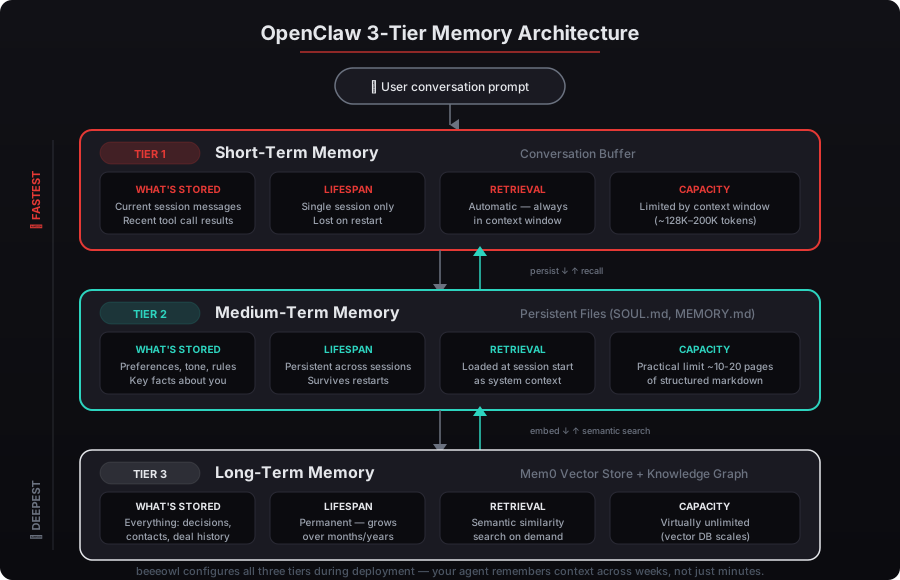
Agent memory isn’t a single feature — it’s a stack with three distinct layers. Getting the architecture right means understanding what each tier does and where it breaks down.
Short-term memory is the conversation buffer. It’s what OpenClaw uses by default within a single session. Every message you send and every response the agent generates stays in context until the conversation ends or the context window fills up. For Claude-based models, that’s roughly 200,000 tokens — enough for a long working session but gone the moment you close the chat.
Short-term memory handles about 80% of in-session work. The problem is the other 20% — the context that accumulates over weeks and months.
Medium-term memory is where OpenClaw’s built-in files come in. Two files matter here: SOUL.md and MEMORY.md. These live inside your OpenClaw workspace and get loaded at the start of every conversation, giving your agent persistent identity and context that survives between sessions.
SOUL.md is your agent’s personality and role definition. It contains who you are, how the agent should communicate, what it should prioritize, and behavioral guardrails. Think of it as the agent’s job description — read once at startup, referenced throughout every interaction.
MEMORY.md is the agent’s working notebook. It stores key facts, ongoing projects, preferences, and decisions that the agent has learned from prior conversations. Unlike SOUL.md, which you write once and update occasionally, MEMORY.md is designed to grow. The agent can append to it after significant interactions, building a running log of what it’s learned about you and your work.
Together, these files give your agent a baseline that carries across sessions. A McKinsey 2025 survey on AI personalization found that personalized AI interactions increase executive adoption rates by 58% compared to generic responses. SOUL.md and MEMORY.md are the simplest path to that personalization.
Long-term memory is the third tier — and where frameworks like Mem0 become essential. Medium-term files work for the first few weeks, but they have a ceiling. MEMORY.md grows linearly. Eventually it becomes too large to fit in the context window, and you’re back to losing information. Long-term memory solves this by extracting discrete facts from conversations, storing them in a structured database, and retrieving only what’s relevant to the current interaction.
How Does Mem0 Work With OpenClaw?
Mem0 is an open-source memory framework purpose-built for AI agents. It slots into OpenClaw as a memory layer that sits between your conversations and a persistent fact store. Here’s the flow.
When you have a conversation with your agent, Mem0 monitors the exchange and extracts key facts. “The user prefers financial summaries in three bullet points.” “The board meeting moved to April 15th.” “The Series C target is $40M at $200M pre-money.” These facts get stored as discrete, timestamped entries scoped to your user profile.
When your next conversation starts, Mem0 retrieves relevant memories based on the current context — not just keyword similarity, but user-specific relevance. If you ask about board prep, it pulls your board-related preferences, the updated meeting date, and recent decisions — without retrieving every document in your knowledge base.
The benchmarks from Mem0’s comparison study tell the story. Memory-augmented agents achieved a 26% accuracy improvement over standard RAG on personalization tasks. Token usage dropped by over 90% per retrieval, because Mem0 returns extracted facts rather than raw document chunks. Latency fell by 91%, from an average of 4.5 seconds per RAG retrieval to 0.4 seconds for memory recall.
For private deployments, Mem0 runs entirely on your infrastructure. The fact store lives on your Mac Mini or hosted VPS — no data leaves your network. This matters for the same reasons we harden every deployment with Docker sandboxing and firewall rules. Your agent’s memory of your board strategy, deal pipeline, and financial decisions stays on hardware you control.
How Do You Configure the Built-In Memory Files?
Start with SOUL.md. This file lives in your OpenClaw workspace directory and gets injected into every conversation’s system prompt. Here’s what belongs in it.
Role definition. Tell the agent what it is. “You are an executive assistant to [Name], CEO of [Company]. Your primary responsibilities include board deck preparation, investor communication drafts, and competitive intelligence monitoring.” Be specific — vague role descriptions produce vague outputs.
Communication preferences. “Always use bullet points for summaries. Keep emails under 200 words. Use formal tone for investor communications, casual tone for internal Slack messages.” These instructions compound over time. An agent that knows your writing style from day one saves hours of editing.
Key facts. Company name, your direct reports, board members, active projects, fiscal year timing. Anything the agent needs in nearly every conversation goes here. According to a 2025 analysis on AI agent architecture, agents with structured context files produce 40% fewer hallucinations on company-specific questions.
Behavioral guardrails. “Never send emails without my explicit approval. Always flag financial figures that differ by more than 10% from last quarter. Never share board materials outside the approved distribution list.” These constraints are critical for executive deployments where the cost of an error is measured in board confidence, not just productivity.
MEMORY.md is simpler to start but requires ongoing maintenance. Begin with an empty file and configure your agent to append after meaningful conversations. A working entry looks like this: a date, a category (decision, preference, fact, project update), and the content. Over time, MEMORY.md becomes a structured log that your agent references every session.
The maintenance piece is what most deployments get wrong. Without periodic cleanup, MEMORY.md accumulates contradictions — you preferred weekly summaries in January but switched to daily in March, and both entries persist. We build cleanup routines into every deployment so the file stays current. For more on how we handle deployment differently, see beeeowl vs SetupClaw vs DIY.
What Does Memory Look Like in Executive Workflows?
Memory transforms an agent from a reactive tool into a proactive partner. Here’s what that means across three common executive use cases.
Board preparation. Without memory, you tell your agent the board meeting date, attendee list, preferred deck format, and key metrics every single time. With memory, the agent already knows your board meets the third Thursday of each quarter, that your lead investor wants ARR and burn rate on slide two, and that you switched from Google Slides to Keynote last month. It starts pulling data and drafting without being asked. We cover this workflow in detail in AI-powered board deck assembly.
Deal flow and investor updates. For VCs and managing partners, memory means your agent tracks which LPs received which performance commentary, remembers that Fund III’s IRR methodology changed in Q4, and knows that you prefer to exclude co-investment details from quarterly letters. Mem0’s benchmarks show these user-scoped facts are retrieved with 91% lower latency than document-level RAG — critical when you’re preparing for a Monday partner meeting on Sunday night. See specific VC workflows in building a deal flow triage agent.
Daily briefings. A memoryless agent gives you a generic morning summary. A memory-equipped agent knows you check Slack before email, that you want competitor mentions flagged before product updates, and that your Thursday briefing should include the week’s cash position because that’s when your CFO reviews it with you. Gartner’s 2026 AI agent forecast predicts that personalized briefing agents will save senior executives an average of 7.2 hours per week — but only when memory is configured to retain workflow patterns over time.
How Do Short-Term, Medium-Term, and Long-Term Memory Work Together?
The three tiers aren’t alternatives — they’re layers in a single system. Here’s how they interact in a typical executive interaction.
You open a new conversation on Monday morning. Before you type anything, OpenClaw loads SOUL.md (your agent’s identity and your preferences) and retrieves relevant entries from Mem0 (last week’s open items, your stated priorities for this week, recent decisions). That’s medium-term and long-term memory working before the conversation even starts.
You start discussing Q2 planning. The agent draws on short-term memory to track the current conversation’s flow — your questions, its responses, the decisions you’re making in real time. It cross-references long-term memory to recall that you deprioritized a product line last month and that your CTO flagged infrastructure costs as a concern.
When the conversation ends, Mem0 extracts new facts: “User confirmed Q2 revenue target of $12M. User wants weekly pipeline reviews starting in April. User asked for competitive pricing analysis by next Thursday.” These get stored in the long-term layer, available for every future session.
MEMORY.md gets a summary append: the date, the key decisions, and any changed priorities. This ensures that even without Mem0’s retrieval, the agent has a readable log of recent activity.
The result is an agent that doesn’t just respond to what you’re asking right now — it understands the trajectory of your decisions over time. Stanford’s 2025 AI Index Report noted that agents with layered memory architectures showed 3.4x higher user retention than memoryless alternatives in enterprise deployments.
What’s the Real Cost of Running an Agent Without Memory?
Every conversation where your agent asks “what format do you prefer?” or “when is the board meeting?” is wasted time. Multiply that across 20 to 30 interactions per week and you’re losing hours — the exact hours your agent was supposed to reclaim.
The deeper cost is trust erosion. Executives stop relying on agents that can’t remember context. Deloitte’s 2025 Future of Work survey found that 71% of executives who abandoned AI agent tools cited “lack of personalization and context retention” as the primary reason. Not capability limitations. Not security concerns. Memory.
At beeeowl, we configure all three memory tiers as part of every deployment. SOUL.md gets personalized during onboarding. MEMORY.md is structured for your specific workflow patterns. Mem0 integration is set up where the use case demands long-term recall — which, for most executive deployments, is from day one. We don’t ship agents that forget.
If you’re running OpenClaw without memory, you’re running it at a fraction of its potential. If you haven’t deployed yet, memory configuration is one of the reasons the hosted setup at $2,000 or a Mac Mini deployment at $5,000 pays for itself within the first month. Your agent should know you better every week — not start over every morning.
Request your deployment and we’ll configure memory that actually remembers.