OpenClaw Credential Security: Why Your Agent Should Never See Your Passwords
35% of exposed OpenClaw instances have credential vulnerabilities. Learn how Composio OAuth middleware keeps your API keys, tokens, and passwords out of your agent's reach.
How Bad Is the OpenClaw Credential Exposure Problem?
Worse than most CTOs assume. Over a third of internet-exposed OpenClaw instances have credential vulnerabilities that would fail any compliance audit — and the number is climbing every month.

SecurityScorecard’s February 2026 threat intelligence report identified 40,214 internet-exposed OpenClaw instances globally. Of those, 35.4% — roughly 14,236 systems — were flagged as vulnerable to credential exposure. The primary issue: API keys stored in plaintext configuration files, readable by any process running on the host machine.
That number matters if you’re a CEO or CFO authorizing an OpenClaw deployment. One misconfigured YAML file means your Gmail OAuth token, Salesforce API key, and Slack bot credential are all sitting in a text file the agent reads at startup. If the agent gets prompt-injected — and Sangfor’s research on OpenClaw attack surfaces shows this is a real vector — those credentials can be exfiltrated in a single request.
We’ve deployed over 40 OpenClaw instances at beeeowl. Not one stores credentials in plaintext. Here’s how.
What Does a Typical OpenClaw Credential Vulnerability Look Like?
The default approach stores raw API keys in the agent’s configuration file, making every credential visible to the agent process and anything else running on the same machine.
Here’s what a standard DIY OpenClaw setup looks like before hardening:
# DANGEROUS: keys in plaintext, visible to agent
integrations:
  gmail:
    api_key: "AIzaSyD-XXXXXXXXXXXXXXXXXXXXXXXXXX"
    oauth_token: "ya29.a0AfH6SMB-XXXXXXXXXXXXX"
  slack:
    bot_token: "xoxb-XXXXXXXXXXXX-XXXXXXXXXXXXXXXX"
  salesforce:
    client_secret: "3MVG9XXXXXXXXXXXXXXXXX"
    refresh_token: "5Aep861XXXXXXXXXXXXXXXX"
Every key is readable by the agent. Every key is readable by any malware on the host. Every key persists on disk indefinitely with no rotation.
According to Verizon’s 2025 Data Breach Investigations Report, 44% of AI-related security breaches involved exposed API credentials. The OpenClaw credential pattern — keys in config files, no rotation, no scope limits — is exactly the scenario that creates those breaches.
The fix isn’t better file permissions. It’s removing credentials from the agent’s reach entirely.
How Does Composio OAuth Middleware Actually Work?
Composio replaces raw credentials with a single reference ID. Your agent receives only a connected_account_id — a pointer to an authenticated session. Composio injects the actual OAuth tokens server-side, so credentials never appear in the agent’s memory, config files, or logs.
The flow works like this:
- You authenticate once through Composio’s OAuth consent screen (standard Google/Microsoft/Slack flow)
- Composio stores the token in its encrypted vault — AES-256 at rest, TLS 1.3 in transit
- Your agent gets a
connected_account_id— a reference string likeacc_gmail_jashan_29f8a - Agent requests an action — “send this email” or “check calendar for conflicts”
- Composio injects the real token server-side, executes the API call, and returns only the result
The agent never sees ya29.a0AfH6SMB.... It never sees xoxb-XXXX.... It sends structured action requests and gets structured results back. If the agent gets compromised through prompt injection, there are no credentials to steal — just a reference ID that’s useless outside Composio’s infrastructure.
This is the architecture we use in every beeeowl deployment. No exceptions.
What Makes Composio’s Auth Architecture Different from Storing Keys in Environment Variables?
Environment variables are better than config files — but they’re still in-memory and accessible to the agent process. Composio’s server-side injection means the token never enters the agent’s runtime at all.
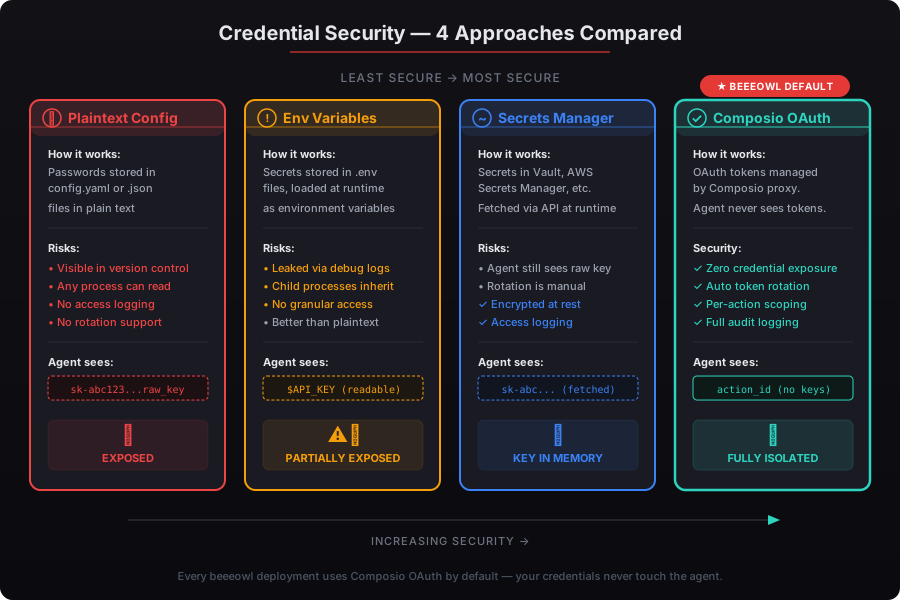
Here’s the comparison:
| Approach | Credential Location | Agent Access | Rotation | Audit Trail |
|---|---|---|---|---|
| Plaintext config file | On disk, readable | Full access | Manual | None |
| Environment variable | In memory at runtime | Full access | Manual restart | None |
| Secrets manager (Vault) | Encrypted store | Pulled at startup | Automatic | Partial |
| Composio OAuth | Composio vault | Never accessible | Automatic | Full |
The difference matters for compliance. If you’re working toward SOC 2 readiness or your organization handles data subject to GDPR, auditors want to see that credentials are isolated from the AI process — not just encrypted, but architecturally separated. Environment variables don’t pass that bar. Composio does.
We’ve had three clients go through SOC 2 audits with beeeowl-deployed OpenClaw instances. In every case, the Composio credential isolation was specifically called out as a control strength. For the full compliance picture, see our GDPR, SOC 2, and EU AI Act compliance guide.
Is Composio Itself Secure? What About SOC 2 Compliance?
Yes. Composio holds SOC 2 Type 2 certification, meaning their infrastructure has been independently audited for security, availability, and confidentiality — not just at a point in time, but over a sustained period.
Here’s what that covers according to Composio’s documentation:
- Encryption at rest: All stored tokens encrypted with AES-256
- Encryption in transit: TLS 1.3 for every API call between your agent and Composio’s servers
- Access controls: Role-based access with audit logging on every token operation
- Token lifecycle management: Automatic refresh, expiration enforcement, and revocation support
- Incident response: Documented breach notification procedures within the SOC 2 framework
For executives worried about adding another vendor to the chain, this is the right concern. But the alternative — storing credentials in your agent’s config — creates a far larger attack surface. Composio’s SOC 2 Type 2 certification means their security practices are audited to a standard that most self-hosted setups never reach.
I’ll be direct: the risk of Composio being breached and exposing scoped, time-limited OAuth tokens is orders of magnitude lower than the risk of a plaintext API key sitting in a YAML file on an unhardened Mac Mini.
How Do You Configure Permission Scoping with Composio?
Composio lets you restrict exactly which actions and API scopes your agent can access — so your Gmail integration can send emails but can’t delete your entire inbox.
Permission scoping happens at two levels:
OAuth scope level: When you authenticate through Composio, you choose which permissions to grant. For Gmail, that might be gmail.send and gmail.readonly — but not gmail.modify or gmail.settings.basic. The token Composio stores can only do what you authorized.
Composio action level: Beyond OAuth scopes, Composio lets you restrict which of its pre-built actions the agent can invoke. You might allow GMAIL_SEND_EMAIL and GMAIL_GET_EMAILS but block GMAIL_DELETE_EMAIL and GMAIL_CREATE_FILTER. This is a second gate that OAuth scopes alone don’t provide.
At beeeowl, we configure both levels for every client. The default is minimum necessary access — your agent gets exactly the permissions its workflows require and nothing more. We document every scope and action in the deployment handoff, so you know precisely what your agent can and can’t do. See our Composio integration walkthrough for the full setup process.
Can You Bring Your Own OAuth Credentials to Composio?
Yes. Composio supports a bring-your-own-credentials model where you register your own OAuth apps with Google, Microsoft, Salesforce, or any other provider — giving you full control over the client ID, client secret, and permission scopes.
This matters for larger organizations with existing OAuth app registrations. Instead of using Composio’s shared OAuth apps (which work fine for most clients), you register your own app in Google Cloud Console or Azure AD, then provide those credentials to Composio. Your tokens flow through your OAuth app, under your admin console, with your revocation controls.
We’ve set this up for three enterprise clients so far — two with existing Google Workspace admin policies that required first-party OAuth apps, and one with a Microsoft 365 conditional access policy that blocked third-party OAuth. In both scenarios, Composio’s bring-your-own-credentials flow took under 30 minutes to configure.
The AICPA’s 2025 SOC 2 guidance on third-party integrations specifically recommends that organizations maintain ownership of OAuth app registrations when connecting AI systems to business-critical services. Composio’s BYOC model satisfies that recommendation.
What Are the Key Rotation Best Practices for OpenClaw Deployments?
Rotate OAuth tokens every 90 days, never commit credentials to version control, and treat environment variables as a fallback — not a primary credential store.
Here’s the rotation schedule we implement for every beeeowl client:
| Credential Type | Rotation Cycle | Method |
|---|---|---|
| OAuth refresh tokens | 90 days | Composio automatic rotation |
| API keys (if any remain) | 60 days | Manual rotation with calendar reminder |
| Composio API key | 90 days | Regenerate in Composio dashboard |
| Docker registry tokens | 180 days | CI/CD pipeline rotation |
Three non-negotiable rules we enforce:
Never commit credentials to Git. This sounds obvious, but GitGuardian’s 2025 State of Secrets Sprawl report found 12.8 million new secrets exposed in public repositories in 2024 alone — a 28% increase year over year. We configure .gitignore patterns and pre-commit hooks to block accidental credential commits on every deployment.
Use .env files only as a last resort. Environment variables are better than config files, but they’re still in memory. For any service that supports OAuth through Composio, use Composio. Reserve .env files for infrastructure credentials like Docker registry access that Composio doesn’t handle.
Audit credential access quarterly. We set up logging that captures every time a credential is accessed, by which process, and for which action. If your audit logs show credential access patterns that don’t match expected agent behavior, that’s an early warning sign worth investigating.
What Happens If Composio Goes Down — Does My Agent Stop Working?
Your agent loses access to external integrations until Composio recovers, but the agent itself keeps running. Core functionality like local document processing and on-device LLM queries aren’t affected.
Composio publishes uptime metrics on their status page. Their historical uptime has been above 99.9% — which translates to less than 9 hours of downtime per year. For an executive’s AI agent that primarily handles email triage, calendar management, and CRM updates, that’s an acceptable dependency.
For clients who can’t tolerate any integration downtime, we configure a fallback layer with cached OAuth tokens stored in an encrypted local vault. The tokens are still managed by Composio during normal operation, but if Composio becomes unreachable, the agent can use cached credentials for up to 24 hours. We’ve implemented this for two clients in regulated industries where integration uptime is a compliance requirement.
The trade-off is clear: accept a 0.1% downtime risk with Composio, or accept a 35.4% credential vulnerability rate with plaintext configs. That’s not a close call.
How Does beeeowl Implement Composio OAuth in Every Deployment?
Every beeeowl deployment — hosted, Mac Mini, or MacBook Air — includes full Composio OAuth configuration as standard. It’s not an add-on. It’s not optional. It’s infrastructure.
Here’s what we do on deployment day:
- Install and configure Composio CLI on the target system
- Register connected accounts for each integration the client needs (typically 5-8 services)
- Scope permissions to minimum required access at both OAuth and Composio action levels
- Configure token rotation on 90-day cycles with automated refresh
- Set up audit logging for every credential access event
- Test every integration end-to-end to verify the agent can execute actions without seeing credentials
- Document the configuration in a handoff sheet the client keeps
The agent’s configuration file contains exactly zero passwords, zero API keys, and zero OAuth tokens. It contains connected_account_id references and Composio action definitions. That’s it.
We’ve been doing this since our first deployment. Credential isolation isn’t a feature we added later — it’s foundational to how we think about private AI infrastructure. If you’re evaluating how beeeowl compares to other deployment services, ask them one question: does the agent ever see raw credentials? If the answer is yes, or “it depends,” that tells you everything.
Ready to Deploy OpenClaw Without the Credential Risk?
Every beeeowl deployment includes Composio OAuth setup, credential isolation, and 90-day token rotation — across all tiers starting at $2,000. Your agent works with your tools. It never sees your passwords.
Request Your Deployment and we’ll have your hardened OpenClaw instance running within a week.