Connecting OpenClaw to n8n: Workflow Automation for Executives
OpenClaw handles reasoning. n8n handles execution. Together they automate board decks, deal flow triage, and weekly briefings. Here's the complete setup guide.
Why Isn’t OpenClaw Enough for Workflow Automation?
OpenClaw is built for reasoning — interpreting intent, making decisions, drafting content, and holding context across conversations. It’s not built for structured, multi-step process execution that must run identically every time. That’s a different problem, and it needs a different tool.

Here’s what I mean. When a CEO asks their OpenClaw agent to “prep my board deck,” the agent understands the request, knows which data sources matter, and can draft narrative sections. But pulling Q1 revenue from Salesforce, formatting it into a specific slide template, merging it with a Google Sheets forecast, and delivering a polished PDF to five board members via email at 8 AM Tuesday — that’s a workflow. It requires deterministic execution with error handling, retries, and an audit trail.
According to a 2025 Gartner survey on AI agent deployments, 67% of enterprises that deployed conversational AI agents needed to add a separate workflow orchestration layer within six months. The agents were good at thinking. They weren’t good at doing the same thing reliably, repeatedly, on schedule.
That’s where n8n comes in.
What Is n8n and Why Does It Pair Well with OpenClaw?
n8n is an open-source, self-hosted workflow automation engine with 400+ pre-built integrations. Think of it as the execution layer your OpenClaw agent is missing. It connects to Salesforce, Google Workspace, Slack, HubSpot, Notion, Jira, and hundreds of other tools — then chains them into repeatable workflows triggered by webhooks, schedules, or events.
The hybrid architecture is straightforward: OpenClaw is the brain, n8n is the body. OpenClaw decides what needs to happen. n8n executes it with precision.
This isn’t a theoretical pairing. According to Kollox’s 2026 analysis on architecting agentic workflows, the OpenClaw-to-n8n pipeline has become one of the most common integration patterns in private AI deployments. The pattern works because both tools are self-hostable, both run in Docker, and they communicate through simple webhooks — no proprietary middleware, no vendor lock-in.
The cost is negligible. n8n Community Edition is free. If you’re running OpenClaw on a Mac Mini or cloud VPS, n8n runs alongside it as another Docker container using minimal resources. The paid cloud version starts at $20/month, but self-hosting is the better option for executives who need their data to stay private.
How Does the OpenClaw-to-n8n Architecture Work?
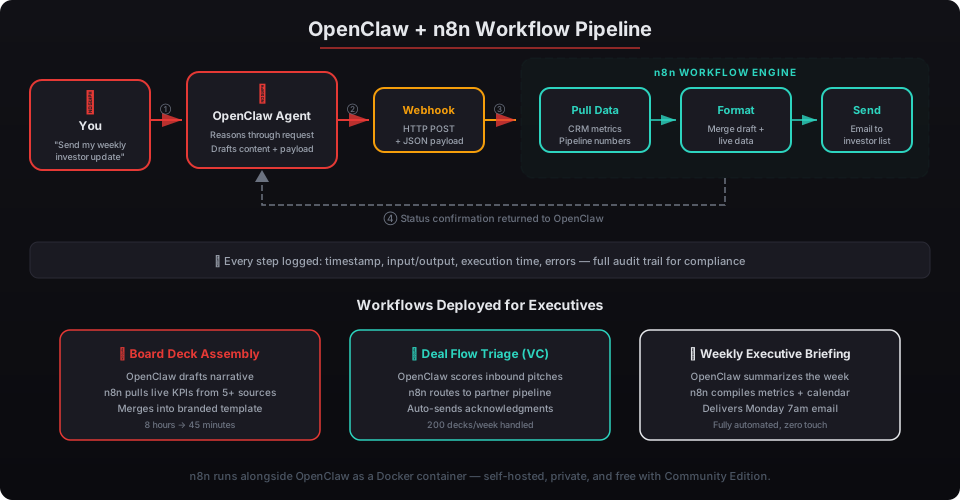
The connection uses webhooks — HTTP endpoints that n8n exposes and OpenClaw calls when it needs something done. Here’s the flow:
- You tell your OpenClaw agent what you need: “Send my weekly investor update.”
- OpenClaw reasons through the request — determines which data to include, drafts the narrative, decides on formatting.
- OpenClaw fires a webhook to n8n with a structured JSON payload containing the content and instructions.
- n8n executes the workflow — pulls live metrics from your CRM, merges them with OpenClaw’s draft, formats the email, and sends it to your investor list.
- n8n returns a status to OpenClaw confirming execution or reporting errors.
Every step is logged. Every execution has a timestamp, input/output record, and error trace. That’s the kind of audit trail compliance teams need — and it’s something pure agent-based execution can’t guarantee. For more on OpenClaw’s logging capabilities, see our guide on audit logging and monitoring.
Here’s a basic webhook configuration in n8n:
{
  "nodes": [
    {
      "name": "OpenClaw Webhook",
      "type": "n8n-nodes-base.webhook",
      "parameters": {
        "path": "openclaw-trigger",
        "httpMethod": "POST",
        "authentication": "headerAuth",
        "responseMode": "onReceived"
      }
    }
  ]
}
And the corresponding OpenClaw skill that triggers it:
# skills/trigger-n8n-workflow.yaml
name: trigger_n8n_workflow
description: Triggers an n8n workflow via webhook
parameters:
  workflow_id:
    type: string
    description: Which n8n workflow to execute
  payload:
    type: object
    description: Data to pass to the workflow
execution:
  type: http
  method: POST
  url: "http://localhost:5678/webhook/openclaw-trigger"
  headers:
    Authorization: "Bearer ${N8N_WEBHOOK_SECRET}"
  body: "${payload}"
The authentication uses a shared secret stored as an environment variable — never hardcoded. For details on how credential isolation works across your deployment, see our Composio OAuth guide.
What Executive Workflows Can This Automate?
We’ve deployed this architecture for over two dozen executives. Three workflows come up in nearly every engagement.
Board Deck Assembly
A managing partner at a mid-market PE firm was spending 6-8 hours every quarter assembling board decks. The data lived in five different systems — Salesforce for pipeline, QuickBooks for financials, Google Sheets for the operating model, Slack threads for qualitative updates, and Notion for strategic initiatives.
The OpenClaw + n8n setup reduced that to 45 minutes of review time. OpenClaw drafts the narrative sections and identifies the key metrics to highlight. n8n executes a 12-step workflow: pull revenue data from the CRM, format financials from QuickBooks, extract KPIs from Google Sheets, compile Slack highlights, merge everything into a branded Google Slides template, and drop the final deck into a shared Drive folder with a Slack notification.
McKinsey’s 2025 report on executive time allocation found that 19% of senior leadership hours go to information assembly rather than decision-making. This workflow eliminates most of that. We cover the full board deck agent configuration in our board deck assembly guide.
Deal Flow Triage for VCs
Venture investors evaluating 200+ inbound deals per month can’t afford to manually review every pitch deck. The hybrid setup handles the intake pipeline end-to-end.
When a new pitch deck arrives via email or a Typeform submission, n8n catches the event, extracts the PDF, and passes it to OpenClaw for analysis. OpenClaw reads the deck, scores it against the fund’s thesis criteria, writes a two-paragraph assessment, and returns a structured verdict — pass, review, or fast-track. n8n then routes it: passes go to a polite decline email (auto-sent), reviews land in a Notion database for the next partner meeting, and fast-tracks trigger a Slack alert to the deal lead with the assessment attached.
According to Cambridge Associates’ 2025 VC Benchmark, top-quartile funds evaluate 3.2x more opportunities per closed deal than bottom-quartile peers. Speed at the top of the funnel directly correlates with returns. We’ve built this specific workflow for several VC clients — see our deal flow triage agent guide.
Weekly Executive Briefings
This is the most requested workflow we deploy. OpenClaw scans your inbox, calendar, Slack, and CRM every Monday at 5 AM. It identifies what matters — revenue changes above threshold, calendar conflicts, unread messages from VIP contacts, deals that changed stage. Then it writes a prioritized briefing.
n8n handles the delivery chain. It formats the briefing into a clean HTML template, sends it via your preferred channel (Slack DM, WhatsApp, or email), logs the delivery, and archives the raw data for compliance. If any source fails — say the CRM API times out — n8n retries three times, then sends a degraded briefing with a note about what’s missing.
Forrester’s 2025 executive productivity study found that C-suite leaders spend an average of 67 minutes every Monday morning manually assembling context for the week. This workflow gives you that hour back. We cover the full setup in our executive briefing agent guide.
How Do You Set Up the First Workflow?
The initial setup takes about 90 minutes if you’re technical. Here’s the step-by-step.
Step 1: Deploy n8n alongside OpenClaw. If you’re running Docker (and every beeeowl deployment does), add n8n to your docker-compose.yml:
# docker-compose.yml (add to existing OpenClaw stack)
n8n:
  image: n8nio/n8n:latest
  container_name: n8n
  ports:
    - "5678:5678"
  environment:
    - N8N_BASIC_AUTH_ACTIVE=true
    - N8N_BASIC_AUTH_USER=admin
    - N8N_BASIC_AUTH_PASSWORD=${N8N_PASSWORD}
    - WEBHOOK_URL=http://localhost:5678/
    - N8N_ENCRYPTION_KEY=${N8N_ENCRYPTION_KEY}
  volumes:
    - n8n_data:/home/node/.n8n
  networks:
    - openclaw-net
  restart: unless-stopped
Step 2: Create a webhook workflow in n8n. Open the n8n editor at localhost:5678, create a new workflow, and add a Webhook trigger node. Set the path to something descriptive like openclaw-board-deck and require header authentication.
Step 3: Build the execution chain. Add nodes for each step of your workflow. For a board deck, that might be: HTTP Request (pull CRM data) → Code node (format metrics) → Google Slides node (populate template) → Google Drive node (save file) → Slack node (notify team).
Step 4: Register the webhook as an OpenClaw skill. Create a YAML skill file that maps the webhook URL to a named action your agent can call. Test it by asking your agent to “run the board deck workflow” — you should see the execution appear in n8n’s log.
For more details on how OpenClaw skills work, see our OpenClaw ecosystem guide.
What About Security and Compliance?
Running n8n self-hosted means your workflow data never leaves your infrastructure. Every execution — inputs, outputs, errors, timestamps — stays on your hardware. That’s the same principle behind every beeeowl deployment: your data, your machine, your control.
n8n stores credentials encrypted with AES-256. Workflow definitions and execution logs are stored in a local SQLite or PostgreSQL database inside the Docker container. No telemetry is sent to n8n’s servers when you run the Community Edition.
The audit trail is particularly valuable for regulated industries. Every n8n execution creates a record showing exactly what data was accessed, what transformations were applied, and what actions were taken. According to Deloitte’s 2025 AI Governance Report, 73% of financial services firms now require deterministic audit trails for any AI-assisted process that touches client data. n8n’s execution logs satisfy that requirement out of the box.
For the webhook connection between OpenClaw and n8n, we use a shared secret rotated monthly and transmitted via HTTPS even on localhost (using a self-signed certificate within the Docker network). The Docker sandboxing that’s standard in every beeeowl deployment ensures n8n can’t access anything outside its container.
How Much Does This Cost to Run?
Almost nothing incremental. n8n Community Edition is free and open source. It runs as a Docker container consuming roughly 256MB of RAM — negligible on a Mac Mini with 16GB+ or any modern VPS.
Here’s the full cost breakdown for a typical executive deployment:
| Component | Cost | Notes |
|---|---|---|
| OpenClaw (beeeowl Mac Mini) | $5,000 one-time | Hardware included, shipped configured |
| n8n Community Edition | $0 | Self-hosted alongside OpenClaw |
| n8n Cloud (alternative) | $20/month | Only if you prefer managed hosting |
| Additional agent config | $1,000 | beeeowl sets up n8n + workflows |
| Ongoing infrastructure | $0 | Runs on hardware you already own |
Compare that to enterprise workflow platforms. Workato starts at $10,000/year. Zapier’s business tier runs $600+/year and caps executions. Microsoft Power Automate charges per-flow, per-user. n8n self-hosted has no execution limits, no per-user fees, and no annual renewals.
The ROI calculation is simple. If board deck assembly alone saves a managing partner 24 hours per quarter — and that partner’s time is worth $500/hour — the setup pays for itself in the first quarter. Add deal flow triage and weekly briefings, and you’re looking at 10-15 hours per week reclaimed across the executive team.
Is This Hard to Maintain?
n8n updates are a single docker pull command. The Community Edition follows a monthly release cycle, and updates are backward-compatible. Your workflows don’t break when you update.
Monitoring is built in. n8n’s execution log shows every run with pass/fail status, execution time, and error details. You can configure n8n to send Slack alerts when a workflow fails — so your OpenClaw agent can even tell you about it during your next morning briefing.
The most common maintenance task is updating OAuth tokens when a connected service rotates them. With Composio handling authentication for your OpenClaw integrations, and n8n managing its own credential store, token rotation is handled automatically in most cases. Manual intervention is rare — maybe once or twice per year.
What’s the Bottom Line?
OpenClaw gives you an AI that thinks. n8n gives it hands. Together, they turn executive intent into executed workflows — board decks assembled, deals triaged, briefings delivered, all on your own infrastructure with full audit trails.
We’ve been deploying this architecture since early 2026, and it’s become our most requested add-on configuration. The pattern is proven, the cost is minimal, and the time savings compound every week.
Every beeeowl deployment — from the $2,000 hosted setup to the $6,000 MacBook Air package — can include n8n configuration as part of the additional agent service. We set up the webhook connections, build your initial workflows, and make sure everything is locked down and auditable.
Request Your Deployment and we’ll have OpenClaw + n8n running on your infrastructure in one day.