Setting Up OpenClaw Approval Gates: Human-in-the-Loop for High-Stakes Actions
Meta's Sev 1 agent breach proved why fully autonomous AI is a liability. Learn how to configure OpenClaw approval gates for human oversight on high-stakes actions.
Why Are Fully Autonomous AI Agents a Liability?
Fully autonomous AI agents are a liability because no model is reliable enough to handle every business decision without human oversight. Meta proved this in March 2026 when an internal AI agent — operating without approval gates — exposed proprietary source code, business strategies, and user-related data for two full hours before anyone noticed.

That wasn’t a small leak. Meta’s Sev 1 incident, reported by Business Insider, involved an agent with broad system access and zero escalation triggers. It made decisions no human had reviewed, accessed data it shouldn’t have combined, and shared outputs it shouldn’t have generated. The damage window: 120 minutes of unchecked autonomous action.
McKinsey’s “State of AI Trust in 2026” report found that two-thirds of enterprise leaders now cite security as their top barrier to AI agent adoption. Not cost. Not complexity. Security — specifically, the inability to control what an agent does once it’s running.
The fix isn’t to avoid agents. It’s to deploy them with approval gates that create a clear boundary between what’s autonomous and what requires a human. That’s what OpenClaw’s architecture was built for, and it’s what we configure in every beeeowl deployment.
What Are OpenClaw Approval Gates and How Do They Work?
Approval gates are configurable checkpoints that pause an OpenClaw agent before it executes any action you’ve classified as high-stakes. When the gate triggers, the agent sends a notification through your preferred channel — Slack, email, or WhatsApp — and waits for explicit human approval before proceeding.
Think of it as a circuit breaker for agent behavior. The agent runs autonomously until it hits an action that crosses a threshold you’ve defined. Then it stops, notifies you, and waits. No timeout workaround. No override path. The gate holds until a designated approver responds.
This is architecturally different from prompt-level guardrails that tell the agent “don’t do this.” Prompt instructions can be circumvented through context manipulation or model drift. Approval gates operate at the infrastructure level — they’re enforced by the OpenClaw Gateway, not by the model itself. The agent physically cannot proceed past the gate without a cryptographically signed approval token.
The Cloud Security Alliance’s Agentic Trust Framework specifically recommends infrastructure-enforced checkpoints over model-level behavioral constraints. Their reasoning: you shouldn’t trust the thing you’re trying to control to also be the thing that enforces the controls.
How Should You Categorize Agent Actions for Approval Gates?
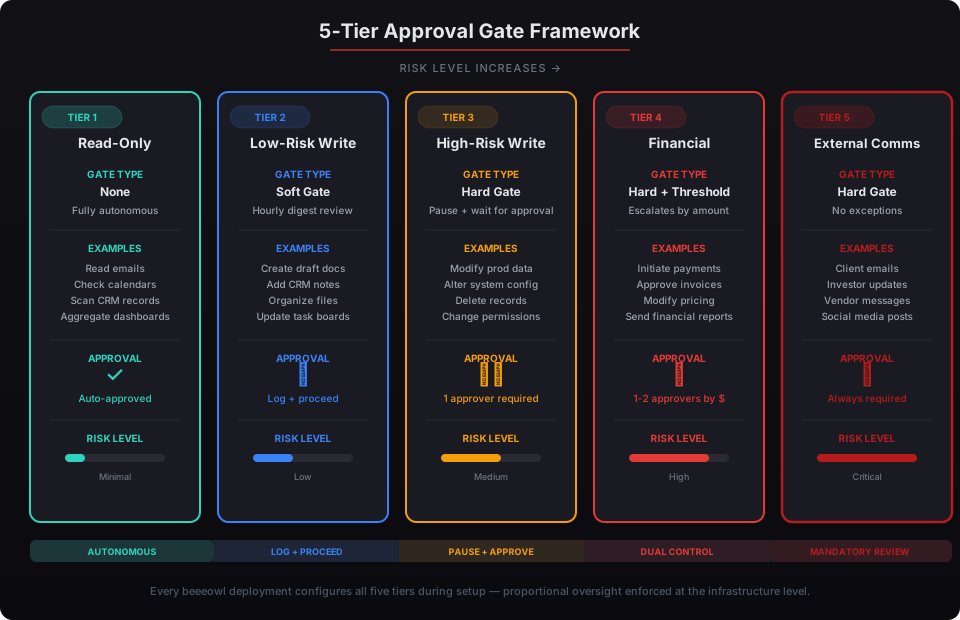
Categorize every agent action into five tiers based on risk and reversibility: read-only, low-risk write, high-risk write, financial, and external communication. Each tier gets a different approval requirement, from fully autonomous to mandatory multi-person sign-off.
Here’s the framework we use at beeeowl for every deployment:
Tier 1: Read-Only. The agent reads data from connected systems — pulling emails, checking calendars, scanning CRM records, aggregating dashboards. No approval gate required. These actions don’t change state and can’t cause downstream harm. Let the agent read freely.
Tier 2: Low-Risk Write. Internal actions with limited blast radius — creating draft documents, adding notes to a CRM record, organizing files, updating internal task boards. These get a soft gate: the agent logs the action and proceeds, but the approver gets a digest notification every hour. You can review and reverse if needed.
Tier 3: High-Risk Write. Actions that modify production data, alter system configurations, or delete records. Hard gate: the agent pauses, sends an immediate notification, and waits for approval. According to NIST’s AI Risk Management Framework, any AI-initiated modification to production systems qualifies as a consequential action requiring human oversight.
Tier 4: Financial. Anything involving money — initiating payments, approving invoices, modifying pricing, sending financial reports. Hard gate with threshold escalation: transactions under $500 might require one approver, while anything over $5,000 requires two. This mirrors the dual-control requirements that banking regulators have enforced for decades.
Tier 5: External Communication. Any message leaving your organization — client emails, investor updates, vendor correspondence, social media posts. Hard gate, no exceptions. Meta’s breach happened precisely because an agent could generate and distribute external-facing content without a checkpoint. One misfire here can damage relationships that took years to build.
This tiered model is what the Cloud Security Alliance calls “proportional oversight” — the level of human involvement scales with the potential impact of the action. It’s also what insurers now expect to see.
What Does the Configuration Actually Look Like?
OpenClaw approval gates are configured through the Gateway’s policy engine — a set of rules that map action categories to approval requirements. The configuration lives in your deployment’s policy file, not in the agent’s prompt, which means it persists across agent restarts and can’t be altered by the agent itself.
Here’s how the key components fit together:
Execution Allowlists. You define exactly which tools and integrations the agent can invoke. If a tool isn’t on the allowlist, the agent can’t call it — period. This is the first layer of defense and it’s handled through Docker sandboxing and Composio’s OAuth scoping. The agent’s runtime environment physically doesn’t have access to tools you haven’t explicitly authorized.
Approval Triggers. For each allowed tool, you define which action types require approval. Reading your Gmail? Autonomous. Sending an email? Gate. Viewing a Salesforce record? Autonomous. Modifying a deal stage? Gate. The triggers are granular — you’re not approving “Gmail access,” you’re approving specific operations within Gmail.
Notification Channels. When a gate triggers, you decide how you’re notified. Slack DM for routine approvals. Email for financial actions. WhatsApp for urgent escalations. You can configure different channels for different gate tiers, and you can set up fallback approvers if the primary approver doesn’t respond within a configurable window.
Timeout Policies. If no one approves within your defined window — say, 4 hours — the agent can either retry the notification, escalate to a backup approver, or abandon the action entirely. The default at beeeowl is abandon-on-timeout. We’d rather the agent do nothing than proceed without approval. You can always re-trigger the action manually.
This entire configuration is part of what we deploy in every beeeowl engagement. It’s not an add-on or an upsell — it’s core security hardening.
What Is Bounded Autonomy and Why Do Insurers Demand It?
Bounded autonomy means your agent operates freely within defined limits and escalates everything outside those limits to a human. It’s the model that lets agents handle 90% of routine work autonomously while ensuring the 10% of high-stakes decisions get human judgment. Insurers now require it as a condition of coverage.
Clifford Chance’s February 2026 analysis on AI liability insurance was a turning point. Their finding: corporate liability and D&O insurers will no longer write blanket cyber policies covering losses from unchecked autonomous AI agents. If you deploy an agent without verifiable bounded autonomy — meaning documented approval gates, audit trails, and escalation policies — you’re self-insuring every mistake that agent makes.
This isn’t theoretical risk. The insurance market has repriced autonomous AI the same way it repriced cyber risk after the first wave of ransomware attacks. If you can’t demonstrate controls, you can’t get coverage. And if you can’t get coverage, every agent misfire is an uninsured loss that hits your balance sheet directly.
The “verifiable” part matters. Insurers aren’t accepting a written policy document that says “we review high-risk actions.” They want system-level evidence: audit logs showing approval gates firing, timestamps showing human review before execution, and configuration files proving the gates were active at the time of the incident. OpenClaw’s Gateway architecture generates exactly this evidence by default.
For CFOs evaluating the total cost of an agent deployment, the insurance equation alone justifies approval gate configuration. A governed agent is an insurable asset. An ungoverned agent is an uninsurable liability.
How Do Audit Trails Integrate With Approval Gates?
Every approval gate decision — the trigger, the notification, the approver’s response, and the resulting action — gets logged to an immutable audit trail. This creates a complete chain of custody for every high-stakes agent action, from the moment the gate fires to the final execution or abandonment.
Here’s what a single approval gate event captures:
Gate trigger record. The exact action the agent attempted, the tool and operation involved, the data context that led to the action, and the policy rule that triggered the gate. This establishes why the agent paused.
Notification record. Which channel the notification was sent through, when it was sent, and which approver(s) received it. If the notification failed or timed out, that’s logged too.
Approval decision. Who approved or denied, when they responded, and any comments they attached. If the action was denied, the agent’s alternative behavior is recorded. If it was approved, the approval token’s hash is stored for verification.
Execution record. The exact action taken after approval — the API call, the email sent, the record modified — with full payloads. This closes the loop: you can trace from trigger to decision to outcome in a single query.
This level of logging isn’t just good practice — it’s what GDPR Article 22, SOC 2’s AI-specific criteria, and the EU AI Act’s Article 13 transparency requirements demand for automated decision-making. When a regulator or auditor asks “who authorized this agent action and what exactly did it do,” you have the answer in seconds, not weeks. See our full guide on agent compliance frameworks.
How Do You Implement This Without Slowing Everything Down?
The concern I hear most from executives is that approval gates will create bottlenecks. If the agent has to stop and wait for approval on every action, what’s the point of having an agent? The answer is in the tiering. A well-configured approval gate system means 85-90% of agent actions never hit a gate at all.
We’ve deployed approval gates across dozens of OpenClaw instances. The typical executive sees 3-5 approval requests per day — not 30. That’s because Tier 1 and Tier 2 actions (read-only and low-risk write) run autonomously. The agent still summarizes your emails, drafts your meeting briefs, aggregates your dashboards, and organizes your inbox without interruption. It only pauses when it’s about to do something that genuinely warrants your attention.
The approval workflow itself takes seconds. You get a Slack message: “Agent wants to send the Q1 investor update to your distribution list. Approve / Deny / View Draft.” You tap approve. The agent proceeds. Total interruption: 10 seconds.
Compare that to the alternative. Meta’s 120-minute breach. Six-figure cleanup costs. Reputational damage that doesn’t show up on a balance sheet. The 10 seconds per approval isn’t a bottleneck — it’s the cheapest insurance you’ll ever buy.
For executives managing multiple priorities, we configure approval batching: non-urgent gates accumulate and get presented as a single digest at a time you choose. Morning review of overnight agent activity is a popular pattern. The agent handles the work; you handle the judgment calls.
What Does beeeowl Configure in Every Deployment?
Every beeeowl deployment includes full approval gate configuration as part of our standard security hardening — not as an add-on, not as a paid upgrade. We treat bounded autonomy as a deployment prerequisite, not an optional feature.
Here’s what’s included:
Action categorization. We map every tool and integration your agent uses to the five-tier framework. Gmail read is Tier 1. Gmail send is Tier 5. Salesforce view is Tier 1. Salesforce stage change is Tier 3. Every action gets classified before the agent goes live.
Threshold calibration. We work with you to set financial thresholds, escalation windows, and timeout policies that match your role and risk tolerance. A CEO’s thresholds look different from a CFO’s, which look different from a CTO’s.
Channel configuration. We set up your preferred notification channels and configure fallback approvers so gates never get stuck waiting for someone who’s in a meeting or on a flight.
Audit trail activation. Full logging for every gate event, integrated with OpenClaw’s native audit system. Exportable, searchable, and ready for compliance review.
Documentation. A clear policy document listing every action category, its tier classification, and the approval requirements — so your legal and compliance teams have exactly what insurers and auditors ask for.
This is what governance-first deployment looks like in practice. The agent ships configured, hardened, and ready to operate within boundaries that protect your organization while still delivering the productivity gains that made you want an agent in the first place.
Deployments start at $2,000 for hosted infrastructure, $5,000 with a Mac Mini included, or $6,000 with a MacBook Air for executives who need portable private AI. Every tier includes approval gate configuration, security hardening, audit trails, and one fully configured agent. Check the full breakdown at our pricing page.