OpenClaw for Non-Technical Founders: What You Need to Know Before Your First Deployment
No coding required. No terminal commands. No Docker configuration. Here are the honest answers to the seven questions every non-technical founder asks before deploying OpenClaw — hardware options, real costs, setup timeline, what to automate first, and the specific DIY pitfalls that turn a promising weekend project into a production security incident.

Do I Actually Need to Know How to Code?
Answer capsule. No. You don’t write code, manage servers, configure Docker, or touch a terminal. After a professional beeeowl deployment, you interact with your OpenClaw agent the same way you’d message a colleague — through Slack, WhatsApp, Telegram, iMessage, or email. If you can send a text message, you can use OpenClaw. The technical work (OS hardening, OpenClaw installation, Docker sandbox, Composio OAuth, audit logging, firewall rules) all happens on our side before the hardware ships or the VPS is handed over. Your only interaction with the system is sending messages to the agent through tools you already use every day.

This is the most common question we hear from founders, and the concern is understandable. OpenClaw is open source software with 350,000+ GitHub stars. NVIDIA’s Jensen Huang compared it to Linux at CES 2025 and called it “the operating system for agentic computers.” That sounds deeply technical. And the raw software is — installing it from GitHub involves Docker, command-line tools, environment variables, Linux capabilities, seccomp profiles, iptables rules, and configuration files that would make any non-developer’s eyes glaze over. Reading the official install guide takes about 45 minutes and the install itself takes 2-3 hours even for experienced developers who know the stack. See our comparison of beeeowl vs SetupClaw vs DIY OpenClaw deployment for the honest breakdown of what each path actually involves.
That’s exactly why professional deployment exists. According to Deloitte’s 2025 Enterprise AI Adoption Survey, 71% of AI projects stall at the security review and installation stage — not because the AI is hard, but because the infrastructure around the AI is unfamiliar territory for most companies. The technical barrier isn’t the agent itself; it’s Docker, firewalls, authentication, audit logging, OAuth middleware, and the dozen other production-grade concerns that need to be right before real data touches the system. beeeowl handles every one of those, and you get the finished product on day one rather than trying to figure it out yourself on weekends.
Think of it like electricity. You don’t need to understand transformers, load balancing, and circuit breakers to flip a light switch. The electricians built the infrastructure so you can focus on what you actually want to do (read, cook, work) instead of becoming an electrician yourself. Your OpenClaw agent works the same way. See our getting your first agent running in one day guide and our walkthrough of why executives need an agent, not a chatbot for the broader context.
What Hardware Do I Actually Need?
Answer capsule. Three options: no physical hardware at all (Hosted Setup on a cloud VPS, $2,000 one-time), a Mac Mini that sits in your office ($5,000 tier with hardware included, shipped within a week), or a MacBook Air for traveling executives ($6,000 tier with portable hardware). Your choice depends on whether you want portability (MacBook Air), physical control of the machine (Mac Mini), or the simplest possible setup with no shipping delays (Hosted). All three tiers include the same seven-layer security hardening, the same Composio OAuth configuration for your integrations, the same one configured agent, and the same one year of monthly mastermind access — the differences are purely about where the hardware physically lives.
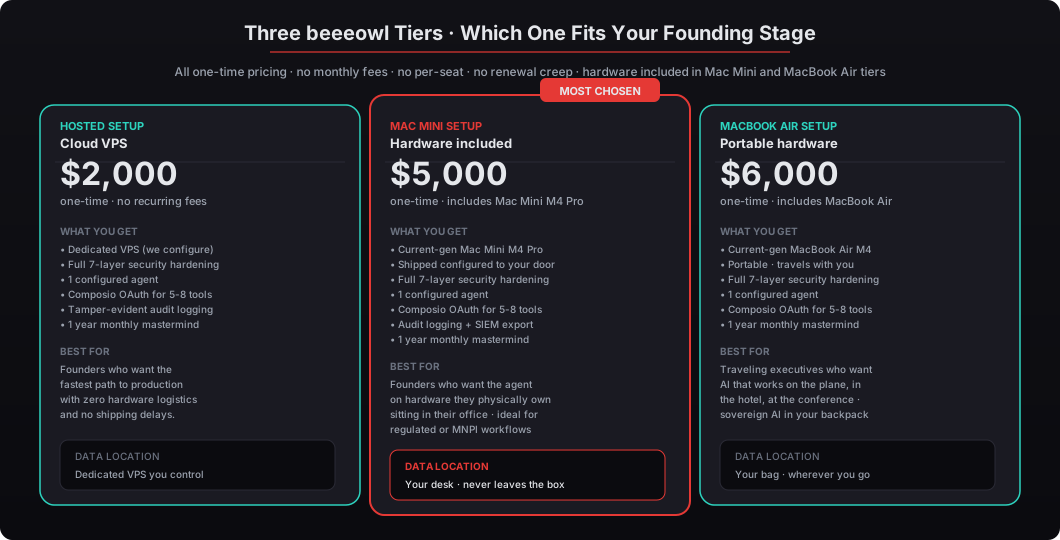
Here’s the detailed breakdown:
| Option | Price (one-time) | What You Get | Best For |
|---|---|---|---|
| Hosted Setup | $2,000 | Agent runs on a dedicated VPS beeeowl configures and hands over | Founders who want the fastest path to production with zero hardware logistics |
| Mac Mini Setup | $5,000 | Current-generation Mac Mini M4 Pro hardware included, shipped pre-configured to your office | Most-chosen tier: founders who want the agent in their office on hardware they physically own |
| MacBook Air Setup | $6,000 | Current-generation MacBook Air M4 hardware included, portable, travels with you | Traveling executives who want AI that works on the plane, in the hotel, at the conference |
| In-Person Setup | +$2,000 | Add-on for hardware tiers: we come to your office and set it up on-site with your team | Clients who want hands-on onboarding and training |
| Additional Agents | $1,000 each | Per executive beyond the first | Team deployments with 2+ executives |
| Private On-Device LLM | +$1,000 | Local LLM so prompts and data never leave the machine | Highly regulated workflows (legal, healthcare, financial advisory) |
According to Gartner’s 2025 AI Infrastructure Report, 67% of enterprises handling sensitive data now require AI processing on infrastructure they directly control. For founders managing investor communications, board discussions, and financial data, the Mac Mini or MacBook Air tiers mean your data never leaves hardware you physically possess — there’s no cloud vendor, no cross-border transfer, no third-party data processing agreement to worry about.
The Hosted option is equally secure — it’s a dedicated VPS (not a shared cloud service), fully hardened with the same seven-layer stack, and beeeowl is the only party with operational access to the machine. The difference is where the hardware physically lives: for the Hosted tier, it’s in a data center; for the hardware tiers, it’s in your office or your bag. Both options pass the same compliance audits (SOC 2, EU AI Act, GDPR) because the architecture is identical. The hardware tiers just add the additional guarantee of physical custody for founders who want it.
All three tiers include the same deployment: OpenClaw installation, OS security hardening, Docker sandboxing with the seven-layer security stack, Composio OAuth configuration, one fully configured agent connected to 5-8 tools, authentication mandatory, tamper-evident audit logging, and 12 months of monthly mastermind access for ongoing Q&A. See our pricing page for the complete matrix.
How Long Does Setup Actually Take from Order to First Use?
Answer capsule. One day for the technical deployment work on beeeowl’s side, one week for hardware delivery (if you picked a hardware tier), and 14 days to measurable time savings. Accenture’s 2025 Technology Vision data found the average enterprise AI pilot takes 4.2 months from approval to first production use. beeeowl compresses that to under two weeks because we’ve standardized every step of the deployment process across 150+ previous engagements. The difference isn’t speed shortcuts — it’s that the deployment pattern is the same every time, so we don’t rebuild the wheel for each client.
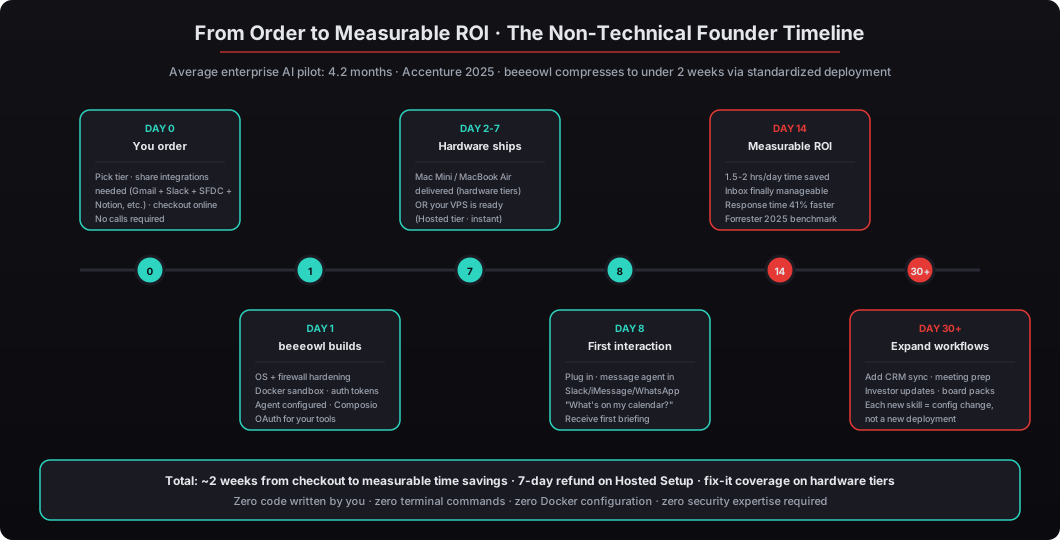
Here’s the typical timeline in detail:
Day 0 — You order. You choose your tier, tell us which integrations you need (email, CRM, calendar, Slack, whatever), and complete checkout online. No phone calls required, no lengthy discovery meetings, no three-week “scoping process.” We need roughly 5-10 pieces of information: your email address, which email provider you use (Gmail, Outlook, custom domain), which CRM you use (Salesforce, HubSpot, Pipedrive, none), which messaging tools you use (Slack, Teams, WhatsApp, iMessage), and which document storage you use (Google Drive, OneDrive, Notion, Dropbox). That’s it. See our pricing and ordering page.
Day 1 — beeeowl builds. Our team does the full deployment in one business day: OS hardening (firewall, file permissions, append-only audit logs), OpenClaw installation (pinned version, SHA-256 verified), Docker sandbox configuration (read-only rootfs, dropped capabilities, non-root user, resource limits), seccomp profile, token authentication, Composio OAuth flow for each of your integrations (you authenticate in your browser; Composio captures the tokens, the agent never sees them directly), and agent configuration with your first workflow. We ship only after the deployment passes our 47-point pre-ship checklist.
Day 2-7 — Hardware ships (hardware tiers only). The Mac Mini or MacBook Air leaves our office by end of day 1 and arrives at yours within the standard shipping window for your location. For Hosted Setup clients, the VPS is ready immediately and we hand over access on day 1. See our deployment walkthrough for specifics.
Day 8 — First interaction. The hardware arrives (or the VPS is already live), you plug it in (or log in), and you send your first message to the agent through whichever Channel you configured. Your first message might be “what’s on my calendar today?” or “show me yesterday’s emails that need follow-up” or “draft a follow-up to the call with Sarah about the Series B terms.” The agent responds in the same Channel within seconds. This is your first concrete sense of what the system can do.
Day 14 — Measurable ROI. By the end of the second week, you have 14 days of compounding efficiency gains: 1.5-2 hours per day of time saved, an inbox that’s actually manageable for the first time in years, response time to critical communications down by 41% (Forrester 2025 benchmark), and enough confidence in the system to start thinking about what to automate next. You’re still skeptical of the magic, but you’re also not going to go back to handling email the old way.
Day 30+ — Expand workflows. Add CRM sync after every meeting, daily morning briefings, investor update drafting, board deck assembly, competitive intelligence monitoring. Each new workflow is a configuration change, not a new deployment. The same hardware handles 5-8 workflows comfortably, and we don’t charge extra for adding workflows to an existing deployment.
According to Accenture’s 2025 Technology Vision data, the average enterprise AI pilot takes 4.2 months from approval to first production use. beeeowl’s model compresses that to under two weeks because we’ve standardized every step of the deployment process across 150+ previous engagements. The difference is repeatability — we’ve done this 150 times, so the 151st time follows the same playbook without surprises.
What Can Go Wrong With DIY Installation?
Answer capsule. Security gaps. That’s the honest answer. OpenClaw’s source code is public on GitHub and anyone can install it — but installing it correctly with enterprise-grade security is a different problem entirely. The three most common DIY failure modes we see in audits are: exposed Docker sockets (giving the agent root-equivalent access to the host), no audit logging (agent runs for weeks with no record of what it did), and missing firewall rules (unrestricted outbound traffic creates data exfiltration risk). Censys found 30,247 exposed OpenClaw instances on the public internet in March 2026, most running with default configurations. IBM’s 2025 Cost of a Data Breach Report put breaches involving AI systems at an average of $5.2 million per incident — 13% higher than non-AI breaches.
Here’s what founders miss when they try to self-install or hire a freelance developer to do it:
-
No Docker sandboxing — the agent runs with full access to the host operating system instead of an isolated container. If a prompt injection or malicious skill compromises the agent, it can read SSH keys, modify any file on the machine, and install persistent backdoors. See our Docker sandboxing walkthrough for what production hardening actually looks like.
-
Exposed Docker socket — mounting
/var/run/docker.sockinto the container gives the agent root-equivalent control of the Docker daemon and, through it, the entire host. Docker’s own security documentation says mounting the socket is “essentially giving root access to the host.” We see this in ~50% of DIY deployments because some community plugins assume they can spawn child containers. -
Exposed credentials — API keys and OAuth tokens stored in plain-text environment variables or config files that the agent process can read directly. When the agent is compromised, every connected service is compromised with it. See our walkthrough of OpenClaw credential security and Composio OAuth explained for the isolation pattern that prevents this.
-
No audit trails — no structured logging of what the agent accessed, when, or what actions it took. When an incident happens (and eventually one will), there’s nothing to investigate. See our audit logging and monitoring walkthrough for the four-pillar observability stack every production deployment needs.
-
Missing authentication — the gateway runs with
AUTH_ENABLED=false(the default), meaning anyone who can reach the gateway port can issue commands to the agent. Censys found 30,247 OpenClaw instances exposed on the public internet in March 2026, most running unauthenticated. See our analysis of the 30,000 exposed OpenClaw instances problem for the CVE-2026-25253 attack chain and the exact hardening that prevents it. -
No firewall configuration — the host firewall doesn’t exist or uses default rules. Outbound traffic is unrestricted, so a compromised agent can exfiltrate data to any destination on the internet. Inbound traffic accepts connections to management ports that should have been closed.
-
No skill vetting — third-party ClawHub skills installed without source review or permission auditing. 12-20% of ClawHub skills exhibit malicious or high-risk behaviors per early 2026 audits. See our ClawHub skills vetting walkthrough.
According to IBM’s 2025 Cost of a Data Breach Report, breaches involving AI systems averaged $5.2 million per incident — 13% higher than non-AI breaches. NVIDIA built the NemoClaw enterprise security framework specifically because running an unprotected AI agent on a corporate network is genuinely dangerous. Jensen Huang said it directly at CES 2025: “Agentic systems in the corporate network can have access to sensitive information, execute code, and communicate externally. Obviously, this can’t possibly be allowed” — without proper guardrails. NemoClaw is NVIDIA’s answer to that problem, and beeeowl adds client-specific hardening on top.
Every beeeowl deployment includes the full NemoClaw-grade security stack. This isn’t an upsell or a premium tier — it’s the baseline. There is no “lite” deployment that skips security. See the seven-layer hardening walkthrough for the specific configuration we ship.
How Do I Actually Talk to My Agent?
Answer capsule. Through the messaging apps you already use — Slack, Microsoft Teams, WhatsApp, Telegram, iMessage, email, or a local web interface. Your agent shows up as a contact, bot, or chat participant in your existing tools, and you message it the same way you’d message a colleague. Forrester’s 2025 Enterprise Communication Survey found that executives average 4.2 communication platforms daily, so asking them to open a fifth standalone dashboard specifically for AI is a non-starter — Microsoft’s 2025 Workplace Analytics found that 73% of standalone AI dashboards get abandoned within 60 days because nobody wants another tool to check. OpenClaw avoids that trap by living inside tools you already open 50 times a day.
Here’s what a typical interaction looks like across the day:
- 8:00 AM (iMessage, commuting): You receive your morning briefing automatically — calendar, attendee backgrounds, overnight updates, action items from yesterday. You scan it while drinking coffee.
- 9:45 AM (Slack, at desk): “What’s the status of the Acme deal?” The agent replies with the latest pipeline stage, recent meeting notes, and any blockers.
- 11:30 AM (Slack, between meetings): “Draft a follow-up email to Sarah from the 10am call.” The agent drafts using context from your CRM, the meeting transcript, and your communication history with Sarah. You review, edit one line, approve.
- 2:30 PM (WhatsApp, at a client lunch): “Did we hear back from Acme on the revised terms?” The agent checks the inbox and Slack channels, replies “Yes, their CFO replied at 1:47pm confirming the 15% discount. I’ll draft the acknowledgment.”
- 4:00 PM (Slack, back at desk): You approve the acknowledgment draft. It goes out.
- 6:00 PM (home, after work): You receive the daily summary — what happened today, what’s in your inbox that needs tomorrow’s attention, what’s on your calendar tomorrow.
Most beeeowl clients use two Channels: one for desktop work (Slack or Microsoft Teams) and one for mobile access (WhatsApp, Telegram, or iMessage). The agent maintains full context across both — you can start a conversation on Slack at noon, pick it up on WhatsApp at 6 PM, and the agent remembers what you were talking about. See our how to configure OpenClaw for WhatsApp walkthrough for specific Channel setups and our ecosystem architecture walkthrough for how Channels fit into the broader OpenClaw design.
The Channel choice matters more than most founders realize. Forrester’s 2025 Enterprise Communication Survey found that executives average 4.2 communication platforms daily. A tool that lives in one of those four platforms gets used; a tool that requires a fifth platform gets abandoned. OpenClaw’s Channels design is specifically built around this reality — the agent shows up where you already work instead of asking you to show up where the agent lives.
What Does It Really Cost Compared to Cloud AI Subscriptions?
Answer capsule. beeeowl is $2,000 to $6,000 one-time depending on tier. ChatGPT Enterprise is $60/user/month ($720/year per person), Microsoft Copilot is $30/user/month, and Google Gemini for Workspace is $30/user/month — all recurring forever. For a 10-person executive team, ChatGPT Enterprise is $21,600 over three years versus beeeowl Mac Mini’s $14,000 one-time ($5,000 base + $9,000 for 9 additional agents), which saves $7,600 and keeps every prompt on hardware you own. The cost math tilts further in beeeowl’s favor every year after three because the cloud AI subscriptions never stop billing. Deloitte’s 2025 AI Cost Benchmarking study found that companies choosing on-premises AI reported 34% lower total cost of ownership over three years compared to cloud-only strategies.
Here’s the complete pricing, one-time, no monthly fees:
| Tier | One-Time Price | What’s Included |
|---|---|---|
| Hosted Setup | $2,000 | Full deployment on dedicated VPS, 1 agent, 7-layer security hardening, 1 year mastermind access |
| Mac Mini Setup | $5,000 | Hardware included + everything in Hosted |
| MacBook Air Setup | $6,000 | Portable hardware included + everything in Hosted |
| In-Person Setup | +$2,000 | Add-on for hardware tiers (we come to your office) |
| Additional Agents | $1,000 each | Per executive beyond the first |
| Private On-Device LLM | +$1,000 | Data never leaves your machine — not even to ChatGPT or Claude APIs |
The three-year cost comparison for a 10-executive team:
| Platform | Year 1 | Year 2 cumulative | Year 3 cumulative | Data location |
|---|---|---|---|---|
| ChatGPT Enterprise ($60/u/mo) | $7,200 | $14,400 | $21,600 | OpenAI cloud |
| Microsoft Copilot ($30/u/mo) | $3,600 | $7,200 | $10,800 | Microsoft Azure |
| Claude Team ($30/u/mo) | $3,600 | $7,200 | $10,800 | Anthropic/AWS |
| beeeowl Mac Mini | $14,000 | $14,000 | $14,000 | Your hardware |
| beeeowl Hosted | $11,000 | $11,000 | $11,000 | Your VPS |
The beeeowl numbers assume the tier base price plus $1,000 per additional agent beyond the first (10 executives = 1 primary + 9 additional). No per-seat licensing, no annual renewals, no 15% contract creep every renewal cycle. Hardware included in the Mac Mini tier. One year of monthly mastermind access included in all tiers. See our detailed private AI vs cloud AI comparison for the full TCO breakdown with compliance implications.
According to Deloitte’s 2025 AI Cost Benchmarking study, companies choosing on-premises AI reported 34% lower total cost of ownership over three years compared to cloud-only strategies. That 34% gap gets wider every year because the recurring subscriptions compound while the one-time cost doesn’t.
Hosted Setup comes with a 7-day 100% refund guarantee — full refund if you’re not completely satisfied, no questions asked. Hardware tiers (Mac Mini, MacBook Air) are non-refundable once shipped, but they’re covered by our fix-it commitment: if the system doesn’t work as specified, we troubleshoot and resolve at no extra charge. We’ve processed a handful of refund requests over the years, and in every case we learned something about a client’s specific workflow that we built into the next deployment. The guarantee isn’t a marketing gimmick — it’s how we force ourselves to ship deployments that actually work for the client’s specific situation, not just the average case.
What Should My First OpenClaw Workflow Be?
Answer capsule. Email triage or a morning briefing. Both deliver measurable ROI within two weeks, require minimal configuration tuning, and build your confidence in the system before you expand to more complex workflows. Email triage scans your inbox every 30 minutes, categorizes messages by urgency, drafts responses for routine items, and flags messages that need your attention — Harvard Business Review 2025 found executives spend 4.1 hours daily on email, and agent-assisted triage cuts that in half. The morning briefing delivers a daily summary at 8am with your calendar, attendee backgrounds from LinkedIn and your CRM, previous meeting notes with each person, talking points, and overnight activity. Pick whichever is consuming more of your time right now, and add the other one by week three.
Email triage is the most common starting point because the time-to-value is fastest. Within the first 48 hours, you see drafted replies in your drafts folder and get a concrete sense of what the agent is doing. Within the first week, you’ve trained the agent on your communication style by approving or editing its drafts. By the end of week two, the drafts match your voice closely enough that you’re approving most of them with minimal editing. The specific workflow:
- Every 30 minutes, the agent scans your inbox for new messages
- Categorizes each message: urgent, routine, informational, promotional/noise
- Drafts responses for routine items (meeting confirmations, brief informational replies, polite declines)
- Flags urgent items for your attention in your preferred Channel (Slack, iMessage, whatever)
- Archives the promotional/noise category automatically
- Produces a daily inbox summary at end of day showing what was handled and what needs follow-up
Harvard Business Review 2025 found executives spend 4.1 hours daily on email on average. Even a 50% reduction gives you 2 hours back every day — over 500 hours per year. For most founders this is the single biggest time sink on the calendar, which makes it the highest-leverage place to start.
Morning briefing is the close second most common starting point because the output is immediately tangible. At 8am every weekday, you receive a briefing that includes:
- Your full schedule for the day with timezone-adjusted times
- Attendee backgrounds for each meeting — LinkedIn profile, their role, their company, any recent news
- Previous interactions with each attendee — last meeting notes from your CRM, recent email threads
- Talking points for each meeting tailored to what’s likely to come up
- Overnight activity across your communication channels — anything from the night that’s worth flagging
- Action items from yesterday that need your attention today
The briefing lands in your inbox or your preferred Channel before you’ve had coffee. You read it in 5 minutes and walk into your first meeting actually prepared instead of winging it. See our walkthrough of building an AI executive briefing agent in OpenClaw for the specific configuration.
We’ve deployed 150+ agents across beeeowl clients. The pattern is consistent: founders who start with one of these two workflows see enough value in the first 14 days to add CRM sync, competitive intelligence, or investor update drafting by month two. The ones who try to scope “an agent that does everything on day one” get stuck in analysis paralysis and delay the deployment by months while they figure out scope. The one-workflow-first approach wins every time.
Start small. Prove the value. Expand from there. Your first workflow doesn’t have to be the workflow the agent ultimately handles — it’s the workflow that builds your confidence in the system so you know what to add next. See our role-specific walkthroughs: 7 ways CEOs use OpenClaw, CFOs using AI agents for variance commentary, VCs using agents for deal flow, and CTOs using OpenClaw for due diligence.
Ready to Start?
The honest summary for non-technical founders: You don’t need to understand the technology to use it effectively. You need to know what problem you’re solving (usually email triage or morning briefings), which tools you already use (Gmail or Outlook, Slack or Teams, Salesforce or HubSpot), and which tier fits your context (Hosted for speed, Mac Mini for physical control, MacBook Air for travel). beeeowl handles everything technical, you get the finished product within a week or two, and you measure ROI in the first two weeks of use.
The pricing is one-time, not recurring. If you’re cautious about committing to hardware, the Hosted Setup tier includes a 7-day 100% refund so you can try it without financial risk — full refund if you’re not completely satisfied, no questions asked. Hardware tiers include fix-it coverage so you’re never stuck with a broken deployment. The 1 year of mastermind access means you have ongoing Q&A support as you expand workflows, not just at the initial setup. And the technology is the same stack that 150+ other executives across US and Canadian companies are already using every day.
Request your deployment at beeeowl.com. Setup takes one business day on our side, shipping is within a week for hardware tiers, and you’re measuring time savings within two weeks of order.
Related reading — for the broader context, see what OpenClaw actually is in plain English, the case for private AI in 2026, why every executive needs an agent, not a chatbot, and how to get your first OpenClaw agent running in one day. For the security and compliance picture, see the security hardening complete checklist and GDPR, SOC 2, EU AI Act compliance for AI agents in 2026.